
AI Keyboard: KeyAI
Send error-free messages in every app you type in — built-in grammar and spell check corrects mistakes right from your AI keyboard, with no copy-pasting between apps.
Listing not yet reviewed by our editors · How we check
Overview
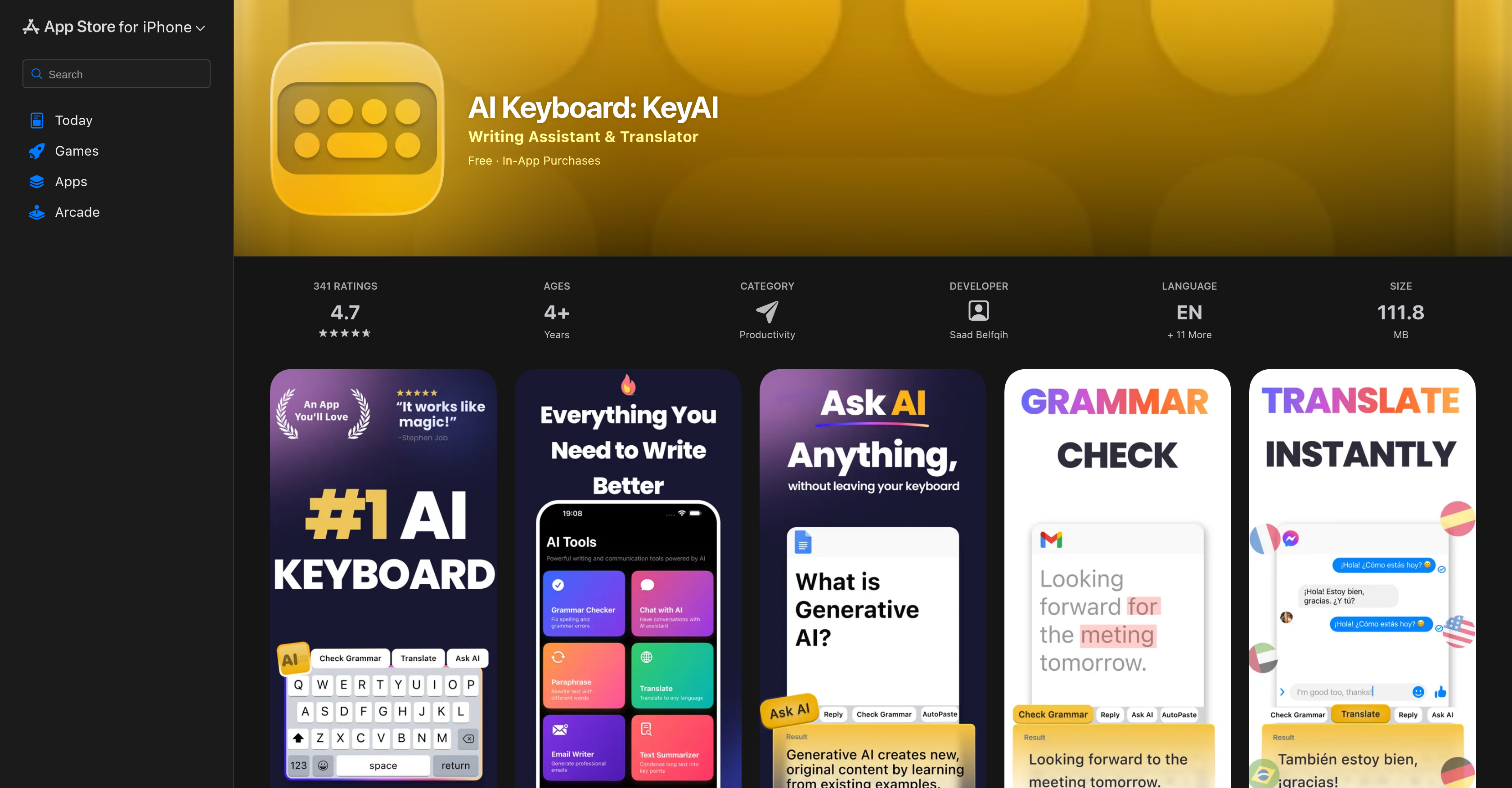
- Send error-free messages in every app you type in — built-in grammar and spell check corrects mistakes right from your AI keyboard, with no copy-pasting between apps.
- Chat and work across 99+ languages without switching apps — the global translator converts text directly from the keyboard mid-conversation.
- Finish professional emails in seconds instead of minutes — the email generator drafts subject lines and body text from a short prompt or the surrounding context.
- Answer messages faster with replies that fit the conversation — the AI reply feature reads the ongoing discussion and suggests context-aware responses instead of canned templates.
- Strike the right tone with clients, colleagues, or friends — adjustable tone settings shift your writing from formal to casual before you hit send.
- Stop retyping signatures, addresses, and common responses — auto-paste stores custom text snippets and inserts them instantly wherever you type.
- Grasp long documents without reading every line — the text summarizer condenses lengthy content into brief, actionable key points.
- Rewrite repetitive or unclear sentences into original, readable text — the paraphrasing tool restructures wording while keeping your meaning, and synonym suggestions add variety to your vocabulary.
- Type in a writing space shaped around your habits — customize both the keyboard layout and the KeyAI workspace to match your writing style.
- Start improving your writing at no cost — the free basic version includes core writing assistance, with unlimited access available through subscription or in-app purchase.
Pros & Cons
From the listing; not yet checked by our editors.
Pros
- Grammar and spell check
- Auto-paste custom snippets
- Integrated email generator
- Synonym suggestions
- Text summarization feature
- Paraphrasing capability
- Adjustable tone settings
- Keyboard workspace customization
- Applicable across all apps
- Suits professional and casual needs
- Free basic version
- Supports many languages
- Auto translation feature
- In-app purchase options
- Subscription services available
- Document drafting ease
- Improves communication efficiency
- Enhances linguistic precision
- Assists in quick replies
- Privacy policy in place
- Assists in complex document drafting
- Increases productivity
- Regular updates for bugs fixes
Cons
- Subscription required for full access
- Can have keyboard latency issues
- Autocorrect not automatically enabled
- Doesn't highlight misspelled words
- Potential privacy concerns
- Subpar performance during quick typing
- Platform limited to iOS
- Limited tone settings customization
- Sizeable at 111.8 MB
- Contains in-app purchases
Alternatives to AI Keyboard: KeyAI
Tools that share the most tags with AI Keyboard: KeyAI.
- Essay.app
Overcome writer's block by forming a strong foundation for any writing project with the guided Creation Phase
Paid · from $6/month
$6/month
Not yet checked
- Clico
Draft posts and email replies that match the conversation's tone instantly, using the AI that reads your existing text and context.
Free
Not listed
Not yet checked
- AMP FinePoint
Produce audience-ready content faster by reducing editing cycles with guided refinement of tone, length, and clarity
Paid · from $1.99/month
$1.99/month
Not yet checked
- Textglow
Write raw thoughts in Gmail, Slack, or LinkedIn and instantly polish them into professional, confident, or empathetic messages without ever leaving the page by highlighting text and selecting from 10+ emotional intelligence tones.
Freemium · from $4.99/month
$4.99/month
Not yet checked
- Sidelong
Turn every article, book, podcast, and video you consume into a searchable research library that feeds directly into your writing, with AI-powered content organization and key insight extraction.
Free trial · from $9/month
$9/month
Not yet checked
- Writer Assistant
Fix grammar mistakes the moment they appear: real-time grammar suggestions flag and correct issues during drafting, so errors never pile up for later.
Paid · from $25/month
$25/month
Not yet checked
Reviews
Rate this tool
Loading reviews...
Frequently asked questions
What makes KeyAI unique among AI keyboard applications?
KeyAI differentiates itself by being a consolidation of several writing assistance tools. Its features include grammar and spell checking, auto-pasting reusable snippets, email generation, synonym suggestions, text paraphrasing, translating 99+ languages, text summarization, and tone adjustment. KeyAI also provides AI-driven, context-aware responses and customizable keyboard layouts.
How does KeyAI improve user's linguistic precision with their typing?
KeyAI improves linguistic precision in several ways. It offers grammar and spell check to eliminate writing errors. It also provides synonym suggestions to subtly improve the richness of the vocabulary employed. Furthermore, The AI-driven reply feature offers context-aware responses, enhancing word accuracy based on surrounding text. Lastly, through the 'paraphrasing power' feature, KeyAI can rewrite text for improved clarity and uniqueness.
Can you explain the auto-paste feature offered by KeyAI?
The auto-paste feature in KeyAI allows users to store and reuse custom snippets of text. This is especially handy for information that is frequently used, like common responses, signatures, or commonly referenced details. The snippets can be pasted at lightning speed, improving overall productivity.
What is the process to translate a text using KeyAI?
KeyAI's global translator allows users to translate text directly from the keyboard. Supporting 99+ languages, it offers a seamless translation experience without needing to leave your current application or switch tools.
Could you elaborate on the paraphrasing feature of KeyAI?
The paraphrasing feature in KeyAI is a powerful tool for rewriting text to improve clarity and uniqueness. It allows users to input text and receive a paraphrased version, maintaining the original meaning while altering the structure and choice of words. This is particularly helpful to avoid repetition, enhance readability, and avoid plagiarism.
Can KeyAI summarize lengthy documents, and how does it do so?
Yes, KeyAI has a feature to summarize lengthy documents. It can condense extensive text into brief, clear, and actionable key points. This feature helps in understanding the core content of long readings without needing to go through the entire text, hence saving time and effort.
What is the tone adjustment function offered by KeyAI?
The tone adjustment feature in KeyAI is an innovative option allowing users to craft messages with the desired tone, according to their audience. It offers adjustable settings so users can choose how formal or casual they want their text to be, further enhancing the adaptability of their communication to different contexts.
What does it mean that KeyAI offers 'context-aware' replies?
'Context-aware' replies offered by KeyAI refer to the intelligent responses generated by the AI based on the context of the conversation or text. In other words, it does not just respond with pre-programmed replies, but assesses and understands the ongoing discussion to provide relevant and suitable responses.