
AI Manga Colorizer
Get color manga pages that still look like your original artwork: the colorizer adds color while retaining line art, shading, characters, and backgrounds instead of redrawing them.
Listing not yet reviewed by our editors · How we check
Overview
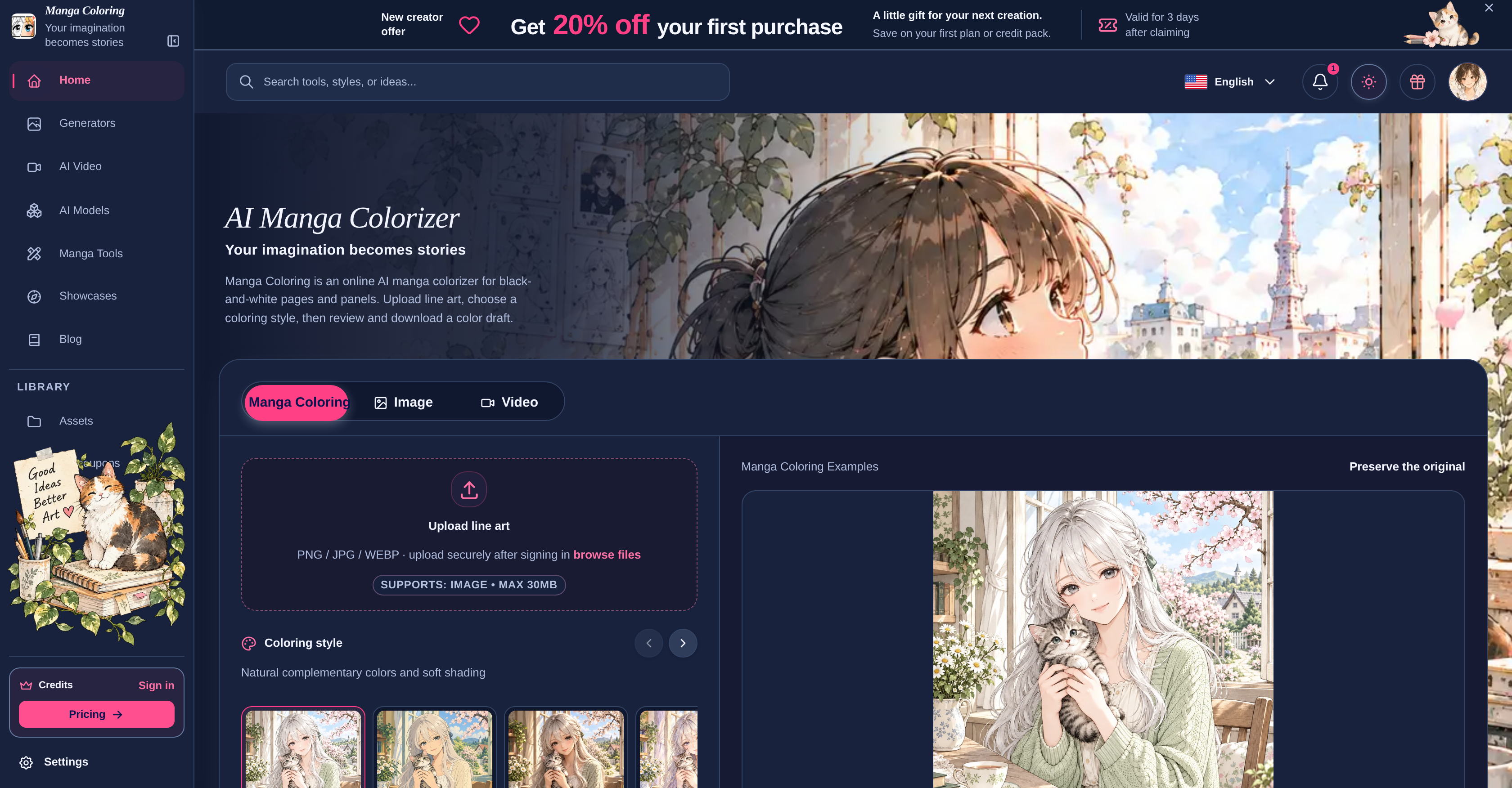
- Get color manga pages that still look like your original artwork: the colorizer adds color while retaining line art, shading, characters, and backgrounds instead of redrawing them.
- Match the exact look your project needs: choose from 24 published coloring styles, including Preserve the Original, Hand-drawn Animation, and 3D Cel Shading.
- Approve every page before you keep it: compare each color draft against the source image, and process pages one at a time to keep color consistent across a chapter sequence.
- Preview a palette before committing to a full page: Manga Panel Colorizer tests color on individual scenes and panels.
- Bring monochrome anime sketches to life without losing character: Anime Colorizer adds color while keeping pose, facial expression, and outline intact.
- Start coloring in three steps: upload a PNG, JPG, or WEBP line-art page, pick a style, and generate a downloadable draft.
- Strip scan noise without touching the art: AI Manga Cleaner removes dust, gray paper tone, and moiré before lettering, restoration, or upscaling.
- Repair worn or damaged pages without redesigning them: AI Manga Restoration fixes scratches, fading, and small tears using nearby intact lines, screentones, and panel geometry as reference.
- Export low-resolution pages at print-ready sizes: AI Manga Upscaler outputs at real 2K or 4K while protecting line weight, text shapes, panels, and screentone patterns.
- Localize manga for new readers faster: AI Manga Translator produces a reviewable translation draft in your target language, and AI Manga Text Remover delivers clean pages ready for re-lettering and typesetting.
- Keep a record of every coloring project: your colorization history is saved to your account for later review.
- Know your exact cost before every job: credits are shown before you submit, with a free trial, subscription plans, and one-time credit packs available.
Pros & Cons
From the listing; not yet checked by our editors.
Pros
- Line-preserving color
- Multi-language support
- Multiple colorization styles
- Preserves shading details
- Maintains original character details
- Preserves background details
- Offers manga restoration
- Provides manga translation
- Features manga processing
- Diverse toolset
- Page-review function
- Scene-testing tool
- Anime colorizing capability
- Machine learning upscaling
- Restoration tool
- Upload PNG/JPG/WEBP
- Manga speed lines generator
- Expandable toolkit for needs
- Free colorize black & white manga
- Manga storyboard generator
- Manga text remover
- Manga line art extractor
- Manga character generator
- Manga background generator
- Includes image editing capabilities
- Manga screentone generator
- Publishing tool
- Assists in initial creation
- Supports final production
- Pose and expression changers
- Manga speech bubble generator
- Automatic chapter batching
- Focused workflow for manga
- Outfit changing tool
- Illustration enhancement
- Manga cover generator tool
- Manga filter tool
- Noise removal tool
- Offers cropping tool
- User-friendly interface
- Quick review and download
- Cleaner tool
- Manga coloring toolkit
- Real-time draft reviewing
- Manga Background Generator
- Creates manga from description
- Photo to anime conversion
- Image to anime conversion
- 20% off on first purchase
Cons
- Limited to manga colorization
- No offline functionality
- No batch processing
- Limited file size upload (10MB)
- Requires registration for use
- Limited language selection
- No automatic suggestions for color palette
- Cannot colorize 3D models
- Lacks collaborative features
- No mobile application
Alternatives to AI Manga Colorizer
Tools that share the most tags with AI Manga Colorizer.
- Kyukoma AI Manga Colorizer
Turn black-and-white manga panels and comic pages into colorized images without losing the original ink lines, thanks to an advanced colorization algorithm that preserves line art structure
Free trial · from $12/month
$12/month
Not yet checked
- MangaFusion
Read any manga, manhwa, or manhua in your preferred language instantly with one-click manga translation that automatically detects, translates, and replaces text in speech bubbles and SFX.
Free trial · from $4.80/unit
$4.80/unit
Not yet checked
- Manga Image Translator
Launch prototypes in seconds with Vite's instant hot module replacement and rapid cold server startups, enabling iterative UI design without full browser refreshes
Not listed
Not listed
Not yet checked
- OpenToon
Read any manga, manhwa, or webtoon in your native language by pasting the chapter URL and selecting from 50+ languages
Free trial · from $5.99/unit
$5.99/unit
Not yet checked
- Kyukoma
Turn any text story into a complete manga or comic by simply inputting your narrative and character names, with AI rendering the visuals.
Free trial · from $12/month
$12/month
Not yet checked
- Sumi
Read manga in your native language instantly without creating an account, thanks to Sumi's AI engine that provides on-demand translations without user signup.
Free trial · from $6.99/month
$6.99/month
Not yet checked
Reviews
Rate this tool
Loading reviews...
Frequently asked questions
What is the AI Manga Colorizer?
AI Manga Colorizer is an online tool that uses artificial intelligence to colorize black and white manga. It allows users to upload line art, choose a coloring style and then review and download the color draft. It aims to preserve the key elements in the art, including line art, shading, characters, and backgrounds. Additional manga tools are provided beyond coloring for a diverse set of needs.
How does the AI Manga Colorizer work?
AI Manga Colorizer colorizes black and white manga by using artificial intelligence. Users are required to upload the line art, choose their preferred coloring style, then generate a color draft. The AI will strive to maintain key features in the artwork, such as line art, shading, and characters, among other things. The colored product can then be downloaded by the user.
What kind of files can I upload to AI Manga Colorizer?
You can upload PNG, JPG, and WEBP images to the AI Manga Colorizer. It's recommended to use the clearest page you have to achieve the best result.
What is the process to colorize a manga with AI Manga Colorizer?
AI Manga Colorizer makes the coloring process simple with three steps. First, upload your clear line-art page in PNG, JPG, or WEBP format. Secondly, choose your preferred coloring style. Lastly, you can generate a color draft, and after reviewing and comparing it with the source, you can proceed to download it.
Can I alter the coloring style with AI Manga Colorizer?
Yes, AI Manga Colorizer allows users to alter and choose different coloring styles. The system currently provides 24 published coloring styles, offering users a wide range of creative choices. These styles include 'Preserve the Original', 'Hand-drawn Animation', and '3D Cel Shading', among others.
Does the AI Manga Colorizer only colorize or does it also enhance image quality?
Beyond simply colorizing, AI Manga Colorizer also enhances the quality of images. For instance, it has an AI Manga Upscaler feature, which improves low-resolution manga pages for a larger export using real 2K or 4K output settings.
How does AI Manga Colorizer preserve key components during coloring?
AI Manga Colorizer preserves key components during coloring by using intelligent algorithms that recognize and retain elements such as line art, shading, characters, and backgrounds. The tool is designed to add color without substantially altering the original artwork.
What are the additional manga tools offered by AI Manga Colorizer?
In addition to colorization, AI Manga Colorizer offers a range of other manga tools. This includes the Manga Panel Colorizer for scene testing, the Anime Colorizer for colorizing anime drawings, and more specialized tools such as AI Manga Translator, AI Manga Filter, AI Manga Cleaner, AI Manga Text Remover, AI Manga Restoration, and AI Manga Upscaler.