

AI Toolbox
Find any old AI conversation by a single word or phrase and jump straight to the highlighted message, using full-text chat search that indexes every message, not just chat titles.
Listing not yet reviewed by our editors · How we check
Overview
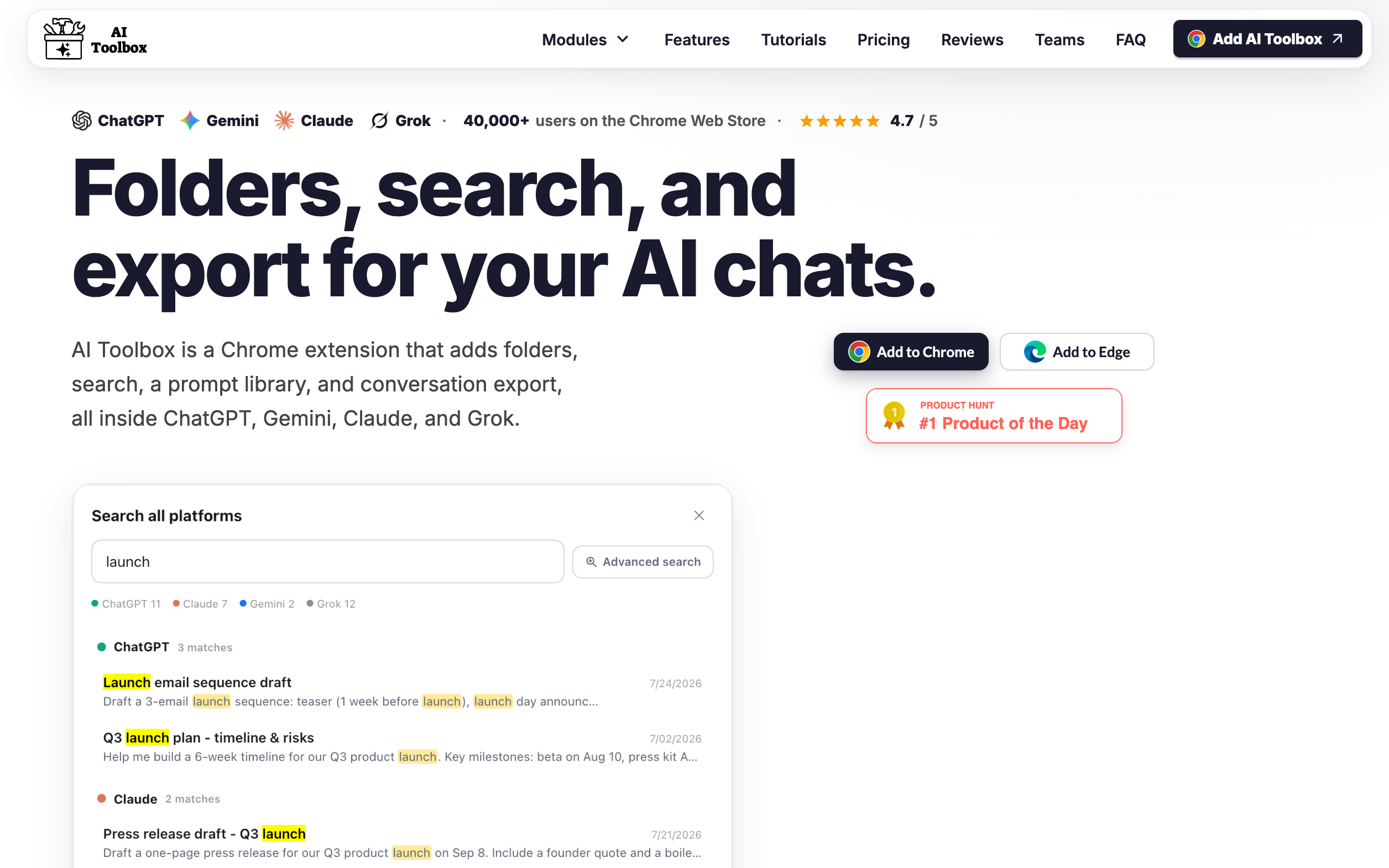
- Find any old AI conversation by a single word or phrase and jump straight to the highlighted message, using full-text chat search that indexes every message, not just chat titles.
- Stop checking four sites to locate one answer: one search covers your ChatGPT, Claude, Gemini and Grok history at once, including Grok inside X.
- Turn a cluttered chat history into a structured library with nested folders and subfolders in the sidebar, plus pinned chats and folders that stay at the top in ChatGPT.
- See related conversations grouped by topic without filing them yourself, because Smart Tags read each chat and tag it automatically even when the chats sit in different folders.
- Keep a permanent, portable copy of your work by exporting chats to TXT, Markdown, JSON or PDF, one at a time or in bulk as a single ZIP file.
- Clear out dead conversations in one pass with bulk delete from Manage Chats instead of removing chats one by one.
- Stop retyping your best instructions: save reusable prompts and drop them into any chat box by typing //.
- Run repeatable multi-step workflows hands-free with prompt chains that send each saved prompt in sequence and wait for every answer before the next step.
- Return to the exact replies that matter with message bookmarks you color-code, annotate and open from one bookmarks list.
- Avoid losing quality in long threads, since the free context window meter shows how close the current chat is to its limit on all four AIs.
- Keep your team's prompts consistent with AI Toolbox Teams, which adds a shared prompt library, seat management and one invoice for teams of 2 or more.
- Pick up where you left off on any computer, with folders, saved prompts and settings synced and encrypted at rest, while your search index stays in your browser.
- Start organizing in seconds with zero learning curve: the AI Toolbox button sits in the bottom-right corner of the AI sites you already use on Chrome, Edge, Brave, Opera, Arc and other Chromium browsers.
- Try it with no cost or commitment through a free plan with no time limit and no credit card, then go unlimited with Premium from $9.99 a month backed by a 14-day money-back guarantee.
Pros & Cons
From the listing; not yet checked by our editors.
Pros
- Works on ChatGPT, Claude, Gemini and Grok
- Folders with unlimited subfolders
- Full-text search across every past chat
- Export chats as TXT, Markdown, JSON or PDF
- Bulk export and bulk delete
- Saved prompts with variables and prompt chains
- Bookmarks for individual messages
- Smart Tags group chats by topic automatically
- Context window meter for the current chat
- One search across all four AIs
- Free plan, no credit card needed
- Rated 4.7 and Featured on the Chrome Web Store
- 14-day money-back guarantee
Cons
- Chrome and other Chromium browsers only
- No mobile app
- Bulk export and Markdown, JSON, PDF formats need Premium
- Free plan limited to 2 top-level folders
Alternatives to AI Toolbox
Tools that share the most tags with AI Toolbox.
- FaceShapeDetector
Get a precise, personalized face shape analysis that goes beyond generic labels with our unique Face Shape Blend™, revealing your exact proportions like 80% Oval + 20% Heart.
Freemium · from $6.99
$6.99
Not yet checked
- Transition
Follow a training plan that automatically adjusts to your daily schedule and recovery metrics, ensuring you stay on track even when life gets busy
Paid · from $19/month
$19/month
Not yet checked
- Mixboard
Turn scattered thoughts into mature, actionable concepts by visualizing and manipulating them on an interactive AI concepting board.
Not listed
Not listed
Not yet checked
- NVIDIA Earth-2
Make strategic decisions with confidence using precise, AI-driven weather predictions that mitigate operational risks across aviation, agriculture, and marine sectors.
Not listed
Not listed
Not yet checked
- Engain
Turn Reddit into a repeatable organic traffic channel instead of a gamble by finding and engaging in high-intent discussions that already rank on Google or where users are actively seeking solutions.
Freemium · from $79/month
$79/month
Not yet checked
- OCR | z.AI
Instantly digitize printed documents and scanned PDFs without manual typing, using AI-powered optical character recognition.
Not listed
Not listed
Not yet checked
Reviews
Rate this tool
Loading reviews...
Frequently asked questions
What is AI Toolbox?
Infi 🛠️ 1 tool wrote:AI Toolbox is a Chrome extension that adds folders, full-text search, export, saved prompts and bookmarks to ChatGPT, Claude, Gemini and Grok. It works inside the AI sites you already use, so there is no separate app to learn.
Is AI Toolbox free?
Infi 🛠️ 1 tool wrote:Yes. The free plan needs no credit card and includes 2 top-level folders with unlimited subfolders, the first 5 results per search, 2 bookmarks, 2 saved prompts, 2 prompt chains, and single-chat TXT export. Premium is unlimited, from $9.99 a month, with yearly and lifetime plans and a 14-day money-back guarantee.
Which AI chatbots does AI Toolbox work with?
Infi 🛠️ 1 tool wrote:ChatGPT, Claude, Gemini and Grok, including Grok inside X. One install covers all four, and one search can look through all of them at once.
Can I search inside my old chats, not just their titles?
Infi 🛠️ 1 tool wrote:Yes. AI Toolbox indexes the full text of your conversations, so you can find any message by a word or phrase and jump straight to it, with the matching text highlighted.
How do I export my chats?
Infi 🛠️ 1 tool wrote:Open a chat and choose Export to save it as TXT, Markdown, JSON or PDF, or select many chats in Manage Chats and export them together as one ZIP file. Single-chat TXT export is free; bulk export and the other formats are part of Premium.
Which browsers are supported?
Infi 🛠️ 1 tool wrote:Chrome, Edge, Brave, Opera, Arc and other Chromium-based browsers on desktop. Firefox, Safari and mobile browsers are not supported.
Where are my chats stored?
Infi 🛠️ 1 tool wrote:Your search index is built and kept in your browser. Folders, saved prompts and settings sync to AI Toolbox servers, encrypted at rest, so they follow you across devices. Conversation text is only sent for processing when you use a summary feature, such as Context Mentions on a long chat.
How do I install AI Toolbox?
Infi 🛠️ 1 tool wrote:Click Add to Chrome on the Chrome Web Store (Edge users can also install it from Microsoft Edge Add-ons), then open ChatGPT, Claude, Gemini or Grok. The AI Toolbox button appears in the bottom-right corner of the page.