

Aithenticate
Readers know instantly whether each post was written by a person or by AI: blue icons mark AI-generated content and green icons mark human-authored content on your pages.
Listing not yet reviewed by our editors · How we check
Overview
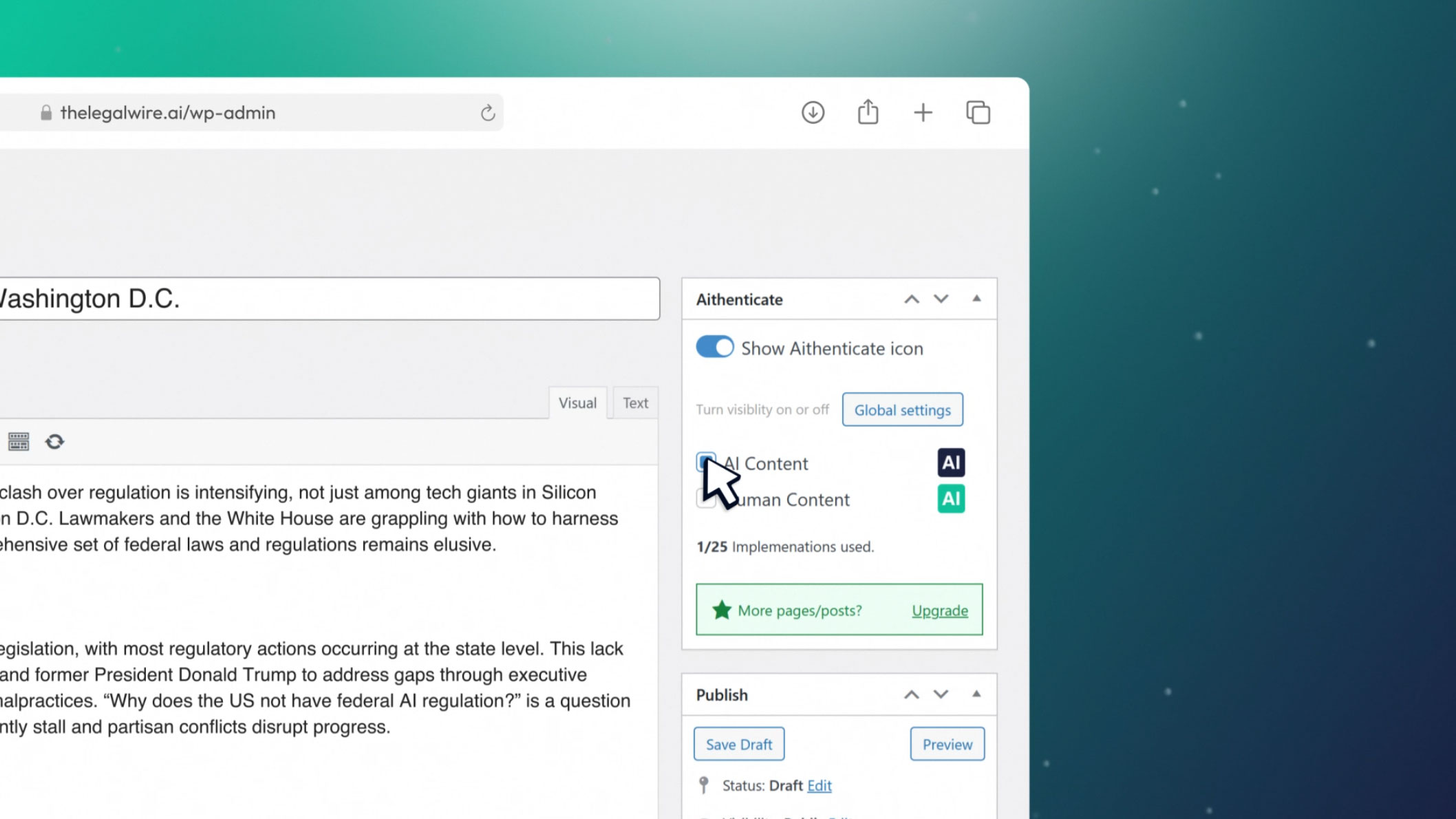
- Readers know instantly whether each post was written by a person or by AI: blue icons mark AI-generated content and green icons mark human-authored content on your pages.
- Stay ahead of evolving AI regulations without drafting legal copy yourself: the Disclosure Generator produces a precise AI disclosure statement aligned with transparency protocols.
- Show visitors exactly which AI tools power your content: a dedicated company profile page lists your business details, the specific AI technologies you use, and your custom AI disclosure.
- Accurately describe how much AI went into your content: disclosure statements specify whether content is fully AI-generated, partially AI-assisted, or entirely human-written.
- Give every badge a verifiable source: each icon links to your company page on Aithenticate's website, where visitors read the full AI usage disclosure.
- Disclose AI use across an entire WordPress site in seconds instead of tagging page by page: Automatic site-wide implementation applies consistent AI transparency badges with one click.
- Keep full control over what gets labeled: choose individual posts and pages to receive the AI disclosure badge.
- Start AI content labeling at no cost and scale as your content grows: the free plan includes limited implementations with a standard company page, and premium from €5.99 per month adds unlimited implementations and a custom company profile.
Pros & Cons
From the listing; not yet checked by our editors.
Pros
- Boosts site credibility
- Aids compliance with regulations
- WordPress plug-in for transparency
- Company profile page with details
- Disclosure Generator for compliance
- Visual representation (blue/green icons)
- Links to detailed disclosure
- Free version available
- Premium version for unlimited use
- Boost for Website development
- Transparency protocols aligned
- Facilitate user information
- Subscription-based offerings
- Enhanced peace of mind
- Creating trust in audience
- Shows human-authored content
- Custom company profile page
- Automatic site-wide implementation
- Limited/Unlimited Implementations
- Standard/custom company page
- Available to all users
- Free-of-charge plugin
- Monthly subscription available
- User-friendly sign-up process
- Featured by leading platforms
- Increased transparency for users
- Allows content type disclosure
- Integrated solution for compliance
- Concise disclosure generation
- Badges for content authenticity
- Fosters clear user communication
- Promotes audience trust
- Signal of authenticity
- Offers comprehensive disclosure
- Aids in increasing transparency
- Supports regulatory compliance
- Plugin for website integration
Cons
- Limited free version
- Wordpress dependency
- Unavailability for non-website platforms
- Paid version for extensive content
- Requires profile page creation
- No multi-language support
- Potential confusion between icons
- No API mentioned
- Standard company page for free users
Alternatives to Aithenticate
Tools that share the most tags with Aithenticate.
- IsThisImage.AI
Verify the authenticity of any image instantly by uploading JPG, PNG, or WEBP files for a deep analysis of visual patterns and textures left by AI generators.
Free trial · from $3.99/month
$3.99/month
Not yet checked
- Clever AI Detector
Identify which exact sentences in a document read as AI-generated using sentence-level signal analysis, so you can target edits where they matter most instead of rewriting entire drafts.
Free
Not listed
Not yet checked
- isgen.ai
Identify AI-written content from GPT-5, ChatGPT, Claude, Deepseek, and Gemini with pinpoint accuracy using an ensemble of AI systems trained on millions of samples
Free trial · from $8/month
$8/month
Not yet checked
- AI or Not: Text Detector
Verify authorship of any essay, cover letter, email, or news article with a clear score, verdict, and annotations showing exactly where AI writing appears
Freemium · from $19.99
$19.99
Not yet checked
- AnyImageDetector
Verify whether an image is AI-generated or human-made in seconds with a probability score and confidence label, powered by statistical signal analysis.
Free trial · from $3.19/month
$3.19/month
Not yet checked
- Know Nota
Verify academic integrity by checking drafts for signs of AI authorship with Know Nota's AI detection tool
Freemium · from $6
$6
Not yet checked
Reviews
Rate this tool
Loading reviews...
Frequently asked questions
What does Aithenticate do?
Aithenticate is designed to bring transparency to AI-generated content on websites. The tool delineates whether the content has been crafted by humans or AI, offering features like a WordPress plugin for managing AI transparency, a company profile page for business details and specific AI technologies used, and a custom AI disclosure statement. It also includes a Disclosure Generator to create precise disclosure statements in accordance with transparency protocols. Moreover, Aithenticate uses system icons to denote the type of content created, and offers both a free, limited implementation version and a premium, unlimited implementation version.
How does Aithenticate help boost a site's credibility?
Aithenticate boosts a site's credibility by providing transparency between AI-generated and human-authored content. It offers distinct system icons that represent the type of content generated: a blue icon for AI-crafted content and a green icon for human-authored content. These icons can be linked to a company profile on Aithenticate’s website where users can find a detailed disclosure about the type of content, thereby enhancing trust in the website and conforming to AI transparency regulations.
What does the WordPress plug-in by Aithenticate provide?
Aithenticate's WordPress plug-in handles AI transparency on a website. It significantly aids in increasing transparency for users and readers through the use of distinct icons that help users differentiate between AI-assisted and human-authored content. Moreover, it offers one-click site-wide implementation for the seamless disclosure of AI usage across an entire website.
How does the Aithenticate company profile page work?
The Aithenticate company profile page serves as a platform for companies to disclose information about their usage of AI technology. It details essential company information along with specific types of AI technologies employed in the website content creation process, presenting a custom AI disclosure statement generated with the assistance of Aithenticate. This profile aims to foster a greater level of transparency and trust between website owners and their users.
What is the Disclosure Generator in Aithenticate?
The Disclosure Generator in Aithenticate is a tool that produces a precise disclosure statement aligned with transparency protocols. Its purpose is to inform website users about the use of AI assistance during website development. Once created, these disclosures can be easily accessible to users, enhancing transparency and assisting websites to comply with AI regulations.
What do the blue and green icons signify in Aithenticate?
In Aithenticate, the blue and green icons represent the type of content generated on a website. The blue icon signifies that the particular content was generated using AI technology, while the green icon denotes that the content was authored by a human without the assistance of AI.
What do the icons link to on the Aithenticate website?
The blue and green icons in Aithenticate link to the company's specific page on the Aithenticate's website. Here, visitors can find a comprehensive disclosure about the nature of the content, including whether it was crafted by humans or AI, and details on the specific AI tools used in site development when applicable.
What is the difference between the free and premium version of Aithenticate?
Aithenticate has both free and premium versions, each offering different levels of implementation. The free version of Aithenticate offers limited implementations, coupled with a standard company page and AI usage disclosure. The premium version, starting at €5.99 per month, provides unlimited implementations, a custom company profile, and AI usage disclosure. This version is primarily tailored for sites with extensive content that require comprehensive and seamless AI disclosure.