

Call Prompter
Never forget a key talking point or fumble an objection again with real-time prompts that adapt to your live conversation
Listing not yet reviewed by our editors · How we check
Overview
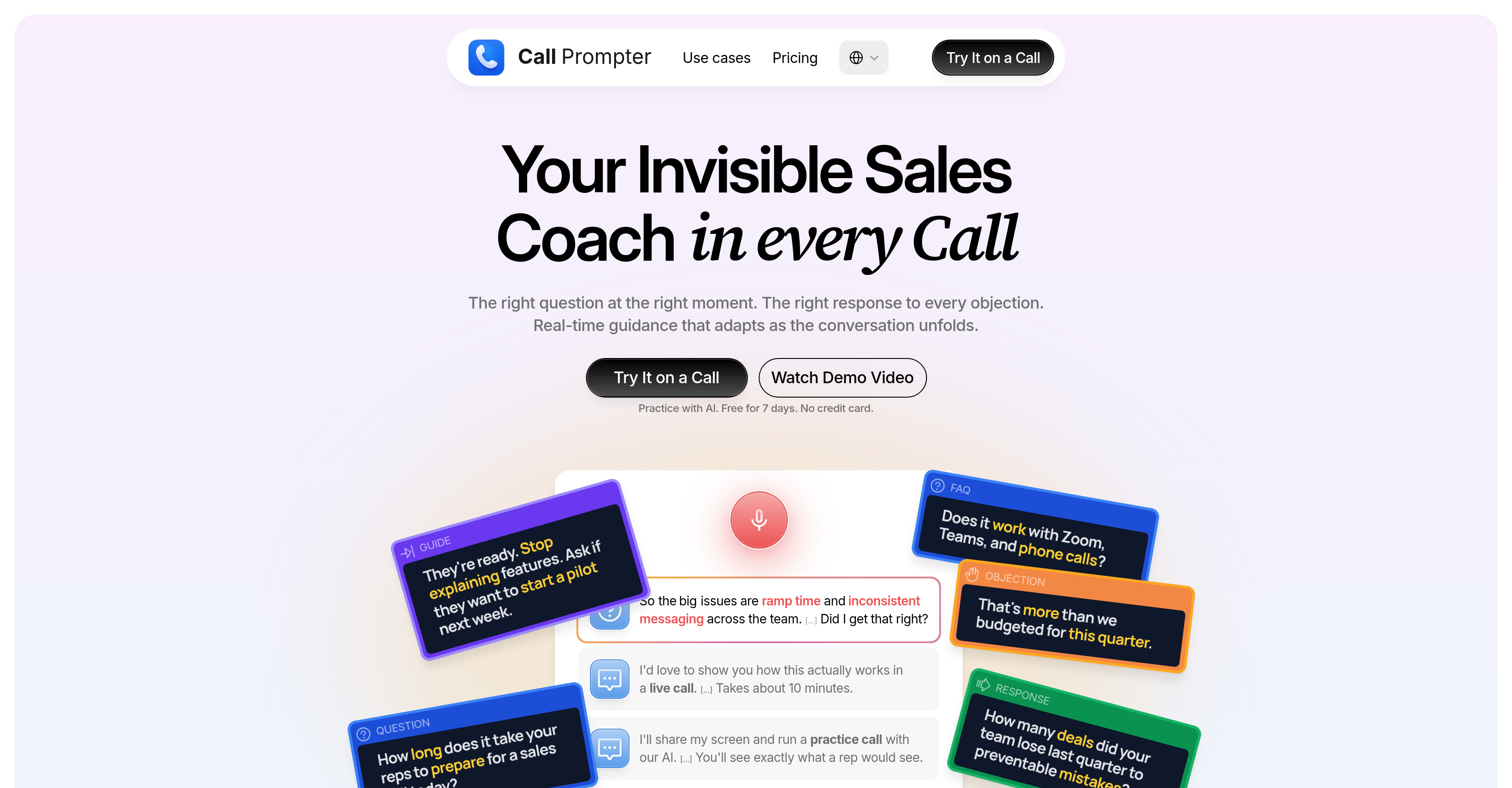
- Never forget a key talking point or fumble an objection again with real-time prompts that adapt to your live conversation
- Instantly counter any prospect objection with proven responses from your team's shared library, surfaced in milliseconds
- Close more deals by recognizing buying signals with AI coaching cues that tell you when to stop talking and when to ask for the sale
- Sound like a seasoned pro from your first call by following dynamic scripts with branching logic for different personas and scenarios
- Practice and refine your pitch in a risk-free environment with realistic AI buyers that push back and test your responses
- Maintain a perfectly natural conversation with prospects, as all guidance is 100% invisible on screen shares and recordings
- Align your entire sales team around winning messaging with consistent scripts, objection handling, and real-time guidance for every rep
- Set up and start using the tool in minutes, going from download to your first guided call with no complex configuration
Pros & Cons
From the listing; not yet checked by our editors.
Pros
- Real-time guidance
- Invisible to prospects
- Customizable dynamic script
- Adapts to conversation
- Works with multiple platforms
- User-friendly setup
- Supports, guides different roles
- Floating bubbles prompts
- Tracks call conversation
- Quick response time
- Enhances sales efficiency
- Ensures consistent messaging
- Continuous sales coaching
- Reduces response stress
- Zoom, Teams compatible
- Phone calls compatible
- Sales development representatives support
- Business development reps support
- Simulates real sales practice
- Objection handling feature
- Discovery questions feature
- Personalized caller assistance
- Improves call preparation
- Real-time cues feature
- Branching logic scripts
- Alternative prompting mode
- Instant message responses
- Accelerates new reps' ramping
- Detects conversation patterns
- Enhances user confidence
- Equips founder-sellers
- Aids cold-calling
- Adaptive question generation
- Transparent overlay feature
- Screen share friendly
- Recordings friendly
- Coaching signals feature
- Unified team experience
- Performance analysis capability
- Affordable pricing plans
- Free trial available
- Unlimited call coaching
- Manager's dashboard
- Team script sharing
- CRM integration
- Compatible with browsers
- Provision for coaches
- Enterprise customization available
- Affiliate program
Cons
- Requires script setup
- May interrupt natural conversation
- Inability to handle non-standard objections
- Dependency on audio clarity
- Visibility issues on crowded screen
- Requires fast reaction to prompts
- Requires continuous attention to screen
- Misinterpretation of spoken words
- Doesn't work offline
- Limited use in silent environments
Alternatives to Call Prompter
Tools that share the most tags with Call Prompter.
- Wink AI
Win the second sale on every phone call: real-time product suggestions combine live conversation context, customer purchase history, and your live catalog to surface upsell and cross-sell matches, like earrings for last week's pendant or an in-stock ring in size seven, while the customer is still on the line.
Not listed
Not listed
Not yet checked
Reviews
Rate this tool
Loading reviews...
Frequently asked questions
What is the main purpose of CallPrompter?
CallPrompter's main purpose is to provide real-time guidance during sales calls, aiming to minimize errors such as forgetting key talking points or inadequately responding to objections by providing appropriate responses, questions, and coaching signals.
How does CallPrompter work in a live sales call?
In a live sales call, CallPrompter listens to the conversation and tracks the current context. It offers real-time prompts adapted to the conversation such as questions, objection responses, and coaching signals. These prompts appear on the user's screen, guiding him/her through the call.
What features does CallPrompter offer to handle objections?
CallPrompter possesses robust objection handling features. In response to any objection, the tool instantly provides the user with appropriate responses from a shared library. These responses have proven successful in previous conversations, readying the user when needed.
Does CallPrompter work with Zoom and Teams?
Yes, CallPrompter is fully compatible with both Zoom and Teams, along with any other call platform.
Can CallPrompter be used with any audio source?
Indeed, CallPrompter can be utilized with any audio source. Whether it's Zoom, Teams, phone calls, or any other audio source, the tool is capable of capturing system audio effectively.
How is CallPrompter adaptable to different sales roles?
CallPrompter is highly adaptable to various sales roles. It offers specific guidance for different roles such as new salespeople, experienced reps, founder-sellers, Sales Development Representatives (SDRs), and Business Development Representatives (BDRs).
Is CallPrompter user-friendly and easy to set up?
CallPrompter is designed to be exceptionally user-friendly. The setup process is quick and easy, which means you can go from download to first call in just a few minutes.
How are CallPrompter's responses displayed during a call?
During a call, CallPrompter's responses and coaching signals are discreetly displayed on the user's screen as floating bubbles. They are invisible to the prospects, screen shares, and recordings.