

Canva Online Translator
Launch campaigns in any market instantly by translating designs into over 100 languages without leaving your Canva workflow
Listing not yet reviewed by our editors · How we check
Overview
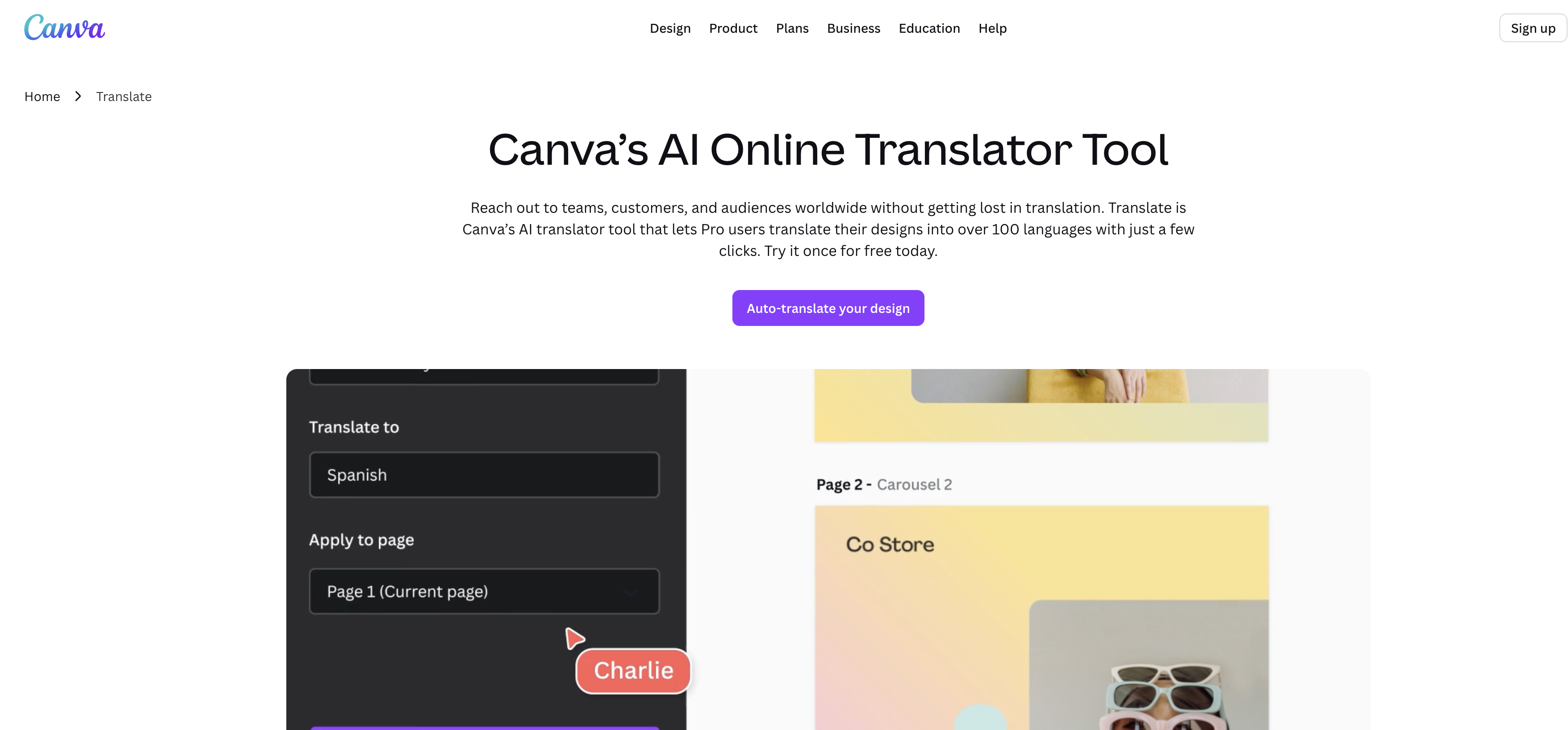
- Launch campaigns in any market instantly by translating designs into over 100 languages without leaving your Canva workflow
- Maintain perfect design integrity with automatic layout preservation, even for right-to-left languages like Arabic
- Scale global team communication by translating large volumes of internal documents, presentations, and videos in batches
- Edit and finalize translated content immediately with full editing control before downloading or sharing
- Ensure translations sound natural to local audiences using advanced machine learning that analyzes context
Pros & Cons
From the listing; not yet checked by our editors.
Pros
- Translates 100+ languages
- Maintains original design layout
- Right-to-left language support
- Internal documents translation
- Marketing content translation
- Integrates with Canva Pro
- Automated translation during designing
- Edit, share, print functions
- Large volume translation
- Maintains design while translating
- Automates design translation
- Integrated software solution
- Enhances global collaboration
- Speedy translation process
- Efficient content localisation
- Swift translation tool
- Artificial Intelligence powered translations
- Online editing capability
- Business useful tool
- Connects international audiences
- Ease of use
- Helps break language barriers
- Video translation capability
- Multimedia translation option
- Real-time collaboration feature
- Access on any device
- Cloud storage for designs
- Autosave feature
- Brand Kit Integration
- Automated document resizing
- One-click background remover
- One-click design resizing
- Drag-and-drop editing tools
- Access to numerous fonts
- Millions of free images
- Multilingual design tool
- Easy sharing and exporting
Cons
- Only in Canva Pro suite
- Possible translation errors
- No separate translation software
- May alter design layout
- Only online access
- Limited communication tools
- Translate large volumes monthly
- RTC language conversion errors
- Limited multimedia format translations
- Can't translate mobile designs
Alternatives to Canva Online Translator
Tools that share the most tags with Canva Online Translator.
- TransLinguist
Host fully multilingual webinars and conferences with real-time translation that engages global audiences directly in their preferred languages
Not listed
Not listed
Not yet checked
- Lara Translate
Translate technical documents with absolute precision using Faithful mode that maintains original structure and meaning
Freemium · from $9/month
$9/month
Not yet checked
- AI-Translate
Achieve human-quality translation accuracy verified by professional translators in blind tests through advanced neural networks that capture nuanced meaning
Not listed
Not listed
Not yet checked
- Reverso
Translate entire documents while keeping original formatting intact with support for Word, PDF, PowerPoint and Excel files
Freemium · from $7.41/month
$7.41/month
Not yet checked
- Lingvanex
Translate text, speech, and images instantly across 109 languages with neural machine translation
Not listed
Not listed
Not yet checked
- CoeFont Interpreter
Make instant decisions in global meetings with real-time multilingual interpretation that captures every word accurately
Freemium · from $20/month
$20/month
Not yet checked
Related Videos
Canva Translate | Convert Text To Any Language Instantly!
Jason Gandy · May 10, 2023
How to Translate in Canva | Easy Guide for Multilingual Design
Rebecca Sun · Mar 25, 2025
Canva tutorial of Translate 🌏💬
Gold City Ventures · Sep 5, 2023

Scale global campaigns with AI translation & bulk creation | Canva AI demo
Canva · Oct 20, 2025

Translate Your Design With Canva’s AI Online Translator tool
Web-Skills · Nov 7, 2024
Reviews
Rate this tool
Loading reviews...
Frequently asked questions
What is Canva Online Translator?
Canva Online Translator is an artificial intelligence tool designed to meet designing and translating needs beneficial to global team collaborations, marketing, and business necessities. It allows users to automatically translate their designs into various languages, thereby breaking language barriers and connecting with international audiences with precision.
How many languages does the Canva Online Translator support?
Canva Online Translator supports translations in over 100 different languages.
Is Canva Online Translator available for all Canva Pro suite subscribers?
Yes, Canva Online Translator is available to all subscribers of the Canva Pro suite.
Does the Canva Online Translator maintain the original layout even in RTL languages?
Yes, the Canva Online Translator retains the original layout of the design, even when translating between left-to-right and right-to-left languages such as English to Arabic and vice versa.
Can I edit my designs after translating it with Canva Online Translator?
Yes, after translating your designs with Canva Online Translator, you have the freedom to edit them according to your needs.
Can I share or print my translated designs directly from the Canva platform?
Yes, you can directly share or print your translated designs from the Canva platform.
How accurate are the translations using Canva Online Translator?
The accuracy of translations using Canva Online Translator relies on its advanced machine learning technology, which helps provide clear and natural sounding translations. However, the quality of translation also depends on the complexity and context of the original text.
Does Canva Online Translator utilize machine learning technology for translations?
Yes, Canva Online Translator uses advanced machine learning technology for its translation services.