

CaughtTheMagic
Show your kids Santa standing in their own living room, by the tree, at the fireplace, or in the entryway: upload a room photo and the Santa image is built on your real home as the background.
Listing not yet reviewed by our editors · How we check
Overview
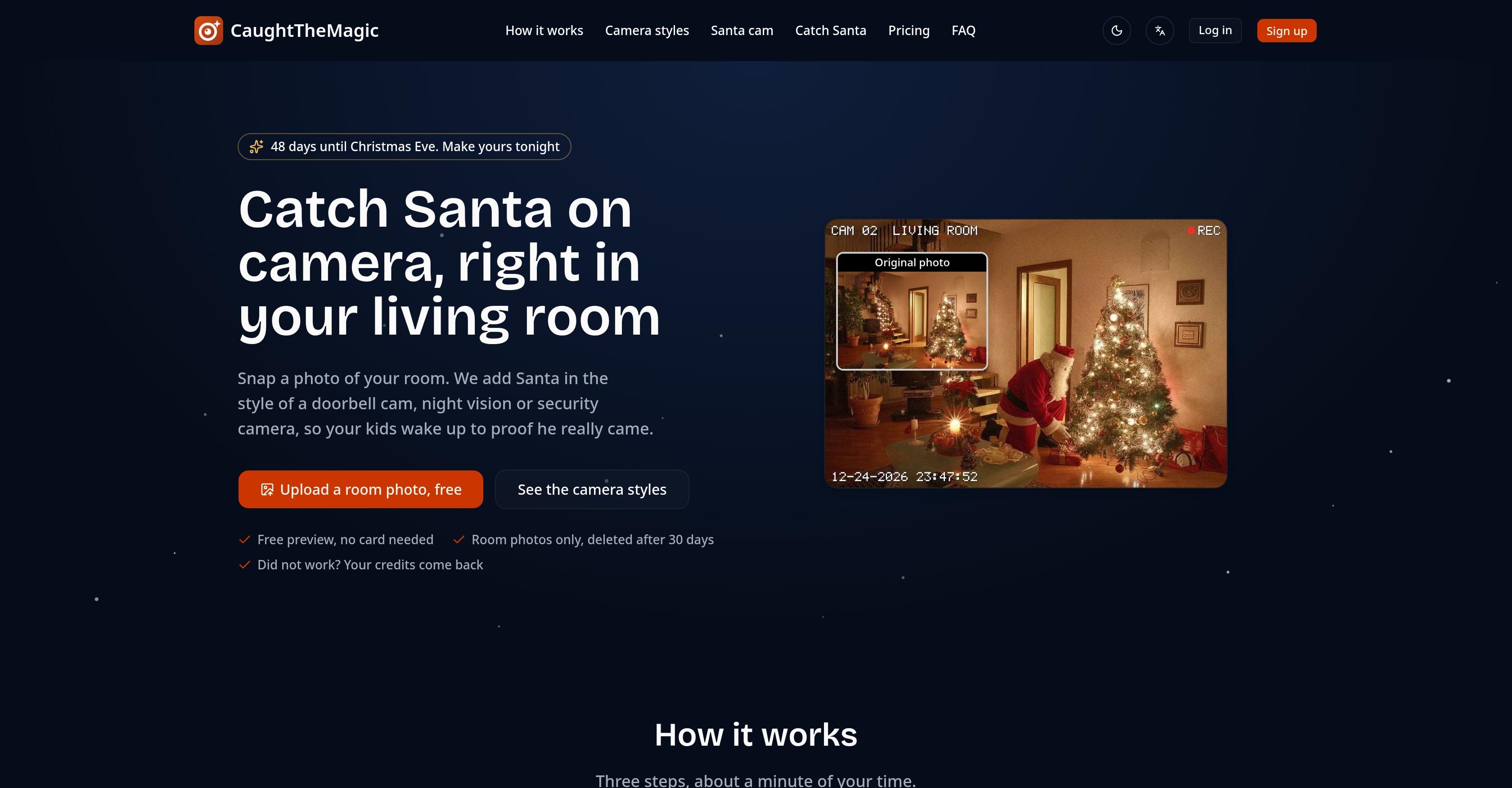
- Show your kids Santa standing in their own living room, by the tree, at the fireplace, or in the entryway: upload a room photo and the Santa image is built on your real home as the background.
- Make the Santa sighting look like real home-camera footage by picking a style: a wide-angle doorbell cam with a Christmas Eve timestamp, grainy infrared night vision, security camera footage with recording indicators, or a slightly blurry phone snapshot.
- Show Santa moving through the room, not just standing still, by turning any Santa photo into an eight-second video that ends with him vanishing in a sparkle effect.
- Give the whole family a complete Christmas Eve story with the North Pole evidence kit: three staged views of the same room at different times, a Santa video, and a printable surveillance report with a case number and camera times to leave by the tree.
- Make the keepsake feel personal to each child by adding their name to a gift tag. Santa's pose and activity also vary from one generation to the next.
- See your Santa camera photo before you pay with a free preview. After that, buy one-time credit packs starting at $4.99 for 5 credits, with no subscription and credits you use whenever you like.
- Get a result you're happy with at no extra cost: credits for failed photo or video generations return to your account automatically, you get one free retake, and unused credits are refundable within 14 days of purchase.
- Keep your home photos private: room photos are deleted automatically after 30 days, creations stay hidden unless you create a share link, and shared pages are kept out of search engines.
- Get your Santa photo in time for Christmas morning: images usually finish in under a minute and videos in a few minutes, through a simple upload, style, and download-or-share flow.
Pros & Cons
From the listing; not yet checked by our editors.
Pros
- Uses your own room background
- Four distinct camera styles
- Christmas Eve doorbell timestamp
- Grainy infrared night vision
- Security footage recording indicators
- Slightly blurred phone snapshot
- Security style suits elevated photos
- Santa pose varies between generations
- Eight-second moving Santa video
- Sparkle-effect Santa disappearance
- Three timed views from one room
- Printable report with case details
- Camera times included in report
- Personalized gift-tag name
- Free preview without payment card
- No subscription required
- Pay-per-use credit packs
- Failed generations return credits
- One free same-shot retake
- Unused credits refundable within 14 days
- Room photos deleted after 30 days
- Private until you create a share link
- Shared pages excluded from search
- Downloadable images and videos
- Room-only upload workflow
- Confirms no people appear
- Photo generation typically under a minute
- Eight-second videos use four credits
- Coordinated holiday evidence kit
- One-minute setup in three steps
Cons
- Photos must contain no people
- Only four camera styles
- Security style favors overhead photos
- Videos are eight seconds
- Santa poses vary each generation
- Photos are deleted after 30 days
- Free preview is watermarked
- One free retake per photo
- Videos cost four credits
Reviews
Rate this tool
Loading reviews...
Frequently asked questions
How do I create a Santa photo with CaughtTheMagic?
Upload a photo of a room, choose a camera style, then download or share the generated image. You can also turn it into a short video.
What kind of room photo should I upload to CaughtTheMagic?
Upload a photo of the room where Santa should appear, such as a living room, tree area, fireplace, or entryway. Make sure no people are in the shot; a brighter room photo may help if you want a different result.
Can I use a photo with people in it on CaughtTheMagic?
No. CaughtTheMagic asks you to upload a room photo with no people and confirm that no people appear in it. It advises against uploading photos containing children or other people.
What camera styles does CaughtTheMagic offer?
CaughtTheMagic offers a wide-angle doorbell cam with a Christmas Eve timestamp, grainy infrared night vision, home security footage with recording indicators, and a slightly blurry phone snapshot.
Which room angle works best for CaughtTheMagic’s security camera style?
A photo taken from up high works best for the security camera style.
Can CaughtTheMagic turn my Santa photo into a video?
Yes. You can turn a Santa photo into an eight-second video showing Santa moving through the room and disappearing in a sparkle effect. It costs 4 credits.
What’s included in CaughtTheMagic’s North Pole evidence kit?
The North Pole evidence kit includes three staged photos of the same room at different times, an eight-second video, and a printable surveillance report with a case number and camera times.
Can I add my child’s name to a gift tag with CaughtTheMagic?
Yes. You can add your child’s name to a gift tag.