Flashback
Overview
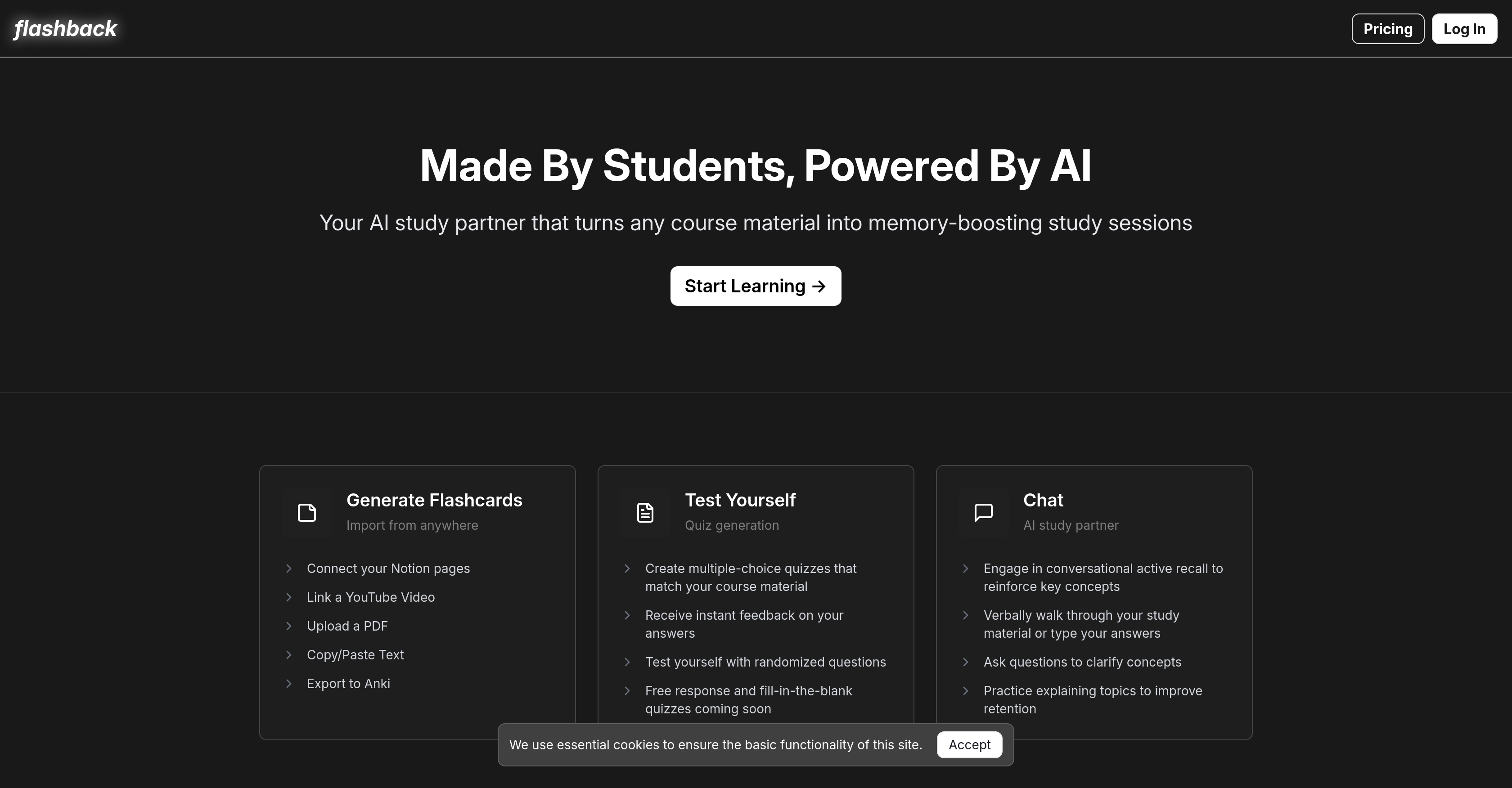
- Transform any study material into flashcards instantly by importing from Notion, YouTube, PDFs, or text
- Create multiple-choice quizzes from your course content for immediate practice and feedback
- Clarify confusing concepts through conversational AI that answers your specific questions
- Solidify long-term memory using research-backed active recall exercises with your AI study partner
- Practice explaining topics verbally or through text to deepen understanding beyond memorization
- Export generated flashcards directly to Anki to maintain your existing study workflow
- Generate study materials from YouTube videos by simply linking to educational content
- Upload PDF documents and convert them automatically into interactive study sessions
Pros & Cons
Pros
- Generates flashcards
- Imports from Notion
- Imports from YouTube
- Imports from PDFs
- Multiple-choice quizzes creation
- Active recall feature
- Interactive learning enhancement
- Enables user to clarify concepts
- Facilitates practice in topic explanation
- Exports to Anki
- Integrates with productivity apps
- Backed by academic research
- Improves long-term retention
- Transforms traditional study process
- Free response quizzes coming soon
- Fill-in-the-blank quizzes coming soon
- Randomized questions testing
- Instant feedback on answers
- Verbal walkthroughs for study material
Cons
- No offline capabilities
- Lacks customization of quizzes
- Limited source integration
- No native mobile app
- Dependant on other platforms
- Limited interactivity
- Could struggle with complex topics
- Doesn't support all file types
- Future features not yet implemented
Reviews
Rate this tool
Loading reviews...
❓ Frequently Asked Questions
Flashback is an AI-powered study tool designed to enhance learning and improve long-term retention. It is used by students as a study aid to transform course material and other content sources into interactive study sessions. One of its key features is the ability to generate flashcards and quizzes from various sources, reinforcing understanding through active recall exercises. Interactive features such as the AI study partner enable users to clarify concepts and practice explaining topics, thereby improving their retention of the material.
Flashback uses AI to enhance learning by turning any course material into interactive study sessions. This is done primarily through the generation of flashcards and custom quizzes driven by the user's course content. The AI also powers a conversational study partner feature, which engages users in active recall exercises, allowing them to solidify their understanding and memory of key concepts. Flashback's AI also facilitates the main feature where users can ask questions to clarify concepts and receive appropriate responses.
Flashback is compatible with a wide variety of material sources. This includes Notion pages, YouTube videos, text and PDF files. The integration with these sources allows Flashback to generate useful study flashcards and quizzes from a range of different resources, catering to many personal and academic study needs.
Yes, Flashback has the ability to generate flashcards from YouTube videos. Users simply need to link the desired YouTube video in the software, and Flashback will create flashcards based on the content of the video.
Flashback's flashcards creation process involves it converting specified study materials into flashcards. Users can connect their Notion pages, link a YouTube video, upload a PDF or copy/paste text. Flashback then uses this material to generate flashcards that users can study from. The flashcards are designed to help users recall key concepts and improve their content retention.
Yes, Flashback is capable of creating multiple-choice quizzes that adhere to user's course material. This feature allows students to practice their material in a testing format and receive instant feedback on their answers.
In the future, Flashback has plans to support additional interactive testing formats, including free response and fill-in-the-blank quizzes. These features are designed to further broaden the user's study experience and enhance their understanding of key concepts.
Yes, Flashback offers a feature where users can ask questions to clarify certain concepts. This capability is part of Flashback's commitment to ensuring students get to fully understand the concepts they are studying, not just memorize them.
The role of the AI study partner in Flashback is to engage the user in a conversational active recall exercise. By doing this, the AI study partner reiterates key concepts to the user, aiding them to solidify their understanding and memory of the course material. It also encourages the student to verbally walk through their study material, further engaging and solidifying the content in their memory.
Flashback assists in content retention in several ways. Its active recall feature helps solidify understanding and memory, while the ability to generate flashcards facilitates regular exposure to key concepts. Flashback's AI study partner also allows for the clarification of concepts and encourages the practice of explaining topics, both of which significantly boost content retention.
Yes, Flashback has system-level integrations with other productivity apps. Specifically, flashcards created with Flashback can be exported to Anki, and it supports importing of study materials from the Notification application.
Yes, the created flashcards in Flashback can be exported to Anki. This feature allows users to seamlessly transition their study material between the two platforms, extending the study capability and personalization.
Flashback bases its functioning on two key research-backed study methods: 'Improve Long-term Retention' by Henry L. Roediger, III & Jeffrey D. Karpicke (2006), and 'Learning Through Productive Failure' by Nate Kornell, Matthew Jensen Hays, & Robert A. Bjork (2009). These methods underpin Flashback's functionalities and reinforce its commitment to fostering productive learning and improving long-term information retention.
Flashback seeks to transform traditional study methods by incorporating advanced artificial intelligence. By turning course material into interactive study sessions, it redefines how students revise, review and remember information. By generating flashcards, creating multiple-choice quizzes, and using the AI-powered chat feature, Flashback optimizes the study process to improve understanding, recall, and long-term retention of knowledge.
Yes, Flashback assists in long-term memory retention. It does this by converting course material into flashcards and quizzes for repeated engagement. In addition, Flashback uses active recall through its AI study partner to solidify understanding and memory of key concepts. These techniques are known to improve long-term memory retention.
Yes, Flashback offers a free version. On their website, you can see a 'Start Studying For Free' button that leads to the log-in page for starting a free learning session.
Yes, the AI study partner in Flashback supports both text and verbal responses. It allows students to either verbally walk through their study material or type their answers, offering flexibility in how students choose to engage and learn.
Yes, you can use Flashback to upload and study from PDF files. It has a functionality that allows users to upload a PDF from which Flashback can generate study flashcards and quizzes.
Pricing
Pricing model
Freemium
Paid options from
$9/month
Billing frequency
Monthly