
Foldwrap
Overview
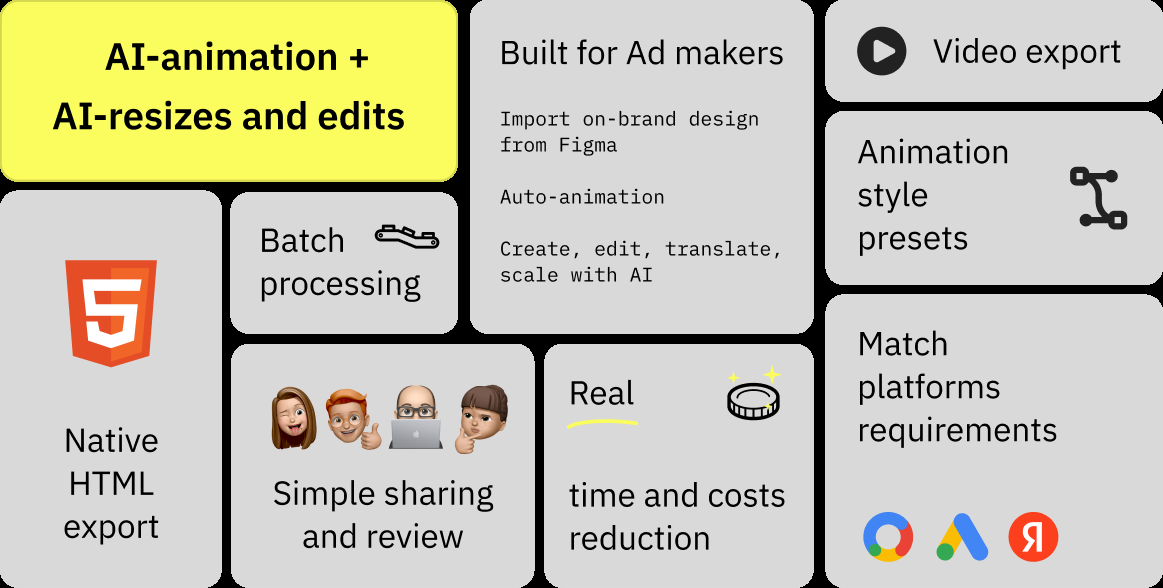
- Generate complete animated banner ads from simple text prompts using AI-powered design creation
- Transform existing Figma designs into animated banners instantly through seamless Figma integration
- Automatically resize single designs to fit all ad platform formats with AI-powered resizing
- Eliminate manual animation work with automated element animation using smart presets
- Merge multiple Figma frames into cohesive animated sequences that tell your marketing story
- Export production-ready ads in HTML or video formats with optimized ZIP packages for immediate publishing
Pros & Cons
Pros
- Animated banner creation
- Instant ad resizing
- Turns text prompts into designs
- Figma integration
- Production-ready HTML ads
- Instant video ad creation
- Smart presets for polished outputs
- Merging multiple frames into one
- Automated animation of elements
- Exports in HTML or video
- Optimized ZIP package provision
- Significant time-saving in design
- Appropriateness for digital agencies
- Appropriateness for in-house teams
- Appropriateness for freelance designers
- Frame sequential appearance
- Animation customization
- Resize designs to fit all formats
- Auto-animation of pre-existing designs
- Impacts on productivity
- Automated banner review process
- Single-click Figma design animation
- Animated ads from Figma
- Easy creative review and approval
- Auto resizing and translation
- Automatic banner generation from prompts
- Integration with Google Sheets
- Generates ready-to-publish ads
- Native HTML5 ads
- Video and GIF export
- Scale ads with data
Cons
- No direct integration with ad platforms
- Not suitable for 3D animations
- Absence of collaboration features
- No native app for mobile
- Limited preset styles
Reviews
Rate this tool
Loading reviews...
❓ Frequently Asked Questions
Foldwrap is an AI-powered tool designed to aid in the creation and resizing of animated banner ads.
Foldwrap makes use of AI to streamline the ad creation and animation process. The tool has the capability to turn text prompts or Figma designs into production-ready HTML ads and videos instantly. Additionally, it automates the animation of every element within a frame, reflecting the user's preferred style and eliminating the need for manual animation.
Key features of Foldwrap include: AI-powered design and animation, compatibility with text prompts and Figma designs, automatic resizing to any format, smart presets for polished output, integration with Figma for seamless design import, generation of animations for every frame element, and post-design exports in HTML or video form with an optimized ZIP package for publishing.
Yes, Foldwrap can create animated ads from text prompts. By using AI, it can turn text inputs into animated banner designs.
Yes, Foldwrap has an automatic resizing feature. This feature is powered by AI to adapt the design to fit all sizes, making the output ready for any ad platform.
Foldwrap interacts efficiently with Figma designs. It offers smart integration with Figma, allowing the user to import their designs. Multiple frames from the imported Figma designs can be merged seamlessly into an animated banner.
Foldwrap supports two main export formats: HTML and video. Post-design, Foldwrap provides users with an optimized ZIP package containing the animated banners in these formats, ready to be published across varying platforms.
Yes, Foldwrap automates all element animations within a frame. It has smart presets that ensure the polished look of every animated element, eliminating the need for manual animation.
Yes, Foldwrap can create banner ads for any ad platform. It automates the resizing of designs to accommodate any format, getting them ready for various ad platforms, and exports the animated banner ads in formats compatible for these platforms.
The process of creating an animated ad on Foldwrap usually begins with entering a prompt or importing a Figma design. The platform uses AI to turn these inputs into custom banner designs. Subsequently, animations are added automatically, and the user can make AI-powered edits or fine-tune using the intuitive timeline. Finally, the design is resized to fit any format using the platform's AI capability.
Foldwrap caters to a variety of user groups including digital agencies, in-house teams, and freelance designers.
Yes, Foldwrap does offer time-saving features. Through its automation capabilities in design creation, animation, and resizing, Foldwrap promises significant time savings. It effectively eliminates the manual element involved in these processes, thereby speeding up the overall ad production.
Foldwrap provides two main export options: HTML and video. The platform generates an optimized ZIP package containing the animated banner and the necessary resources ready for publication or embedding on websites.
No, there is no need for manual animation when using Foldwrap. The platform automates the animation of every element within the frame, reflecting the style preferred by the user.
The smart presets in Foldwrap are built-in settings that aid in creating polished outputs. They work automatically to ensure a professional and consistent look and feel for animated banners.
Yes, Foldwrap allows merging of multiple frames into a single animated banner. This feature comes from its smart integration with Figma, enabling the user to import Figma designs and merging multiple frames into a single animated banner.
The optimized ZIP package provided by Foldwrap contains an animated banner and the necessary resources ready to be published across various advertising networks or to be embedded on a website.
Yes, Foldwrap offers a smart integration with Figma. This allows users to directly import their Figma designs into Foldwrap for processing into animated banners.
Yes, with Foldwrap, you can convert your Figma designs into animated ads with ease. The platform uses AI to automatically turn these designs into custom animations.
To import designs from Figma into Foldwrap, you simply use the Figma integration feature in Foldwrap. It allows direct import of your Figma designs, which can then be seamlessly turned into animated banner ads.
Pricing
Pricing model
Free Trial
Paid options from
$45/month
Billing frequency
Monthly
Related Videos
Foldwrap tutorial and overview
Foldwrap•728 views•Jul 9, 2024