

Hindi Typing
Type Hindi at over 100 WPM without learning a Hindi keyboard layout. Predictive Hinglish transliteration turns phonetic English input into Devanagari, and you pick suggestions instantly with the space bar or number keys 1-5.
Listing not yet reviewed by our editors · How we check
Overview
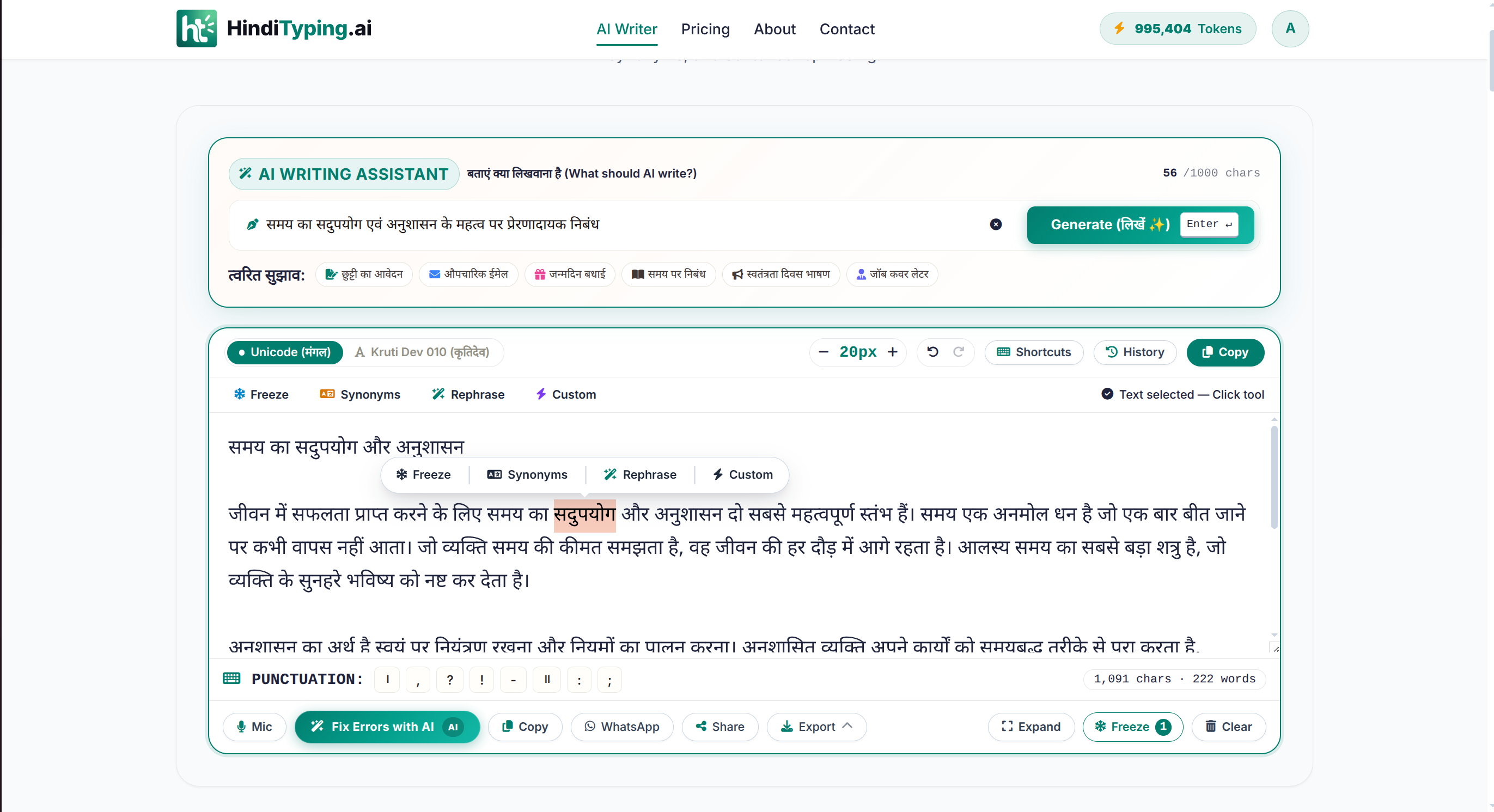
- Type Hindi at over 100 WPM without learning a Hindi keyboard layout. Predictive Hinglish transliteration turns phonetic English input into Devanagari, and you pick suggestions instantly with the space bar or number keys 1-5.
- Dictate long Hindi passages hands-free at 120+ WPM. Continuous Devanagari voice typing is tuned for matras, nasalization, homophones and Hindi punctuation, with live waveform feedback and silence detection.
- Get ready-to-send leave applications, RTI requests, affidavits, cover letters, speeches and essays in seconds. The Hindi AI writer turns a short prompt into up to 500 words of editable Hindi text in 2-3 seconds.
- Submit Hindi text free of spelling, matra and homophone mistakes. Select text and press Alt + Enter, and the Hindi grammar checker corrects errors such as मैं vs मै and कि vs की in one pass.
- Meet government office, court and print shop font requirements without retyping. A single Alt + K converts between Unicode (Mangal) and Kruti Dev 010 while keeping conjuncts like विद्या and द्वार intact.
- Refine tone and word choice without losing the wording you already approved. Contextual synonyms and sentence rephrasing improve your draft, while the Freeze/Lock button shields protected sections from AI edits.
- Finish recurring Hindi correspondence faster. Custom AI command keywords insert your saved phrases and templates on demand.
- Add correct Devanagari punctuation without hunting for symbols. A 1-click toolbar inserts Poorna Viram (।), Deergh Viram (॥) and standard marks.
- Deliver finished documents in the format your recipient needs. One-click export saves Word (.docx), PDF, TXT or image cards, and direct WhatsApp sharing sends your text or file without leaving the editor.
- Keep sensitive drafts on your own device. Draft history is stored 100% locally, with a privacy toggle that stops saving entirely.
- Start writing Hindi immediately at no cost. Typing, transliteration, voice dictation and 10k AI tokens work without login, and Premium adds unlimited tokens, longer voice sessions and use on up to five devices.
Reviews
Rate this tool
Loading reviews...
Frequently asked questions
How does HindiTyping.ai generate Hindi articles or essays with the AI writer?
HindiTyping.ai’s AI writer accepts a user prompt of up to 1,000 characters, then uses a specialized Hindi language model to produce up to 500 words (≈1,000 tokens) of Hindi text in 2‑3 seconds. The output appears directly in the editable workspace so the user can modify it immediately.
Can I use HindiTyping.ai without logging in, and what features are limited for free users?
Yes. Core typing, transliteration, voice dictation, basic editing, and the free 10 k AI‑token allowance are available without signing in. Free users cannot access higher AI‑token limits, longer document generation, expanded voice‑typing duration, multi‑device premium sync, and advanced editing shortcuts that are reserved for paid plans.
What’s the difference between the Unicode (Mangal) and Kruti Dev 010 modes in HindiTyping.ai?
Unicode (Mangal) mode outputs standard Unicode Devanagari code points that work everywhere on modern browsers and devices. Kruti Dev 010 mode outputs the legacy Kruti Dev font encoding used by many Indian government offices, courts and printing shops. The two formats are instantly convertible with a single click (Alt + K) while preserving half‑letters, conjuncts and vowel signs.
How accurate is the continuous Devanagari voice dictation on HindiTyping.ai?
The continuous Devanagari voice dictation is tuned for Hindi‑specific phonetics, handling matras, homophones, nasalization and Devanagari punctuation. It provides real‑time wave‑form visualisation, silence detection and claims a hands‑free speed of over 120 WPM with high transcription accuracy for extended passages.
Does HindiTyping.ai fix homophone errors like मैं vs मै automatically?
Yes. The built‑in surgical AI error & grammar fixer automatically corrects common homophone mistakes such as मैं vs मै and कि vs की when the user triggers the fix (Alt + Enter).
How do I switch between HindiTyping.ai’s transliteration suggestions using the keyboard?
When the predictive transliteration list appears, pressing the space bar selects the top suggestion; pressing number keys 1‑5 selects the corresponding alternative. Arrow keys can also navigate the list before confirming with space or a number.
What punctuation marks can I insert with the 1‑click toolbar in HindiTyping.ai?
The 1‑click punctuation toolbar inserts Poorna Viram (।), Deergh Viram (॥), commas, question marks (?), exclamation points (!), hyphens (‑), colons (:), and semicolons (;).
Can I export my HindiTyping.ai document as a Word file, PDF, or image card in one click?
Yes. A single click on the export icons downloads the current document as a Word (.docx), PDF (.pdf), plain‑text (.txt) or as an image‑card, all without leaving the editor.