

JingleLark
Get a station ID that actually says your station or show name: write a short script and generate a custom voiceover instead of settling for a generic jingle pack.
Listing not yet reviewed by our editors · How we check
Overview
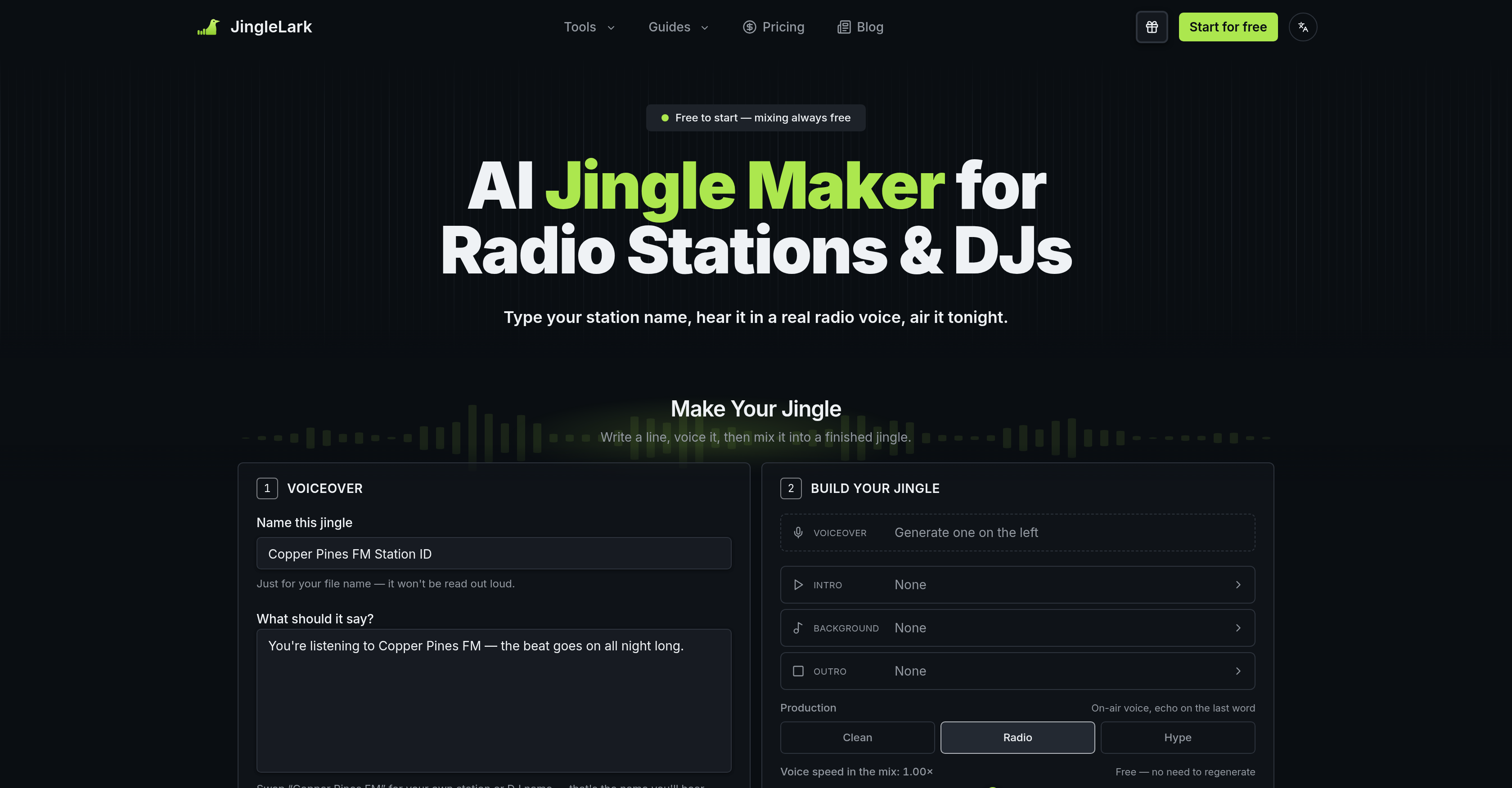
- Get a station ID that actually says your station or show name: write a short script and generate a custom voiceover instead of settling for a generic jingle pack.
- Sound like a professional radio station without booking a voice session: pick from 28 broadcast voices grouped across 7 on-air roles, and preview every voice and sound before signing up.
- Keep one consistent on-air identity across all your station imaging: reuse a single voiceover for station IDs, sweepers, news stings, sponsor spots, show openings, presenter tags, segment stings, DJ drops and set openers.
- Experiment with arrangements at no extra cost: build, revise and download unlimited mixes from one voiceover, swapping among 45 intros, 28 background beds and 15 outros while credits are spent only on voice generation.
- Air drops that are clean and correctly leveled the first time: sidechain ducking keeps speech clear over music, silence is trimmed from effects, and every mix is normalized to -16 LUFS broadcast loudness.
- Hear every name pronounced correctly with the right energy: adjust pronunciation of station or DJ names and set speaking pace from 0.7× to 1.2× before generating.
- Put your own voice, or a presenter's with permission, on air: clone it free from 8–30 seconds of recorded or uploaded speech, keep up to 5 cloned voices, with cloned voices reading 10 languages including Spanish, French, German, Chinese and Japanese.
- Add finished radio polish without an audio editor: apply an on-air effect or an echo on the final word, then download the jingle as MP3 or WAV with nothing to install.
- Run sponsor spots and promos without licensing worries: finished jingles are royalty-free for station use and paid advertising, with no per-play fees or reporting.
- Fit radio imaging into a volunteer or small-station budget: start with a free signup credit plus credits earned from weekly check-ins, then buy packs from $14.90 for 50 credits that never expire, with failed generations refunded.
Pros & Cons
From the listing; not yet checked by our editors.
Pros
- 28 voices across seven roles
- Broadcast roles organize voice selection
- Voice samples available before signup
- All voices available to every account
- Voice pace adjustable from 0.7 to 1.2
- Name pronunciation can be adjusted
- Create a voice from 830 seconds
- Record or upload voice samples
- Reuse voiceovers across unlimited mixes
- Mix revisions cost no credits
- Compare saved versions side by side
- Replace sounds without regenerating speech
- Add intros, beds, and outros
- Apply on-air voice effects
- Add echo to the final word
- Sidechain ducking keeps speech clear
- Sound-effect silence is trimmed automatically
- Mixes normalized to -16 LUFS
- Templates fill scripts and select voices
- Templates include seasonal options
- Scripts support up to 900 characters
- Short scripts cost one credit
- Failed generations return credits
- Generation errors are reported
- Download finished mixes as MP3
- Download finished mixes as WAV
- Royalty-free for station use
- Paid advertising use is included
- No per-play fees
- No audio editor or installation required
- Examples demonstrate finished formats
- Formats include station IDs and sweepers
- Formats include news and sponsor spots
- Formats include show and presenter tags
- Formats include DJ drops and set openers
- Scripts can be adapted over time
Cons
- Doesn't write scripts
- Scripts capped at 900 characters
- Long scripts cost two credits
- Voiceover generation uses credits
- Mixes require a generated voiceover
- Downloads limited to MP3 or WAV
- Voice cloning needs 830 seconds
- Cloning requires clear speech
- Voice pace limited to 0.71.2
Alternatives to JingleLark
Tools that share the most tags with JingleLark.
- FaceShapeDetector
Get a precise, personalized face shape analysis that goes beyond generic labels with our unique Face Shape Blend™, revealing your exact proportions like 80% Oval + 20% Heart.
Freemium · from $6.99
$6.99
Not yet checked
- Transition
Follow a training plan that automatically adjusts to your daily schedule and recovery metrics, ensuring you stay on track even when life gets busy
Paid · from $19/month
$19/month
Not yet checked
- Mixboard
Turn scattered thoughts into mature, actionable concepts by visualizing and manipulating them on an interactive AI concepting board.
Not listed
Not listed
Not yet checked
- NVIDIA Earth-2
Make strategic decisions with confidence using precise, AI-driven weather predictions that mitigate operational risks across aviation, agriculture, and marine sectors.
Not listed
Not listed
Not yet checked
- Engain
Turn Reddit into a repeatable organic traffic channel instead of a gamble by finding and engaging in high-intent discussions that already rank on Google or where users are actively seeking solutions.
Freemium · from $79/month
$79/month
Not yet checked
- OCR | z.AI
Instantly digitize printed documents and scanned PDFs without manual typing, using AI-powered optical character recognition.
Not listed
Not listed
Not yet checked
Reviews
Rate this tool
Loading reviews...
Frequently asked questions
How do I make a station ID with JingleLark?
Write a short script with your station name, choose a radio voice and pace, and generate the voiceover. Then add an intro, background bed and outro, choose any production effects, and build the mix. Download the finished station ID as MP3 or WAV.
Can JingleLark create sweepers, news stings, sponsor spots, and show intros?
Yes. JingleLark can make sweepers, news stings, sponsor spots and show intros, as well as station IDs, presenter tags, segment stings, DJ drops and set openers.
How many radio voices and sound effects does JingleLark offer?
It offers 28 radio voices across 7 on-air roles and 88 sounds: 45 intros, 28 background beds and 15 outros.
Can I preview JingleLark’s voices and sounds before signing up?
Yes. You can play samples of every voice and sound before signing up.
Can I adjust how JingleLark pronounces my station or DJ name?
Yes. You can optionally adjust how a name is pronounced before generating the voiceover.
Can I change the speaking pace in JingleLark?
Yes. Speaking pace can be adjusted from 0.7× to 1.2×.
Can I clone my own voice in JingleLark, and what recording do I need?
Yes. Record or upload 8–30 seconds of clear speech from one speaker, recorded in a quiet room without music. Creating a cloned voice is free; you can keep up to 5 cloned voices.
Can I use someone else’s voice in JingleLark if I have their permission?
Yes, provided you have the speaker’s permission to use their voice.