

Luminal
Process massive 5M+ row spreadsheets instantly without manual Excel work or Python scripts using AI-powered data transformations
Listing not yet reviewed by our editors · How we check
Overview
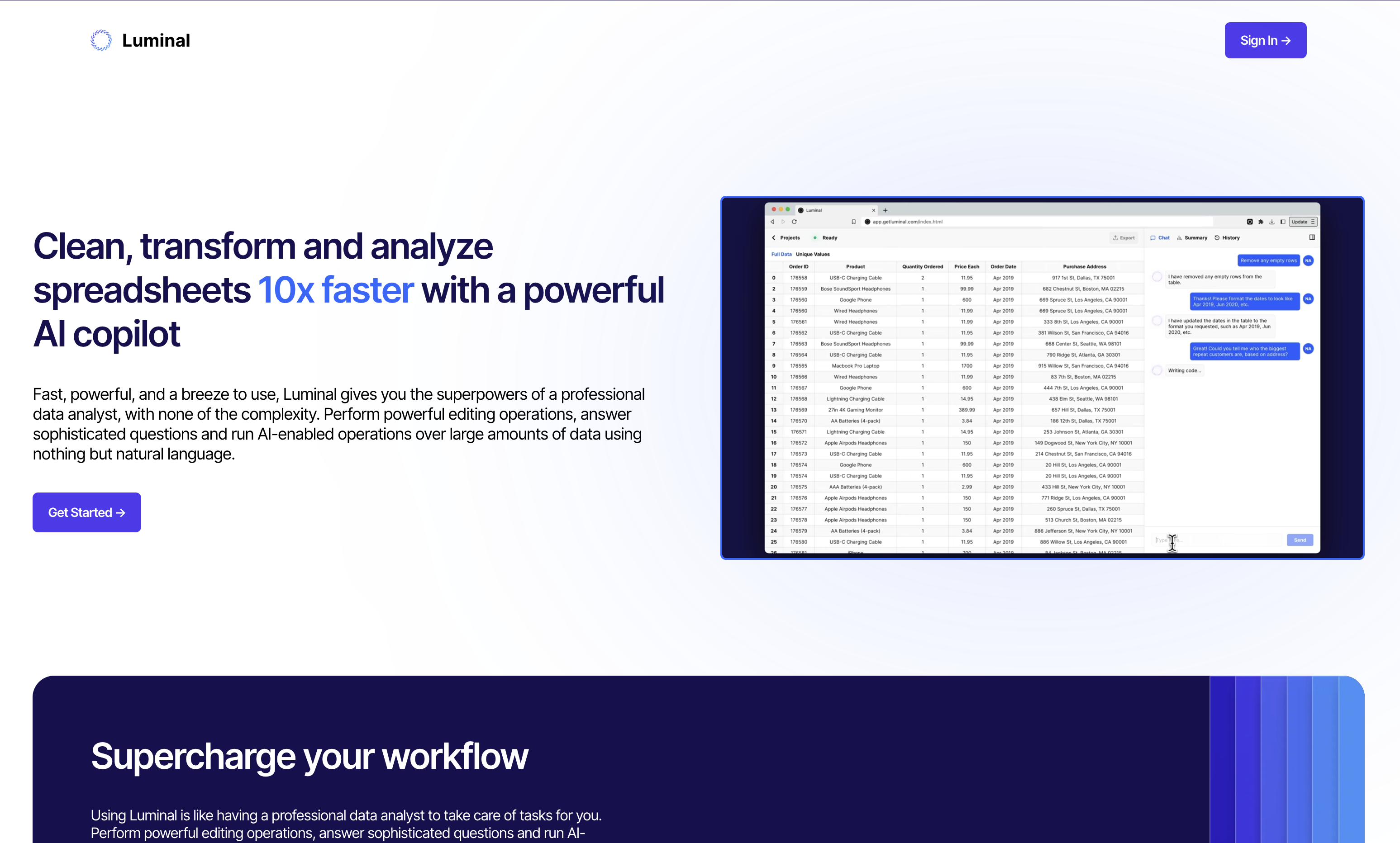
- Process massive 5M+ row spreadsheets instantly without manual Excel work or Python scripts using AI-powered data transformations
- Automatically categorize and tag complex data entries using intelligent AI algorithms that understand your business context
- Fix validation errors in bulk with visual inspection tools that highlight discrepancies and enable rapid bulk corrections
- Map spreadsheet columns intelligently using semantic understanding that goes beyond simple string matching
- Normalize inconsistent data formats automatically with advanced formatting rules for dates, numbers, and text
- Ensure complete data security with enterprise-grade encryption and automatic data purging after processing
- Configure custom validation rules for niche requirements without coding using flexible rule-building capabilities
- Handle complex data types seamlessly from language codes to domain names with specialized column configuration
- Process data in multiple languages including中文, français, and español using multilingual AI understanding
Pros & Cons
From the listing; not yet checked by our editors.
Pros
- Transformed spreadsheet import
- Flexible validation
- Processes spreadsheets 10x faster
- Learns from every interaction
- Handles spreadsheets over 5M rows
- End-to-end solution
- Configuration features
- Semantic column mapping
- Advanced formatting
- Validation features with visual inspection
- Bulk fixes capability
- Filtering option
- Summarization feature
- Data encryption in-transit and at rest
- Zero data persistence
- Secure hosting with top cloud providers
- 100% increase in conversion
- Saves 6+ months engineering time
- Wide range of data types
- Auto-tagging
- Auto-categorization
- Complex validation rules setup
- Improves onboarding experience
Cons
- Doesn't support non-spreadsheet files
- Only supports English language
- Limited advanced formatting options
- No mobile app available
- Too complex for novice users
- Lack of comprehensive tutorials
- No real-time collaboration features
- Data purge may not be suitable for all
- No offline usage capacity
- No API for external integration
Alternatives to Luminal
Tools that share the most tags with Luminal.
- Yorph AI
Transform raw data into strategic decisions automatically with intelligent automation that processes and analyzes information
Freemium · from $29.99/month
$29.99/month
Not yet checked
- Arria
Automatically generate enterprise reports and financial analysis from raw data using patented NLG technology that mimics expert analysts
Free trial · from $15/month
$15/month
Not yet checked
- GigaSpaces eRAG GenAI
Get instant, accurate answers from all your operational data by asking questions in plain English, powered by advanced semantic reasoning that translates your intent into precise SQL queries.
Not listed
Not listed
Not yet checked
- Trend Hunter
Receive detailed trend insights 20 times faster than traditional research methods with AI-powered trend reports
Paid · from $199/month
$199/month
Not yet checked
- One AI
Transform unstructured text, audio, and video into structured analytics with advanced NLP capabilities
Freemium
Not listed
Not yet checked
- Eilla
Automate routine deal tasks like report generation and due diligence with AI-powered workflow automation
Not listed
Not listed
Not yet checked
Reviews
Rate this tool
Loading reviews...
Frequently asked questions
What is Luminal?
Luminal is an AI-powered spreadsheet importer, designed to streamline the process of importing and processing spreadsheets. It learns from every interaction, adapting and improving its capabilities with every use, facilitating more efficient and improved spreadsheet importation over time.
How does Luminal streamline the spreadsheet importing process?
Luminal streamlines the spreadsheet importing process by applying AI-powered transformations like summarization, auto-tagging, and auto-categorization. It also offers configuration capabilities, advanced formatting, semantic column mapping, and flexible validation rules which ensures that the data is ready for smooth processing.
What makes Luminal faster than other spreadsheet importers?
Luminal's speed superiority is derived from its AI-powered capabilities which learn from every interaction, making the importing process faster with each use. In addition, powerful validation features allow for quick fixes, minimising delays caused by data discrepancies.
What kind of data can Luminal handle?
Luminal is designed to handle complex data types, including but not limited to text, numbers, and dates. The flexibility of the AI allows it to accommodate various data formats and validations, contributing to its robust data handling abilities.
Can Luminal process spreadsheets with over 5M+ rows?
Yes, Luminal is fully capable of processing spreadsheets with over 5 million rows. This scale of capability allows it to handle large volumes of data efficiently.
What are the key features of Luminal?
Key features of Luminal include AI-powered transformations, configuration capabilities encompassing a range of data types, semantic column mapping, advanced formatting options, and flexible validation rules. It also includes inspection features allowing for easy identification and rectification of validation failures, as well as robust data security measures.
How does Luminal's AI-powered transformations work?
Luminal's AI-powered transformations are applied through complex algorithms that can perform tasks like summarization, auto-tagging, and auto-categorization. These operations allow for more efficient data analysis and processing.
What kind of data types can Luminal configure for columns?
Luminal can configure columns with a wide range of data types, from 'language code' to 'domain name' to 'business name'. This flexibility allows it to accommodate diverse customer requirements and complexities.