

Maester code creator
Generate complete functions instantly from plain English descriptions using AI that understands your specific requirements
Listing not yet reviewed by our editors · How we check
Overview
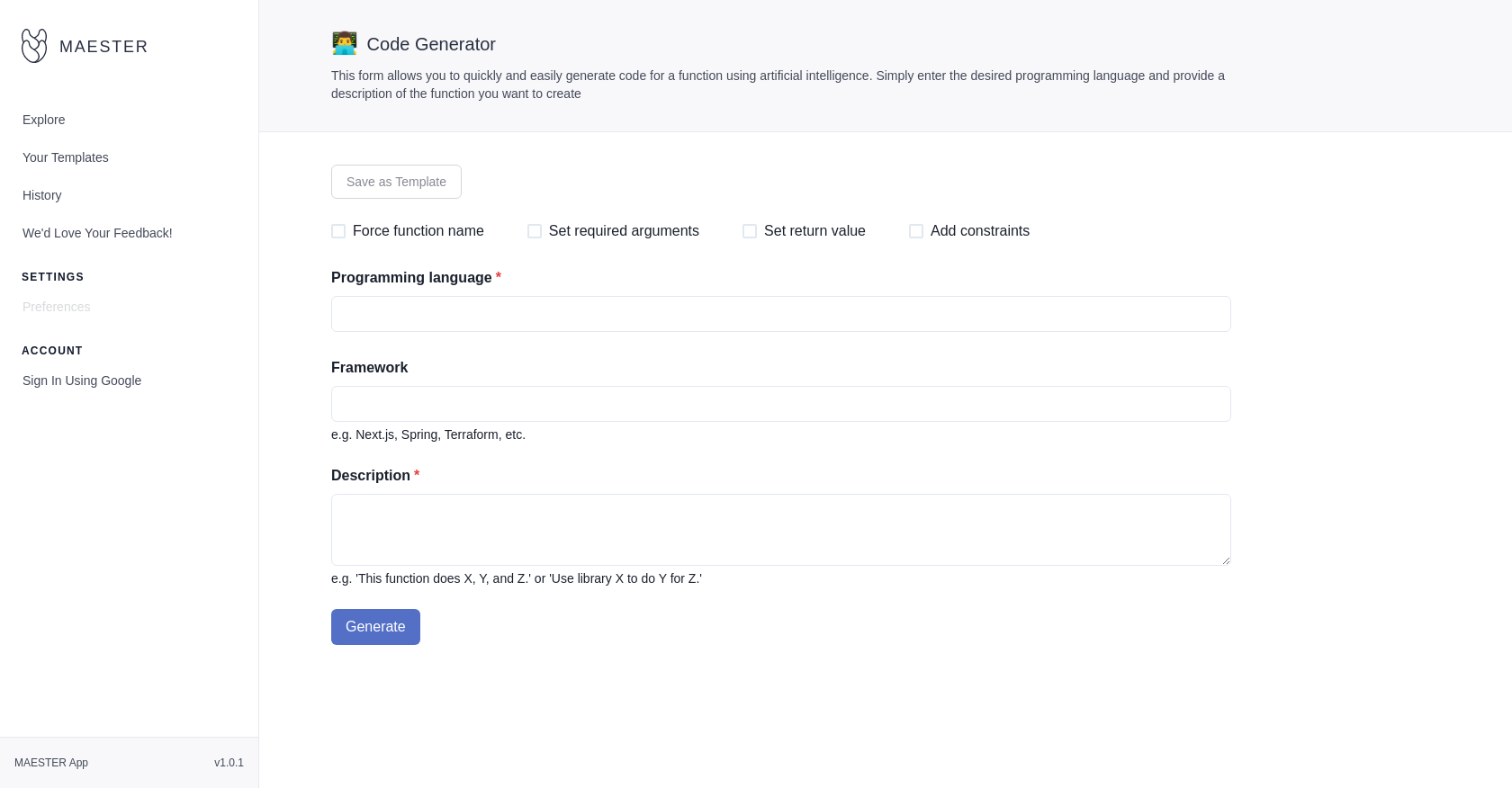
- Generate complete functions instantly from plain English descriptions using AI that understands your specific requirements
- Build reusable code components by saving generated functions as templates for future projects and team consistency
- Accelerate development across multiple languages and frameworks by specifying your exact programming environment and constraints
- Maintain coding standards by forcing specific function names and setting precise return values and argument requirements
- Track your coding patterns through generation history that lets you review and reuse previous function creations
Pros & Cons
From the listing; not yet checked by our editors.
Pros
- Assisted code generation
- Supports multiple programming languages
- Permits function parameter customization
- Allows return value settings
- Enables constraints addition
- Save function as template
- Suitable for all levels
- Form-based interface
- Time and effort saver
- Framework compatibility
- Allows description input
- Force function name option
- History tracking
- Feedback options
- User preference settings
- Google account integration
- Version control
Cons
- Limited programming languages support
- Unclear framework selection
- No predefined templates
- No code editing features
- Requires detailed function description
- Potential privacy concerns
- Sign-in only with Google
- No offline usage
- No versioning history
Alternatives to Maester code creator
Tools that share the most tags with Maester code creator.
- Google Antigravity
Google's agentic development platform: agents plan and run coding tasks across an app, a CLI, an IDE, IDE extensions and a Python SDK.
Freemium · from $30/month
$30/month
Nov 24, 2026
- Base44
Transform your ideas into working apps in minutes using simple conversation instead of complex coding
Freemium · from $16/month
$16/month
Not yet checked
- CodeRabbit
Eliminate manual code review bottlenecks with instant PR summaries and intelligent code walkthroughs that accelerate your development workflow
Free trial · from $24/month
$24/month
Not yet checked
- Rocket
Launch complete applications in minutes instead of weeks by generating full-stack code from a single description
Freemium · from $25/month
$25/month
Not yet checked
- OnSpace.AI - AI Mobile App Builder
Launch mobile apps in hours instead of months using conversational AI that transforms your descriptions into working applications
Freemium · from $25/month
$25/month
Not yet checked
- Durable AI Website Builder
Launch a complete business website in 30 seconds with AI-generated content and curated imagery tailored to your industry
Paid · from $12/month
$12/month
Not yet checked
Reviews
Rate this tool
Loading reviews...
Frequently asked questions
What is Maester code creator?
Maester code creator is an artificial intelligence powered platform for code generation, designed to assist developers of all levels in creating functions. Its users can define their desired programming language, provide a detailed description of the function, and stipulate the necessary arguments, return value, and any constraints.
What functions can Maester code creator generate?
Maester code creator can generate a wide range of functions based on developer-provided descriptions, arguments, return values, and constraints. The complexity of the functions depends on the details specified by the user.
What programming languages does Maester App support?
The exact list of programming languages supported by Maester App is not explicitly mentioned on their website. However, users are prompted to specify their desired programming language, suggesting a versatile language support.
How does Maester App use AI in code generation?
Maester App utilizes AI to transcribe a user's detailed descriptions of a function into actual code in their preferred programming language. It accounts for parameters such as the desired arguments, return value and constraints to ensure the generated function meets the user's needs.
In what ways can Maester App simplify code creation for developers?
Maester App simplifies code creation for developers by automatically generating code for the described functions, potentially reducing the amount of time, effort, and knowledge required to write the code manually. The AI-assisted tool also allows developers to save their generated functions as templates for future use.
How can I set the required arguments in Maester App?
In Maester App, setting the required arguments for a function is done via an interface option, 'Set required arguments'. However, further details about the process are not given on their website.
How do I set the return value and constraints for a function using Maester?
To set the return value and constraints for a function using Maester, users can use the 'Set return value' and 'Add constraints' options respectively on the interface. Further specific details about the process are not provided on their website.
Can I save my generated functions as templates in Maester?
Yes, Maester App allows users to save generated functions as templates via the 'Save as Template' option for future use and swift code generation.