MenuPhotoAI
Overview
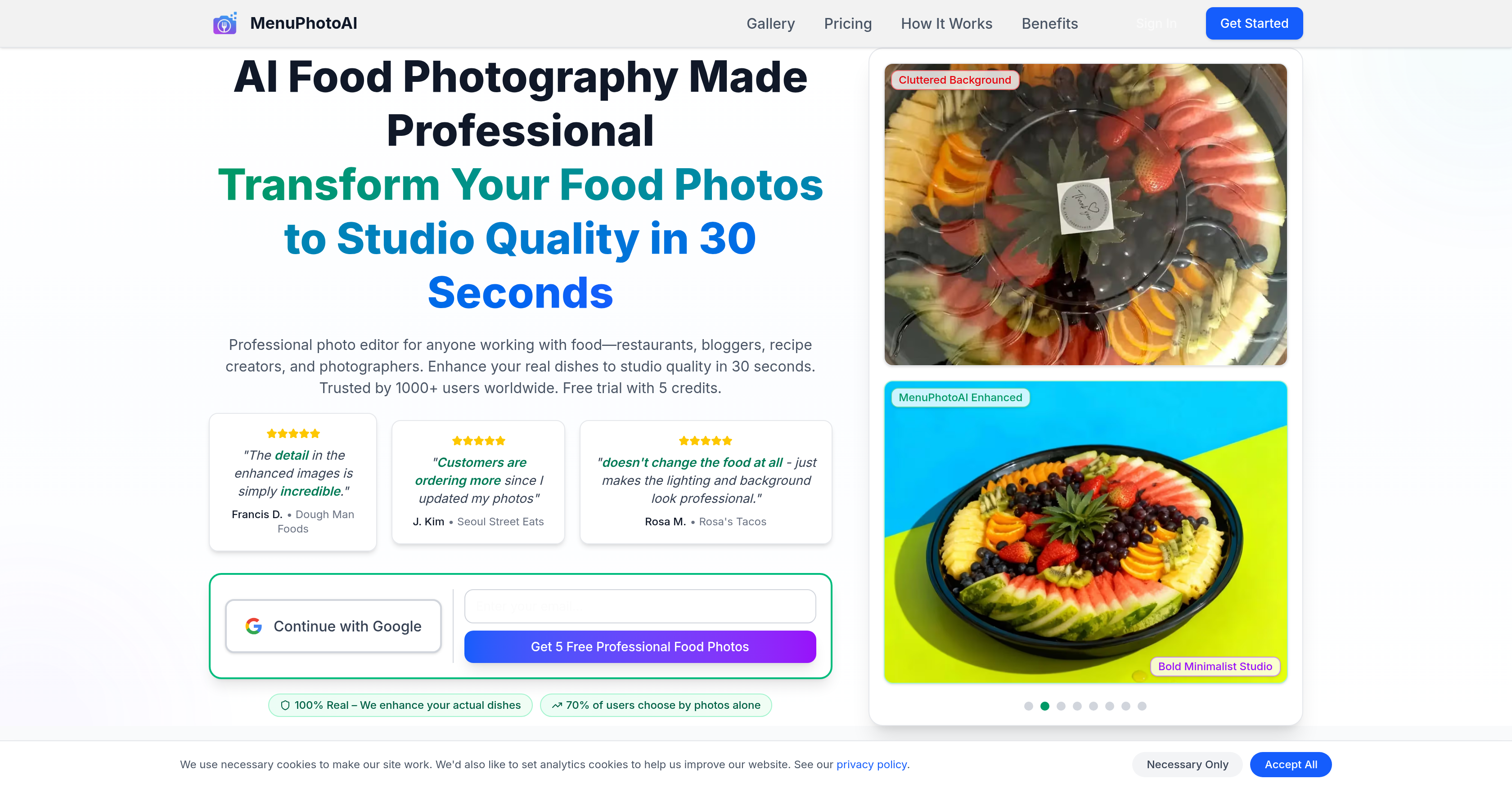
- Convert phone snapshots into sales-driving menu photos in 30 seconds using AI that enhances lighting and backgrounds without altering the food's authentic appearance.
- Increase customer orders and engagement with studio-quality images optimized specifically for DoorDash, Uber Eats, and Grubhub platform requirements.
- Establish a consistent, professional brand aesthetic across all content by selecting from specialized photography styles like Moody Fine Dining or Bright Brunch Vibes.
- Process up to 100 images simultaneously with batch processing, saving hours compared to manual editing or professional photoshoots.
- Fix common photo issues automatically, including poor lighting, messy backgrounds, bad angles, and color imbalances, with no photography skills required.
- Maintain a true representation of your dishes while making them look more appetizing, as the AI enhances only the scene around the actual food.
Pros & Cons
Pros
- Transforms food photos quickly
- Improves real dish images
- Array of photography styles
- Doesn't generate fake food images
- Increases customer engagement
- Increases order volume
- Offers free trial
- Customizable to specific needs
- Multiple styles like 'moody fine dining'
- Multiple styles like 'bright brunch vibes'
- Quality enhancement in 30 seconds
- Maintains food authenticity
- Improves lighting and background
- Users worldwide trust it
- Number of free trial credits
- Heightens image detail
- Varied range of photography styles
- Can match aesthetic needs
- Improves appeal of food-related images
- Offers different themed styling options
- Targets different user base like restaurants, bloggers, etc.
- Has societal proof from user feedback
- Results in increased order volumes
- Removes irregular people in frame
- Fixes poor lighting in original photos
- Adjusts wrong colors in original photos
- Corrects blurry photos
- Fixes bad angles in original photos
- Cleans up messy backgrounds in original photos
- Allows batch uploads up to 100 photos
- Customization based on type of food
- Customization based on delivery platform
- Web-optimized JPG download format
- Platform-specific sizes for download
- Cheaper than a traditional photographer
- Boosted less-expensive plans with discount code
- Cancellable monthly subscriptions
- Commercial license provided
- Watermark-free downloads
- Reduces expenditure vs. photographers
- Large variety of food photography styles
- Delivers professional results fast
- Cheaper option for professional photos
- Solves issues of poor photos in the food industry
- Turns better photos into more orders
- Provides free credits for experimentation
Cons
- Only for food photos
- Limited trial credits
- No fake images creation
- Requires photography style selection
- Limited customers' scenarios
- Subscription-based pricing
- No mentioned API
- Requires photo upload
- Processing time of 30s
- May result in over-stylization
Reviews
Rate this tool
Loading reviews...
❓ Frequently Asked Questions
MenuPhotoAI is a professional photo editing tool driven by AI which is designed specifically to transform food photos into studio-quality images.
MenuPhotoAI is intended for anyone who works with food content. This includes restaurants, bloggers, recipe creators, and photographers.
No, MenuPhotoAI does not generate fake food images. Instead, it enhances the actual dishes captured in the photos.
MenuPhotoAI enhances food images by improving elements like lighting and background to make them appear more professional. It offers users the ability to select from various photography styles ranging from 'moody fine dining' to 'bright brunch vibes', thereby allowing users to deliver visually appealing and diverse food content.
MenuPhotoAI offers an array of photography styles to choose from. These include 'moody fine dining', 'bright brunch vibes', 'Dark & Moody', 'Bright & Airy Close-Up', 'Natural Light', 'Candid & Warm', 'Dark Elegant Overhead', 'Dark & Rustic Still-Life', 'Dark Minimalist Close-Up', 'Bright & Elaborate Flat-Lay', 'Dark Intimate Close-Up', 'Bright Intimate Close-Up', 'Natural Intimate Close-Up', 'Bold & Minimalist Studio', 'Bright & Clean Flat-Lay', 'Vibrant & High-Contrast Action', 'Abundant Feast', and 'Messy & Indulgent Action'.
Yes, users can customize their photo styles when using MenuPhotoAI. They can select from a variety of photography styles based on their specific needs and preferences.
According to user testimonials, using MenuPhotoAI greatly improved their photo quality. This reportedly resulted in increased customer engagement and more orders.
MenuPhotoAI provides a free trial for users to test the tool's capabilities. This means that users can use the tool and witness its performance before they decide to fully commit.
The exact duration of the free trial offered by MenuPhotoAI may vary and is not explicitly mentioned on their website.
MenuPhotoAI significantly enhances the lighting and background of food images. It uses artificial intelligence to automatically improve these elements, which makes the dishes and scenes in the photos appear more professional.
The transformations by MenuPhotoAI are not done in real-time, they take a few seconds. Specifically, it can transform food photos to studio quality in about 30 seconds.
Yes, MenuPhotoAI supports batch processing of images. Users can upload up to 100 photos at once, which saves a lot of time.
MenuPhotoAI is most effective on all types of food-related content. It enhances real dishes and scenes captured in the photos, making it useful for any type of food image, irrespective of the cuisine or dish.
No, you do not need professional photography knowledge to use MenuPhotoAI. The AI-driven tool does all the enhancements automatically, making it easy for anyone to use it to improve their food photography.
MenuPhotoAI has a profound impact on food presentation in images. By improving elements like lighting and background, it brings out the best features of the dishes and makes them look more appetizing and professional.
MenuPhotoAI significantly improves the quality of food photos, which has been seen to increase customer orders. Although the precise increase can vary depending on factors like the original photo quality and the specific business, an increase in customer engagement and orders is reported by users.
Yes, MenuPhotoAI is highly beneficial to bloggers focused on food content. It allows them to quickly and easily transform their food photos into studio-quality images, helping to make their blog posts more appealing and effective.
Yes, MenuPhotoAI offers solutions that are very beneficial to restaurant marketing. High-quality, appealing food photos can significantly enhance a restaurant's online presence and appeal, potentially leading to an increase in customer engagement and orders.
MenuPhotoAI offers professional photo enhancements especially for food images. It improves elements such as lighting and background, and offers customization options with various photography styles. These enhancements transform ordinary food photos into professional, studio-quality images.
Yes, MenuPhotoAI is an AI-driven tool. It uses artificial intelligence to analyze and automatically enhance food photos, making them look professional within seconds.
MenuPhotoAI uses AI algorithms to analyze your food photos and make enhancements such as improving lighting, balancing colors, retouching messy backgrounds, and correcting angles. This process helps to transform real food images into professional, studio-quality photos in mere seconds.
Those who regularly work with food content stand to benefit immensely from using MenuPhotoAI. This encompasses restaurants, food bloggers, recipe creators, photographers, and establishments in the food industry like cafes and food trucks.
MenuPhotoAI improves several elements like lighting, colors, and backgrounds. AI algorithms are employed to correct any poor lighting conditions, incorrect colors, messy backgrounds or unflattering photo angles, thereby significantly enhancing the overall visual appeal of the image.
No, MenuPhotoAI cannot and does not generate fake food images. The tool only enhances actual dishes and scenes captured in photos, improving their features without altering the authenticity of the food itself.
MenuPhotoAI provides an array of photography styles to choose from, ranging from 'moody fine dining' to 'bright brunch vibes'. This allows users to match the aesthetic of the photos to their specific needs and preferences, thus promoting diversity in their content.
Based on user reports, employing MenuPhotoAI for photo enhancement has resulted in increased customer engagement and order placements, attributed to the marked improvement in photo quality.
Yes, MenuPhotoAI does offer a free trial. This provides potential users with an opportunity to test the tool's capabilities before deciding on a full commitment. The exact number of trial credits provided may vary.
The AI tool developed by MenuPhotoAI, renowned for its speed and effectiveness, is capable of transforming food pictures into studio-quality images in around 30 seconds.
MenuPhotoAI is certainly beneficial for professional photographers. It allows them to quickly and conveniently enhance their food photographs, making them more appealing and professional. By improving aspects such as lighting and background, photographers can add another dimension of visual attraction to their photos.
Yes, MenuPhotoAI can effectively correct issues like poor lighting and wrong colors in food photos thanks to its AI algorithms. It can also rectify other common issues such as people appearing in the frame, blurry photos, bad photo angles, and messy backgrounds.
MenuPhotoAI supports a wide range of images. This encompasses photos taken from phone cameras, existing menu photos, and food images of varying quality levels. The tool is designed in a way to fix all common issues associated with the aforementioned image sources, effectively enhancing their quality.
The user base of MenuPhotoAI is quite diverse and expansive, spanning globally. Its users widely include restaurants, food trucks, cafes, food bloggers, recipe creators, and photographers who need an effective way to transform their food images to studio standards.
MenuPhotoAI does not alter the appearance of the food in any form. The tool enhances the features of the actual dishes captured in the photos, but it retains the authenticity of the food and ensures the final image is still a true representation of the dish.
To use MenuPhotoAI, you simply need to upload your photos, customize your style, and get the results. Initial upload of photos takes around 5 seconds, after which you can select the desirable photography style suited to your specific needs. The AI will process the photo enhancements in approximately 30 seconds, after which you can download the enhanced image in a web-optimized JPG format.
MenuPhotoAI offers platform optimization for popular food delivery apps like DoorDash, Uber Eats, and Grubhub. This enables your food images to be correctly formatted and optimized per the specific requirements of these platforms, ensuring they look their best on each respective platform.
The average cost of using MenuPhotoAI is significantly less than that of hiring a professional photographer. Prices start from $39 per month for the Starter plan that offers enhancements for 25 images each month, making it a budget-friendly alternative to traditional photography.
With MenuPhotoAI, you can customize the style of your photos by selecting from a wide array of photography styles that suit your specific needs - these styles range from moody fine dining to brighter and more intimate variations.
Enhancing photos through MenuPhotoAI involves a simple three-step process. Initially, you upload your photos, where it supports phone camera photos, existing menu photos, and more. Then, you can customize the style of your choice. Once done, the AI processes the enhancements in around 30 seconds, and you get professionally enhanced food photos.
Yes, MenuPhotoAI is highly applicable for use in the e-commerce and digital marketing industries. Since these sectors mandate high-quality and visually appealing images to drive user engagement, MenuPhotoAI's capability of effectively enhancing food photos to studio standards lends functionality in designing attractive marketing campaigns and online product presentations.
Pricing
Pricing model
Free Trial
Paid options from
$27/month
Billing frequency
Monthly
Refund policy
No Refunds