

OpenSEO
Own your entire SEO stack with no vendor lock-in: the MIT-licensed open-source codebase lets you inspect, modify, and self-host the platform with Docker while keeping full operational control.
Listing not yet reviewed by our editors · How we check
Overview
- Own your entire SEO stack with no vendor lock-in: the MIT-licensed open-source codebase lets you inspect, modify, and self-host the platform with Docker while keeping full operational control.
- Find out whether AI search engines recommend your brand: the AI visibility checker sends the same web-enabled question to ChatGPT, Gemini, Claude, and Perplexity, records every cited source in order, flags whether your site is named or linked, and compares the most-referenced domains across assistants.
- Keep SEO data costs predictable: pay-per-lookup pricing shows each call's price up front, a monthly spending cap blocks paid calls once reached, cached results make repeat queries free for hours up to 7 days, and $5 in starter credit covers a trial of every tool.
- Run SEO workflows directly from your code editor or terminal: the MCP server exposes 76 tools to compatible AI agents, including VS Code and command-line clients, with prepared workflows for SEO coaching, site audits, keyword research, competitor analysis, Search Console review, and local SEO.
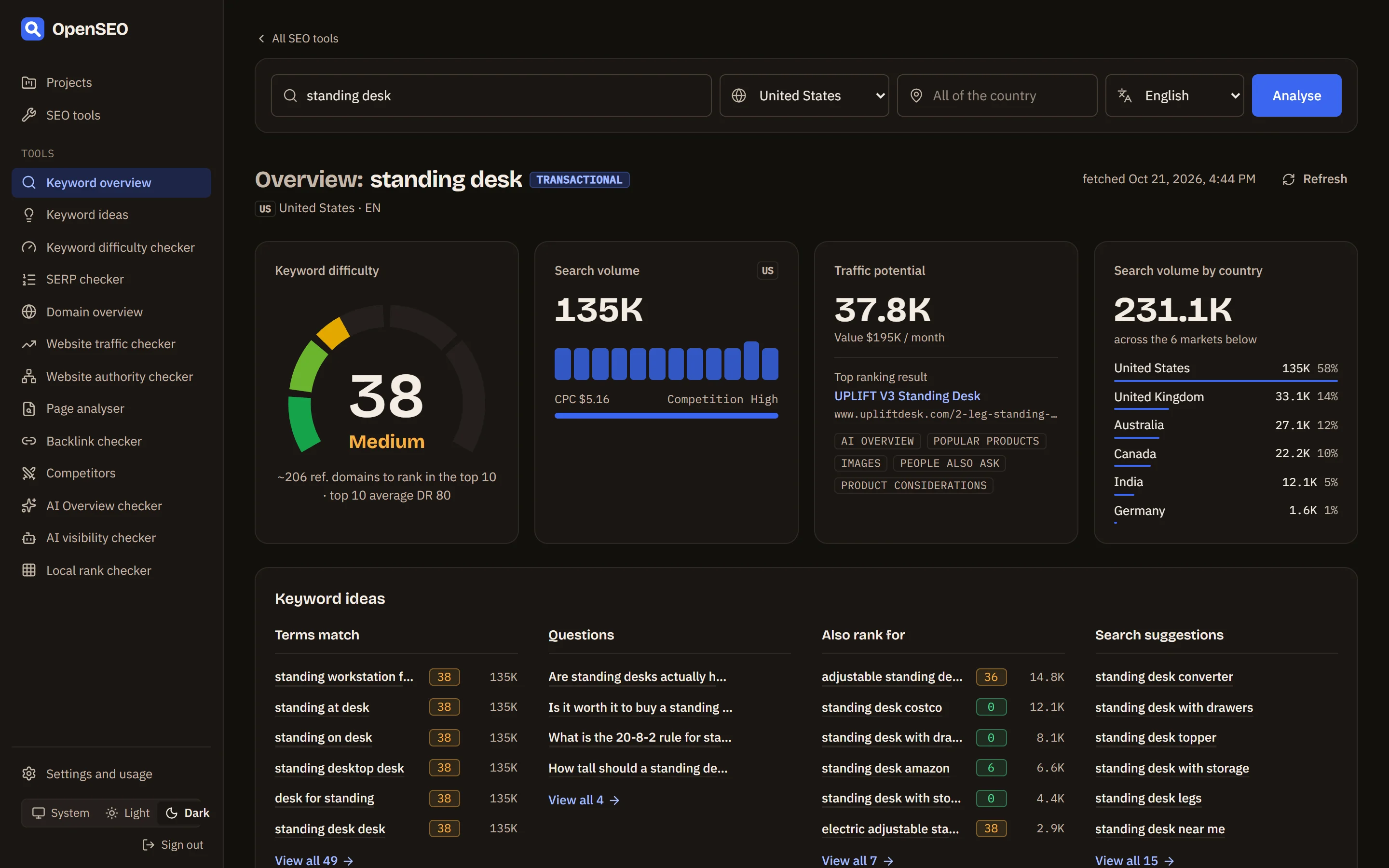
- Target keywords you can realistically rank for: keyword research returns search volume, keyword difficulty, traffic potential, search intent, trends, related questions, and live top results, and you can filter ideas, tag them, save them to projects, or export them to CSV.
- Win visibility in the exact markets you serve: location-scoped research covers country, language, city, state, region, and zip-level areas, and a Google Maps local rank grid tracks multiple businesses on the same map.
- Understand how rankings differ by device: the SERP checker pulls separate desktop and mobile top-10 results for any location, with authority scores, backlink counts, estimated traffic, and SERP features such as featured snippets and local packs.
- Capture the traffic competitors are taking from you: keyword gap analysis compares multiple competitors side by side to surface keywords you share, keywords only they rank for, and the gaps you can save as opportunities, supported by domain overviews showing Domain Rating, organic traffic, ad value, referring domains, and direct organic competitors.
- Fix the technical issues that hurt rankings first: the site audit crawler runs 117 technical SEO checks, covering broken links, redirect chains, duplicate meta tags, canonicalization, structured data, HTTPS, and mobile-friendliness, and ranks fixes by their impact on rankings.
- Diagnose why a single page underperforms: page analysis checks a URL's title, meta description, headings, authority, organic traffic, ranking terms, and strongest backlinks in one view.
- Replace a patchwork of SEO subscriptions with one workspace: rank tracking, backlink investigation, Google Search Console data, saved keywords, projects, and market settings live together for repeat investigations and team collaboration.
Pros & Cons
From the listing; not yet checked by our editors.
Pros
- MIT licensed open source
- Selfhostable via Docker
- Full code transparency
- MCP server API for agents
- Single query loads all metrics
- Free repeat searches within 24h
- Localised data by city/state
- Export keyword sets to CSV
- Desktop and mobile SERP views
- Result authority and traffic estimates
- Domain advertising value metric
- Ranking movement tracking over time
- Page analysis shows strongest backlinks
- Audit prioritizes highimpact fixes
- Keywordgap analysis with competitors
- Citation order tracking per assistant
- Identify site mentions in citations
- CLI and editor workflow integration
- Call price preview and limits
- Cache reusable calls up to 7 days
- Collaborative project tagging system
- Multimarket research across locales
- Live top10 results inclusion
- Local SERP grid rankings
- Backlink history monthly trends
- Spam score and dofollow share
- Competitor keyword overlap visualization
- Search Console data integration
- Integrated rank tracking low cost
- Agentready prepared SEO workflows
- Supports VS Code, CLI clients
- Granular filter by intent/difficulty
- Save and reuse keyword projects
- Oneclick competitor analysis
- Local search volume sidebyside
- Exportable CSV for all tools
- OpenAPIlike MCP endpoint
- Selfhost ensures data privacy
- Unlimited site audit checks
- Responsive UI centralizes research
- Realtime keyword difficulty updates
- Integrated backlink investigation dashboard
- Geographic ranking movement heatmap
- Automated SEO coaching via agents
Cons
- No native Windows installer
- Manual API key management needed
- Limited realtime data updates
- MCP server adds latency
- Exports only CSV format
- No builtin keyword clustering
- Lacks integrated linkbuilding tools
Alternatives to OpenSEO
Tools that share the most tags with OpenSEO.
- SEObot
Eliminate manual keyword research with automated analysis that identifies the most relevant Google search terms for maximum impact
Paid · from $19/month
$19/month
Not yet checked
- Lovarank
Attract qualified traffic with hidden, low-competition keywords discovered automatically by AI analysis of your niche
Free trial · from $99/month
$99/month
Not yet checked
- Nichely
Uncover expert-level subtopics competitors miss through AI-powered Topic Discovery that maps millions of niche relationships
Freemium
Not listed
Not yet checked
- ContentEdge
Generate complete, ready-to-publish content in 15 seconds with AI-powered writing that mimics human language patterns
Free trial · from $24/month
$24/month
Not yet checked
- BlogSEO
Analyzes a website URL, finds keyword opportunities and competitors, then writes blog articles and publishes them to your CMS on a schedule.
Free trial · from $97/month
$97/month
Nov 23, 2026
- Yahini
Transform your website into a prioritized content roadmap with automated funnel-aware keyword research that maps topics to customer journey stages
Freemium · from $39/month
$39/month
Not yet checked
Reviews
Rate this tool
Loading reviews...
Frequently asked questions
What does OpenSEO need to run locally with Docker?
You need Docker (or Docker‑Compose), a PostgreSQL instance (included in the provided compose file), the OpenSEO source repository, and an .env file that defines AUTH_SECRET and ENCRYPTION_KEY. After cloning the repo, you run docker compose up -d --build to launch the API, dashboard, and database. An API key from YepAPI is also required to power the data‑driven tools.
Can I read and modify OpenSEO's source code because it's MIT‑licensed?
Yes. OpenSEO is released under the MIT licence, which permits you to read, modify, and redistribute any part of the source code.
How does OpenSEO pull keyword volume and difficulty data?
Keyword volume, difficulty and related metrics are fetched from YepAPI, the external data provider that supplies search‑volume, ranking difficulty, traffic potential, and related keyword ideas.
Is the local search feature in OpenSEO limited to city and state only?
No. The local‑search feature can be scoped to country, language, city, state, region or even specific zip‑level locations, not just city and state.
What AI models does OpenSEO's visibility checker support?
The AI visibility checker queries four models: OpenAI’s ChatGPT, Google Gemini, Anthropic’s Claude, and Perplexity.
How do I connect a ChatGPT or Claude agent to OpenSEO via MCP?
Start the OpenSEO MCP server (the open‑source MCP component) and then paste the provided setup prompt into your ChatGPT, Claude or other supported agent. The prompt points the agent at the MCP endpoint, performs a test connection (free), and then the agent can invoke any of the 76 MCP tools via REST calls.
Does OpenSEO charge per lookup and can I set a monthly spending limit?
OpenSEO charges per lookup, displaying the exact price of each call. You can define a monthly spending ceiling; once the limit is reached, further paid calls are blocked automatically.
What kind of technical checks are included in OpenSEO's site audit?
The built‑in site auditor runs 117 technical checks covering crawl errors, broken links, redirect chains, missing or duplicate meta tags, page‑speed signals, HTTPS enforcement, robots.txt and sitemap validity, canonicalisation, mobile‑friendliness, structured‑data markup, and spam‑score assessments, prioritising fixes that most affect rankings.