

Painboard
Clear your customer feedback backlog in less time: AI analysis sorts large volumes of unstructured feedback into organized themes and recurring issues, so you stop reading comments one by one.
Listing not yet reviewed by our editors · How we check
Overview
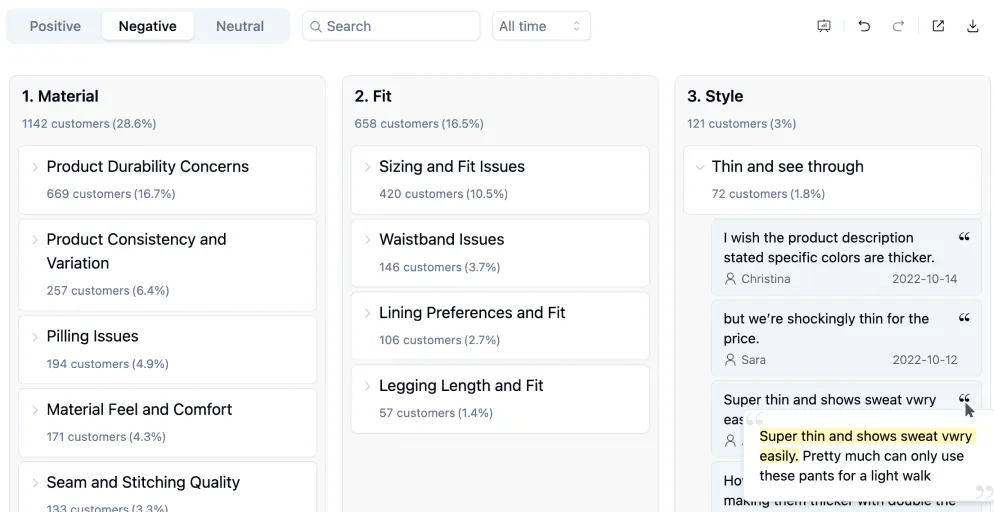
- Clear your customer feedback backlog in less time: AI analysis sorts large volumes of unstructured feedback into organized themes and recurring issues, so you stop reading comments one by one.
- Get insight categories that match how your business works: merge, move, and rename themes to fit your organizational goals and internal terms.
- Understand any theme at a glance: built-in visuals show the key details of each thematic area, so stakeholders grasp customer pain points without reading raw data.
- See whether problems are growing or fading: the comparative view filters and compares feedback insights across time periods and custom fields to expose trends and recurring issues.
- Answer new questions about your customers when they come up: on-demand themes let you explore and refine feedback themes through chat, without waiting on a new report.
- Build strategies that combine data with your team's judgment: AI-generated themes are refined by human intuition and turned into business-specific actions on customer needs and preferences.
Pros & Cons
From the listing; not yet checked by our editors.
Pros
- Converts unstructured feedback to insights
- Efficient customer feedback management
- Ability to merge, move, rename themes
- Alignment with organizational objectives
- Generates valuable visuals
- Immediate comprehension of themes
- Comparative view feature
- Filters and compares insights
- Tracks trends over periods
- Understands recurring issues
- On-demand themes via chat
- Proactive data interaction
- Enhances customer engagement
- Streamlines customer service improvement
- Reformats raw data into actions
- Facilitates tailored business strategies
- Unclutters feedback piles
- Tailors themes to fit objectives
- See visuals at a glance
- Explores and refines themes
- Business-specific strategy formulation
- Helps in trend analysis
- Improves customer insight understanding
Cons
- No API integration mentioned
- No mobile application mentioned
- Unclear data export options
- No automation features mentioned
- Lack of real-time analysis
- No language selection mentioned
- No sentiment analysis mentioned
- Seemingly limited customization
- No multi-user feature mentioned
- No offline working mode
Alternatives to Painboard
Tools that share the most tags with Painboard.
- SurveySparrow
Boost survey response rates with conversational forms that feel like a real chat, making feedback collection more engaging and effective.
Not listed
Not listed
Not yet checked
- Backsy.ai
Get honest customer feedback through anonymous collection that encourages candid responses
Freemium · from $19.99/month
$19.99/month
Not yet checked
- ClientZen
Uncover customer pain points instantly with automated feedback tagging and sentiment analysis that replaces manual processing
Free trial · from $206.69/month
$206.69/month
Not yet checked
- HarmonizeAi
Understand exactly why customers feel the way they do with AI that analyzes the qualitative meaning behind feedback across all channels
Not listed
Not listed
Not yet checked
- Canny
Stop wasting time on duplicate feedback with automatic detection and merging that consolidates similar ideas into single threads
Freemium · from $79/month
$79/month
Not yet checked
- Hubble.team
Gather authentic user feedback during actual product usage through in-product SDK integration, eliminating biased recall from separate surveys
Freemium
Not listed
Not yet checked
Reviews
Rate this tool
Loading reviews...
Frequently asked questions
What is Painboard?
Painboard is an AI-driven tool designed to assist businesses by transforming unstructured customer feedback into discernable and actionable insights. It serves as an advanced intelligence platform, combining AI analysis and human intuition to create business-specific strategies.
How does Painboard help in converting unstructured customer feedback into actionable insights?
Painboard uses artificial intelligence to process unstructured customer feedback, transforming it into understandable and actionable insights. This efficiency enables businesses to effectively manage and respond to client needs and preferences.
How does Painboard blend AI analysis with human intuition?
Painboard seamlessly blends AI and human intuition by developing an iterative interaction between users and the AI. The AI analyzes the customer feedback, finds trends, and generates themes, while human intuition refines these themes and channels them into business-specific strategies.
What is meant by Painboard's 'on-demand themes' feature?
Painboard's 'on-demand themes' is a unique feature that facilitates users to explore and refine themes via chat. This encourages an active interaction and engagement with generated data, thus making data exploration a more dynamic and interactive process.
Can Painboard effectively manage huge piles of customer feedback?
Yes, Painboard is designed to efficiently manage large volumes of customer feedback. It streamlines the process of recognizing and responding to client needs and preferences, thus replacing the normally overwhelming task of handling customer feedback with an organized and effective approach.
How can Painboard help me understand my clientele's needs and preferences?
Painboard assists you in understanding your clientele's needs and preferences by converting their unstructured feedback into actionable insights. It highlights trends, recurring issues and themes in the feedback, offering a meticulous understanding of your customer's experiences and needs.
What does merging, moving, and renaming themes mean in Painboard?
In Painboard, merging, moving, and renaming themes are options provided to align the themes better with your business objectives. You can merge similar themes, move themes to a different category or rename them to reflect their content more accurately.
How does Painboard's comparative view feature work?
Painboard's comparative view feature allows businesses to filter and compare insights across different periods and custom fields. This feature delivers a thorough understanding of trends, recurring issues, and enables businesses to compare their performance over time.