

Overview
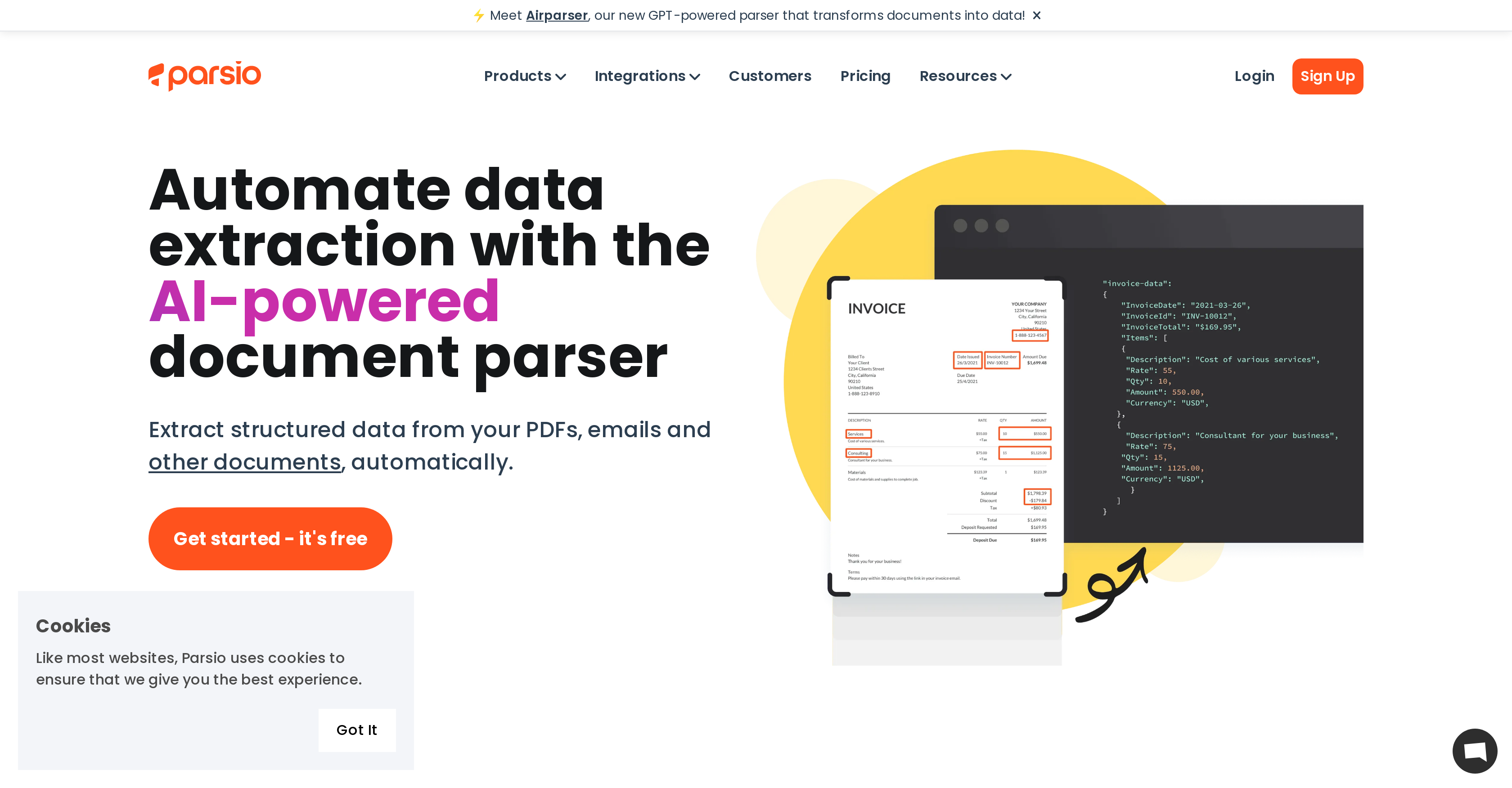
- Eliminate manual data entry completely by automatically extracting structured information from emails, PDFs, and documents using AI and OCR technology
- Capture leads instantly from real estate emails, LinkedIn messages, and automotive inquiries with pre-built templates for popular platforms
- Export parsed data directly to your workflow by automatically sending structured information to Google Sheets, CRMs, databases, and 6000+ other applications
- Convert human-written documents into structured data using Airparser's GPT-powered natural language processing for unstructured content
- Extract specific business information from identity documents, invoices, and receipts with custom data formatting that applies your business logic
- Handle tables with variable rows effortlessly through specialized table extraction designed for complex document layouts
- Process international documents confidently with multi-language support for Latin and European languages in both printed and handwritten text
Pros & Cons
Pros
- Extracts from varied documents
- Exports to Google Sheets
- Exports to 6,000+ applications
- OCR technology
- Pre-built templates
- Customizable templates
- Multiple language support
- Email parsing
- Attachment parsing
- Data formatting options
- Table extraction
- Integrates with existing tools
- Cost-effective
- Airparser GPT-powered parsing
- Email signature parsing
- Cross-industry usability
- Real-time data extraction
- Built-in email templates (HARO, Airbnb, LinkedIn)
- Automates data entry
- Receipt data extraction
- Business card data extraction
- ID document data extraction
- Invoice processing
- Lead capturing
- Slack integration
- QuickBooks integration
- Google Drive integration
- Automated table extraction
- Multi-language OCR
- Cloud storage for attachments
- Timestamp and merchant extraction
- Parse W-2 forms
- Real estate specific use cases
- Automotive industry specific use cases
- ID card extraction
- Passport extraction
- Driver's license extraction
- Zapier integration
- Trello integration
- Dropbox integration
- PDF parser
- Airtable integration
- Automated lead capturing
- Automates manual data entry
- Webhook integration
- User-friendly setup
- Automates email parsing
- Job title extraction from business cards
- Emails to Google Sheets conversion
- Real-time notifications via Slack
- Captures data from bills for QuickBooks
- Real-time export to Google Sheets
Cons
- Limited OCR languages support
- No offline operation
- Dependent on internet speed
- Accuracy varies by document
- Potential privacy concerns
- Limited pre-built templates
- No mobile app
- Complicated for non-tech users
- Potential integration issues
- No hands-on customer support
Reviews
Rate this tool
Loading reviews...
❓ Frequently Asked Questions
Parsio is an AI-powered tool that facilitates the automated extraction of structured data from a variety of document types, such as emails, PDFs, receipts, invoices, business cards and ID documents. It leverages OCR technology to parse transactional documents like invoices and receipts. Parsio can auto-export this data to numerous applications, particularly Google Sheets, databases, CRMs and webhooks. It also supports custom data formatting and offers a plethora of pre-built templates for email parsing from platforms like Airbnb, LinkedIn, etc. It aims to eliminate manual data entry, streamline data extraction, and integrate easily with various online tools and applications.
Parsio is capable of parsing a variety of documents including emails, PDFs, invoices, receipts, business cards, ID documents, and more.
Yes, Parsio supports multi-language parsing, capable of recognizing handwritten and printed text in Latin and European languages.
Indeed, Parsio offers a number of pre-built templates for parsing emails from platforms like HARO, Airbnb, LinkedIn and others.
Parsio offers integrations with a wide range of applications and online tools, including Google Sheets, Slack, QuickBooks, Google Drive, and various others through platforms such as Zapier, Make, Pabbly Connect, KonnectzIT and Integrately.
Yes, Parsio delivers superior services while being cost-effective. Compared to its competitors, it offers its services at a fraction of the cost.
Airparser is a new GPT-powered parser in Parsio that employs natural language processing to convert unstructured, human-written documents into structured data.
Parsio is usable across various industries, including but not limited to real estate and automotive. It's suitable for various use-cases like lead capturing and table extraction within these industries.
Parsio does incorporate OCR (Optical Character Recognition) technology. This allows Parsio to parse invoices, receipts, and other transactional documents.
Custom data formatting in Parsio allows users to add business-specific formatting and logic to the parsed data before exporting it.
In Parsio, data export refers to the automated process of sending the parsed data from Parsio to platforms like Google Sheets, databases, CRMs, webhooks, and over 6,000 other applications.
With Parsio, you can extract a wide range of data from emails including contact information, purchase data, booking details, timestamps, and specific content based on custom templates.
Parsio supports lead capturing by enabling users to automatically parse leads from emails, thus eliminating the need for manual data entry, reducing errors and saving time.
Yes, Parsio supports table extraction. It is designed to simplify data extraction from tables that have variable numbers of rows.
In the real estate industry, Parsio can be used to extract lead data from real estate emails. In the automotive industry, it serves to efficiently extract car sales leads from emails and XML ADF files.
Parsio allows parsed data to be exported to various applications, specifically Google Sheets, databases, CRMs, webhooks and over 6,000 other applications.
Certainly, in Parsio users are provided with the flexibility to create their own parsing templates using its easy-to-use highlighting feature.
Parsio automates data extraction by applying AI and OCR technologies to parse documents, invoices, receipts, and more, then auto-exports the structured data to platforms like Google Sheets, databases, CRMs, webhooks and various other applications.
Parsio is adept at parsing identity documents like passports, driver's licenses and ID cards, and can extract data such as names, job titles, emails, and more from them.
Yes, Parsio includes built-in templates to parse emails from platforms like LinkedIn, which effectively means that it can parse and extract data from LinkedIn emails.
Pricing
Pricing model
Freemium
Paid options from
$41/month
Billing frequency
Monthly


