

pip
Complete unfamiliar multi-step workflows in any Mac app without digging through menus or tutorials: on-screen guidance highlights exactly where to click at each stage.
Listing not yet reviewed by our editors · How we check
Overview
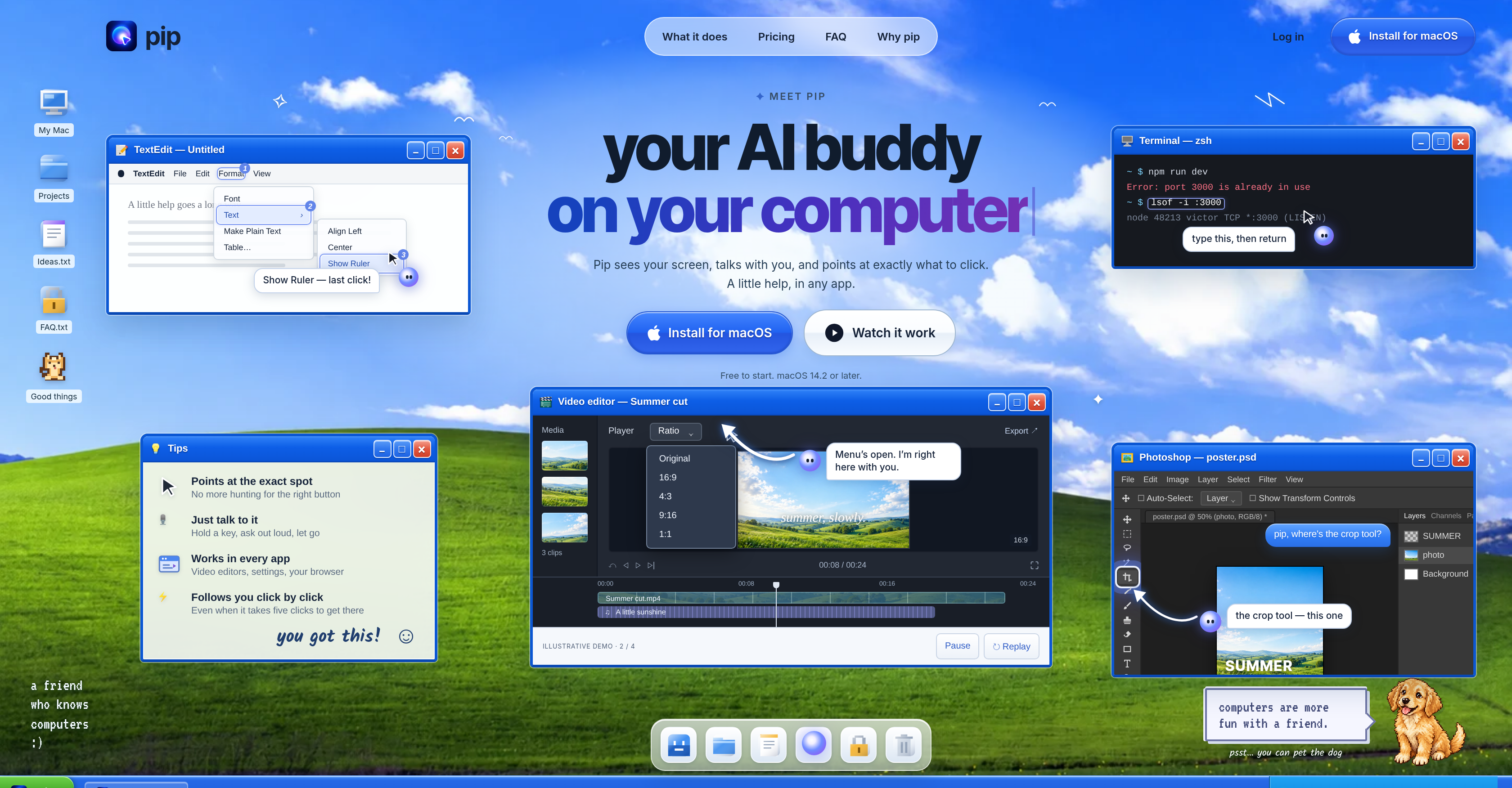
- Complete unfamiliar multi-step workflows in any Mac app without digging through menus or tutorials: on-screen guidance highlights exactly where to click at each stage.
- Get productive in professional creative software in your first session: step-by-step coaching for video editing, color grading, and audio production points to the right control and explains its function.
- Run Terminal commands correctly the first time and avoid costly mistakes: Pip shows the exact command to type and confirms its function before you press return.
- Keep your hands on the timeline, mixer, or keyboard while you work: a spoken interface takes commands, questions, and task requests by voice, and Pro adds voice typing directly in the terminal.
- Get the answer you need without leaving the app you're working in: Pip retrieves relevant information on demand and pairs it with a pointer to the precise control that acts on it.
- Use screen-aware assistance without exposing your desktop around the clock: screen viewing starts only when you activate Pip, screenshots are never stored, and voice data goes solely to a speech-to-text service.
- Build software skills that stick instead of memorizing shortcuts from videos: hands-on guidance has you perform every click yourself, so you stay in full control of your Mac while you learn.
- Start learning new tools at no cost and scale up as your usage grows: a Free plan covers core guidance, while Pro and Max subscriptions add more monthly queries and extra features on macOS 14.2 and later.
Pros & Cons
From the listing; not yet checked by our editors.
Pros
- Works on MacOS
- Interactive screen guide
- Voice command interface
- Assists multi-step processes
- Guide for pro applications
- Acts as terminal guide
- Offers subscription services
- Respects user privacy
- Supports hands-on learning
- Fetches needed information
- Highlights specific controls
- Efficiency-focused approach
- Learning tool for software
- Helps in software navigation
- Clarifies complex processes
- Teaches technical assistance
- Free basic version
- Pro and Max versions
- Activity based on activation
- Commands, queries, tasks assistance
- Supports variety of apps
- Works within computer environment
- Simply points, no action
- Available pet assistants
- Offers voice typing
- 300 questions for Pro
- 1000 questions for Max
- Three simple plans
- Switch or cancel anytime
- Pricing is transparent
- Natural language queries support
- Works with all apps
- Supports design tools
- Interactive in-app guidance
- Helps identify buttons
- Action execution stays with user
- Teaches as you execute
- Commands performed right on Mac
- Doesn't store screenshots
- Location-based screen reading
- Figma clicking path guide
- Circles exact controls
- Follows through multi-clicks
- Doesn't require plug-ins
- Available model description
- Understands plain words
- Provides app-specific assistance
- Email support provided
- Multiple payment options
Cons
- MacOS only
- Limited free version
- Pricey subscriptions
- Potential privacy concerns
- Depends on voice commands
- Limited interaction - no clicks
- Limited queries per month
- Works on visual interface only
- No plug-in for specific apps
- Privacy depends on user activation
Alternatives to pip
Tools that share the most tags with pip.
- CtrlOps
Keep server credentials off third-party clouds: local-first processing keeps SSH keys and access credentials on your own machine.
Free trial · from $7/month
$7/month
Not yet checked
- Google Antigravity
Google's agentic development platform: agents plan and run coding tasks across an app, a CLI, an IDE, IDE extensions and a Python SDK.
Freemium · from $30/month
$30/month
Nov 24, 2026
- Base44
Transform your ideas into working apps in minutes using simple conversation instead of complex coding
Freemium · from $16/month
$16/month
Not yet checked
- CodeRabbit
Eliminate manual code review bottlenecks with instant PR summaries and intelligent code walkthroughs that accelerate your development workflow
Free trial · from $24/month
$24/month
Not yet checked
- Rocket
Launch complete applications in minutes instead of weeks by generating full-stack code from a single description
Freemium · from $25/month
$25/month
Not yet checked
- OnSpace.AI - AI Mobile App Builder
Launch mobile apps in hours instead of months using conversational AI that transforms your descriptions into working applications
Freemium · from $25/month
$25/month
Not yet checked
Reviews
Rate this tool
Loading reviews...
Frequently asked questions
What is Pip?
Pip is an AI assistant designed for interaction with your Mac. This AI buddy operates within your computer environment, serving as an interactive guide that helps you navigate applications.
How can Pip assist with using applications on my Mac?
Pip assists by seeing your screen and guiding you through tasks, highlighting where to click, and assisting with multi-step processes in any application. It also offers assistance with pro applications such as video editors, color tools, and audio suites.
Does Pip support voice commands?
Yes, Pip supports voice commands. It provides a smooth spoken interface for commands, queries, and tasks.
What kind of tasks can Pip help me with?
Pip can assist with a wide range of tasks including fetching information, pointing at precise controls for efficient task completion, and guiding through terminal commands to ensure correct entry.
What pro applications does Pip support?
Pip supports pro applications like video editors, color tools, audio suites, and more.
In what ways does Pip help with terminal commands?
Pip provides guidance with terminal commands by showing the exact command to be typed and confirming its function before you press return.
What are the different subscriptions available for Pip?
Pip offers three different subscription plans: Free, Pro, and Max. The Free plan offers a limited number of queries, while the Pro and Max plans provide a higher number of available queries per month, along with additional features.
How does Pip ensure my privacy?
Pip ensures your privacy by only starting to watch your screen once activated. Screenshots are not stored, and voice data is only sent to a speech-to-text service for processing.