

QuickSEO
Know exactly which search queries bring visitors to your site: keyword analysis surfaces your high-performing keywords so you invest in the terms that already drive organic traffic.
Listing not yet reviewed by our editors · How we check
Overview
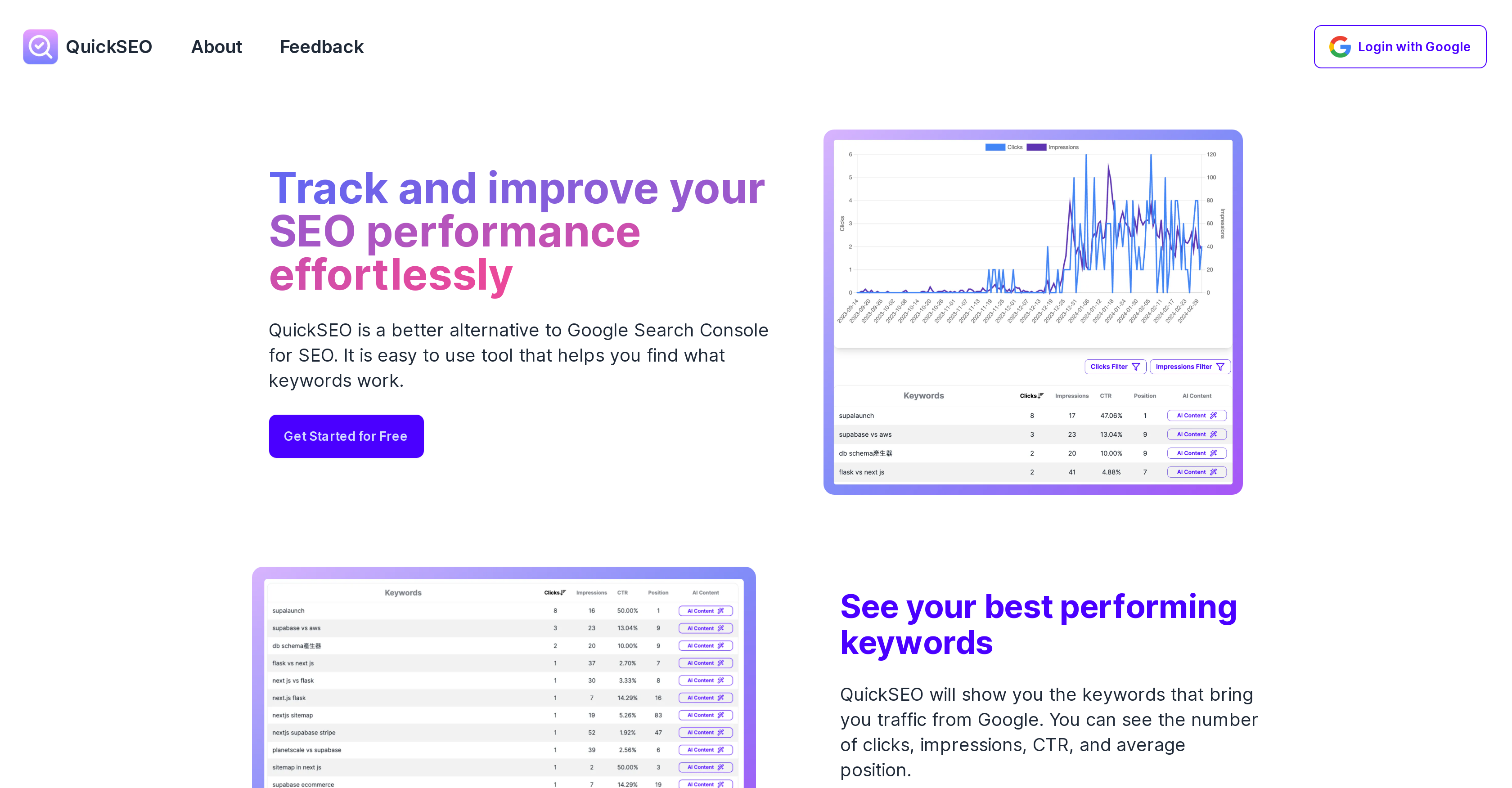
- Know exactly which search queries bring visitors to your site: keyword analysis surfaces your high-performing keywords so you invest in the terms that already drive organic traffic.
- Pinpoint pages that rank but fail to earn clicks: track clicks, impressions, click-through rate (CTR), and average position for every keyword to find quick SEO wins.
- Publish your next article with a proven topic: AI content ideation turns your top-performing keywords into targeted content ideas built on demand your site already captures.
- Answer specific ranking questions in seconds: advanced filters and sorting options let you slice keyword data by the metric that matters to your SEO strategy.
- Skip manual exports and spreadsheet cleanup: connect Google Search Console once, choose your websites, and your search performance data loads in a clear, readable layout.
- Read your SEO data without a steep learning curve: a simplified interface built for beginners and experienced SEOs replaces Google Search Console's complex reports.
- Run keyword tracking and content planning on a zero budget: QuickSEO is currently free to use for website owners, bloggers, and marketers.
Pros & Cons
From the listing; not yet checked by our editors.
Pros
- Alternative to Google Search Console
- Emphasizes accessibility and simplicity
- Keyword analysis feature
- Identifies high-performing keywords
- Detailed performance metrics
- Tracks Click-Through Rate
- Tracks average page position
- Generates targeted content ideas
- Offers advanced filters
- Provides sorting options
- Customizable keyword analysis
- Fetches data from Google Search Console
- Presents data in user-friendly format
- Streamlines SEO management
- Suitable for beginners
- Suitable for SEO experts
- Currently free to use
- Plans for future monetization
- Focused on website optimization
- Tracks website traffic
Cons
- Fetches data from Google only
- Monetization plans unclear
- No analytics export feature
- No multi-language support
- Lack of integration options
- No mobile application
- Limited website platform compatibility
- Doesn't provide backlink analysis
- No support for local SEO
- Doesn't offer competitor analysis
Alternatives to QuickSEO
Tools that share the most tags with QuickSEO.
- SEObot
Eliminate manual keyword research with automated analysis that identifies the most relevant Google search terms for maximum impact
Paid · from $19/month
$19/month
Not yet checked
- Lovarank
Attract qualified traffic with hidden, low-competition keywords discovered automatically by AI analysis of your niche
Free trial · from $99/month
$99/month
Not yet checked
- Nichely
Uncover expert-level subtopics competitors miss through AI-powered Topic Discovery that maps millions of niche relationships
Freemium
Not listed
Not yet checked
- ContentEdge
Generate complete, ready-to-publish content in 15 seconds with AI-powered writing that mimics human language patterns
Free trial · from $24/month
$24/month
Not yet checked
- BlogSEO
Analyzes a website URL, finds keyword opportunities and competitors, then writes blog articles and publishes them to your CMS on a schedule.
Free trial · from $97/month
$97/month
Nov 23, 2026
- Wellows
Understand exactly how AI models interpret your brand with a unified dashboard tracking citations, sentiment, and visibility trends across ChatGPT, Perplexity, and Gemini
Free trial · from $39.99/month
$39.99/month
Not yet checked
Reviews
Rate this tool
Loading reviews...
Frequently asked questions
What is QuickSEO?
QuickSEO is a tool designed to enhance Search Engine Optimization performance for websites. It serves as an alternative to Google Search Console and emphasizes on accessibility and simplicity. QuickSEO is specifically aimed at identifying high-performing keywords, observing important metrics, and aiding in content ideation using AI technology.
What are the main features of QuickSEO?
The main features of QuickSEO include keyword analysis, AI-assisted content ideation, advanced filters and sorting options, and fetching data directly from Google Search Console. QuickSEO enables users to track clicks, impressions, Click-Through Rate (CTR), and average page position, and generate content ideas based on top-performing keywords.
How does QuickSEO use AI to assist SEO?
QuickSEO uses AI technology to generate content ideas based on a website's top-performing keywords. Users can leverage these AI-assisted content ideation suggestions to create new, targeted content for their website.
Can QuickSEO help identify high-performing keywords?
Yes, QuickSEO is designed to help users identify high-performing keywords that direct traffic to their site. By tracking the performance of these keywords, users can effectively optimize their web content and SEO strategy.
What kind of metrics can QuickSEO fetch?
QuickSEO can fetch a variety of metrics including the number of clicks, impressions, Click-Through Rate (CTR), and the average page position.
Can QuickSEO generate content ideas based on keywords?
Yes, one of the main features of QuickSEO is its ability to generate content ideas based on a website's high-performing keywords, using AI technology.
How customizable is QuickSEO in terms of filtering and sorting options?
QuickSEO offers advanced filters and sorting options, enabling users to customize their keyword analysis according to their specific needs.
What data does QuickSEO fetch from Google Search Console?
QuickSEO fetches data directly from Google Search Console to provide users with insights into their website's SEO performance, including keywords analysis and other relevant metrics.