
Strokes
Keep full ownership of your writing: every document is a file in a folder on your own macOS or Windows machine, never handed to someone else's server, and Strokes never trains AI on your writing.
Listing not yet reviewed by our editors · How we check
Overview
- Keep full ownership of your writing: every document is a file in a folder on your own macOS or Windows machine, never handed to someone else's server, and Strokes never trains AI on your writing.
- Write, edit and export with no internet connection, because the local-first editor runs fully offline and only the AI assistant needs a connection.
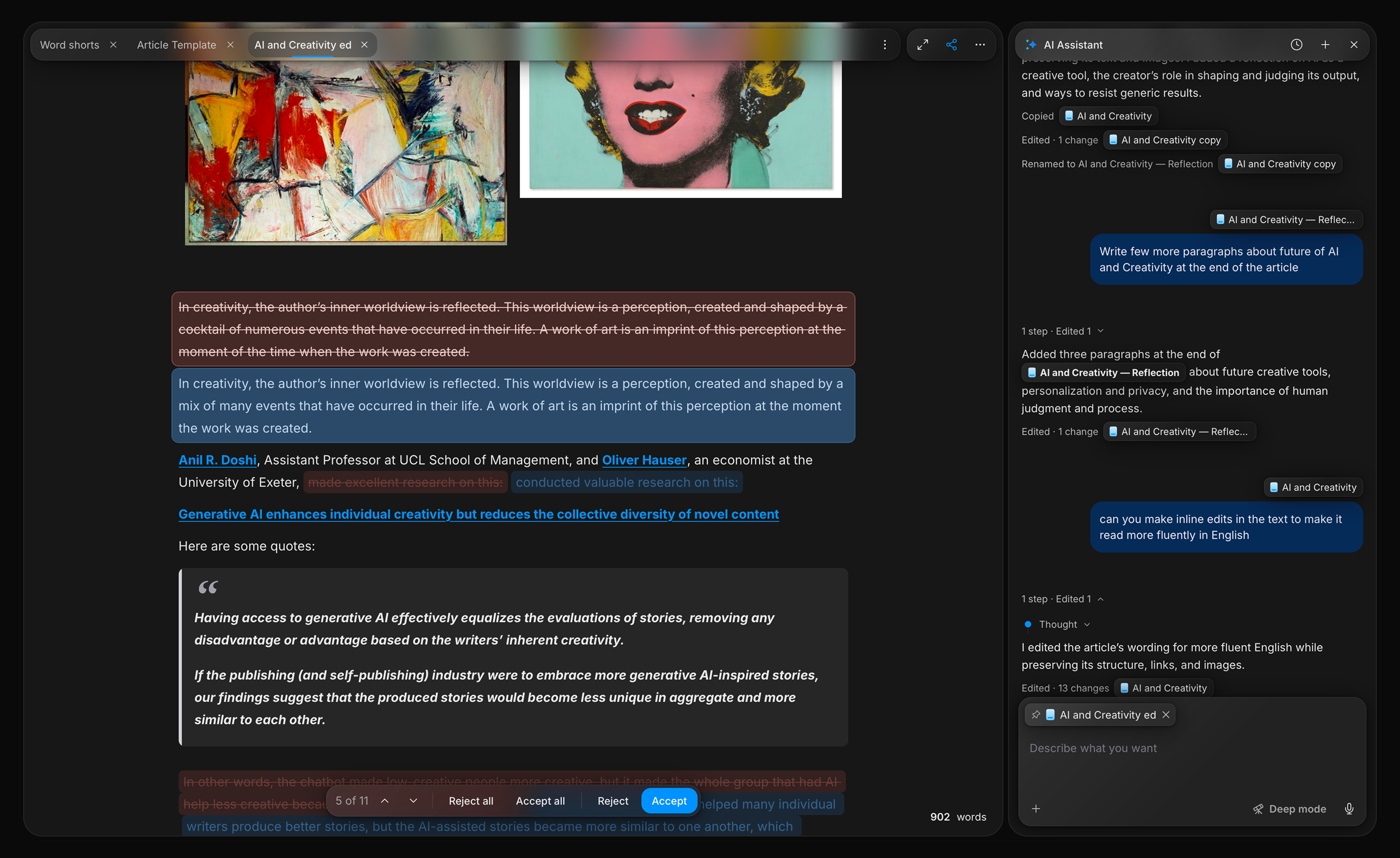
- Approve every AI edit before it lands: the assistant shows each proposed change as a suggestion in your text, and you accept or reject it. Select text and press Cmd+K to request a rewrite right where you're working.
- Research and draft in one workspace: ask the AI writing assistant about any passage, attach files for it to read first, and get web research answers beside your draft.
- Complete multi-document revisions without micromanaging, as agent mode works across your whole writing project step by step and shows each step it takes.
- Bring existing drafts over in minutes by importing Word, Markdown, plain text and Notion exports.
- Hand readers the exact format they need: export to PDF, Word, EPUB, Markdown, plain text or HTML, or share a public read-only link that recipients can't alter.
- Restore any earlier draft with a version history stored on your device.
- Lay out each document for its purpose by switching between page view and pageless, with headings, lists, tables, images and code blocks organized into projects and folders.
- Start writing with AI at no cost: the free plan includes the assistant and web research, Plus ($9/month) adds encrypted cloud backups, image creation and 5x usage, and Pro ($29/month) unlocks Deep mode, multi-agent mode and 15x usage.
Pros & Cons
From the listing; not yet checked by our editors.
Pros
- Documents are files on your machine
- Editor works offline
- Every AI edit is a suggestion you accept or reject
- Assistant panel beside the document
- Web research without leaving the page
- Attach files for the assistant to read
- Image creation (Plus and Pro)
- Agent mode across the files in a project
- Page view and pageless mode
- Version history kept on your device
- Import Word, Markdown, plain text and Notion
- Export PDF, Word, EPUB, Markdown, HTML
- Share a document as a public read-only link
- Projects and folders
- Code blocks with syntax highlighting
- Dark mode
- No AI training on your content
- Free plan includes the assistant and web research
- macOS and Windows
- Dictate requests with the microphone
- Deep mode and multi-agent mode on Pro
Cons
- Desktop only: no mobile, web or Linux
- The assistant needs an internet connection
- No real-time collaboration
- No citation or reference manager
- Documents do not sync between devices
- Free plan has a limited assistant allowance
- Monthly plans only, no annual pricing
- Google Drive and Dropbox import not yet available
- Shared web pages are read-only
Alternatives to Strokes
Tools that share the most tags with Strokes.
- Essay.app
Overcome writer's block by forming a strong foundation for any writing project with the guided Creation Phase
Paid · from $6/month
$6/month
Not yet checked
- Clico
Draft posts and email replies that match the conversation's tone instantly, using the AI that reads your existing text and context.
Free
Not listed
Not yet checked
- AMP FinePoint
Produce audience-ready content faster by reducing editing cycles with guided refinement of tone, length, and clarity
Paid · from $1.99/month
$1.99/month
Not yet checked
- Textglow
Write raw thoughts in Gmail, Slack, or LinkedIn and instantly polish them into professional, confident, or empathetic messages without ever leaving the page by highlighting text and selecting from 10+ emotional intelligence tones.
Freemium · from $4.99/month
$4.99/month
Not yet checked
- Sidelong
Turn every article, book, podcast, and video you consume into a searchable research library that feeds directly into your writing, with AI-powered content organization and key insight extraction.
Free trial · from $9/month
$9/month
Not yet checked
- ReadPo
Get through long reports, papers, and articles in a fraction of the time with AI speed reading that processes high volumes of text quickly.
Freemium · from $8/month
$8/month
Not yet checked
Reviews
Rate this tool
Loading reviews...
Frequently asked questions
What does the Strokes writing application offer?
Strokes offers a desktop writing application enriched with functionalities to support users in creating, editing, and managing documents. Its key features include an intelligent assistant for writing tasks and query handling in-app, a deep mode for focused writing, in-app web browsing, file attachments, and image creation. The software maintains privacy by storing files on the local machine as opposed to third-party servers and provides an AI offline mode. It's designed to enable seamless importing and exporting of documents in multiple formats (.docx, .md, .txt, .html). Users can share documents through public links and email with read-only access. A unique feature of Strokes is the 'Page view/Pageless' option permitting users to choose between a one-page or multipage view. The software also offers project organization options.
How does the intelligent assistant within Strokes help with writing tasks?
The intelligent assistant in Strokes aids with writing tasks and handles queries directly in the application. This eliminates the need for users to switch between applications or copy-paste between apps, thereby making the writing process smoother and more efficient.
How does the query handling feature in Strokes work?
In Strokes, user can handle queries directly in the application. The intelligent assistant in the app allows users to ask questions or seek guidance about any passage without leaving the workspace, thus adding efficiency and continuity to the writing process.
What is the principle behind Strokes' deep mode for focused writing?
The principle behind Strokes' 'deep mode' for focused writing is to create a distraction-free environment that facilitates concentration on writing tasks. This mode aims to enhance productivity by minimizing interruptions and keeping the user's focus firmly on the writing process.
Can I attach files in Strokes?
Yes, Strokes supports attachment of files directly in the application, thus enhancing its functionality and user flexibility.
What is the purpose of the web browsing feature in Strokes?
The purpose of the web browsing feature in Strokes is to enhance user efficiency by eliminating the need to switch between the writing application and a separate web browser. This allows users to conduct research, reference web sources, and gather data without having to leave the Strokes environment.
How does the image creation within Strokes software function?
Strokes supports image creation within the application. Although the exact processing may vary, this feature generally involves incorporating image editing tools or the options to import images or graphics from various sources and integrate them into the documents.
Does Strokes store my files on third-party servers?
No, Strokes does not store user files on third-party servers. Privacy is emphasized in Strokes by storing files locally on the user's machine.