

Vight
Close service calls with complete ticket documentation already written. Speaker-labeled call transcription summarizes the issue, troubleshooting steps, and resolution, then posts structured notes and time entries to ConnectWise, Autotask, HaloPSA, or Syncro tickets.
Listing not yet reviewed by our editors · How we check
Overview
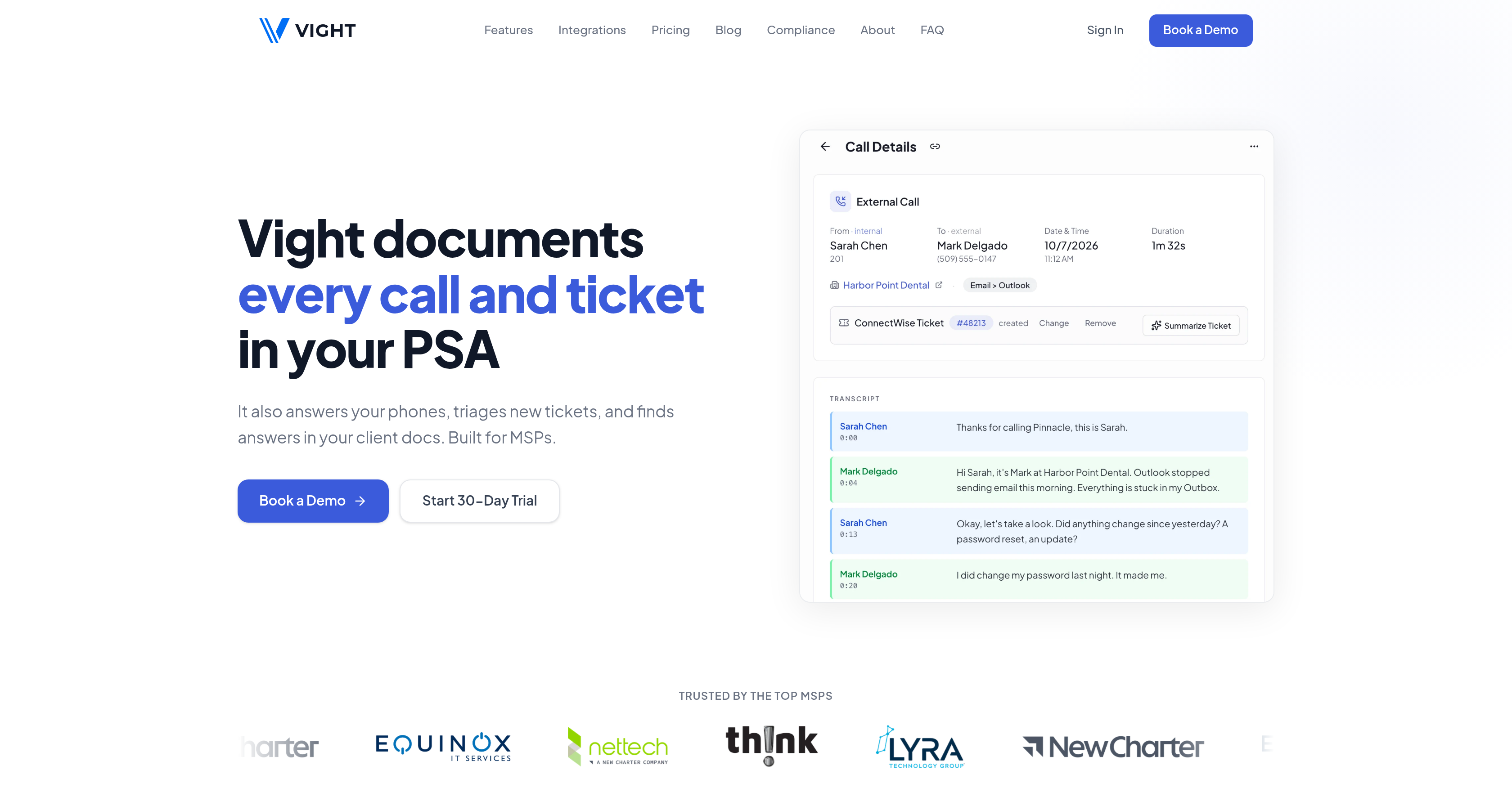
- Close service calls with complete ticket documentation already written. Speaker-labeled call transcription summarizes the issue, troubleshooting steps, and resolution, then posts structured notes and time entries to ConnectWise, Autotask, HaloPSA, or Syncro tickets.
- Catch unhappy clients and revenue opportunities before they slip by. Client sentiment scoring flags negative calls, raises critical alerts on urgent incidents, and routes upsell cues to account managers.
- Start every ticket with the diagnostic details your technicians need. Scenario-based intake emails clients for missing information, logs answered and open questions in an internal note, and moves complete tickets to your ready-to-work status.
- Keep your service desk queue clean and searchable. Automated ticket cleanup rewrites vague titles with requester name and urgency, applies type and category fields, and merges duplicate tickets from the same client.
- Bill every minute of technician work without manual time tracking. A lightweight desktop agent captures on-screen work sessions and converts them into step-by-step work notes and PSA time entries.
- Grow your MSP knowledge base from fixes your team already completed. Captured work notes become drafted knowledge base articles tied to the original client and service record.
- Cover the front desk and after-hours phones without adding staff. An AI phone-answering agent asks triage questions, gathers caller information, determines urgency, and files fully populated tickets when no technician picks up.
- Resolve repeat incidents faster with your team's own history. Accumulated call, ticket, and work-session data briefs technicians on similar incidents and suggests prior fixes.
- Get answers about client environments from ChatGPT or Claude using your actual service records. A read-only MCP connector, governed by user permissions, returns answers that cite the source ticket or document.
- Offload repetitive admin tasks while keeping technicians in control. A beta resolution workflow plans actions for technician approval, then executes them in connected systems such as Microsoft Entra.
- Meet client security expectations for call recordings and service data. AES-256 encryption at rest and in transit backs SOC 2 compliance with independent attestation.
- Go live in one business day without retraining your technicians. Passive background capture lets technicians take calls and work tickets as usual while documentation attaches itself for review.
Pros & Cons
From the listing; not yet checked by our editors.
Pros
- Speakeridentified call transcription
- Realtime sentiment scoring
- Negativeinteraction alerts
- Urgent incident detection
- Upsell opportunity flagging
- Call clarity scoring
- Actionitem extraction from meetings
- Automated ticket scenario matching
- Email triage for missing diagnostics
- Autorewritten vague ticket titles
- Automatic type/category assignment
- Duplicate ticket merging
- Frustration detection in notes
- Configurable incident alerts
- Lightweight onscreen capture agent
- Sessiontostepbystep work notes
- Autogenerated time entries
- Drafted knowledgebase articles
- Phoneanswering triage agent
- Afterhours automated ticket creation
- Readonly MCP connector
- Permissiongoverned external query access
- Beta resolution workflow with approval
- Automated actions in Microsoft Entra
- Passive capture, no extra clicks
- Team memory linking across interactions
- Contextual tech briefing on new tickets
- Crossreference assets, configs, tickets
- Sourcecited answers for queries
- Slashcommand shortcuts for lookups
- Multiplatform PSA integration
- Phone system integration suite
- Realtime ticket readytowork transition
- Automatic categorization by scenario library
- Sentimentbased escalation routing
- Zeromanual documentation generation
- Configurable readytowork thresholds
- Automatic call duration time entry
- Integrated client asset lookup
- Realtime knowledgebase draft review
- Scalable across unlimited agents
- Secure readonly data access
- Unified view PSA and phone logs
- Autolinked internal notes with answers
- Automated ticket prioritization by sentiment
- Realtime meeting decision capture
- Autogenerated followup tasks
- Contextaware external assistant integration
- Lowoverhead desktop agent footprint
- Multichannel communication handling
Cons
- Only supports four PSA platforms
- Desktop agent consumes CPU
- Latency adds minutes to updates
- Sentiment analysis yields false positives
- Phone agent limited script flexibility
- Readonly MCP blocks ticket edits
- Initial integration setup complex
- Transcription struggles with heavy accents
- Beta workflow not production ready
- Screen capture requires constant bandwidth
Reviews
Rate this tool
Loading reviews...
Frequently asked questions
How does Vight transcribe calls and add notes to ConnectWise tickets?
Vight records each service call, runs an AI transcription engine that produces a text transcript with speaker identification, then automatically generates a summary of the issue, troubleshooting steps, and resolution; the structured notes and a time entry are posted directly to the associated ConnectWise ticket via the PSA integration on their website.
Can Vight identify speakers in a call transcript?
Yes, Vight’s transcription includes speaker identification so each participant in a call is labeled in the transcript on their website.
Does Vight assess client sentiment and alert on negative calls?
Vight evaluates client sentiment on every call, assigns a sentiment score from 1 to 5, and generates alerts for calls flagged as negative on their website.
How does Vight flag urgent incidents or sales opportunities?
Vight scans call content for urgency signals and upsell cues; it flags urgent incidents as critical alerts and surfaces potential sales opportunities for account managers on their website.
What PSA platforms does Vight integrate with?
Vight integrates with ConnectWise, Autotask, HaloPSA, and Syncro as the supported PSA platforms on their website.
Is Vight compatible with 3CX, Microsoft Teams, RingCentral, and Zoom Phone?
Vight is compatible with 3CX, Microsoft Teams, RingCentral, and Zoom Phone among other calling and collaboration services on their website.
How does Vight handle incoming tickets that are missing diagnostic details?
When a new ticket lacks required diagnostic details, Vight matches the request to a predefined scenario, automatically emails the client to request the missing information, logs answered and outstanding questions in an internal note, and moves the ticket to a configurable ready‑to‑work status on their website.
Can Vight automatically rewrite vague ticket titles?
Vight rewrites vague ticket titles by inserting the requester’s name and urgency level automatically on their website.