

Warp
Execute shell commands using natural language instead of memorizing syntax with AI Command Search powered by GPT-3
Listing not yet reviewed by our editors · How we check
Overview
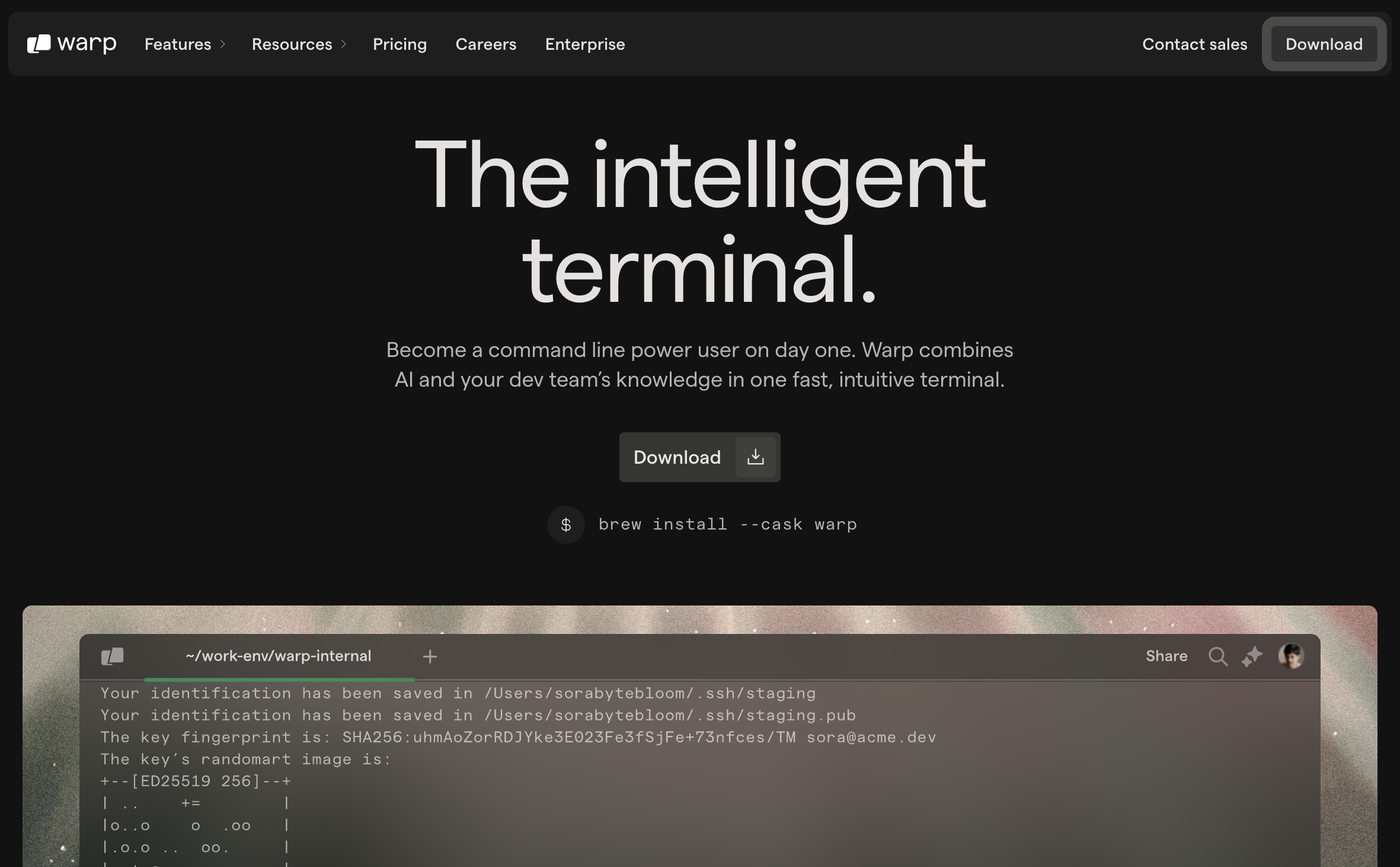
- Execute shell commands using natural language instead of memorizing syntax with AI Command Search powered by GPT-3
- Save complex commands as reusable workflows and recall them instantly with Warp Drive, eliminating repetitive typing
- Share interactive notebooks with runnable commands across your team, keeping terminal knowledge synchronized in real-time
- Debug errors faster with block-structured command outputs that highlight errors and enable easy text copying
- Customize your terminal environment with personalized themes and completions that match your development workflow
- Maintain complete privacy with encrypted requests that are never used to train public AI models
Pros & Cons
From the listing; not yet checked by our editors.
Pros
- Built with Rust
- Terminal emulator
- Modern app design
- Feels like code editor
- Cursor positioning
- Selections and completion menus
- Converts natural language
- Executable shell commands
- Blocks for quick scrolling
- Highlights and copies errors
- Backward-compatible with zsh, fish, bash
- Supports Dracula and Solarized themes
- DIY completion specs
- Highly customizable
- Theme creation and sharing
- Workflow creation and sharing
- Built-in coding assistance
- Interactive notebooks
- Collaborative tools
- Reusable workflows
- Command suggestions
- Data security
- Knowledge sharing function
- Warp Drive feature
- Organizes hard-to-remember commands
- Light and dark mode
- Integrated modern editing features
- Built-in smart completions
- Available for MacOS and Linux
- Private and secure requests
- Custom themes
- Text handling like IDE
- Increases efficiency and productivity
- Private collaboration tools
- Secure programming solutions
- Runnable shared commands
- Auto-generated theme palettes
- Fast boot times
- Separated command blocks
- Easy scrolling
- Error highlighting
- Command pasting
- Input and output privacy
- Optional app analytics and crash reports
- Account-level data encryption in transit and at rest
Cons
- Windows version still in development
- Specific to command line interface
- Dependent on Rust language
- Limited theme options
- Requires knowledge of CLI workflows
- No mobile support
- Highly customizable might confuse beginners
- Potential compatibility issues with non-supported shells
- Limited command suggestion
Alternatives to Warp
Tools that share the most tags with Warp.
- Google Antigravity
Google's agentic development platform: agents plan and run coding tasks across an app, a CLI, an IDE, IDE extensions and a Python SDK.
Freemium · from $30/month
$30/month
Nov 24, 2026
- Base44
Transform your ideas into working apps in minutes using simple conversation instead of complex coding
Freemium · from $16/month
$16/month
Not yet checked
- CodeRabbit
Eliminate manual code review bottlenecks with instant PR summaries and intelligent code walkthroughs that accelerate your development workflow
Free trial · from $24/month
$24/month
Not yet checked
- Rocket
Launch complete applications in minutes instead of weeks by generating full-stack code from a single description
Freemium · from $25/month
$25/month
Not yet checked
- OnSpace.AI - AI Mobile App Builder
Launch mobile apps in hours instead of months using conversational AI that transforms your descriptions into working applications
Freemium · from $25/month
$25/month
Not yet checked
- Durable AI Website Builder
Launch a complete business website in 30 seconds with AI-generated content and curated imagery tailored to your industry
Paid · from $12/month
$12/month
Not yet checked
Related Videos

Introducing Warp Code | The fastest way from prompt to production
Warp · Sep 3, 2025
Warp vs Claude Code for Daily Coding
Codevolution · Jul 30, 2025

This New AI Coding Platform Is Insane (Warp Tutorial)
Tech With Tim · Jun 29, 2025
it begins… DEATH of the IDE
Alex Ziskind · Jun 24, 2025

The Future of Development: Introducing Warp 2.0
Warp · Jun 24, 2025
Reviews
Rate this tool
Loading reviews...
Frequently asked questions
What is Warp AI?
Warp AI is a Rust-based terminal emulator that leverages artificial intelligence to enhance software development procedures. It incorporates features like AI Command Search, which employs GPT-3 to convert natural language into executable shell commands, alongside an advanced editing environment for command generation, akin to capable IDEs. Additionally, Warp AI presents a feature known as Warp Drive that allows users to organize and retrieve difficult-to-remember commands effortlessly.
How does Warp AI improve productivity?
Warp AI improves productivity through its integrated AI features that offer programming assistance and command suggestions, helping to eliminate time spent on searching for the right commands or debugging errors. The AI-powered command search capability simplifies the execution of shell commands by translating natural language into executable instructions, making it easier for users of all proficiency levels. Additionally, the 'Warp Drive' feature allows users to store and quickly recall frequently used or complex commands, reducing the need for context-switching and boosting productivity.
What are the key features of Warp AI?
Key features of Warp AI include AI Command Search for executing shell commands using natural language, and a modern code-like input environment for efficient command generation. It also includes Warp Drive for easy storage and recall of difficult commands, customizable completions, and collaborative tools that facilitate knowledge sharing among teams. Warp AI supports popular themes like Dracula and Solarized, and users can create and share their own themes and workflows. It ensures data security and privacy, with user requests remaining private and secure.
How does the AI Command Search in Warp AI work?
AI Command Search in Warp AI leverages powerful GPT-3 technology to translate users' natural language into executable shell commands. It enables users to perform complex shell tasks and debug errors more efficiently, providing smart guidance for complex setups. Furthermore, it enhances the privacy and security of the users' requests and ensures that they are never used to train public models.
Can I customize Warp AI according to my preferences?
Yes, Warp AI offers extensive customizability to suit the users' requirements. Users can create, customize, and share themes, workflow specifications, and command completion modules, tailoring the tool to fit the developers' favourite CLI or specific workflows. This makes Warp AI adaptable to personal aesthetics and professional needs, enhancing productivity and user experience.
What are the system requirements for using Warp AI?
Warp AI is currently available on MacOS and Linux platforms. The specifics of system requirements are not explicitly mentioned on their website. A version for Windows is also in development. It is recommended to have an up-to-date operating system to ensure the best performance and compatibility with Warp AI.
Which programming languages are supported by Warp AI?
Warp AI is compatible across multiple shell environments, including zsh, fish, and bash, which means it can potentially accommodate any programming languages that these shells support. Though their website doesn't specify a particular list of supported programming languages, the compatibility with commonly used shells suggests that Warp AI is versatile and can be integrated with various programming workflows.
What benefits does the Rust programming language offer in Warp AI?
The use of Rust programming language in Warp AI contributes to the tool's speed, reliability, and efficiency. Rust is known for its performance and memory safety, which can help prevent many common programming errors. It allows Warp AI to offer a responsive and stable experience, handling even sophisticated operations swiftly and securely.