

ZenMulti
Launch a multilingual product in minutes and reach global audiences: select your resource files, choose target languages, and AI translation localizes your content automatically.
Listing not yet reviewed by our editors · How we check
Overview
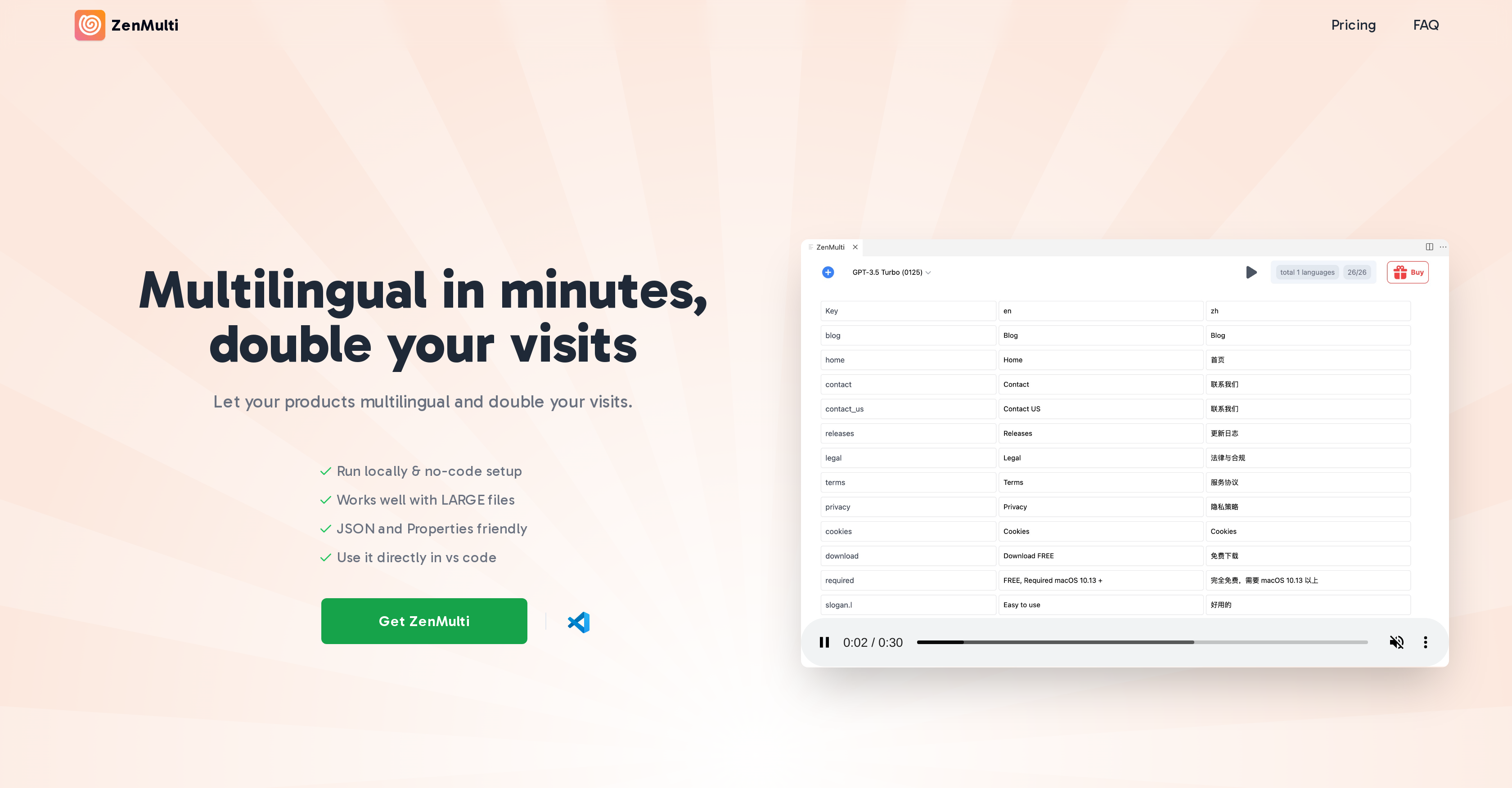
- Launch a multilingual product in minutes and reach global audiences: select your resource files, choose target languages, and AI translation localizes your content automatically.
- Localize app strings without leaving your editor: the dedicated VS Code extension translates resource files directly inside your coding workspace, so you never switch tools.
- Keep your i18n file structure intact: import JSON and Properties files, translate and localize the content, then export it back to its original format, ready to ship.
- Translate large localization files at full speed: the architecture handles substantial data volumes with no loss of speed or quality.
- Add every locale your market needs: unlimited resource files and unlimited languages let your localization grow with each new project and region.
- Let non-developers run localization: the no-code setup runs locally, so beginners translate content without technical expertise.
- Cut translation costs and avoid recurring fees: a one-time purchase gives you permanent use with no subscription renewal and replaces manual translation work.
Pros & Cons
From the listing; not yet checked by our editors.
Pros
- Multilingual production
- Content localization
- Global reach
- No-code setup
- Run locally
- User-friendly
- JSON integration
- Properties files compatibility
- Large data handling
- VS Code extension
- Workflow optimization
- Business scaling
- One-time purchase
- No renewal needed
- Cost-effective
- Supports unlimited files
- Supports unlimited languages
- Time efficiency
- Focus on core business
- Direct usage within VS Code
- Versatile project application
- Efficient data translation
- Double visits feature
- Easy setup for beginners
- Extension install in minutes
- Compatible with large files
- Perfect for non-technical users
- Resource file selection feature
- Useful for start-ups
- Optimizes translation process
- Trusted by other businesses
Cons
- No collaborative features
- Not platform agnostic
- No API available
- Limited file integrations
- VS Code specific
- One-time purchase (no updates)
- Lack of offline capabilities
- No advanced customizability
- Reliant on JSON, Properties files
- No real-time translation
Alternatives to ZenMulti
Tools that share the most tags with ZenMulti.
- TransLinguist
Host fully multilingual webinars and conferences with real-time translation that engages global audiences directly in their preferred languages
Not listed
Not listed
Not yet checked
- Lara Translate
Translate technical documents with absolute precision using Faithful mode that maintains original structure and meaning
Freemium · from $9/month
$9/month
Not yet checked
- AI-Translate
Achieve human-quality translation accuracy verified by professional translators in blind tests through advanced neural networks that capture nuanced meaning
Not listed
Not listed
Not yet checked
- Reverso
Translate entire documents while keeping original formatting intact with support for Word, PDF, PowerPoint and Excel files
Freemium · from $7.41/month
$7.41/month
Not yet checked
- Lingvanex
Translate text, speech, and images instantly across 109 languages with neural machine translation
Not listed
Not listed
Not yet checked
- CoeFont Interpreter
Make instant decisions in global meetings with real-time multilingual interpretation that captures every word accurately
Freemium · from $20/month
$20/month
Not yet checked
Reviews
Rate this tool
Loading reviews...
Frequently asked questions
What is ZenMulti?
ZenMulti is an artificial intelligence tool specifically designed to facilitate multilingual production and localization of digital content, thereby enhancing the global reach of the user's offerings.
How does ZenMulti assist in multilingual production and localization of content?
ZenMulti employs advanced artificial intelligence to automatically translate and localize digital content into multiple languages. It does this seamlessly by providing capabilities to simply choose resource files and apply the desired languages.
Can ZenMulti be used with less technical skills?
Yes, ZenMulti has been designed with a user-friendly interface and no-code setup which makes it very accessible to users with less technical skills. It can also be run locally, further simplifying its operation.
How does ZenMulti integrate with JSON and Properties files?
ZenMulti has an in-built feature to seamlessly integrate with JSON and Properties files. It allows users to import these files, translate and localize their content, and then export the data back into their original formats.
Can ZenMulti handle large amounts of data?
Yes, ZenMulti boasts capabilities to handle and translate large amounts of data. It has been engineered to maintain its performance even while managing substantial data files, thereby ensuring users can get their large projects translated without any compromise on speed or quality.
What is the key feature of ZenMulti in terms of its integration with VS Code?
The key feature of ZenMulti in terms of its integration with VS Code is the dedicated extension it offers. This extension enables developers to utilize ZenMulti and its features directly within their VS Code environment, reducing the complexity of toggling between different tools or platforms.
How does ZenMulti optimize workflow for developers?
ZenMulti optimizes developers' workflow by integrating seamlessly with the VS Code environment through a dedicated extension. This enables developers to translate and localize content easily and efficiently, as they can do it directly on their project files in VS Code without disrupting their coding process.
Does ZenMulti require a subscription renewal?
No, ZenMulti does not require a subscription renewal. It is a one-time purchase tool, which means once you've bought it, it's yours to use forever without any additional cost.