

2Speech AI
Produce professional voiceovers without a microphone, studio, or repeated takes: neural speech synthesis reproduces human tone, pacing, breath, rhythm, and intonation, so your text to speech output sounds like a real narrator.
Listing not yet reviewed by our editors · How we check
Overview
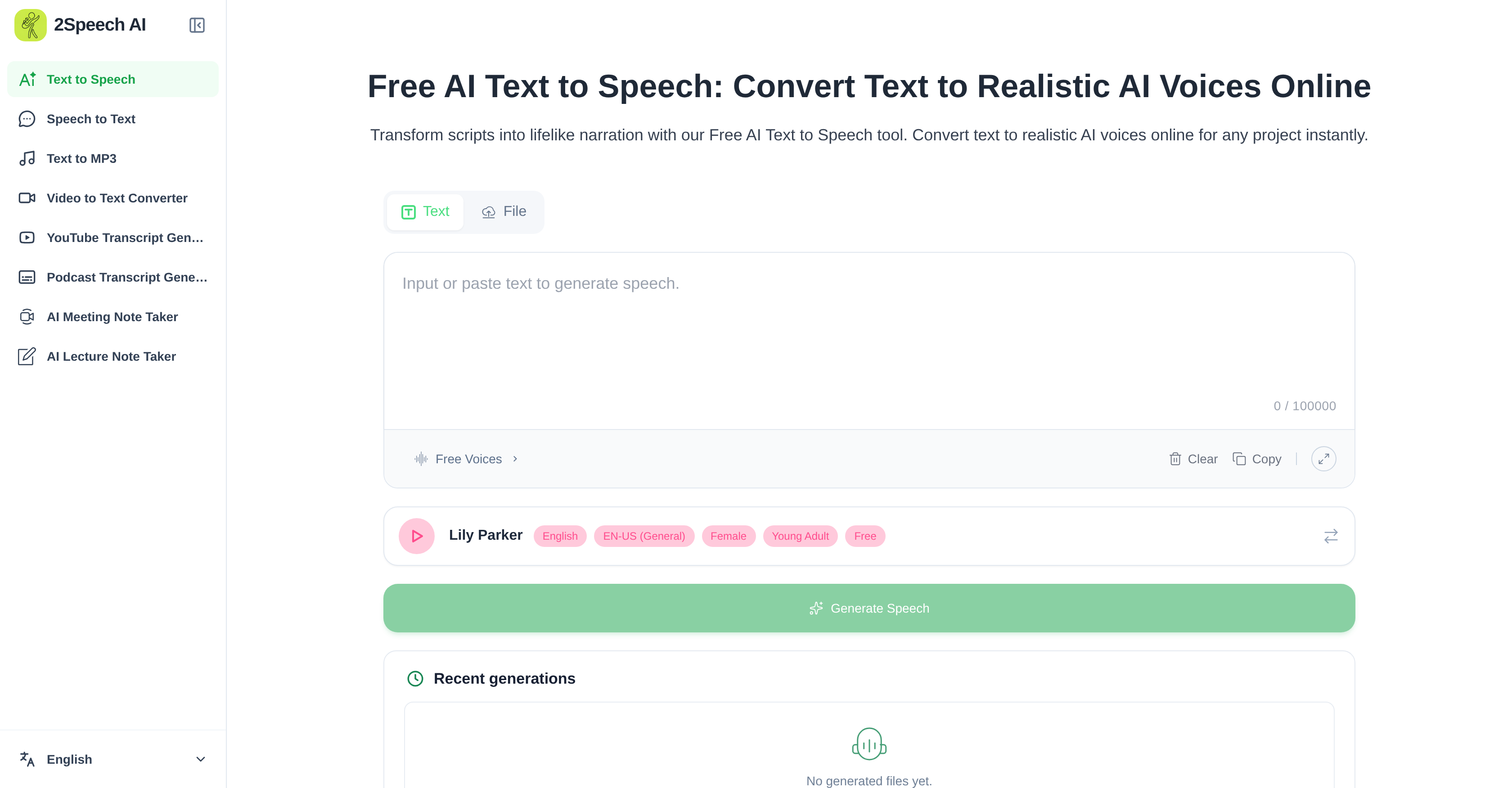
- Produce professional voiceovers without a microphone, studio, or repeated takes: neural speech synthesis reproduces human tone, pacing, breath, rhythm, and intonation, so your text to speech output sounds like a real narrator.
- Turn existing documents into audio without retyping a word: upload PDF, PowerPoint, DOCX, and JPG/PNG images up to 50 MB, or audio and video files up to 10 MB, and convert their text directly to speech.
- Narrate an entire chapter, report, or long script in one pass: each conversion accepts up to 100,000 characters of pasted text.
- Release audiobooks with a consistent narrator from first page to last: Pro Narrator models are tuned for long-form narration and keep voice quality stable without drift.
- Monetize your content on YouTube and other platforms with clean audio: generated voiceovers are cleared for commercial use and contain no watermarks or branding.
- Correct a typo or update a line in minutes instead of rerecording: edit the script text and regenerate the narration.
- Match delivery to the mood of every scene, brand, or audience: prosody controls adjust pitch, speed, and emotional tone across a voice library with multiple English accents and conversational or expressive styles.
- Pick the strongest narrator before you publish: render the same script in several voices one after another and compare the results side by side.
- Drop finished audio straight into any editing workflow: download in MP3 or high-quality WAV and retrieve recent files from your generation history.
- Convert confidential scripts and business updates with confidence: text is transmitted over SSL, processed with encryption, and never used to train public models without your explicit consent.
Pros & Cons
From the listing; not yet checked by our editors.
Pros
- Browseronly, no installation required
- Draganddrop file upload
- Supports PDF, PPT, DOCX formats
- Image file text extraction enabled
- Audio/video file uploads supported
- 100k characters longform input
- 50MB document size limit
- 10MB audio/video limit
- Multiple expressive voice styles
- Accent selection across library
- Neural prosody modeling includes breath
- Realistic tone and pacing control
- Emotional intonation rendering
- Secure TLS encryption for data
- No data retention policy disclosed
- Instant MP3 generation
- Studioquality WAV export option
- Recentgenerations history panel
- Edit text and regenerate instantly
- No recording equipment needed
- Free tier with unlimited conversions
- Oneclick download after synthesis
- Responsive UI for all devices
- No account creation required
- Supports audiobook narration workflow
- Voiceover generation for presentations
- Multivoice selection per project
- Builtin clear and copy controls
- Supports batch processing via dragdrop
- Highfidelity audio without artifacts
- Expressive storytelling voice options
- Conversational and dramatic voice modes
- Low latency generation (<10seconds)
- Private processing environment isolation
- Inline preview playback before download
- Supports accessibility audio creation
- Integration ready via downloadable files
- Nocode audio production workflow
- Supports script revision without reupload
- File history persists across sessions
- Multiaccent library for global projects
- Direct MP3 link sharing capability
- Automatic text normalization
- Handles punctuation for natural pauses
- Optimized for large manuscript conversion
Cons
- No public API
- English only support
- Low file size limits
- Only MP3/WAV outputs
- No batch processing
- Speech rate controls missing
- No voice finetuning
- Browseronly, no desktop app
- Unclear commercial licensing
- No project persistence
Alternatives to 2Speech AI
Tools that share the most tags with 2Speech AI.
- Speechma
Generate professional voiceovers for social media and presentations instantly with 400+ premium AI voices featuring unique personalities and accents
Freemium · from $9/month
$9/month
Not yet checked
- Revoicer
Create human-sounding voiceovers that capture attention using emotional tones like friendly, cheerful, or excited for more engaging content
Paid · from $47
$47
Not yet checked
- WooTechy VoxDo
Generate realistic voiceovers instantly with AI text-to-speech conversion across 100+ languages and global accents
Free trial · from $15.95/month
$15.95/month
Not yet checked
- Speechactors
Produce studio-quality voiceovers instantly with an online AI voice generator that converts your text into natural, engaging speech
Freemium · from $23/month
$23/month
Not yet checked
- Resemble.ai
Clone your exact voice instantly using just a short audio sample, eliminating the need for lengthy recording sessions
Free trial · from $29/month
$29/month
Not yet checked
- Speechify Studio
Produce studio-quality voiceovers instantly with 200+ natural AI voices across 60+ languages and accents
Freemium · from $7.99
$7.99
Not yet checked
Reviews
Rate this tool
Loading reviews...
Frequently asked questions
How many characters can I paste into 2Speech AI for one conversion?
You can paste up to 100,000 characters in a single conversion (the editor shows a limit of 100 000).
What file types can I upload for text‑to‑speech and what's the size limit for each?
Supported upload types are PDF, PPT, DOCX, image files (e.g., JPG/PNG) for text extraction, as well as audio and video files. Document, presentation, book and image uploads are limited to 50 MB each, while audio and video uploads are limited to 10 MB each.
Does 2Speech AI support accents beyond US English?
Yes, the voice library includes multiple accents beyond US English.
Can I download the generated audio as WAV or only MP3?
Both MP3 and WAV formats can be downloaded.
Is there a limit on how many free conversions I can do per day?
IDK
How does 2Speech AI handle long‑form books—does the voice stay consistent?
The specialized “Pro Narrator” models are tuned for long‑form books, keeping the voice consistent throughout without drift or quality loss.
Are the voices customizable for pitch, speed, or emotion?
The platform offers prosody controls that let you adjust pitch, speed, and emotional tone within the preset voice options.
Is the generated audio safe to use in commercial YouTube videos?
Yes, the audio generated by 2Speech AI may be used in commercial YouTube videos.