Overview
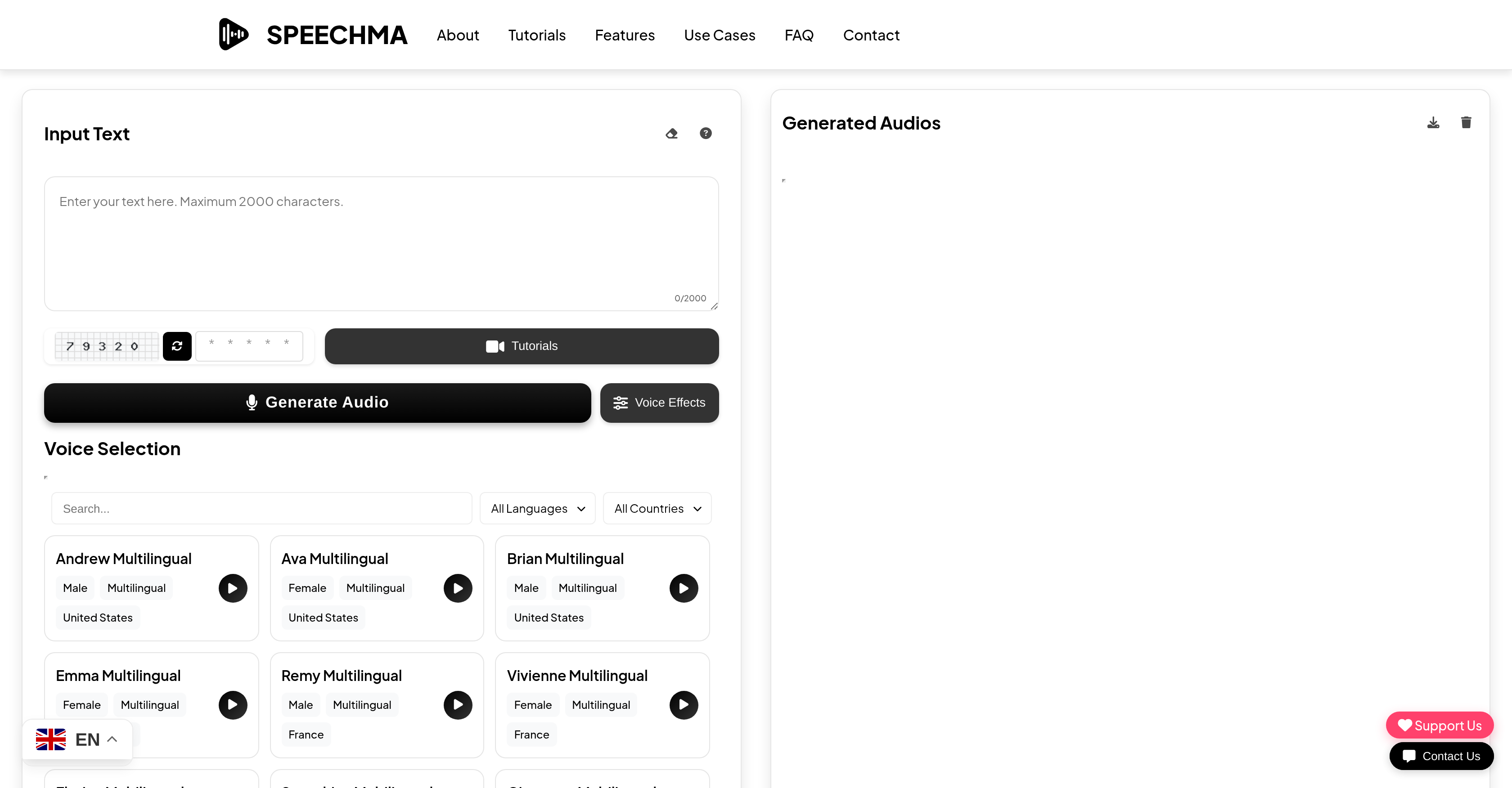
- Generate professional voiceovers for social media and presentations instantly with 400+ premium AI voices featuring unique personalities and accents
- Create engaging e-learning content in over 40 languages including English, Spanish, and Chinese using high-fidelity voice synthesis
- Produce unlimited audio content for commercial projects without restrictions or hidden costs through completely free text-to-speech conversion
- Maintain complete privacy with audio files stored temporarily in your browser's local storage instead of cloud servers
- Access your audio projects from any device with a fully responsive design that works seamlessly on mobile and desktop
- Find the perfect voice match for any project with the most extensive library of natural-sounding AI voices available
Pros & Cons
Pros
- Free-to-use
- Commercial use cases
- Multitude platform compatibility
- High-quality audio
- User-friendly interface
- Supports 40+ languages
- Unique voice personalities
- High-fidelity voice synthesis
- Mobile-ready
- Fully responsive design
- Advanced security
- Unrestricted usage
- Built-in privacy
- Browser local storage use
- No conversion limits
- Perfect for voice-overs
- Fits e-learning purposes
- Handy for professional presentations
- Audiobook suitable
- Corporate video voice-over
- Educational presentation tone
- Cross-platform flexibility
- Unleash creativity
- Wide accent variety
- Caters to global audience
- Youtube, TikTok, Instagram use
- Enhanced user trust
- No credit card required
- User work auto saved
- Speechma Tutorials provided
- Supports commercial license
- Convenient voice preview
- Email customer support
- Support in multiple languages
- Crypto payments accepted
- Support via coffee payments
- Support with direct bank transfer
- Secure global payments
- Fast international payments
- Secure QR code payments
- Offers distinct voice variations
Cons
- Limited text character input
- No offline mode
- Audio stored only locally
- Missing API option
- Security depends on user's browser
- No customization of voice tone
Reviews
Rate this tool
Loading reviews...
❓ Frequently Asked Questions
SPEECHMA is an advanced text-to-speech conversion tool that is free to use for both personal and commercial applications. It allows users to convert text into high-quality, natural-sounding audio, making it ideal for a wide range of applications such as voice-overs, e-learning, and professional presentations. SPEECHMA supports more than forty languages and offers over 400 premium AI voices with unique personalities and accents. Its platform features high-fidelity voice synthesis, advanced security measures, and a user-friendly interface, making it easy for users to create the audio content they need.
SPEECHMA can be used across a wide variety of platforms. These include, but are not limited to, social media platforms like YouTube, TikTok, Instagram, as well as podcasting platforms. It's a versatile tool that caters to a wide range of content creation needs across different platforms.
SPEECHMA supports over forty languages. This includes major languages such as English, Spanish, French, German, Chinese, Japanese, Korean, and Arabic among others. This multilingual capability makes it a versatile tool that caters to global audiences, fulfilling a variety of use cases.
Yes, SPEECHMA can certainly be used for commercial purposes. It is not only for personal use, but also allows for commercial use across a multitude of platforms, giving users the freedom to employ the tool for a wide range of projects including voiceovers, presentations, e-learning materials and more.
SPEECHMA employs advanced security measures to enhance user trust. One of these is storing audio files temporarily in the users' browser's local storage for privacy and easy access. This ensures that SPEECHMA respects user privacy and places significant importance on data security.
SPEECHMA offers a comprehensive library of over 400 premium AI voices. These voices each have unique personalities and accents, providing users with a wide range of options to find the perfect match for their specific projects.
SPEECHMA is versatile and can be used for a variety of applications including but not limited to voice-overs, e-learning, and professional presentations. It's designed to help improve accessibility to communication by allowing users to transform written text into natural-sounding audio across multiple platforms.
SPEECHMA is an excellent tool for e-learning as it allows you to convert instructional text into speech. The high-quality, natural sounding voice synthesis makes the learning material more engaging and easier to understand. The extensive voice library allows for customization, catering to the specific needs and audience of an e-learning course.
Yes, SPEECHMA offers voice-over services. By transforming text to high-quality, natural-sounding audio, it allows users to create professional sounding voice-overs for a variety of applications. Users can choose from a vast library of voices, each with unique personalities and accents, enabling maximum customization for their voice-over projects.
No, there are no limitations on the number of text-to-speech conversions you can do on SPEECHMA. The platform provides unrestricted usage, offering you maximum flexibility for your text-to-speech conversion needs.
No, you do not need to pay to use SPEECHMA. It's a free-to-use tool that offers unlimited access to premium quality text-to-speech conversion for all your creative and professional needs. There are no hidden charges and it does not require a credit card.
Yes, SPEECHMA is mobile-ready with a fully responsive design, which means it can be used effectively on all devices. This makes it highly accessible and convenient for users, allowing them to use the tool wherever they are, whenever they need it.
SPEECHMA has a feature that temporarily stores generated audio files in the user's browser's local storage. This not only ensures quick and easy access to the files, but also maintains user privacy as the files remain accessible only until the user clears their browser data or manually deletes them.
Yes, with SPEECHMA, you can effortlessly transform any text into high-quality, natural-sounding audio for creating professional presentations. The extensive library of unique AI voices allows for customization to match the tone and feel of your presentation. Plus, the high-fidelity voice synthesis ensures the produced audio is clear and of high quality, perfect for enhancing your presentations.
Using SPEECHMA to convert text to audio is simple: you just have to type or paste your text into the input field, choose a voice from the collection of premium voices, and then click 'Generate Audio'. After this, you can download your generated audio file.
Absolutely, SPEECHMA can be effectively used for YouTube, TikTok, and Instagram among other platforms. You can use it to create voiceovers, generate viral content, and add professional narration to your videos or slide presentations. It supports a wide range of use cases to create engaging content for your social channels.
The quality of voices offered by SPEECHMA is premium. They specialize in high-fidelity voice synthesis that is natural sounding, making the synthesized audio almost indistinguishable from human speech. This ensures a high level of realism and enhances the overall user experience.
Yes, SPEECHMA does allow for personality and accent customization of the voices. The platform offers a vast library of voices, each with unique personalities and accents, giving you a wide range of choices to find the perfect voice for your specific project or application.
The audio files generated by SPEECHMA are temporarily stored in the user's browser's local storage. This ensures easy access and keeps user data private. The files remain accessible until the user clears their browser data or manually removes them.
SPEECHMA provides an array of tutorial resources that guide users on how to effectively use the platform. These resources include step-by-step instructions on entering text, choosing a voice, generating the audio and downloading the audio file for use. The tutorials are designed to be user-friendly, ensuring that users can easily learn how to use the tool.
Pricing
Pricing model
No Pricing
Related Videos
How to Create Text to speech with speechma Ai tool for free| free Ai Tool Speechma#speechma#ai
Sadam Jutt Tech Studio•802 views•Apr 3, 2025