

AI Rap Forge
Give someone a birthday, anniversary, or friendship gift they'll replay: Topic Rap turns one photo per performer into a lip-synced rap performance on a stage you choose, with lyrics built around real names and personal details.
Listing not yet reviewed by our editors · How we check
Overview
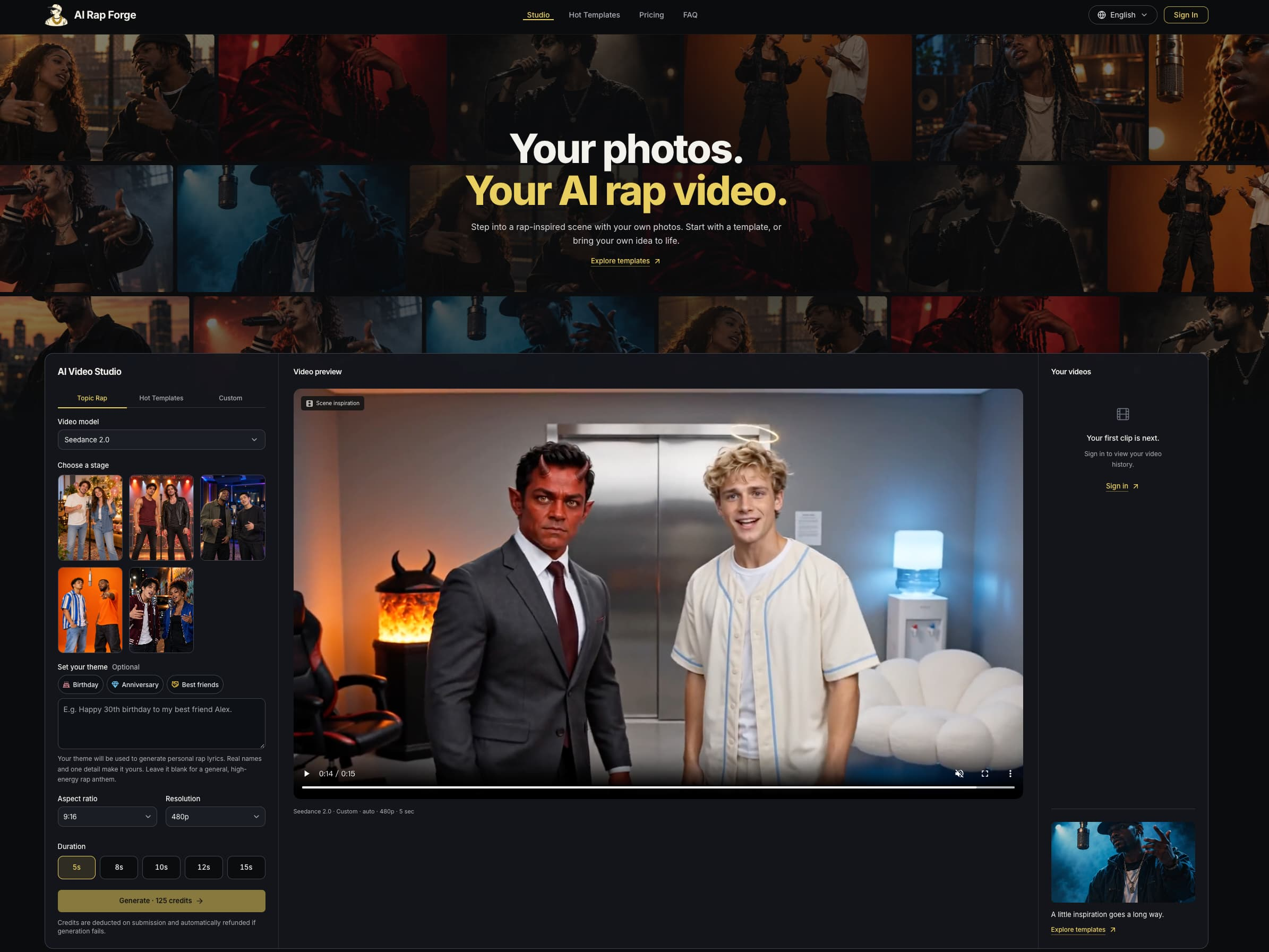
- Give someone a birthday, anniversary, or friendship gift they'll replay: Topic Rap turns one photo per performer into a lip-synced rap performance on a stage you choose, with lyrics built around real names and personal details.
- Get a finished rap video even without a concept: leave the theme blank and Topic Rap generates a high-energy general rap anthem from your photos.
- Jump on trending video formats without scripting a scene: Hot Templates such as Hotel Lobby supply the reference scene and prompt, so you only add the requested photos.
- Direct your own original music video concept: Custom mode takes your described mood, setting, and movement and lets you pick the AI video model, including Seedance 2.0, Seedance 2.5, and MiniMax H3.
- Publish straight to TikTok and Instagram Reels without reformatting: 9:16 vertical output, 5–15 second clips (up to 30 seconds with Seedance 2.5), and resolutions from 480p to 4K.
- Control your spend before you commit: the studio shows the exact credit estimate based on model, resolution, clip length, reference footage, and image inputs before you submit.
- Never lose credits on a bad render: credits for failed or canceled video generations return to your balance automatically.
- Pay once instead of subscribing: one-time credit packs never expire, so you create rap videos on your own schedule.
- Share polished, brand-free clips: HD downloads come without a watermark, and every generated video stays in your personal videos area for preview and saving.
- Keep personal photos private: uploads are not sold or published to a public gallery and are used only to generate your video.
Pros & Cons
From the listing; not yet checked by our editors.
Pros
- Three distinct creation modes
- Topic Rap builds personal anthems
- Optional themes guide lyrics
- Blank themes create general anthems
- Names and details personalize lyrics
- Stage selection shapes performances
- One photo per performer
- Hot Templates personalize preset scenes
- Custom prompts specify mood and movement
- Custom prompts specify settings
- Choose from multiple video models
- Seedance variants and MiniMax H3
- Settings vary by selected model
- Portrait, landscape, and square formats
- Configurable clip duration
- Social-ready portrait framing
- Preview costs before submission
- Estimates account for reference footage
- Estimates account for image inputs
- Reference footage affects per-second rates
- Template and custom pricing match
- Failed generations refund credits
- Canceled generations refund credits
- One-time credit packs
- No recurring subscriptions
- Purchased credits never expire
- HD downloads without watermarks
- First five MiniMax images included
- Extra MiniMax images: 5 credits
- Preview finished clips in studio
- Find clips in personal video history
- Save finished videos for sharing
- Uploaded photos stay out of public galleries
- Uploaded photos are not sold
- No editing timeline required
Cons
- Topic Rap requires a stage
- One photo per performer
- Settings vary by model
- Displayed clips max 15 seconds
- Reference footage time is billable
- Missing timing assumes maximum duration
- MiniMax includes five reference images
- Extra MiniMax images cost credits
- No editing timeline
Alternatives to AI Rap Forge
Tools that share the most tags with AI Rap Forge.
- RapVideo-AI.io
Get a rap about your exact inside joke, not a generic template: type one specific situation and the AI rap lyrics generator writes original bars on that topic, or paste your own lyrics line by line.
Free trial · from $9.99/unit
$9.99/unit
Not yet checked
- AI Rap Videos
Deliver a personalized birthday shout-out, anniversary video, friendly roast, or team celebration without filming or editing: upload two portraits or one clear photo of both people and get a lip-synced rap music video.
Free trial · from $5.80/unit
$5.80/unit
Not yet checked
- RapVid
Star in your own rap music video from a single selfie: Solo mode builds an original verse, beat, and AI vocals around one clear photo, then delivers a lip-synced performance.
Freemium · from $5.99/unit
$5.99/unit
Not yet checked
- AIRapDuo.com
Star in a rap video with a friend who lives miles away: upload two separate portraits and the AI rap generator animates both faces into one synced rap duo performance.
Paid · from $9.99/unit
$9.99/unit
Not yet checked
- AIRapVideo.cc
Put yourself or a friend on the mic in minutes: upload one portrait for a solo rap video, or two portraits or a single shared photo for a duo performance, with JPG, PNG, and WebP support.
Paid · from $9.99/unit
$9.99/unit
Not yet checked
- Kiravu | AI Rap Video Generator
Star in your own rap music video using a single selfie: lip sync maps an original AI-generated verse and synthesized voice to your face, then composites you onto a stage.
Paid · from $29.90/month
$29.90/month
Not yet checked
Reviews
Rate this tool
Loading reviews...
Frequently asked questions
How do I make a personalized birthday rap video with AI Rap Forge?
In Topic Rap, choose an available stage, upload one photo per performer, and select Birthday or enter a birthday theme. Add names and a personal detail to guide the lyrics, choose the video settings, review the credit cost, and submit. Preview and save the finished video to share.
What’s the difference between Topic Rap, Hot Templates, and Custom mode in AI Rap Forge?
Topic Rap builds a performance around a stage and theme, with lyrics and movement inspired by your idea. Hot Templates use preset scenes and trends that you personalize with photos. Custom mode lets you describe an original scene and choose available model and output settings.
How many photos do I need to upload for an AI Rap Forge video?
The number depends on the mode, stage, and template. Topic Rap asks for one photo per performer; for templates, upload the number requested by that template. The uploader shows the requirements for your chosen model.
Can I add names and personal details to the lyrics in AI Rap Forge?
Yes. In Topic Rap, you can include real names and a personal detail to guide the lyrics.
Can I create a video in AI Rap Forge without choosing a theme?
Yes. Leaving the theme blank produces a general, high-energy rap anthem.
How do I use the Hotel Lobby template in AI Rap Forge?
Choose the Hotel Lobby template, upload the required photos, select the available video settings, review the credit cost, and generate. The template supplies the reference scene and prompt.
Can I describe my own scene and movement in AI Rap Forge Custom mode?
Yes. In Custom mode, describe the scene’s mood, setting, and movement, then select an available video model and output settings.
Which AI video models can I choose from in AI Rap Forge?
Choices include Seedance 2.0, Seedance 2.0 Mini, Seedance 2.0 Fast, Seedance 2.5, and MiniMax H3. Available settings depend on the selected model.