

AIMangaTranslator.org
Read translated manga with the artwork untouched and every line beside the character who speaks it: the original Japanese, Korean or Chinese text is erased and your language is lettered back into the same speech bubbles and captions.
Listing not yet reviewed by our editors · How we check
Overview
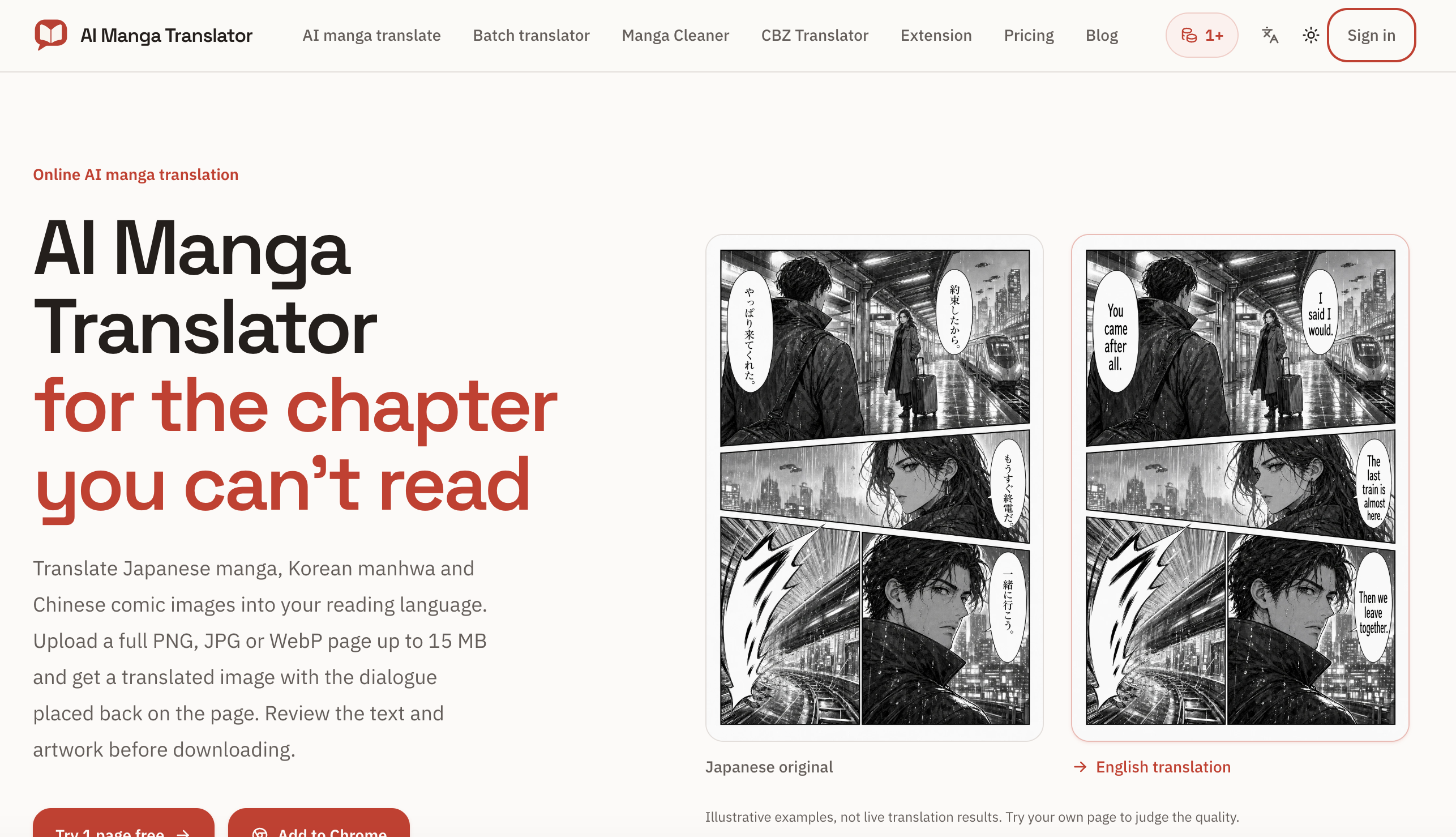
- Read translated manga with the artwork untouched and every line beside the character who speaks it: the original Japanese, Korean or Chinese text is erased and your language is lettered back into the same speech bubbles and captions.
- Skip cropping bubbles and copying dialogue into a separate translator: upload a full manga, manhwa or manhua page in PNG, JPG, JPEG or WebP up to 15 MB and get a finished translated page image.
- Read in 133 languages, including less common ones: the manga translation tools let you pick your reading language for every page.
- Translate a whole chapter in one pass and keep the page order: upload a CBZ or ZIP archive of up to 50 pages (100 MB) and download an ordered translated CBZ or ZIP, or queue up to 20 page images in one batch.
- Start from a link instead of saved files: the Manga URL Translator imports up to 20 pages from image URLs or manga links.
- Translate pages while you read on manga sites: the Chrome extension translates images already loaded on the page in Chrome and compatible Chromium desktop browsers, in 25 languages, using your existing account.
- Recover from a bad page without losing finished work: retry a single failed page while completed pages in the batch stay intact, and credits for failed pages are refunded automatically.
- Pay only for the pages you translate: each page costs 1 credit, packs are one-time purchases starting at $4.99 with no subscription, and purchased credits never expire.
- Check quality before you commit: preview each translated page before downloading, compare names, jokes, vertical text and sound effects against the original, and return to past pages in your account history.
- Letter scanlation pages your own way: Manga Cleaner removes bubble text and detected text from manga pages so you get clean art ready for manual relettering.
Pros & Cons
From the listing; not yet checked by our editors.
Pros
- Erases original text and re-letters the bubbles
- Single pages, 20-page batches and CBZ/ZIP chapters
- Translates Japanese, Korean and Chinese pages
- Chrome extension translates pages while you read
- 1 credit per page, failed pages refunded
- One-time credit packs, no subscription
- Purchased credits do not expire
- Separate Manga Cleaner for text removal
Cons
- Downloads require a purchased credit pack
- No PDF or CBR support yet
- Extension limited to desktop Chromium browsers
- No text editor after translation
Alternatives to AIMangaTranslator.org
Tools that share the most tags with AIMangaTranslator.org.
- MangaFusion
Read any manga, manhwa, or manhua in your preferred language instantly with one-click manga translation that automatically detects, translates, and replaces text in speech bubbles and SFX.
Free trial · from $4.80/unit
$4.80/unit
Not yet checked
- Manga Image Translator
Launch prototypes in seconds with Vite's instant hot module replacement and rapid cold server startups, enabling iterative UI design without full browser refreshes
Not listed
Not listed
Not yet checked
- OpenToon
Read any manga, manhwa, or webtoon in your native language by pasting the chapter URL and selecting from 50+ languages
Free trial · from $5.99/unit
$5.99/unit
Not yet checked
- Sumi
Read manga in your native language instantly without creating an account, thanks to Sumi's AI engine that provides on-demand translations without user signup.
Free trial · from $6.99/month
$6.99/month
Not yet checked
- AI Translate Manga.com
Read raw Japanese manga in English or Simplified Chinese without leaving the artwork: translated dialogue is lettered back into the original panels and speech bubbles.
Free trial · from $4.99/unit
$4.99/unit
Not yet checked
- PanelFont | Manga Translator
Read translated manga pages that look like the original: speech bubble and panel detection removes source lettering, redraws the affected areas, and places translated text back while keeping panel composition, backgrounds, and character expressions intact.
Freemium · from $9.99/month
$9.99/month
Not yet checked
Reviews
Rate this tool
Loading reviews...
Frequently asked questions
Can AI Manga Translator translate a full page without cropping each speech bubble?
Yes. Upload the full page; AI Manga Translator detects the dialogue and captions and returns a translated page image without requiring you to crop each speech bubble.
How do I upload a manga page to AI Manga Translator?
Choose a page image in PNG, JPG, JPEG, or WebP format, select your reading language, and submit it for translation. You can preview the file before starting; translating requires signing in and using credits.
Which image formats does AI Manga Translator accept?
AI Manga Translator accepts PNG, JPG, JPEG, and WebP images.
What is the maximum image size AI Manga Translator allows?
Each image can be up to 15 MB.
How many pages can I process at once with AI Manga Translator?
You can process up to 20 page images in one batch.
Can AI Manga Translator translate a CBZ or ZIP chapter and keep pages in order?
Yes. Upload a CBZ or ZIP archive, and AI Manga Translator can export the translated pages as an ordered CBZ or ZIP. The archive limit is 50 images and 100 MB.
Can AI Manga Translator import pages from a manga link or image URL?
Yes. The Manga URL Translator can import pages from image URLs or manga links, up to 20 pages.
How does the AI Manga Translator Chrome extension work on manga websites?
The Chrome extension translates accessible images already loaded on a webpage in Chrome and compatible Chromium desktop browsers. It uses your website account and supports 25 languages.