

PanelFont | Manga Translator
Read translated manga pages that look like the original: speech bubble and panel detection removes source lettering, redraws the affected areas, and places translated text back while keeping panel composition, backgrounds, and character expressions intact.
Listing not yet reviewed by our editors · How we check
Overview
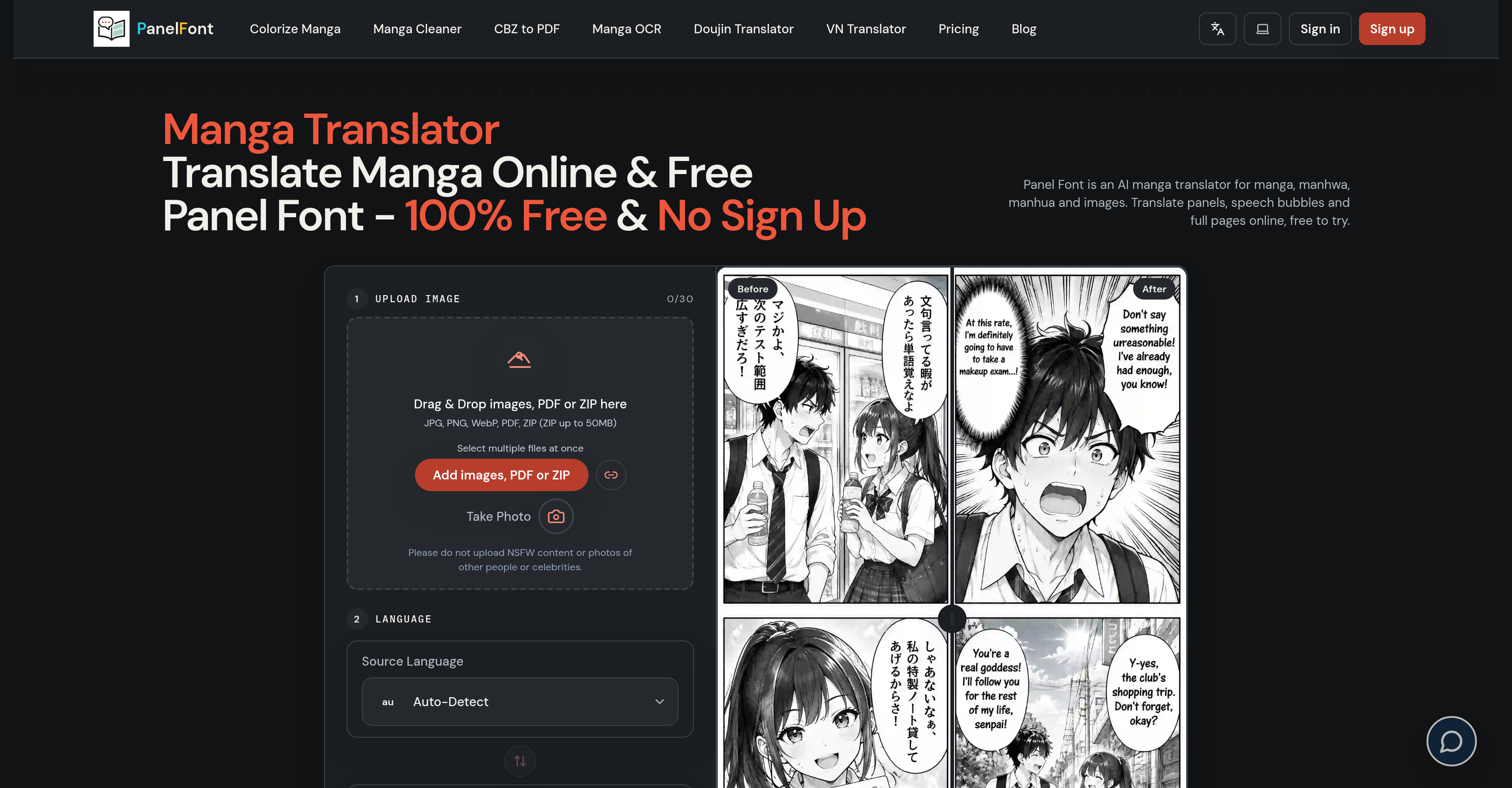
- Read translated manga pages that look like the original: speech bubble and panel detection removes source lettering, redraws the affected areas, and places translated text back while keeping panel composition, backgrounds, and character expressions intact.
- Get clean, readable lettering in difficult layouts: comic-focused typesetting fits translated dialogue into irregular speech bubbles and layered layouts, with handwritten lettering and sound effects shown in its examples.
- Keep character names and series terms consistent across a full chapter: translation models track recurring terminology, character tone, and context across connected panels.
- Translate an entire chapter in one pass instead of page by page: batch mode accepts multiple JPG, PNG, WebP, and PDF files, plus ZIP archives up to 50 MB.
- Open raws from almost any origin: the manga translator supports over 100 popular and niche source languages, including Korean manhwa and Chinese manhua, with Auto-Detect when the source language is unknown.
- Pick the right trade-off for each job: multiple model options let you choose between faster turnaround and higher translation quality.
- Translate comic pages on a phone, tablet, or computer with no software to install: everything runs in the browser, and the upload area includes a camera option for capturing pages directly.
- Test results before committing: guest access requires no account, the free tier provides 10 daily credits, and logged-in accounts keep translated pages saved instead of losing them on refresh.
Pros & Cons
From the listing; not yet checked by our editors.
Pros
- Comic-aware panel detection
- Speech-bubble recognition
- Source lettering removal
- Translated text placed in artwork
- Irregular-bubble typesetting
- Layered-layout handling
- Panel composition preservation
- Background detail preservation
- Character expression preservation
- Comic visual-flow retention
- Character-tone-aware translation
- Recurring terminology consistency
- 100-plus source languages
- Automatic source-language detection
- Single-image translation mode
- Batch translation mode
- Multi-threaded smart queuing
- Up to 30 images
- Multiple files per upload
- PDF upload support
- ZIP upload support
- ZIP files up to 50MB
- JPG, PNG, WebP support
- Camera upload option
- Browser-based; no downloads
- Automatic page-by-page processing
- Selectable translation models
- Speed-versus-quality model choices
- No-watermark plans
- 10 daily free credits
- Two concurrent free jobs
- Four concurrent paid jobs
- Non-expiring one-time credits
- No sign-up advertised
- Free to try
Cons
- Upload capped at 30 files
- ZIP files capped at 50MB
- Free tier: 10 daily credits
- Basic processing costs 10 credits/image
- Other settings may cost more
- Free-tier concurrency limited to two
- One-time buyers cannot access member-exclusive models
- Explicit sexual content prohibited
- Photos of other people prohibited
Alternatives to PanelFont | Manga Translator
Tools that share the most tags with PanelFont | Manga Translator.
- MangaFusion
Read any manga, manhwa, or manhua in your preferred language instantly with one-click manga translation that automatically detects, translates, and replaces text in speech bubbles and SFX.
Free trial · from $4.80/unit
$4.80/unit
Not yet checked
- Manga Image Translator
Launch prototypes in seconds with Vite's instant hot module replacement and rapid cold server startups, enabling iterative UI design without full browser refreshes
Not listed
Not listed
Not yet checked
- OpenToon
Read any manga, manhwa, or webtoon in your native language by pasting the chapter URL and selecting from 50+ languages
Free trial · from $5.99/unit
$5.99/unit
Not yet checked
- Sumi
Read manga in your native language instantly without creating an account, thanks to Sumi's AI engine that provides on-demand translations without user signup.
Free trial · from $6.99/month
$6.99/month
Not yet checked
- AIMangaTranslator.org
Read translated manga with the artwork untouched and every line beside the character who speaks it: the original Japanese, Korean or Chinese text is erased and your language is lettered back into the same speech bubbles and captions.
Free trial · from $4.99/unit
$4.99/unit
Not yet checked
- AI Translate Manga.com
Read raw Japanese manga in English or Simplified Chinese without leaving the artwork: translated dialogue is lettered back into the original panels and speech bubbles.
Free trial · from $4.99/unit
$4.99/unit
Not yet checked
Reviews
Rate this tool
Loading reviews...
Frequently asked questions
How do I translate a manga page with Panel Font Manga Translator?
Choose a model and single-image or batch mode, upload your manga page, select the source language or Auto-Detect and a target language, then start the translation.
Can Panel Font Manga Translator detect the source language automatically?
Yes. Select Auto-Detect as the source language in Panel Font Manga Translator.
Which source and target languages does Panel Font Manga Translator support?
Panel Font Manga Translator advertises support for over 100 popular and niche source languages. You can select a target language, including English; a complete list of supported languages is not provided.
Can Panel Font Manga Translator translate Korean manhwa and Chinese manhua?
Yes. Panel Font Manga Translator supports manga, manhwa, and manhua, including translation from Korean and Chinese.
What image, PDF, and ZIP file formats can I upload to Panel Font Manga Translator?
The upload accepts JPG, PNG, WebP, PDF, and ZIP files. ZIP files can be up to 50 MB.
Can Panel Font Manga Translator process several pages or files in one batch?
Yes. Batch mode lets you upload multiple images or PDF files together. The upload area also accepts ZIP files.
Does Panel Font Manga Translator preserve panel layouts and speech bubble placement?
Panel Font Manga Translator detects panels and speech bubbles and aims to preserve panel composition, bubble placement, and page flow while replacing the text.
How well does Panel Font Manga Translator erase original lettering without damaging the artwork?
It removes the source lettering and redraws the affected areas, with the stated aim of preserving background details and the original illustration. Results depend on the source image; the site recommends high-resolution images without heavy compression or intrusive watermarks.