

Aisma
Clean up shots you thought were ruined by removing a photobomber, passer-by or stray object from existing footage, so a single take stays usable without a reshoot.
Listing not yet reviewed by our editors · How we check
Overview
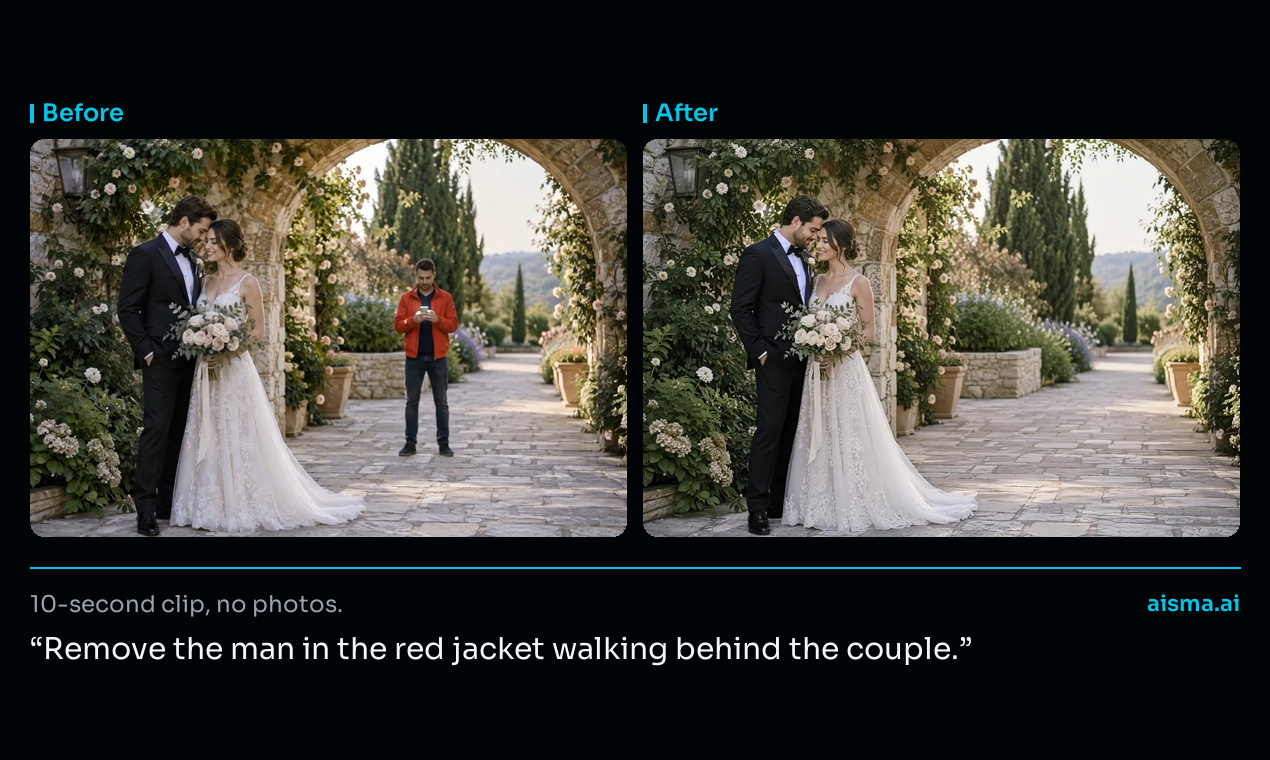
- Clean up shots you thought were ruined by removing a photobomber, passer-by or stray object from existing footage, so a single take stays usable without a reshoot.
- Restyle a look or a product without filming again by changing an outfit or the item in someone's hand from a plain-language prompt, with up to 10 reference photos when an exact face, garment or product must match.
- Place your subject anywhere without a green screen through AI background replacement that keeps the person, movement and camera work exactly as filmed.
- Recast a scene while keeping the performance by replacing a whole person or just a face from a photo, with original gestures preserved.
- Shift season, time of day or visual style in one request: turn a clip into winter or night, or restyle the entire video while framing, clip length, camera motion and original audio stay intact.
- Pay only for what changes because Aisma splits your video into shots, leaves untouched shots as filmed at no cost, and shows the exact credit price before anything renders.
- Fix a miss without starting over by revising just the part that's off with a short clarification instead of re-rendering the whole video.
- Get export-ready results at 720p or 1080p from MP4 or MOV clips of 2 to 60 seconds up to 500 MB, ready to drop into your usual editor for cuts and captions.
- Edit wherever the footage is, on the phone where you shot it or at a desk, with one Library and credit balance synced across devices via Google, Apple or email sign-in.
- Keep client and personal footage under your control with uploads and results private to your account, never sold, and deletable whenever you choose.
- Build video editing into your own pipelines and AI agents through a REST API and MCP server that bring prompt-based footage editing into existing tools.
Pros & Cons
From the listing; not yet checked by our editors.
Pros
- Preserves original framing
- Preserves clip length
- Preserves original audio
- Preserves filmed motion
- Preserves camera work
- Edits existing footage
- Plain-language edit requests
- One request box
- No modes to choose
- Optional reference photos
- Up to ten reference photos
- Reference-specific face edits
- Reference-specific garment edits
- Reference-specific product edits
- Text-only outfit changes
- Remove people or objects
- Fills removed-object areas
- Background changes without green screen
- Keeps subjects during background changes
- Face swaps retain gestures
- Product swaps retain handling
- Restyles preserve motion
- Adds described physical effects
- Supports MP4 and MOV
- Accepts clips up to 60 seconds
- Accepts files up to 500 MB
- Supports vertical and horizontal footage
- 720p or 1080p output
- MP4 output
- Credit price shown before rendering
- Private Library across browser and apps
- Original-and-edit examples
- Example prompts shown
- Example reference photos shown
- Examples usable as starting points
Cons
- No video creation from scratch
- Clips limited to 60 seconds
- Uploads capped at 500 MB
- Uploads accept MP4 or MOV
- Output limited to 720p or 1080p
- Exports only in MP4
- Original audio remains unchanged
- Framing and length stay fixed
- Camera motion stays unchanged
- Edits require paid credits
Alternatives to Aisma
Tools that share the most tags with Aisma.
- Gling - AI Video Editing Software for YouTube
Skip hours of manual editing with AI that automatically cuts silences, bad takes and filler words from your raw footage
Freemium · from $10/month
$10/month
Not yet checked
- AVCLabs
Transform blurry videos into crisp high-resolution footage with AI upscaling and deinterlacing technology
Paid · from $39.95/month
$39.95/month
Not yet checked
- Camtasia
Record screen, camera, and audio simultaneously on separate tracks for complete editing control over every element
Freemium · from $179.88/year
$179.88/year
Not yet checked
- bigmp4
Transform low-resolution videos into crystal clear 8K quality with AI upscaling that simultaneously reduces noise and enhances detail
Freemium · from $6
$6
Not yet checked
- Vidnami
Transform text into complete marketing videos instantly using AI that splits content into scenes and selects matching clips from Storyblocks
Free trial · from $47/month
$47/month
Not yet checked
- Captions
Produce studio-grade videos without technical expertise using AI-powered automation that handles complex editing tasks
Paid · from $9.99/month
$9.99/month
Not yet checked
Reviews
Rate this tool
Loading reviews...
Frequently asked questions
Can Aisma remove a photobomber or other objects from a video I already filmed?
Yes. Aisma can remove a photobomber, people, or objects from footage you’ve already shot.
Can Aisma change someone’s clothes using only a written prompt?
Yes. You can describe a clothing change in words; reference photos are optional.
How do I use reference photos to swap a face, outfit, or product in Aisma?
Upload up to 10 reference photos with your video. Use clear portraits for a face, or a photo of the garment or product you want, and refer to photos by number in your request, such as “Photo 1.”
Can Aisma replace a video background without a green screen?
Yes. Aisma can replace a video background without a green screen while keeping the person, movement, and camera work as filmed.
Does Aisma preserve my original audio, framing, and camera movement?
Yes. Aisma says it preserves the original audio, framing, clip length, motion, and camera work while changing the requested visual content.
Can Aisma create a video from text or a single photo, or does it need existing footage?
Aisma requires footage you’ve already shot. It cannot generate a video from text or a single photo; starting from text or one photo is on its roadmap.
What video formats, file sizes, and clip lengths does Aisma accept?
Aisma accepts MP4 or MOV videos from 2 to 60 seconds long, up to 500 MB.
How many reference photos can I upload for one Aisma edit?
You can upload up to 10 reference photos per edit.