
Overview
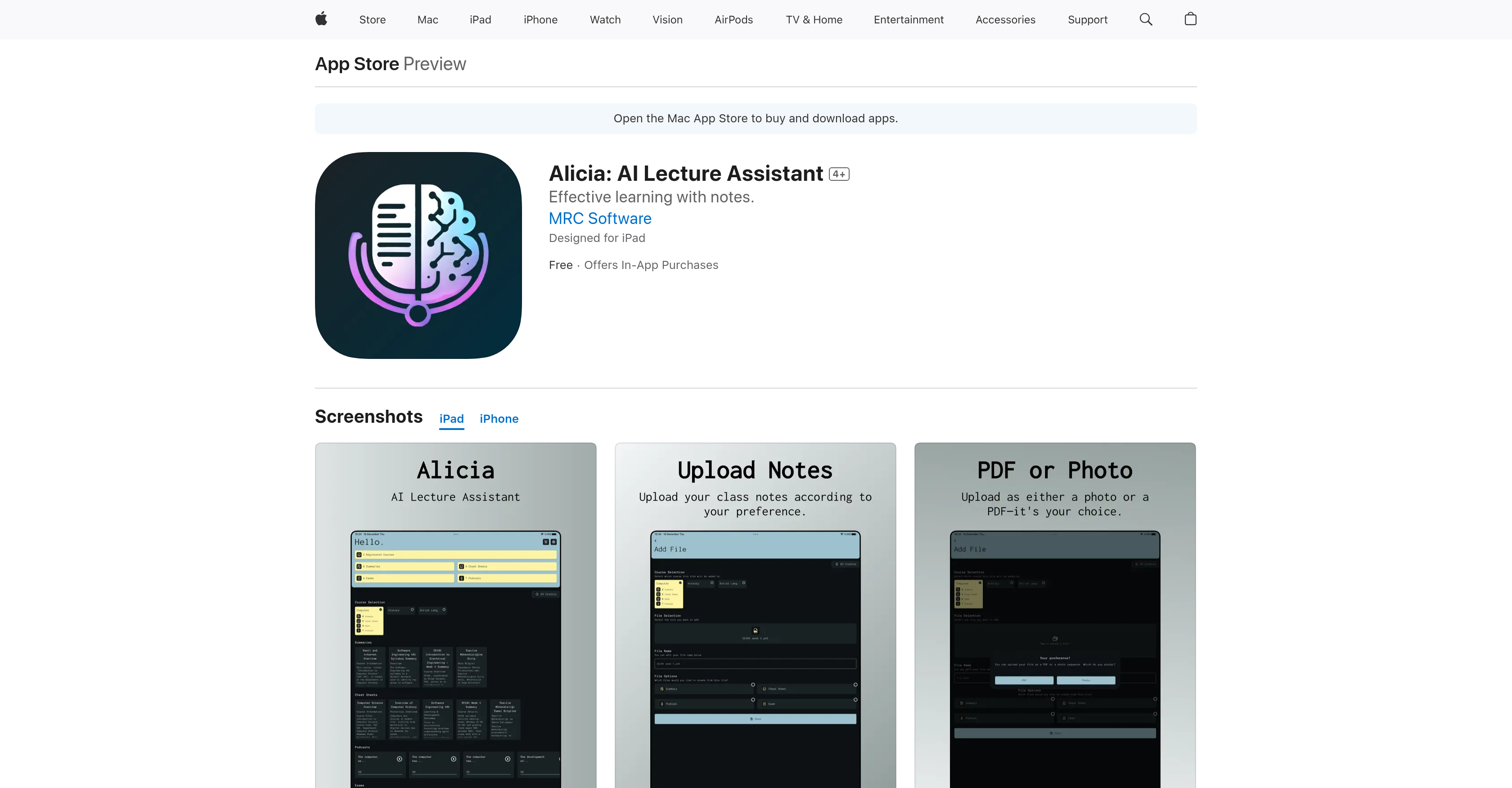
- Master key concepts faster with condensed summaries that highlight only the most crucial information from your lecture notes
- Create quick-reference study aids with concise cheat sheets that compile all critical information for fast review
- Study anywhere by converting your notes into audio podcasts for learning during commutes, workouts, or other activities
- Test your knowledge retention with automatically generated quizzes based on key points from your lecture material
- Organize scattered notes into structured formats that make complex topics easier to understand and recall
- Accommodate your learning style with multiple output formats including visual summaries, audio podcasts, quick-reference sheets, and interactive quizzes
- Process notes in multiple languages including Spanish, French, German, Chinese and 20+ other languages beyond English
Pros & Cons
Pros
- Analyzes lecture notes
- Creates study aids
- PDF or photo uploads
- Generates note summaries
- Generates cheat sheets
- Produces study podcasts
- Designs practice quizzes
- Caters to unique learning styles
- Efficient exam preparation
- Effective note organization
- Knowledge reinforcement
- Supports different learning mediums
- Lecture note conversion
- Cheatsheet generator
- Effective note summarization
- Podcast generation for studying
- Knowledge testing through quizzes
- Designed for iPad
- Features available in-app purchase
- Multilingual interface
- Not linked to user identity
- Flexible learning
- Visual and audio options
- Tailors learning to user pace
Cons
- In-app purchases required
- Only supports PDF or photo formats
- iOS platform dependent
- Not free-to-use
- Limited language support
- Small developer, potentially less support
- Privacy concerns with data handling
- No web application
- Requires specific OS versions
- May oversimplify complex topics
Reviews
Rate this tool
Loading reviews...
❓ Frequently Asked Questions
Alicia: AI Lecture Assistant is an educational technology tool designed to streamline studying. It is a digital assistant that uses AI to analyze lecture notes and convert them into different learning materials, such as summaries, cheat sheets, podcasts, and quizzes. The tool caters to unique learning styles and paces, making it suitable for a variety of learners, including students, individuals that prefer organizing notes, and individuals who enjoy exploring different learning mediums.
Alicia utilizes proprietary AI technology to analyze lecture notes. Users can upload their notes in PDF or photo format, and Alicia processes them to identify key topics, crucial information, and critical points. This understanding is then used to generate summaries, cheat sheets, podcasts, and quizzes that are tailor-made for the user's needs.
Alicia offers four primary outputs from lecture notes analysis: summaries, cheat sheets, podcasts, and quizzes. Each of these formats is designed to meet different studying requirements. Summaries provide condensed versions of key topics, cheat sheets compile crucial information for quick reference, podcasts convert material into audio format for auditory learning, and quizzes allow for knowledge testing and reinforcement.
Alicia employs AI technology to transform uploaded lecture notes into multiple formats. It identifies and concentrates on the main topics in summaries, compiles critical information concisely in cheat sheets, converts key points into audio script for podcasts, and creates quizzes based on important aspects of lecture material for reinforcement.
The summaries provided by Alicia are a condensed version of lecture notes. They offer a focused look at main topics, helping to streamline studying by eliminating unnecessary details and focusing only on the crucial information. This format is beneficial for users looking to save time and boost efficiency in their study sessions.
Yes, Alicia provides learning material in podcast form, allowing users to learn on the go. It converts important lecture note material into an audio format. This feature is especially useful for auditory learners or those who want to optimize their time by studying during commutes, workouts, or other tasks.
Alicia helps users prepare for exams by dissecting lecture notes into summaries and cheat sheets for easy review of important information. It also creates quizzes based on key points from the notes, which enables users to practice and reinforce their knowledge in preparation for exams.
Yes, Alicia aids in organizing lecture notes by processing them into easy-to-review formats like summaries and cheat sheets. It compartmentalizes key topics and critical information into structured formats, making the notes easier to understand and recall when needed.
Alicia caters for individuals with different learning styles and paces by providing various output formats - summaries for those who prefer reading, podcasts for auditory learners, cheat sheets for fast look-ups, and quizzes for active learning. This way, users can select the format or combination that best suits their learning style and pace.
Yes, Alicia is a valuable tool for those who prefer organizing notes. It processes lecture notes and transforms them into structured formats that are easier to understand and recall. It compiles critical information into cheat sheets for quick reference and generates summaries that focus on main topics, thereby streamlining the study process.
Yes, Alicia can convert notes into podcasts. It uses its AI capabilities to convert crucial lecture note material into an audio script and reads it aloud in a podcast format, allowing users to learn while on the move.
Yes, Alicia creates quizzes from lecture notes. It identifies key aspects from the uploaded notes and designs questions based on these. This feature facilitates active learning and knowledge reinforcement through practice.
Alicia caters to unique learning styles and paces through the versatile toolset it provides. It offers multiple output formats from summarized notes for readers, podcasts for auditory learners, cheat sheets for quick reviewers, to quizzes for learners preferring active engagement. Users can choose the most suitable format(s) based on their individual learning style and speed.
Users can upload their lecture notes in PDF or photo format for Alicia to analyze. The AI-driven system is capable of processing these formats to generate summaries, cheat sheets, podcasts, and quizzes.
Alicia caters to multiple languages apart from English. The supported languages include, but are not limited to, Bulgarian, Croatian, Czech, Danish, Dutch, Estonian, Finnish, French, German, Greek, Hungarian, Italian, Japanese, Latvian, Polish, Portuguese, Romanian, Russian, Simplified Chinese, Slovenian, Spanish, Swedish, Thai, and Turkish.
Alicia: AI Lecture Assistant is available as a free app. However, it does offer in-app purchases for extra features or services. The in-app purchase options range from buying 10 credits for $1.99, 50 credits for $8.99, to 100 credits for $17.99.
Alicia is compatible with various platforms. These include iPhone, iPad, iPod touch, and Mac. For iPhone, iPad, and iPod touch, it requires iOS 12.0 or later. For Mac, it requires macOS 11.0 or later and a Mac with Apple M1 chip or later.
Alicia is equipped to support sight-impaired users through its support for visionOS 1.0 or later. The podcast feature in particular aids audible learners or individuals with visual impairments by converting critical study material into audio format.
The privacy policy of Alicia suggests that the app may collect contact info among other data, but such data is not linked to the user's identity. However, the handling of data may vary based on the features used by the user and other situational factors. For more detailed information on data handling, users are directed to the developer's privacy policy.
Alicia was developed by MRC Software. Additional details about them and their other projects can be found on the developer's website on the App Store.
Alicia helps users prepare for exams by dissecting lecture notes into summaries and cheat sheets for easy review of important information. It also creates quizzes based on key points from the notes, which enables users to practice and reinforce their knowledge in preparation for exams.
Yes, Alicia aids in organizing lecture notes by processing them into easy-to-review formats like summaries and cheat sheets. It compartmentalizes key topics and critical information into structured formats, making the notes easier to understand and recall when needed.
Alicia caters for individuals with different learning styles and paces by providing various output formats - summaries for those who prefer reading, podcasts for auditory learners, cheat sheets for fast look-ups, and quizzes for active learning. This way, users can select the format or combination that best suits their learning style and pace.
Yes, Alicia is a valuable tool for those who prefer organizing notes. It processes lecture notes and transforms them into structured formats that are easier to understand and recall. It compiles critical information into cheat sheets for quick reference and generates summaries that focus on main topics, thereby streamlining the study process.
Yes, Alicia can convert notes into podcasts. It uses its AI capabilities to convert crucial lecture note material into an audio script and reads it aloud in a podcast format, allowing users to learn while on the move.
Yes, Alicia creates quizzes from lecture notes. It identifies key aspects from the uploaded notes and designs questions based on these. This feature facilitates active learning and knowledge reinforcement through practice.
Alicia caters to unique learning styles and paces through the versatile toolset it provides. It offers multiple output formats from summarized notes for readers, podcasts for auditory learners, cheat sheets for quick reviewers, to quizzes for learners preferring active engagement. Users can choose the most suitable format(s) based on their individual learning style and speed.
Users can upload their lecture notes in PDF or photo format for Alicia to analyze. The AI-driven system is capable of processing these formats to generate summaries, cheat sheets, podcasts, and quizzes.
Alicia caters to multiple languages apart from English. The supported languages include, but are not limited to, Bulgarian, Croatian, Czech, Danish, Dutch, Estonian, Finnish, French, German, Greek, Hungarian, Italian, Japanese, Latvian, Polish, Portuguese, Romanian, Russian, Simplified Chinese, Slovenian, Spanish, Swedish, Thai, and Turkish.
Alicia: AI Lecture Assistant is available as a free app. However, it does offer in-app purchases for extra features or services. The in-app purchase options range from buying 10 credits for $1.99, 50 credits for $8.99, to 100 credits for $17.99.
Alicia is compatible with various platforms. These include iPhone, iPad, iPod touch, and Mac. For iPhone, iPad, and iPod touch, it requires iOS 12.0 or later. For Mac, it requires macOS 11.0 or later and a Mac with Apple M1 chip or later.
Alicia is equipped to support sight-impaired users through its support for visionOS 1.0 or later. The podcast feature in particular aids audible learners or individuals with visual impairments by converting critical study material into audio format.
The privacy policy of Alicia suggests that the app may collect contact info among other data, but such data is not linked to the user's identity. However, the handling of data may vary based on the features used by the user and other situational factors. For more detailed information on data handling, users are directed to the developer's privacy policy.
Alicia was developed by MRC Software. Additional details about them and their other projects can be found on the developer's website on the App Store.
Pricing
Pricing model
Freemium
Paid options from
$1.99/unit
Billing frequency
Pay-as-you-go