

AutoDub
Watch foreign-language YouTube videos in your own language without leaving the page — a one-click button inside YouTube's player controls lets you pick a language and start AI dubbing instantly.
Listing not yet reviewed by our editors · How we check
Overview
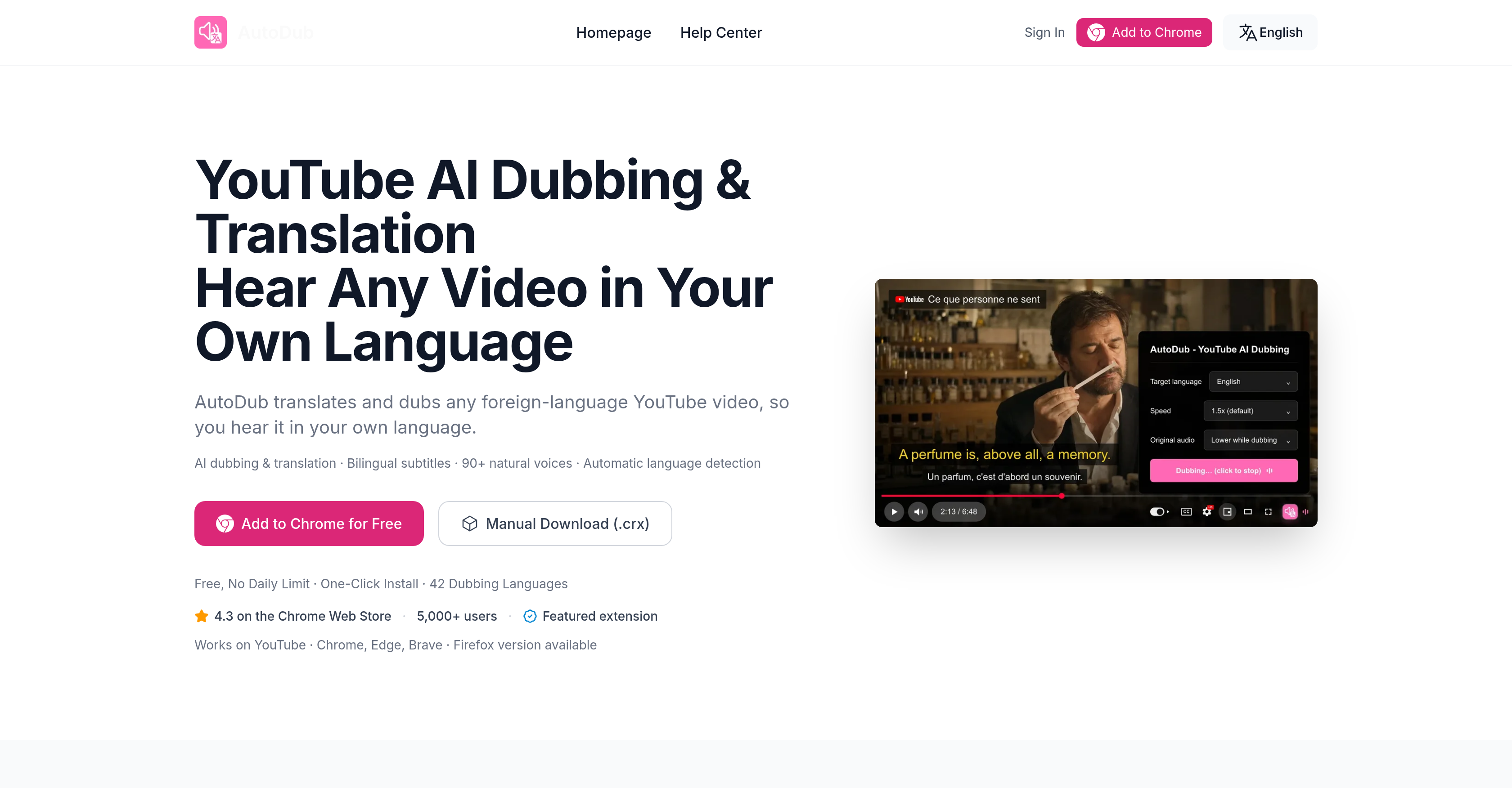
- Watch foreign-language YouTube videos in your own language without leaving the page — a one-click button inside YouTube's player controls lets you pick a language and start AI dubbing instantly.
- Skip manual setup on every video — automatic language detection identifies the original language the moment playback starts.
- Follow along in over 42 languages, including English, Chinese, Japanese, Korean, Spanish, French, German, Arabic, and Hindi — AI video translation covers the global languages most YouTube content is published in.
- Listen to dubbed audio that sounds like a real narrator, not a robot — choose from more than 90 natural-sounding voices for text-to-speech dubbing.
- Learn a new language while you watch — bilingual subtitles display the translated text alongside the original captions on screen.
- Understand technical and professional content accurately — the AI translator handles programming tutorials, business and financial advice, interviews, documentaries, and films.
- Binge-watch translated videos all day — no daily usage limits on YouTube translation and dubbing.
- Keep your viewing private — no account or sign-in required, user data is never sold, and processed captions are tied to the video, not to you.
- Use it in the browser you already have — install in one click from the Chrome Web Store or Firefox Add-ons, with support for Chrome, Edge, Brave, and Firefox.
Pros & Cons
From the listing; not yet checked by our editors.
Pros
- Translates and dubs YouTube videos
- Supports over 42 languages
- Automatic language detection
- Bilingual subtitles provision
- Unlimited daily usage
- Integrates with YouTube controls
- Compatible with multiple browsers
- Single-click installation
- Potential cross-platform expansion
- No account or sign-in required
- Doesn't sell user data
- Technical support availability
- 90+ natural voices
- Broad content application scope
- Privacy policy transparency
- Optimized to maintain playback speed
- Processing doesn't affect viewing experience
- Translates globally recognized languages
- 4.3 rating on Chrome store
- Allows for user feedback
- Low internet bandwidth requirement
- Effective for educational content
- Enhances accessibility of documentaries
- Tool for programming tutorials
- Makes business advice accessible
- Improves understanding of interviews
- Adaptable to lifestyle vlogs
- Recognizes original video language
- High-quality voice dubbing
- Promising future platform expansion
- Compliant with data protection
- Helps overcome language barriers
- Seamlessly integrated with YouTube
- Localizes global creator content
- Convenient for viewer preference
- Optimized translation processing speed
- Subtitles processing on servers
- 24 hours support reply time
- One-click install from web stores
- Useful for breaking language barriers
- Captions are cashed, not data
Cons
- Limited to YouTube
- Internet required
- Doesn't support Safari
- Limited to 42 languages
- Dependant on YouTube subtitles
- Limited to browsers
- Support response takes 24 hours
- No offline usage
Alternatives to AutoDub
Tools that share the most tags with AutoDub.
- YouTube Dubbing
Watch any foreign video in your native language instantly with one-click AI translation and playback
Freemium · from $10/month
$10/month
Not yet checked
- Noiz AI
Create authentic dubbed videos that preserve emotional nuance using expressive voice models that capture subtle feelings like tension, excitement, and warmth
Freemium · from $1.90/month
$1.90/month
Not yet checked
- Dubverse.ai
Expand your audience globally by dubbing videos into 30 languages with AI-powered translation and human-like voiceovers
Free trial · from $9.58/month
$9.58/month
Not yet checked
- AI Dubbing.io
Expand your global audience instantly by translating videos into over 20 languages with AI-generated voices that maintain accurate lip synchronization.
Free
Not listed
Not yet checked
- AI Dubbing by Captions
Expand your global audience with authentic voice cloning that replicates your unique tone across 28+ languages
Not listed
Not listed
Not yet checked
- PERSO.ai
Launch dubbed videos instantly worldwide with AI-powered translation and lip-sync technology
Free trial · from $39/month
$39/month
Not yet checked
Reviews
Rate this tool
Loading reviews...
Frequently asked questions
What is AutoDub?
AutoDub is an AI-powered browser extension designed to translate and dub YouTube videos into the viewer's preferred language, making foreign-language content more accessible.
How does AutoDub translate and dub YouTube videos?
AutoDub automatically detects the original language of a YouTube video, translates its content, and provides a dubbed version in the chosen language. It does this with the use of AI models for translation and natural-sounding voices for dubbing. The translated content is overlaid on the video with bilingual subtitles.
What languages are supported in AutoDub's translation and dubbing?
AutoDub supports over 42 languages for translation and dubbing, including but not limited to English, Chinese, Japanese, Korean, Spanish, Portuguese, French, German, Russian, Arabic, Hindi, Indonesian, and Ukrainian.
Does AutoDub have any usage limitations?
No, AutoDub operates without any daily usage limitations.
Which browsers is AutoDub compatible with?
AutoDub is compatible with multiple browsers, including Chrome, Edge, Brave, and Firefox.
What types of content can AutoDub be useful for?
AutoDub is designed with versatility in mind, suitable for various types of YouTube content such as programming tutorials, educational videos, lifestyle vlogs, business and financial advice, interviews, documentaries, and films.
How can I install AutoDub?
Users can easily install AutoDub from the Chrome Web Store or Firefox Add-ons with a single click.
Is AutoDub exclusively for YouTube?
While AutoDub is primarily intended for YouTube, the developers are considering expanding its capabilities to other platforms.