

Bitcut
Post clips that make sense to new viewers without scrubbing through hours of footage: the AI reads the transcript, pulls passages that stand on their own, and ranks each one with a quality score and a one-line summary of its hook, story or ending.
Listing not yet reviewed by our editors · How we check
Overview
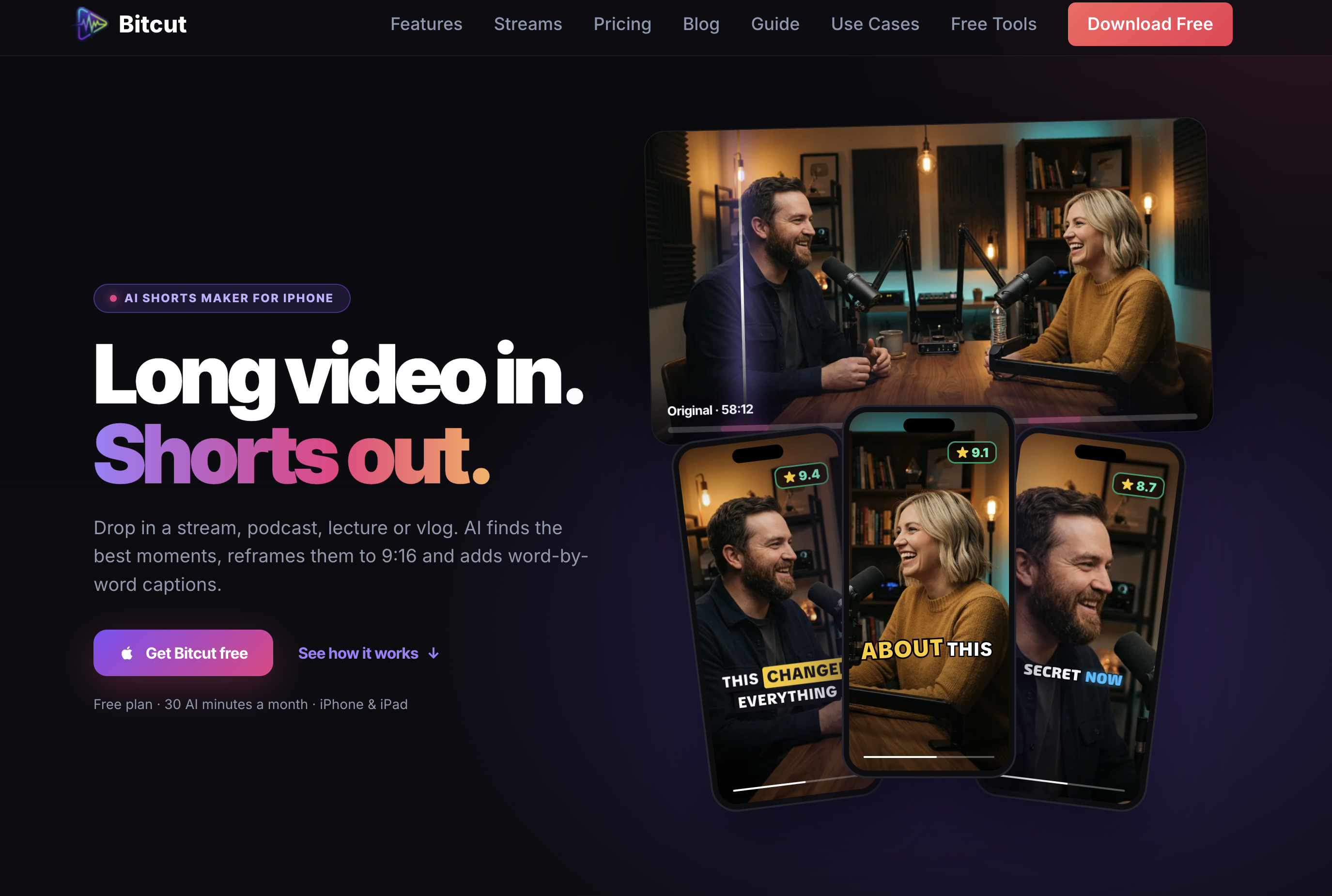
- Post clips that make sense to new viewers without scrubbing through hours of footage: the AI reads the transcript, pulls passages that stand on their own, and ranks each one with a quality score and a one-line summary of its hook, story or ending.
- Get a highlight reel or a full clip series from one podcast, interview, lecture or vlog: Trailer mode stitches the strongest moments into a single reel, and Parts mode splits the recording into equal-length clips for Shorts, Reels and TikTok.
- Keep silent scrollers watching with captions that land on every spoken word: word-by-word subtitles with karaoke highlighting, 18 caption looks and adjustable colors, with text and timing corrected directly on the timeline.
- Turn widescreen footage into vertical video without manual cropping: face tracking reframes 16:9 to 9:16 and follows the speaker across scene changes, so the person talking stays in frame.
- Publish clean cuts that sound deliberate: in music edits, cuts snap to the beat, and speech is never cut mid-word.
- Start clipping from wherever your recording lives: import from Photos, Files or a YouTube link straight into the iPhone and iPad editor.
- Finish every short in one place at no cost: the free multi-track video editor covers trimming, splitting, voiceover, title cards, transitions and voice enhancement.
- Keep raw footage on your device: editing and rendering run on the phone, and only the audio track is sent for transcription.
- Test AI clipping before paying: the free plan includes 30 AI minutes a month with watermarked exports, and paid plans start at $9.99 a month.
Pros & Cons
From the listing; not yet checked by our editors.
Pros
- Turns long videos into quality-ranked Shorts
- Word-by-word captions in 18 looks
- Face tracking reframes 16:9 to 9:16 on the device
- Cuts snap to the beat of the music
- Speech is never cut mid-word
- Full multi-track editor on the free plan
- Editing and rendering run on the phone
- No account needed to start
Cons
- iPhone and iPad only, no Android app
- Free plan: 30 AI minutes a month
- Free exports carry a watermark
- Pro and Creator plans are subscriptions
Alternatives to Bitcut
Tools that share the most tags with Bitcut.
- Studio Momento
Convert long videos into viral-ready shorts in three clicks with automated MagicEdits that identify key moments and frame speakers
Freemium · from $4.99/month
$4.99/month
Not yet checked
- Opus Clip
Launch professional live streams in 5 minutes with AI-powered setup that eliminates complex technical barriers
Freemium · from $14.50/month
$14.50/month
Not yet checked
- Shortmake
Go from idea to published video in under 8 minutes with automated AI generation that handles scripting, voiceover, and editing
Paid · from $14/month
$14/month
Not yet checked
- Dumme
Repurpose hours of long-form content into viral-ready shorts in minutes, using AI that identifies the most engaging, clip-worthy moments while preserving original context.
Not listed
Not listed
Not yet checked
- Hooked
Create viral-ready videos in under 5 minutes without editing skills using the AI video builder that automates script generation and production
Paid · from $19/month
$19/month
Not yet checked
- HiClip AI
Instantly identify and extract the most engaging moments from any long video using Context-Aware Analysis that scans visual dynamics, audio cues, and semantic context.
Free trial · from $9/month
$9/month
Not yet checked
Reviews
Rate this tool
Loading reviews...
Frequently asked questions
What is Bitcut: AI Shorts Maker?
Bitcut: AI Shorts Maker is an advanced tool that uses AI technology to convert long videos into short clips. It is specifically developed for content creators who create content for platforms like Shorts, Reels, and TikTok.
How does Bitcut convert long videos into short clips?
Bitcut uses Artificial Intelligence to detect the most impactful moments from a long video such as a stream, podcast, lecture, or vlog. It reframes these moments into a 9:16 ratio ideal for platforms like Shorts, Reels, and TikTok, and shorter clips are generated. Bitcut organizes these moments by their quality and importantly, these moments are provided with a quality rating and summary.
What is the function of auto-subtitling in Bitcut?
Auto-subtitling feature in Bitcut is based on AI transcription services which create precise and accurate subtitles for videos. The technology allows each word to light up in sync with the voice, and users can pick a look, tweak colors, and fix any word.
How does Bitcut perform tasks like beat syncing, and face tracking?
Beat syncing in Bitcut uses AI technology that allows every cut to snap to the beat when a track is added. The advanced face-tracking options find the speaker and keep them in frame as conversation progresses, ensuring the speaker remains the focus of the video.
What platforms is Bitcut: AI Shorts Maker designed for?
Bitcut: AI Shorts Maker is specifically designed for content creators who create material for social media platforms such as Shorts, Reels, and TikTok.
What does Bitcut's feature of reframing videos to a 9:16 ratio mean?
Reframing videos to a 9:16 ratio means adjusting the video's aspect ratio to suit platforms like TikTok, Shorts, and Reels that favor vertical videos. Bitcut does this by automatically adjusting a standard 16:9 video to fit into a 9:16 frame.
Can Bitcut generate word-by-word captions for my video?
Yes, Bitcut offers the feature of generating word-by-word captions for videos. Using AI transcription services, it ensures accurate subtitles are created for videos and each word is illuminated in accordance with the dialogue.
How does Bitcut use AI to rank moments from a video?
Bitcut utilizes AI technology to rank the moments from a video. The AI scans through the uploaded video and identifies strong moments based on audio peaks, visual cues, and other factors. Then, it assigns a quality score to each of these moments and presents them to the user in rank order, along with a one-line description.