

Canva Magic Formulas
Get instant, accurate answers from your data without memorizing formulas by asking questions in plain language.
Listing not yet reviewed by our editors · How we check
Overview
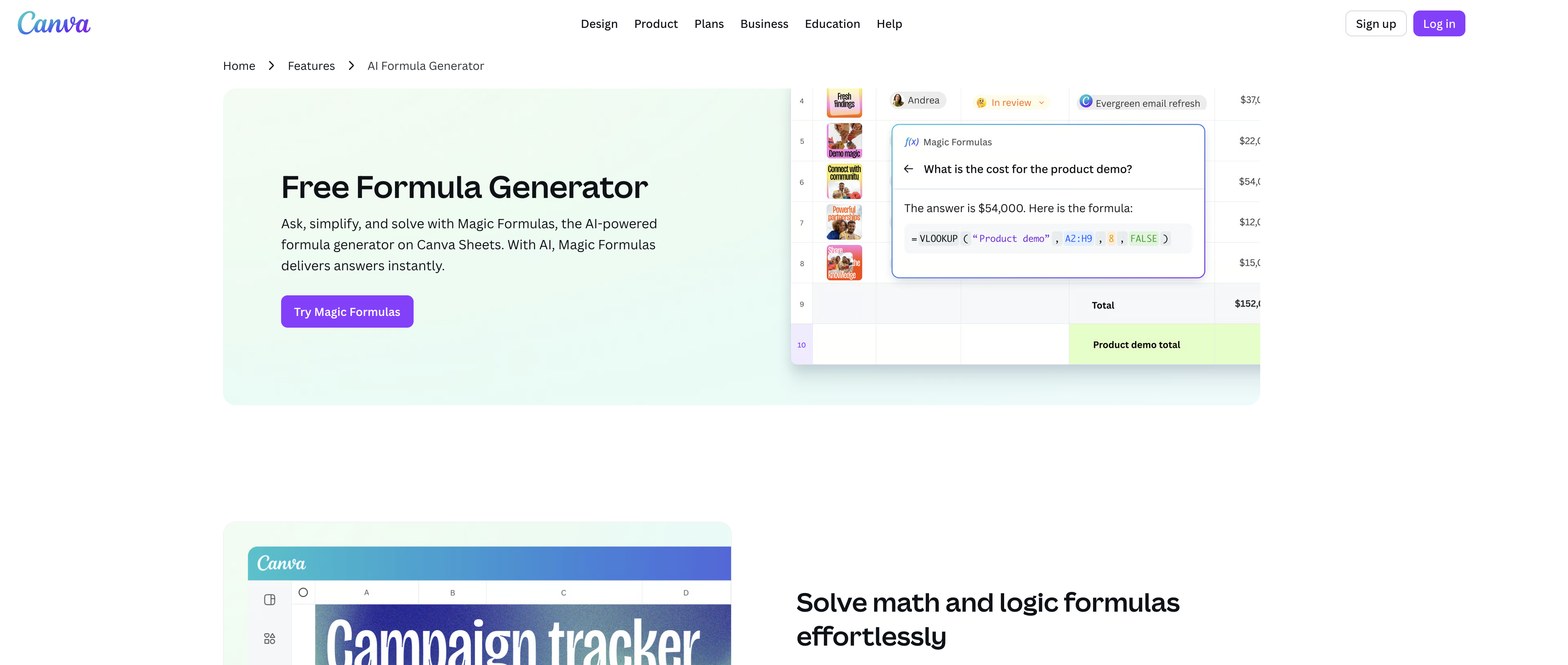
- Get instant, accurate answers from your data without memorizing formulas by asking questions in plain language.
- Create sales, campaign, and profit reports in seconds with automated high-level computations for large datasets.
- Eliminate manual calculation errors and speed up repetitive tasks with AI-generated complex logic.
- Enhance your data analysis workflow through seamless integration with Magic Insights and Magic Charts.
Pros & Cons
From the listing; not yet checked by our editors.
Pros
- Plain language query
- Instant high-level computations
- Handles large datasets
- Reduces human error
- Auto-generates complex logic
- Diverse use case catering
- Eliminates need for memory
- Speeds up repetitive tasks
- Integrates with Canva tools
- Magic Insights tool integration
- Magic Charts tool integration
- Invoices, expense calculations
- Grade and profit computation
- Ideal for students, specialists
- Supports CSV, XLSX formats
- Simplifies mathematical computations
- Canva Sheets integration
- Reduces time on data analysis
- Supports mobile use
- Generates dynamic summaries
- Computes commissions, conversion rates
Cons
- Limited free credits
- Reliant on user specificity
- Not browser-agnostic
- No offline capability
- Tool-specific to Canva Sheets
- Potential lag with large datasets
- Doesn't support all spreadsheet formats
Alternatives to Canva Magic Formulas
Tools that share the most tags with Canva Magic Formulas.
- PromptLoop
Transform messy text into structured data instantly using a simple spreadsheet formula that works like SUM or VLOOKUP
Freemium · from $49/month
$49/month
Not yet checked
- SheetGod
Create complex Excel formulas and Google Sheets functions instantly by typing plain English instructions instead of memorizing syntax
Freemium · from $8/month
$8/month
Not yet checked
- SheetyAI
Create complex spreadsheet formulas instantly by describing your problem in plain English, eliminating the need to memorize syntax
Free
Not listed
Not yet checked
- Free AI Excel Formula Generator
Create accurate Excel formulas instantly without memorizing syntax by describing what you need in plain English
Freemium · from $9/month
$9/month
Not yet checked
- Cargo
Generate complete sales emails instantly using AI-powered templates that fill your spreadsheet automatically
Not listed
Not listed
Not yet checked
- Arcwise
Instantly understand complex spreadsheets by asking questions about calculation interdependencies and sheet functionality through natural language chat
Not listed
Not listed
Not yet checked
Related Videos
Magic Formulas on Canva is the Future of Spread Sheets
Sankalp Sahu · May 4, 2025
Magic Formula in Canva Sheet
GEG_VARANASI · Feb 11, 2026

👀Goodbye EXCEL! Hello CANVA SHEETS + Magic Formulas 🎉
Bootstrap Biz Advice · Dec 13, 2025

Analyze data with Canva Sheets: Data to insight to innovation, instantly
Canva · Oct 30, 2025

Formulas in Canva?! But make it easy ✨
Design with Canva · Apr 21, 2025
Reviews
Rate this tool
Loading reviews...
Frequently asked questions
What is Magic Formulas?
Magic Formulas is an AI tool designed to aid in generating and solving spreadsheet formulas on Canva Sheets. It is designed to assist a wide range of users from students to professionals in executing various tasks such as completing invoices, computing grades, and calculating expenses.
Who can benefit from using Magic Formulas?
Magic Formulas is beneficial for a wide range of users, from students to specialists. It can help with a variety of tasks, including invoice processing, grade computation, expense calculations, and more, making it useful in academic, professional, and personal scenarios.
How does Magic Formulas simplify mathematical computations?
Magic Formulas simplifies mathematical computations by automating the process. Users can ask a question in plain language, and Magic Formulas, using its AI capabilities, will perform the necessary mathematical computation to provide the answer.
How can Magic Formulas assist with completing invoices or computing grades?
Magic Formulas aids in completing invoices or computing grades by allowing users to input these tasks as queries in plain language. The AI then generates the correct formula and performs the calculations, producing accurate results instantly.
What sort of queries can I make with Magic Formulas?
Users can make a variety of queries in plain language with Magic Formulas. This can include any mathematical computation for tasks such as sales, campaign, or profit reports, as well as specific tasks like invoice calculations, grade computations, or expense tracking.
Does Magic Formulas offer integrations with other Canva AI tools?
Yes, Magic Formulas offers integration with other Canva AI tools. Notably, it collaborates with Magic Insights, an AI data analysis tool, and Magic Charts, which recommends the best chart for the user's project.
How does Magic Formulas boost productivity?
Magic Formulas boosts productivity by automating complex mathematical computations, reducing the time taken to perform these tasks. The AI technology used also speeds up repetitive tasks and reduces human error, leading to increased efficiency.
Is Magic Formulas capable of handling large datasets?
Yes, Magic Formulas is capable of handling large datasets. This feature is beneficial for users dealing with extensive data as it can promptly perform computations, making it a powerful tool for data analysis.