

CastTake AI Music Video Maker
Get a finished, beat-synced music video without editing footage or timing a single cut. Beat-cut performance mode finds the most energetic stretch of your song, plans 3 to 18 shots based on length, and cuts each scene on the beat.
Listing not yet reviewed by our editors · How we check
Overview
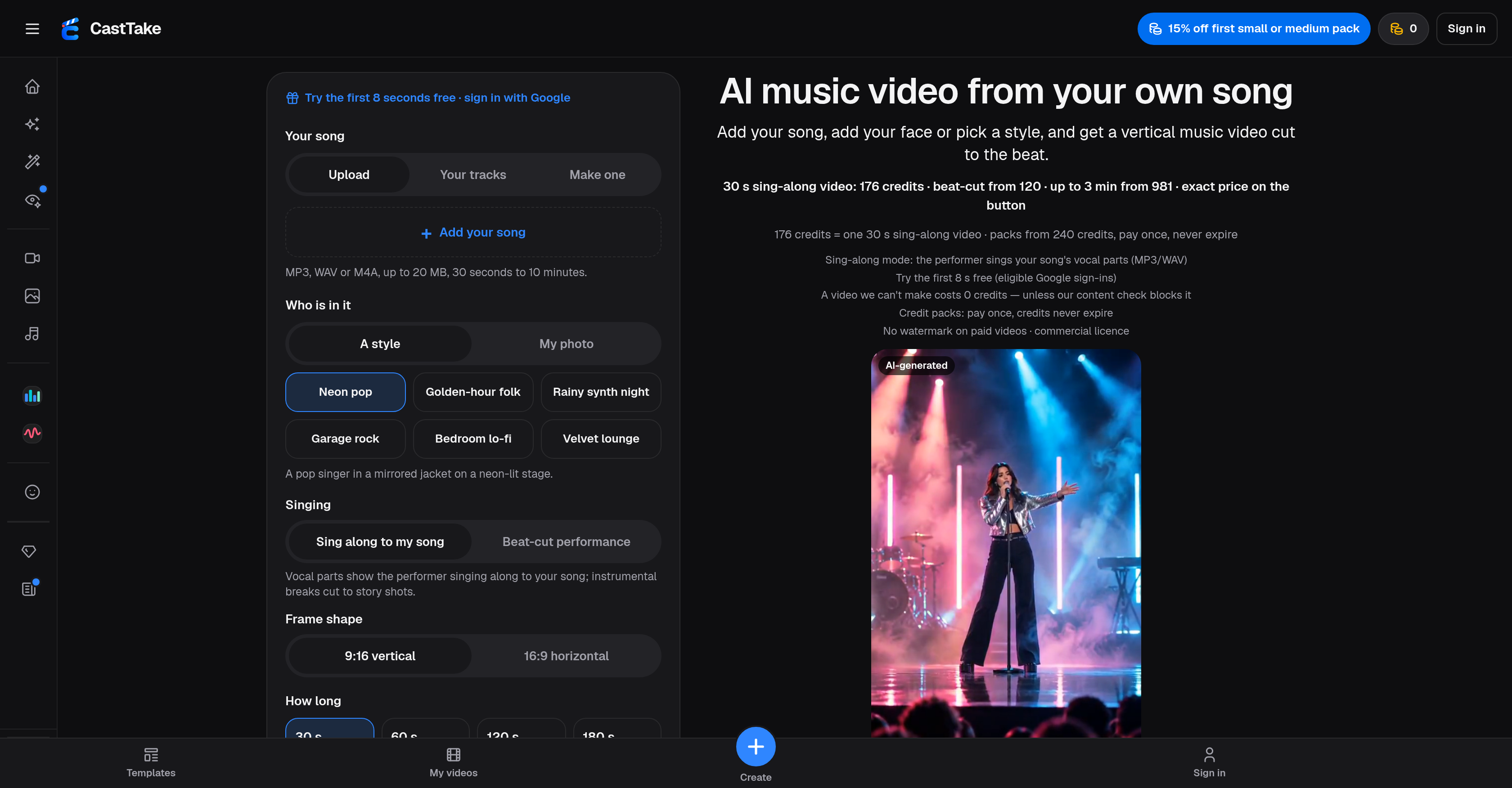
- Get a finished, beat-synced music video without editing footage or timing a single cut. Beat-cut performance mode finds the most energetic stretch of your song, plans 3 to 18 shots based on length, and cuts each scene on the beat.
- Give vocal-heavy tracks a real performance feel. Sing-along mode shows the performer appearing to sing during vocal sections and switches to story or stage shots during instrumental breaks.
- Star in your own music video, or keep your face off camera. Upload a photo of yourself or a consenting adult, or pick a fictional performer style: neon pop, golden-hour folk, rainy synth night, garage rock, bedroom lo-fi, or velvet lounge.
- Publish to TikTok, Reels, Shorts, or YouTube without reformatting. Choose vertical 9:16 or horizontal 16:9 framing and a length from 30 seconds to 3 minutes, with your original song playing under the finished video.
- Use your AI music videos for releases, promos, and client work. Paid videos come watermark-free and include a commercial licence.
- Know your cost before you commit. The exact credit price is shown before submission. Credits are refunded automatically if a video can't be generated, except when a completed video is blocked by content checks. Credit packs never expire and no subscription is required.
- Start from the audio you already have. Upload MP3, WAV, or M4A files from 30 seconds to 10 minutes and up to 20 MB, or pick a track you made on CastTake's Music page.
- Steer the mood and look of every scene without cluttering the frame. Optional lyrics and look-and-feel notes guide the visuals without appearing as on-screen captions.
- Keep working while your video renders. Leave the page and the finished 720p video is saved to your account, with an email notification when it's ready.
Pros & Cons
From the listing; not yet checked by our editors.
Pros
- Dynamic beataligned cutting algorithm
- Automatic energetic segment selection
- Singalong mode uses vocal detection
- Beatcut mode synchronizes movement only
- Vertical and horizontal framing options
- Multiple preset visual styles
- Custom performer face upload
- Optional lyricguided mood setting
- Lookandfeel textual hints accepted
- Three, six, twelve shot planning
- Creditbased transparent pricing display
- Refunds credits on generation failure
- Email notification upon job completion
- Job saved to account persistently
- No watermark on paid videos
- Includes commercial usage license
- Content safety filters reject minors
- Blocks celebrity images
- Supports MP3, WAV, M4A
- File size limit 20MB
- Audio up to ten minutes
- 720p output optimized for Shorts
- Fast generation within minutes
- Credit packs never expire
- Batch credit purchase option
- Automatic beat detection within 1s
- Customizable output length 30120 seconds
- Optional synthetic performer styles
- Userdefined style notes influence visuals
- Commercialready video format
- Crossplatform orientation support
- Audio mixed beneath video track
- Shows credit cost upfront
- Job queue handles concurrent users
- Contentcheck exception handling
- Automatic email with download link
- Stored videos downloadable from account
- Supports lyric input for mood
- Dynamic shot sequencing per tempo
- Nontemplate based video generation
- Multiple credit tiers per duration
- License grants commercial distribution
Cons
- 720p resolution only
- No lip-sync to lyrics
- Only 30120second videos
- Supports only MP3/WAV/M4A
- No public API available
- Credit refunds only on generation failure
- Face continuity errors frequent
- Hand and sign artifacts
- No custom beatmapping options
- Celebrity image uploads rejected
Alternatives to CastTake AI Music Video Maker
Tools that share the most tags with CastTake AI Music Video Maker.
- yesTool | AI Music Video
Create professional animated music videos from any song and image with automatic lip-sync accuracy using Wan S2V AI technology
Freemium · from $14.90/month
$14.90/month
Not yet checked
- Plazmapunk
Transform your music into professional videos in minutes with fast generation that eliminates long rendering times
Freemium · from $5.78/month
$5.78/month
Not yet checked
- AirMusic - AI Music Video Generator
Instantly produce a complete, multi-scene music video from any song with one click using Director Mode for fast, professional results.
Paid · from $11.90/month
$11.90/month
Not yet checked
- 1MoreShot
Create professional music videos from your tracks in minutes using automated AI generation
Freemium · from $8.25/month
$8.25/month
Not yet checked
- LABEL IQ AI
Transform images, lyrics, and keywords into professional music and videos using AI creation tools
Free trial · from $5
$5
Not yet checked
- BeatViz AI
Transform any audio track into professional music videos with perfect beat synchronization using AI-powered audio-visual analysis
Free trial · from $13.90/month
$13.90/month
Not yet checked
Reviews
Rate this tool
Loading reviews...
Frequently asked questions
What audio file formats does CastTake accept and what's the max file size?
CastTake accepts MP3, WAV, and M4A audio files up to 20 MB in size (30 seconds to 10 minutes length).
Can I make a 2‑minute video with CastTake or is it limited to 30/60 seconds?
Yes—you can create a 2‑minute (120 second) video; options are 30 s, 60 s, or 120 s.
What's the difference between Beat‑cut performance and Sing‑along mode in CastTake?
Beat‑cut performance moves the performer on the beat but does not match mouth movements to the lyrics. Sing‑along mode uses vocal sections for shots where the performer appears to sing, while instrumental sections cut to narrative or stage imagery.
Do CastTake videos sync the performer’s mouth to the lyrics?
No—the performer’s mouth is never perfectly synced to the lyrics. Beat‑cut never syncs; Sing‑along only gives the impression of singing during vocal passages.
How many credits does a 30‑second Sing‑along video cost versus a Beat‑cut video?
A 30‑second Beat‑cut video costs 120 credits; a 30‑second Sing‑along video costs 170 credits (additional 6 credits if you choose a made‑up performer style).
Can I use a photo of a friend in CastTake, or does it have to be my own face?
You may use a friend’s photo if the person is 18 or older, has given explicit consent, and the image is not of a celebrity, public figure, or child.
What visual styles can I choose instead of uploading a photo in CastTake?
Available preset visual styles include Neon Pop, Golden‑Hour Folk, Rainy Synth Night, Garage Rock, Bedroom Lo‑Fi, and Velvet Lounge (also listed as folk, synth, rock, lo‑fi, lounge).
Is the output video vertical only, or can I pick horizontal 16:9 too?
Both options are offered: vertical 9:16 for Shorts/Reels/TikTok or horizontal 16:9 for YouTube.