
Overview
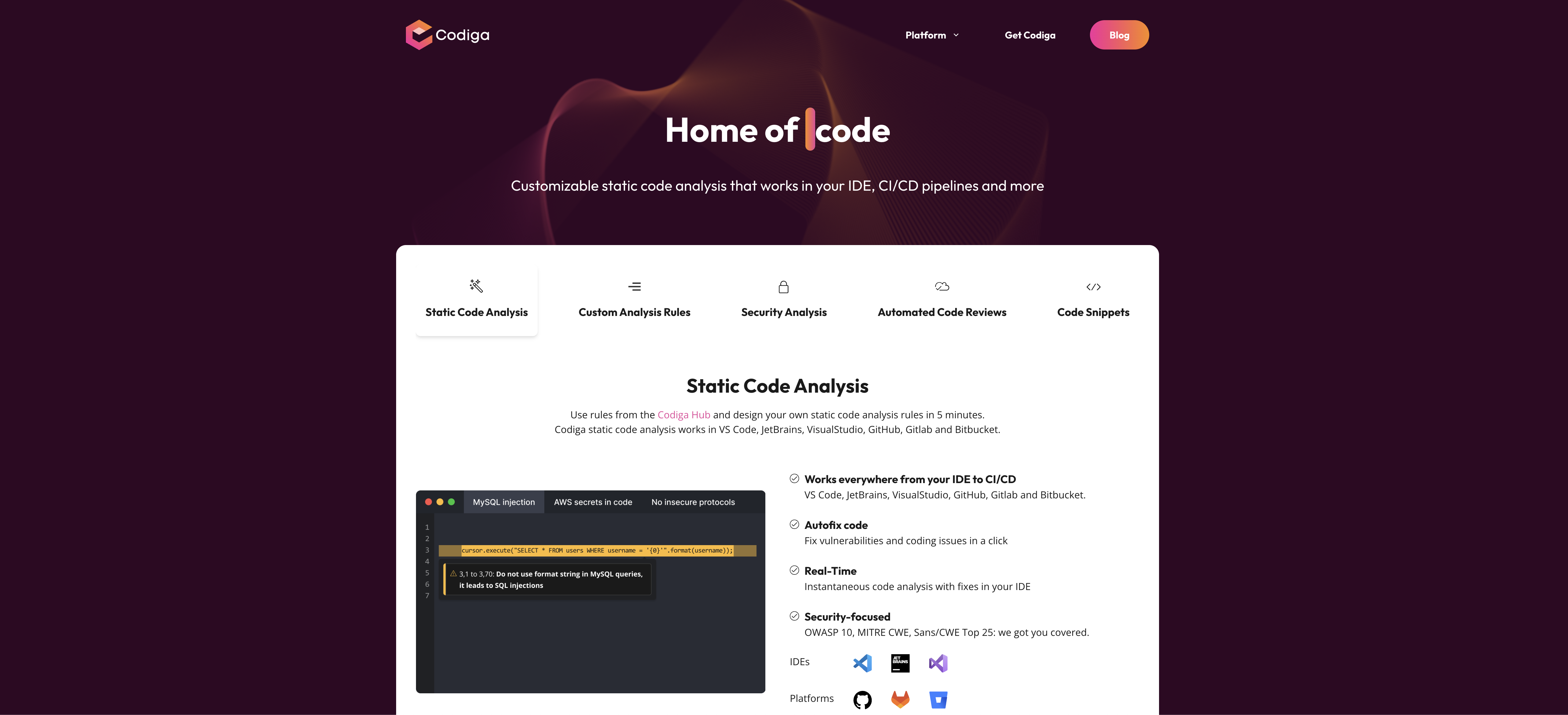
- Automatically fix security vulnerabilities and coding issues with one-click automated code fixes directly in your IDE
- Create custom static analysis rules in 5 minutes without leaving your browser using the intuitive rule builder
- Detect leaked secrets like SSH keys and API tokens before they reach production with advanced security scanning
- Maintain code quality across multi-branch projects with automated code reviews supporting 12+ languages and 1800+ rules
- Access and share smart code snippets instantly within your IDE through the Codiga Hub collection
- Analyze infrastructure code safely with specialized scanning for Docker and Terraform configurations
- Enforce security standards comprehensively with OWASP 10, MITRE CWE, and SANS/CWE Top 25 coverage
- Integrate code analysis seamlessly into existing workflows across VS Code, JetBrains, GitHub, GitLab, and Bitbucket
Pros & Cons
Pros
- Exhaustive code analysis
- Compatible with various environments
- Customizable static code analysis
- Automated code fixes
- Security-focused code analysis
- Support OWASP 10, MITRE CWE, SANS/CWE Top 25
- Support for 12+ languages
- Multi-branches support
- Automated code reviews
- Code snippets feature
- Private code snippets sharing
- Large code snippets collection
- Works in IDEs, CI/CD pipelines
- User-created analysis rules
- Automated security fixes
- Detects leaked secrets
- Infrastructure code analysis
- Fast code feedback
- Supports popular languages and libraries
- Compatible with GitHub, GitLab, Bitbucket
- IDE plugin support
- Git Hooks integration
- Detects issues in real-time
- Historical analysis of errors
- Automated code review
- Checks pull request for violations
- Detects long and complex functions
- Supports popular languages and libraries
- Shows overall code violations
- Displays duplicates, long and complex functions
Cons
- Limited language support
- Requires Node.js for setup
- 5-minute rule creation might be too quick
- Limited security analysis
- Doesn't offer dynamic analysis
- Limited custom rule creation
- Only supports certain IDEs and platforms
- Not explicitly SOC-2 Compliant
- No real-time, continuous monitoring
Reviews
Rate this tool
Loading reviews...
❓ Frequently Asked Questions
Codiga is an AI-powered static code analysis tool for a thorough and secure automated review. Codiga can be integrated with various development environments including VS Code, JetBrains, VisualStudio, GitHub, Gitlab, and Bitbucket.
Codiga offers various features for code analysis. The static code analysis feature helps users create their own static code analysis rules quickly. Codiga also offers automated code fixes for identified vulnerabilities and coding issues with a single click. Security-focused code analysis support is available for OWASP 10, MITRE CWE, and SANS/CWE Top 25. In addition to these, Codiga offers an automated code reviews feature
Codiga can be used with VS Code through a plugin, which provides real-time code analysis and automated fixes right in the IDE. Once installed, Codiga will conduct instantaneous code analysis with fixes in your IDE, and users can access code snippets from the Codiga's Hub within their IDE.
Yes, you can use Codiga for automated code reviews. It supports over 12 languages and 1800+ rules, providing feedback on your code almost instantly. This tool checks code across multi-branches and works with the most popular languages and libraries.
The static code analysis feature in Codiga allows users to enforce their own static code analysis rules and allows code to be tested and shared in accordance with these rules. This analysis works in several platforms including VS Code, JetBrains, VisualStudio, GitHub, Gitlab, and Bitbucket. Also, any coding issues identified can be fixed with a single click using its 'Autofix code' feature.
In Codiga, creating your own static code analysis rules is straightforward. Users can designed their own rules straight from their browser in less than five minutes. They can then test these rules and share them publicly on the Codiga Hub.
Yes, Codiga has the ability to automatically fix vulnerabilities and coding issues within your IDE. Codiga’s auto-fix feature suggests fixes and applies them to your code with a single click. This enhances the security and quality of your code by instantly rectifying any problems detected.
Yes, Codiga offers support for OWASP 10, MITRE CWE, and SANS/CWE Top 25. It uses the largest rulesets of analysis rules to provide thorough security analysis, covering all common threats and software vulnerabilities.
Codiga supports automated code reviews for more than 12 languages. It supports over 1800 rules for these languages, thus catering to a wide range of programming language communities.
Yes, Codiga provides multi-branches support. Whether you work with popular languages or popular libraries, Codiga enables you to operate seamlessly across multiple branches.
In Codiga, code snippets are small bits of re-usable code that can be easily shared. Users can create their own smart code snippets or search for and use ones shared by others in their IDE. These snippets can be made public or kept private to a team as per the user’s discretion. They can be used to resolve frequently encountered issues or serve as templates for repetitive tasks.
Sharing private code snippets with your team using Codiga is as easy as a click. You can easily create code snippets and share them privately with your team. This fosters communication and collaboration within the team, which could be especially helpful for large teams or distributed teams.
Yes, Codiga provides access to a large collection of code snippets available right in your IDE. This collection is accessible from the Codiga's Hub. It is a vital utility for a user and their team to easily find, create, and share smart code snippets.
Codiga offers security-focused code analysis. It supports OWASP 10, MITRE CWE, and SANS/CWE Top 25, which cover common threats and software vulnerabilities. Additionally, Codiga can automatically find and fix security issues in the IDE and detect leaked secrets (like SSH keys and API tokens) in your code. It can also analyze infrastructure code, such as Docker and Terraform, for safety.
Codiga's specific pricing options are not clearly specified on the website, therefore further information would be required to answer this question accurately.
Yes, Codiga can detect leaked secrets in your code. It recognizes leaked SSH keys and API tokens, which enhances the security of your application by preventing unintended exposure of sensitive information.
Yes, Codiga can be integrated with CI/CD pipelines. The static code analysis tool can be used in your IDE, CI/CD pipelines and more. It provides an effortless way to analyze and review code, facilitating continuous integration and continuous delivery processes.
Codiga supports integration with various platforms, including GitLab and Bitbucket. It adapots to your current coding environment and works seamlessly with these platforms, aiding in code review and analysis.
Codiga provides automated security fixes. It automatically fixes security issues right in your IDE, helps detect leaked secrets (like SSH keys and API tokens) in your code, and provides the ability to ensure the safety of your Terraform and Dockers code.
Codiga supports several development environments including VS Code, JetBrains, VisualStudio, GitHub, Gitlab, and Bitbucket. Hence, regardless of your preferred platform, you can leverage Codiga's features to manage and improve your code quality.
Pricing
Pricing model
Freemium
Paid options from
$14/month
Billing frequency
Monthly
Related Videos
CODIGA io
Gustavo Spala•10 views•May 26, 2025