

CrevCLI
Get code review feedback without switching tools: the command-line interface delivers AI code reviews directly in your terminal.
Listing not yet reviewed by our editors · How we check
Overview
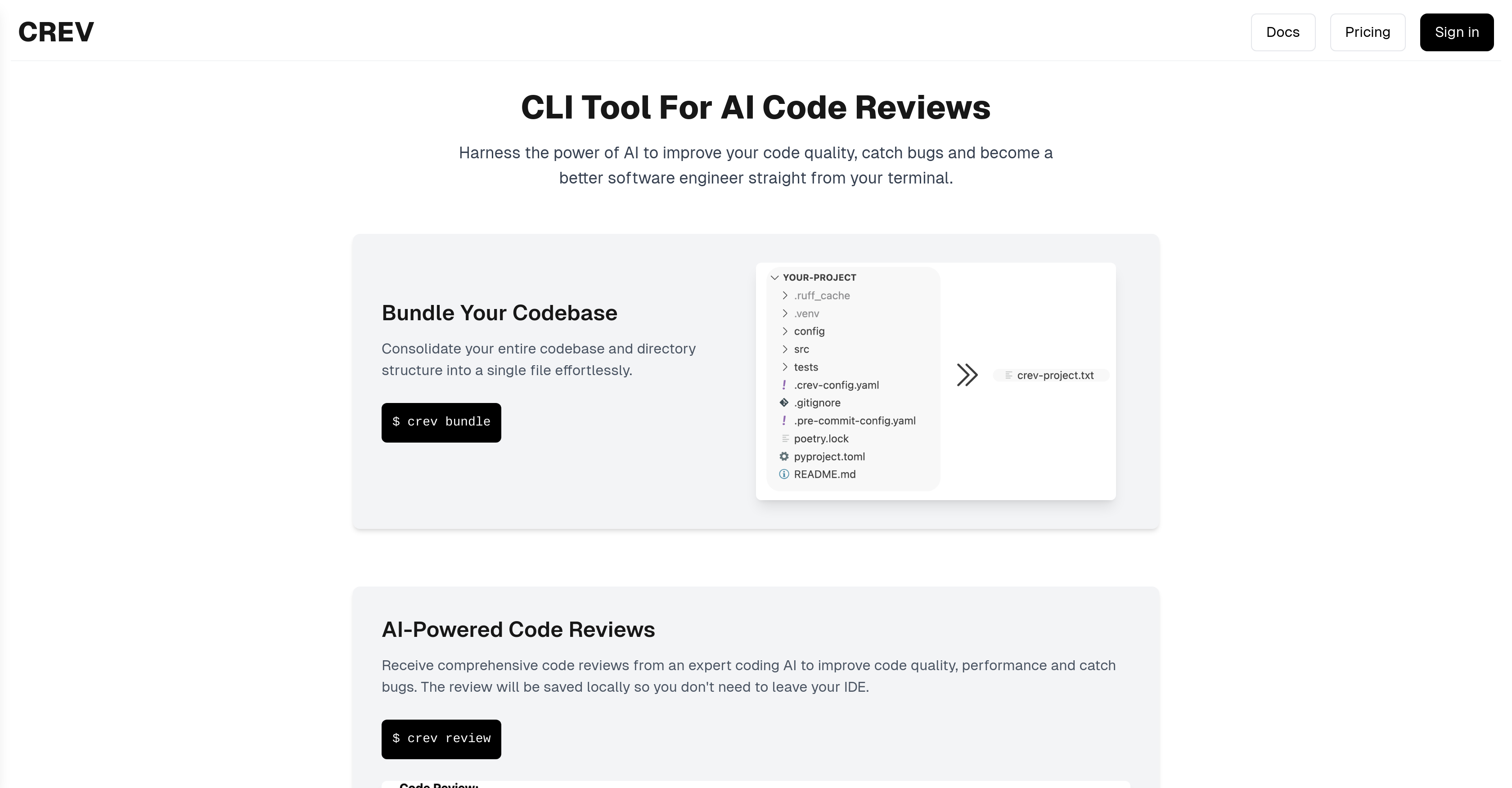
- Get code review feedback without switching tools: the command-line interface delivers AI code reviews directly in your terminal.
- Share your whole project with an AI model in one step: CrevCLI consolidates your entire codebase and directory structure into a single file, so the reviewer sees full project context instead of scattered snippets.
- Catch bugs before they ship: automated code analysis scans your codebase and pinpoints problem areas early in development.
- Ship faster-running software: performance-focused review feedback identifies code that needs optimization and suggests concrete improvements.
- Close security gaps before release: every review includes a security assessment of your code alongside quality checks.
- Keep every critique on hand inside your IDE: generated reviews are saved locally, so you act on feedback within your development environment and track code quality across daily review cycles.
- Run it on any machine your team uses: a fast, efficient Golang build works across Windows, Mac, and Linux.
- Grow into a stronger software engineer: instant, detailed feedback on code quality, bugs, performance, and security shows exactly what to fix and why.
Pros & Cons
From the listing; not yet checked by our editors.
Pros
- CLI integration
- Bug detection
- Code quality improvement
- Performance enhancement
- Code consolidation feature
- Golang built for efficiency
- Cross-platform support
- Locally stored reviews
- IDE-friendly
- Code security checks
- Direct feedback
- Enhances developer productivity
- Improves coding skills
- Single file codebase sharing
- Fast processing
- Windows, Mac, Linux compatibility
Cons
- Knowledge of command line needed
- Codebase compression may lose metadata
- Generates code review offline only
- Relies on Golang efficiency
- No UI for non-terminal users
- Code consolidation may be complex
- Hard to integrate with IDEs
- No specific styles guideline enforcement
- No clear reference to security checks
Alternatives to CrevCLI
Tools that share the most tags with CrevCLI.
- CodeRabbit
Eliminate manual code review bottlenecks with instant PR summaries and intelligent code walkthroughs that accelerate your development workflow
Free trial · from $24/month
$24/month
Not yet checked
- Kilo | Code Reviewer
Eliminate post-merge bugs and security vulnerabilities by catching them in your IDE before committing, using the local code review feature that provides real-time feedback on uncommitted changes.
Freemium · from $15/month
$15/month
Not yet checked
- Coderbuds
Get instant code reviews without waiting for teammates through AI analysis of pull requests under 200 lines
Free trial · from $20/month
$20/month
Not yet checked
- Codiga
Automatically fix security vulnerabilities and coding issues with one-click automated code fixes directly in your IDE
Freemium · from $14/month
$14/month
Not yet checked
- Codoki AI
Merge pull requests faster with structured reviews that highlight only high-impact issues, cutting through noise to focus on what matters
Freemium · from $12.50/month
$12.50/month
Not yet checked
- Mo
Eliminate shipping errors by ensuring your final code matches exactly what your team approved in Slack, using AI to cross-check merge requests for discrepancies before they are merged.
Free trial · from $49/month
$49/month
Not yet checked
Reviews
Rate this tool
Loading reviews...
Frequently asked questions
What exactly is CrevCLI?
CrevCLI is an AI tool designed for code reviewing with the intention to improve code quality, detect bugs, and enhance overall software performance. It includes a seamless command-line interface for developers to receive code reviews without leaving their terminal. A distinguished feature of CrevCLI is its ability to consolidate an entire codebase and directory structure into a single file.
How can CrevCLI help improve my code quality?
CrevCLI reviews your code and provides extensive feedback on quality, performance, and security with the help of sophisticated AI models. By pointing out areas of concern and suggesting potential improvements, CrevCLI aids in increasing the quality of your code.
What is the main purpose of using CrevCLI?
The major purpose of using CrevCLI is to help developers improve their software engineering skills. It achieves this by providing instant feedback on your code and suggesting necessary improvements, thus improving code quality, detecting bugs and boosting the software's overall performance.
How does CrevCLI's code review process work?
CrevCLI accepts your entire codebase consolidated into a single file. The advanced AI models then perform a comprehensive review of the code in terms of quality, bugs, performance, and security. The review results are saved locally for your reference and use.
What sort of feedback can I expect from CrevCLI's code reviews?
CrevCLI's code reviews provide extensive feedback on code quality, performance, and security. The tool uses sophisticated AI models to analyze your codebase and provide this valuable insight, which could include detected bugs, performance enhancement suggestions, and security concerns.
How does CrevCLI consolidate en entire codebase into a single file?
CrevCLI has an unique capability to consolidate your entire codebase and directory structure into a single file. Though the exact mechanism is not mentioned, it is designed to simplify sharing your codebase with AI models for review.
What language is CrevCLI built with?
CrevCLI is built using Golang. This choice of language ensures the speed and efficiency of the tool.
What platforms does CrevCLI support?
CrevCLI is cross-platform and supports Windows, Mac, and Linux operating systems.