

DeVoice X Transcript Generator
Get a Twitter video transcript in one step without saving files: paste a public X post or Space URL and generate text directly from the link, with no download or conversion.
Listing not yet reviewed by our editors · How we check
Overview
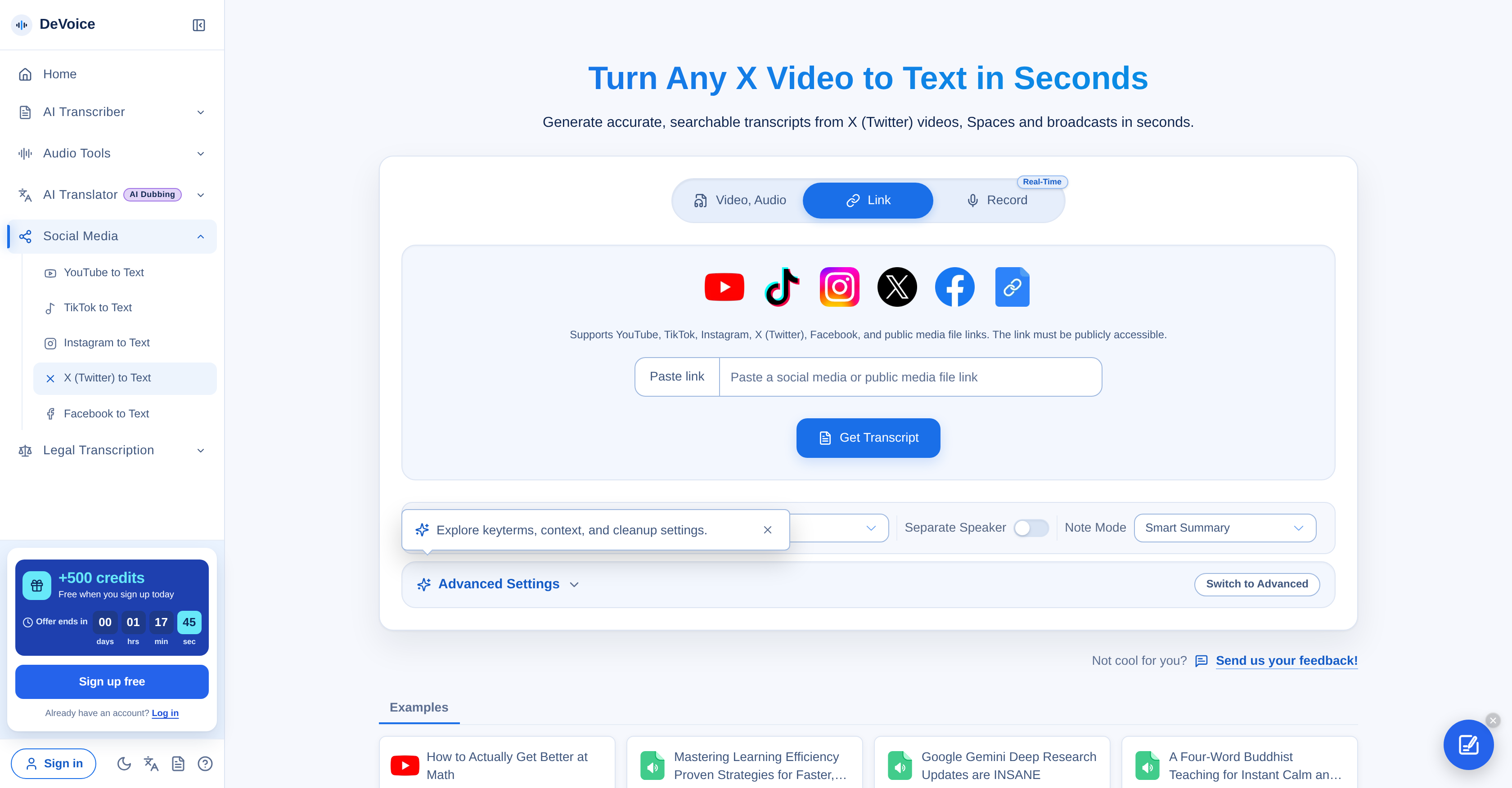
- Get a Twitter video transcript in one step without saving files: paste a public X post or Space URL and generate text directly from the link, with no download or conversion.
- Transcribe every source from one workspace: the same flow covers YouTube, TikTok, Instagram, Facebook and public media links, plus uploaded video or audio files.
- Capture live X Spaces as they happen: real-time recording builds a timestamped, searchable transcript while the broadcast is still running.
- Find any quote in a long X Space in seconds: each transcript line stays linked to the source timeline, so selecting a line jumps to that exact moment.
- Know exactly who said what in multi-speaker discussions: optional speaker separation labels each participant in X Spaces and panel conversations.
- Transcribe X videos in your audience's language: support for 100+ languages, including English, Chinese, Japanese, Spanish, Arabic and Hindi, with automatic language detection for unknown recordings.
- Publish accurate quotes without retyping: inline editing fixes wording before you copy or export, on top of an advertised 95.2% transcription accuracy.
- Add captions to X videos immediately: export ready-to-use SRT and VTT subtitle files with timestamps already in place.
- Archive, search and analyze transcripts in the tools you already use: export to TXT, DOCX or CSV for documents, spreadsheets and records.
- Match transcription depth to the job: Basic mode delivers quick results, while Advanced mode adds an upgraded engine, speaker labeling, note modes and extra settings.
- Leave every meeting with clear accountability: the Meeting Summary template pulls out decisions, action items, owners and next steps.
- Review hours of audio in minutes: Smart Summary picks the best structure automatically, Chapter Summary splits content into headed sections with recaps, and Core Points extracts arguments and conclusions.
- Study lectures and talks faster: Study Notes reformats spoken material into review-ready notes.
- Turn one Space or video into a content pipeline: Creator Repurpose suggests posts, clips and ideas, and podcast show notes add chapter markers and highlights.
- Analyze professional discussions with purpose-built structure: specialized templates map court disputes, party claims and evidence chains, diagnostic debates and treatment options, and factual conflicts with unverified claims flagged.
Pros & Cons
From the listing; not yet checked by our editors.
Pros
- URLonly ingestion, no download
- Supports major social platform links
- Realtime recording transcription workflow
- Clickable timestamps jump to source
- Inline transcript editing before export
- Multiple export formats supported
- Automatic language detection 100+ languages
- Builtin speaker diarization
- Multispeaker attribution labeling
- Framealigned timestamps precision
- Smart Summary autostructure selection
- Chapter Summary with concise recaps
- Core Points extraction mode
- Study Notes formatting template
- Creator Repurpose content ideas
- Meeting Summary action item extraction
- Court Summary dispute extraction
- Diagnostic debate analysis template
- Evidence organization conflict detection
- Podcast show notes with markers
- Advanced transcription settings toggle
- Basic and advanced mode options
- Note mode for quick annotations
- Supports public media file uploads
- No external converter required
- Multilanguage transcription without manual selection
- Speaker labels preserve conversation flow
- Timestamped subtitles ready for captioning
- CSV export suitable for spreadsheets
- DOCX export retains formatting
- Automatic speaker separation in panels
- High accuracy 95%+ reported
- Fast turnaround seconds per minute
- Supports both audio and video inputs
- Handles live broadcast streams
- Copytoclipboard from transcript line
- Adjustable transcription engine selection
- Background noise reduction preprocessing
- Integrated audio trimming tool
- Video trimming aligned with timestamps
- Key Finder highlights important terms
- Legal transcription compliance templates
- Multiformat subtitle generation
Cons
- Public-only media restriction
- No batch URL processing
- Zero free daily credits
- No API for automation
- No PDF export option
- Limited speaker diarization accuracy
- No custom vocabulary support
- Summaries fixed to presets
- No offline processing mode
- No cloud storage integration
Alternatives to DeVoice X Transcript Generator
Tools that share the most tags with DeVoice X Transcript Generator.
- SpacesRecorder
Catch Twitter Spaces you never knew were happening: SpacesRecorder watches the hosts, shows, journalists, and market commentators you follow and checks each account every two minutes, so unannounced live Spaces are recorded automatically.
Freemium · from $10/month
$10/month
Not yet checked
- TranscriptX.AI | X Spaces Transcript
Get the full text of any recorded X Space without signing in or saving audio files: paste the public x.com Space replay link and the audio is retrieved and transcribed for you, with no X account or local download.
Freemium · from $11.99/month
$11.99/month
Not yet checked
Reviews
Rate this tool
Loading reviews...
Frequently asked questions
How do I paste an X (Twitter) video link into DeVoice X Transcript Generator?
Copy the public X post or Space URL using the Share button, paste it into the input field on DeVoice’s X Transcript Generator page, and click the Get Transcript button.
Can DeVoice X Transcript Generator create a transcript without downloading the video?
Yes, DeVoice transcribes directly from the supplied URL without requiring you to download the video first.
What languages does DeVoice X Transcript Generator support and does it auto‑detect them?
DeVoice supports over 100 languages, including English, Chinese, Japanese, Spanish, Portuguese, German, French, Korean, Arabic, Hindi and many others. Automatic language detection is available for recordings where the language is unknown.
Is speaker separation available for X Spaces with multiple participants?
Speaker separation (diarization) is available as an optional setting and works with X Spaces that have multiple participants.
How accurate is the transcription accuracy claim of DeVoice X Transcript Generator?
DeVoice advertises a transcription accuracy of 95.2%.
Which export formats can I download the transcript in (TXT, SRT, VTT, DOCX, CSV)?
Transcripts can be exported as TXT, SRT, VTT, DOCX, or CSV.
Can I generate subtitle files directly from an X video using DeVoice?
Yes. By exporting to SRT or VTT you receive ready‑to‑use subtitle files for the X video.
What’s the difference between the Basic and Advanced transcription modes?
Basic mode uses the standard engine with minimal options; Advanced mode switches to an upgraded engine and exposes additional settings such as automatic language detection, speaker separation, note mode, and other advanced configuration options.