

EasyVideoAI
Put yourself and a partner into a recognizable two-person performance without filming a single frame. Upload two separate portrait photos in JPEG, PNG, or WebP and the AI face swap places both faces onto the Hotel Lobby performers.
Listing not yet reviewed by our editors · How we check
Overview
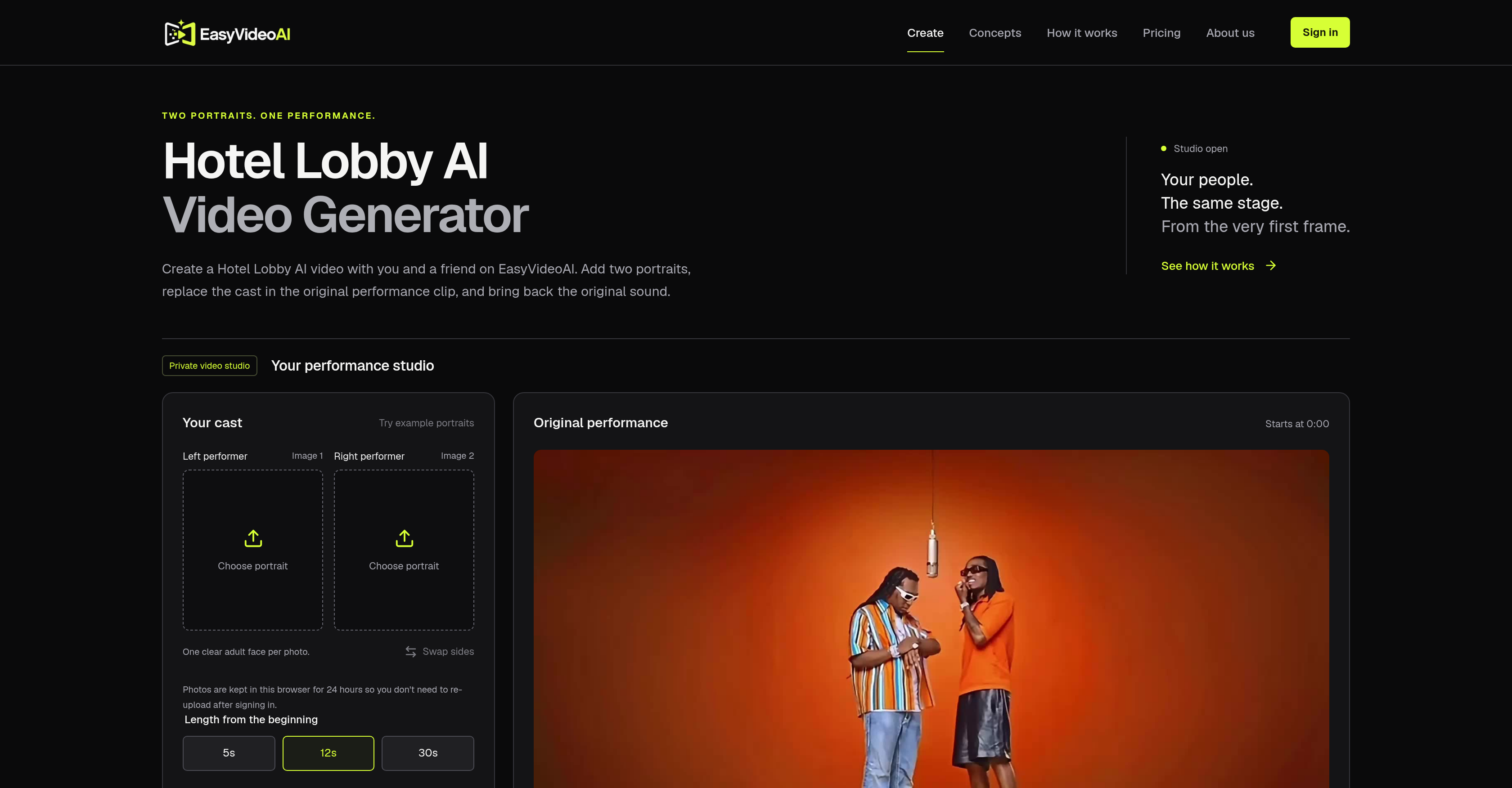
- Put yourself and a partner into a recognizable two-person performance without filming a single frame. Upload two separate portrait photos in JPEG, PNG, or WebP and the AI face swap places both faces onto the Hotel Lobby performers.
- Get a face swap video that moves like the real scene instead of a flat overlay. Motion preservation keeps the original stage, gestures, body movement, and camera angles intact around the new faces.
- Keep the sound that makes the clip instantly recognizable. The original source audio is restored in the finished AI video, so there is no re-recording or manual syncing.
- Post straight to any feed without cropping or re-editing. Export in landscape, square, or vertical format at 480p or 720p resolution.
- Match the clip to its purpose, from a quick reaction post to a full performance. Choose a 5, 12, or 30-second duration before generation starts.
- Avoid wasted generations on the wrong scene or unusable photos. Preview the original clip first, and get the sharpest likeness by using clear, well-lit, front-facing portraits of one person each.
- Publish only results you are satisfied with. Compare the generated video against the original to check performer motion, face likeness, and lip-sync before you download.
- Keep personal photos out of public view. Uploaded portraits stay in your browser for 24 hours, are stored privately, and never appear in a public gallery or get reused without explicit consent.
- Create deepfake content responsibly with consent built into the workflow. Every generation requires confirming that both people pictured are adults who agreed to the use of their likeness.
Pros & Cons
From the listing; not yet checked by our editors.
Pros
- Retains original audio
- Customizable length and resolution
- Preserves background, gestures, movement
- Preserves camera angle
- Review option before download
- Protects privacy with consent
- Accepts JPEG, PNG, WebP
- Perfect placement and synchronization
- Facilitates comparison to original
- Uses predefined clip templates
- Supports face swap technology
- Considers individual facial identities
- Engages deepfake technology
- Aids in digital entertainment
- Promotes content creation
- Preserves motion of original
- Offers video reviewing feature
- Matching lip-sync feature
- Supports two separate photos
- Conserves source framing
- Restores original audio
- Guides in photo optimization
- Helps check source
- Switch between frame ratios
- Resulting video has audio
- Enforces adult consent
- Allows review before download
- Supports up to 10MB images
- Clear instructions for image selection
- Personal media kept private
- One separate clear portrait each
- No upload after login for 24hrs
- Flexible length selection
- Resolution choice: 480p, 720p
- Stage, gestures preserved in output
- File checked before finalization
- Option to swap sides of photos
- Presents terms before use
- Provides precise cost before confirmation
- Offers secure purchase with Stripe
- Personal media not in public gallery
- Explicit privacy policy
- Open for review without final confirmation
- Review includes opening, faces, gestures
- Performance clip built around pre-existing
- Replace people in original frame
- Original audio added back to result
Cons
- Requires two portrait photos
- Non-customizable video templates
- Variable output quality
- Need for video review
- Specific photo format (JPEG, PNG, WebP)
- Consent requirement for pictured individuals
- Non-uploadable custom videos
- No cropping video options
- Inability to upload custom videos
- Lacks real-time video generation
Alternatives to EasyVideoAI
Tools that share the most tags with EasyVideoAI.
- RapVideo.ai
Join the Hotel Lobby trend with just two photos: upload one photo of each person, or one photo of both, and the AI turns them into a rap duo video in the orange booth, with the left person rapping into a hanging mic while the partner hypes.
Paid · from $9.99/unit
$9.99/unit
Not yet checked
- AI Migos Video
Star in the viral Hotel Lobby trend with a friend who isn't in the same room: upload one clear, front-facing photo of each person, and the photos don't need to be taken together or at the same time.
Free trial · from $14.99/month
$14.99/month
Not yet checked
- HotelLobbySi.app
Get a finished, share-ready comedy clip from just two photos: the Hotel Lobby AI Video Generator animates static images into a short video with no filming, editing, or footage required.
Free trial · from $24.90/month
$24.90/month
Not yet checked
- AIReel | Hotel Lobby
Get a finished rap performance video without editing skills: the preset Hotel Lobby template supplies the orange booth, camera framing, and two-person choreography, so you skip manual face swaps and motion syncing.
Paid · from $13.99/month
$13.99/month
Not yet checked
- Mitte AI | Hotel Lobby
Put yourself and a friend into Quavo and Takeoff's COLORS performance: the AI character swap replaces both original performers using just two clear photos, one person per photo.
Paid · from $16/month
$16/month
Not yet checked
- HotelLobbyVideo.com
Put yourself and a friend, partner, or anyone you tag on stage in the viral Hotel Lobby trend, with AI face swap that places both faces onto Quavo and Takeoff from two selfies.
Free trial · from $9.90/unit
$9.90/unit
Not yet checked
Reviews
Rate this tool
Loading reviews...
Frequently asked questions
What is EasyVideoAI?
EasyVideoAI is an AI-powered tool that allows users to create 'Hotel Lobby AI videos'. It uses input of two separate portrait photos to replace actors in a fixed video clip, all while retaining the original audio from the clip. The end product preserves the background, gestures, motion, and camera angle from the original clip, and integrates the user-uploaded portraits as the performers in the video.
What is a 'Hotel Lobby AI video'?
A 'Hotel Lobby AI video' is a type of video created by EasyVideoAI. It uses a two-person performance video template known as 'Hotel Lobby' as the base. The user provides two portrait images which are used to replace the performers in the original video. The original audio, background, gestures, and camera angles are retained.
How do I use EasyVideoAI?
To use EasyVideoAI, users upload two distinct, clear portrait photos, review the original clip and select its duration and resolution. The AI model proceeds to replace the performers in the video with the uploaded images and maintains the original audio clip. Review the resultant video, compare performer motions and identities with the original, and move forward with the final product if satisfied.
What file formats does EasyVideoAI support?
EasyVideoAI supports JPEG, PNG, or WebP format for portrait photos.
Can I use my own video clip with EasyVideoAI?
At the moment, users cannot upload their own video clips with EasyVideoAI. The platform uses pre-set clip templates for the video generation process.
How do the photos I upload affect the final video?
The photos you upload serve as the faces of the performers in the final generated video. The tool retains the background, gestures, motion, and camera angles of the original video but integrates the uploaded portraits onto the performers. Hence, the quality and clarity of the uploaded photos would significantly impact the final appearance and quality of the video.
What does 'face swap' mean in EasyVideoAI?
'Face swap' in EasyVideoAI refers to the process of replacing the faces of the performers in the original clip with the faces from the user-uploaded portraits.
Does EasyVideoAI preserve the original audio from the video clip?
Yes, EasyVideoAI does preserve the original audio from the selected video clip. It is restored in the final generated output, maintaining the auditory elements from the initial footage.