

EzVoice AI
Get a finished voiceover without booking a voice actor or setting up a mic: paste your script, pick a narrator, generate speech, and download the MP3.
Listing not yet reviewed by our editors · How we check
Overview
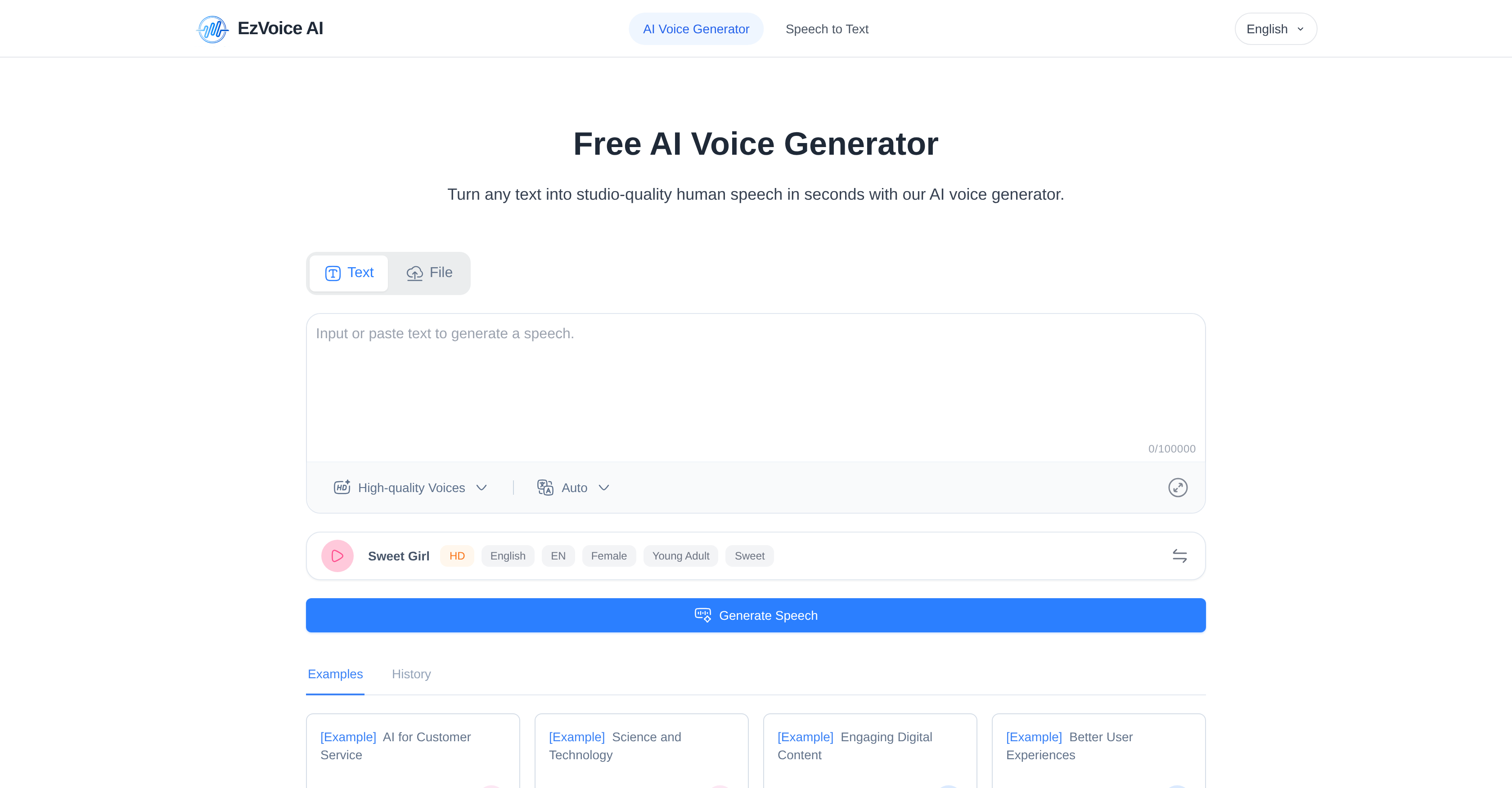
- Get a finished voiceover without booking a voice actor or setting up a mic: paste your script, pick a narrator, generate speech, and download the MP3.
- Turn documents you already have into narrated audio without retyping a word: upload PDF, PowerPoint, DOCX, and book files up to 50 MB for direct text-to-speech conversion.
- Convert screenshots, scanned pages, and photos of text into spoken audio: built-in OCR reads uploaded images and passes the text to the voice generator.
- Repurpose existing recordings and clips: audio and video uploads up to 10 MB go through the generator, and speech-to-text is included in the same interface.
- Reach international viewers with localized narration: a voice library covering 50+ languages and regional accents, including dialects such as British RP and US Southern.
- Find the right narrator in minutes instead of auditioning blind: filter voices by age, gender, and vocal style, then preview each one before generating.
- Keep one recognizable narrator across a YouTube series, faceless channel, or course: reselect the same voice and fine-tune warmth and grit sliders for a consistent sound.
- Hold listener attention with narration that sounds less robotic: breath and pause modeling adds natural inhalations, variable pauses, pacing, and emphasis.
- Drop audio straight into your edit without cleanup: exports are high-bitrate MP3 files processed to remove the digital hiss common in free TTS tools.
- Narrate full course modules, long articles, and book chapters in one pass: the editor accepts up to 100,000 characters per generation.
- Update lessons, ad variations, and podcast segments the moment a script changes: regenerate narration on demand instead of scheduling a new recording session.
- Submit client scripts and unreleased material with confidence: end-to-end encryption, and private scripts are never used to train public models.
- Start producing audio immediately: the AI voice generator is free to try with no account registration required.
- Create and download voiceovers away from your desk: the mobile browser interface supports generating, editing, and downloading audio.
- Return to earlier takes without starting over: a History area keeps your previous voice generations in one place.
Pros & Cons
From the listing; not yet checked by our editors.
Pros
- Expressive breath and pause modeling
- Customizable warmth and grit settings
- Highbitrate MP3 export
- Digital hiss minimization
- Supports PDF, PPT, DOCX
- Image OCR to speech
- Draganddrop file conversion
- No signup free trial
- Generation history retention
- 200+ voices, 50+ languages
- Regional accent library
- Voice style filters (age, gender)
- Lowlatency cloud processing
- Enterprisegrade script confidentiality
- Multilanguage UI
- Brand voice persona repeatability
- Batch processing capability
- Large file upload limits (50MB)
- Supports video narration extraction
- Content localization across languages
- Adjustable voice emotion rendering
- High maximum text length (100k)
- API access potential
- Consistent narrator across projects
- Mobileoptimized interface
- Secure data handling claims
- Highquality expressive TTS
- Custom voice persona building
- Supports audio file input
- Fast generation seconds
- Free usage without registration
- History panel for redownload
- Supports multilingual output
- Finegrained voice characteristic control
- Cloudbased processing scalability
- Brandconsistent audio output
- High fidelity speech synthesis
- Regional voice style presets
- Automatic text flow adaptation
- No background noise artifacts
- Low resource client requirements
- Scalable for enterprise workloads
- Supports elearning narration
- Export ready for broadcasting
- Intuitive preview before generation
- Seamless integration with workflow
- Supports subtitles to audio conversion
- Advanced neural voice models
Cons
- 50MB PDF upload limit
- 10MB audio/video limit
- API access not guaranteed
- Privacy policy vague
- Only MP3 export format
- No offline processing option
- Limited SSML control
- Free trial lacks account features
- Voice finetuning coarse
- Batch processing unclear limits
Alternatives to EzVoice AI
Tools that share the most tags with EzVoice AI.
- Speechma
Generate professional voiceovers for social media and presentations instantly with 400+ premium AI voices featuring unique personalities and accents
Freemium · from $9/month
$9/month
Not yet checked
- Revoicer
Create human-sounding voiceovers that capture attention using emotional tones like friendly, cheerful, or excited for more engaging content
Paid · from $47
$47
Not yet checked
- WooTechy VoxDo
Generate realistic voiceovers instantly with AI text-to-speech conversion across 100+ languages and global accents
Free trial · from $15.95/month
$15.95/month
Not yet checked
- Speechactors
Produce studio-quality voiceovers instantly with an online AI voice generator that converts your text into natural, engaging speech
Freemium · from $23/month
$23/month
Not yet checked
- Resemble.ai
Clone your exact voice instantly using just a short audio sample, eliminating the need for lengthy recording sessions
Free trial · from $29/month
$29/month
Not yet checked
- Speechify Studio
Produce studio-quality voiceovers instantly with 200+ natural AI voices across 60+ languages and accents
Freemium · from $7.99
$7.99
Not yet checked
Reviews
Rate this tool
Loading reviews...
Frequently asked questions
How many languages and regional accents does EzVoice AI offer?
EzVoice AI lists over 50 languages and a large catalog of regional accents across those languages.
Can I upload a PDF or PowerPoint and get a narrated MP3 automatically?
Yes—PDF and PowerPoint files can be uploaded (up to 50 MB) and the service will generate a downloadable MP3 narration.
What is the maximum text length or file size I can process in one go?
The text box accepts up to 100 000 characters; uploaded PDFs, PPTs, DOCX and image files are limited to 50 MB, while audio/video files are limited to 10 MB.
Does EzVoice AI let me tweak voice warmth or grit settings?
The interface includes voice‑settings sliders for warmth and grit, allowing users to adjust those qualities before generation.
Are the exported MP3 files truly high‑bitrate and free of digital hiss?
Exported files are high‑bitrate MP3s, and the platform advertises built‑in processing that removes the typical digital hiss of free TTS tools.
Is there any watermark or usage limit on the free‑no‑signup trial?
IDK
How does EzVoice AI guarantee my script’s confidentiality and privacy?
EzVoice AI states that it uses end‑to‑end encryption and never trains its public models on users’ private scripts, keeping the content confidential.
Can I use the generated voices for commercial projects like ads or podcasts?
IDK