

HouseChief
Keep full control of your shared family calendar: every AI-suggested event change, meal plan, email, and project waits in a pending state until a parent approves or edits it.
Listing not yet reviewed by our editors · How we check
Overview
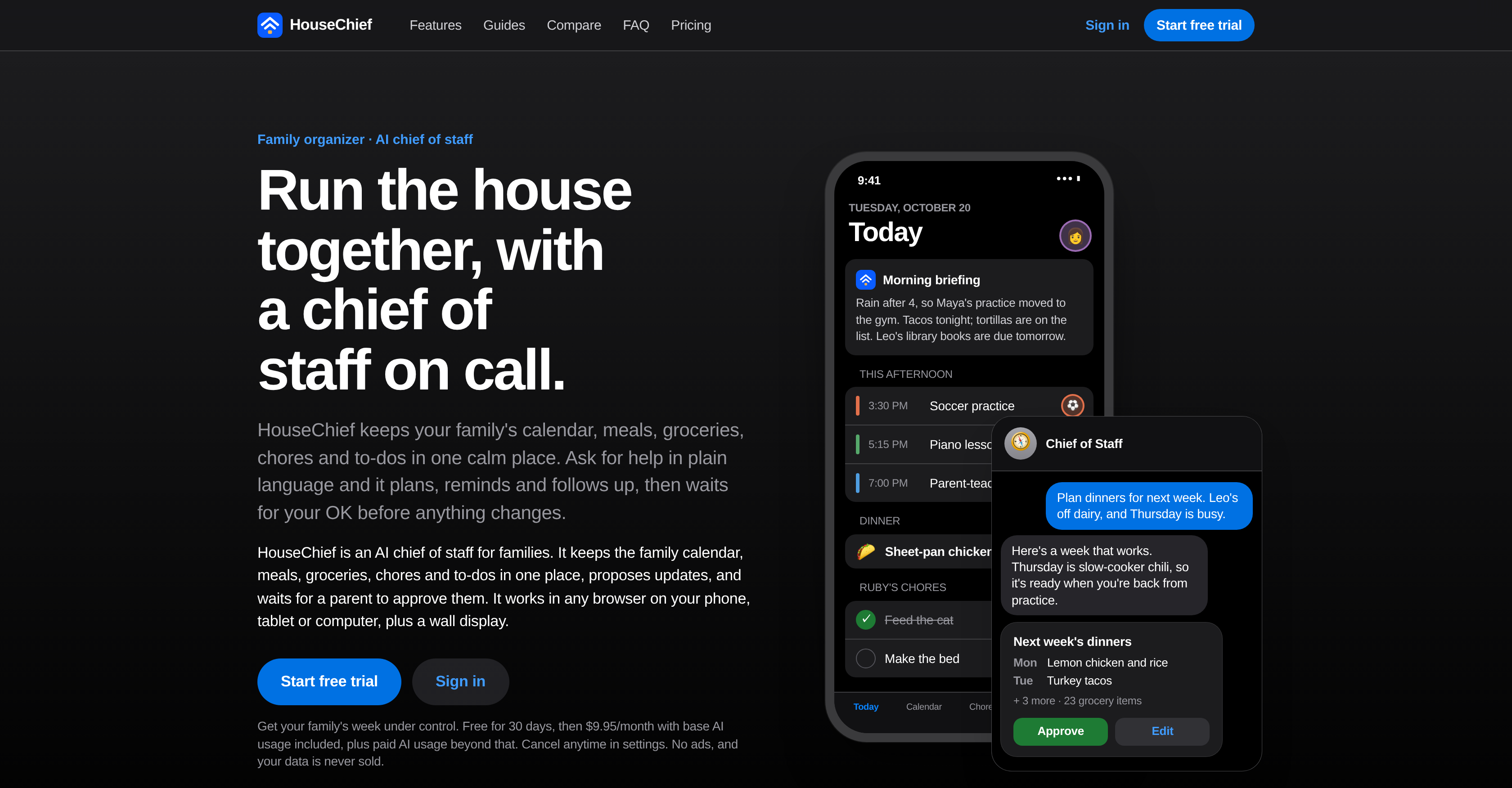
- Keep full control of your shared family calendar: every AI-suggested event change, meal plan, email, and project waits in a pending state until a parent approves or edits it.
- Get school dates onto the family schedule without retyping them: snap a photo of a flyer or forward a school email, and the assistant pulls out dates, locations, and details for your review.
- Keep everyone's schedules in step across the tools you already use: two-way sync with Google Calendar, iCloud, and Outlook, plus per-event destination calendars, color coding by person, and single-occurrence edits to recurring events.
- Serve dinners that fit allergies and busy nights: the weekly meal planner covers breakfasts, lunches, dinners, and snacks, uses family context such as a dairy-free child or a packed Thursday, and stores your recipes with links and ingredients.
- Shop faster with no forgotten items: recipe ingredients move to the grocery list in one tap, and items sort automatically by aisle on separate lists for each store.
- Get kids finishing chores on their own: each child has a personal chore chart with large checkboxes, stars, streaks, and parent-approved rewards, with no email or login needed and a parent PIN that keeps them out of adult settings.
- Put the whole day on the kitchen wall without buying dedicated hardware: any old tablet becomes a family dashboard showing today's and tomorrow's events, chore columns, the dinner plan, and groceries, and it dims at night.
- Hand off specific areas of family life: set up focused agents for meals, school, or travel with separate conversation threads and recurring reviews, and send requests by typing, speaking, or through Alexa or Google Assistant.
- Start each day knowing what needs attention: a morning briefing summarizes the schedule, weather, and open items, with push notifications for reminders from a Home Screen shortcut on iPhone or Android.
- Keep grandparents and sitters informed without sharing private data: send a revocable, read-only schedule link that shows only the calendar and needs no account.
- Keep household documents beside your plans: OneDrive integration stores PDFs, photos, and recipes with your calendar and lists, available on every device.
- Keep monthly costs predictable: one $9.95 subscription after a 30-day free trial includes base AI usage, and AI features pause at the limit unless you buy extra usage up to a cap you set.
- Keep family information inside the household: no ads, no sale of family data, and children's names, chores, calendars, photos, and chats are never sent for ad measurement.
Alternatives to HouseChief
Tools that share the most tags with HouseChief.
- Nestify
Eliminate forgotten plans and endless texts by syncing every family member’s schedule in one shared calendar, with color-coded events for instant visual clarity.
Free
Not listed
Not yet checked
- Zazu
Eliminate the mental load of school deadlines and appointments with Zazu's AI family assistant that tracks and reminds you of critical dates
Free trial · from $19/month
$19/month
Not yet checked
- Nellie by Anello
Get your family schedule handled by sending a text, with no new app to learn: Nellie works inside iMessage, group chats, and email, and you talk to it the way you would talk to a person.
Freemium · from $12/month
$12/month
Not yet checked
Reviews
Rate this tool
Loading reviews...
Frequently asked questions
How does HouseChief's AI chief of staff handle my plain‑language requests?
HouseChief’s AI chief of staff accepts typed or spoken plain‑language requests, interprets the request using the family’s calendar, meals, and lists, and then proposes the appropriate action (e.g., planning a dinner, moving an appointment, creating a reminder). The AI never executes a change without parental confirmation.
Can I use voice commands with HouseChief on my phone or tablet?
Yes. The assistant can process spoken requests on both phones and tablets, allowing voice‑enabled interaction alongside typed input.
What calendars can I sync with HouseChief and is the sync two‑way?
HouseChief syncs two‑way with Google Calendar, iCloud Calendar, and Outlook. Other calendars can be added via subscription links, though those are read‑only imports.
How do I approve or edit the AI‑suggested calendar changes before they’re saved?
All AI‑generated calendar changes, meal plans, emails, and projects remain in a pending state until a parent taps an Approve button or selects Edit to modify them. Only after approval are the changes saved to the calendar.
Can I set up recurring events in HouseChief and change just one occurrence?
Recurring events are supported. Users can edit a single occurrence of a repeating event without altering the rest of the series, and they can also set up new repeating events through the calendar UI or via the AI.
How does the weekly meal planner work and can I add my own recipes?
The weekly meal planner lets families schedule breakfasts, lunches, dinners, and snacks for the entire week. A built‑in recipe box stores links and ingredient lists, and users can add custom recipes or import their own. Recurring dinners can be set to repeat automatically.
Is there a one‑click way to move ingredients from a recipe to the grocery list?
Yes. After a recipe is selected, HouseChief offers a one‑step transfer that moves all listed ingredients directly onto the grocery list with a single tap.
Does HouseChief automatically group grocery items by aisle for each store?
Grocery items are automatically grouped by aisle as they are added. Families can maintain separate store‑specific lists or a single general checklist, and the aisle grouping updates for each store list.