

Overview
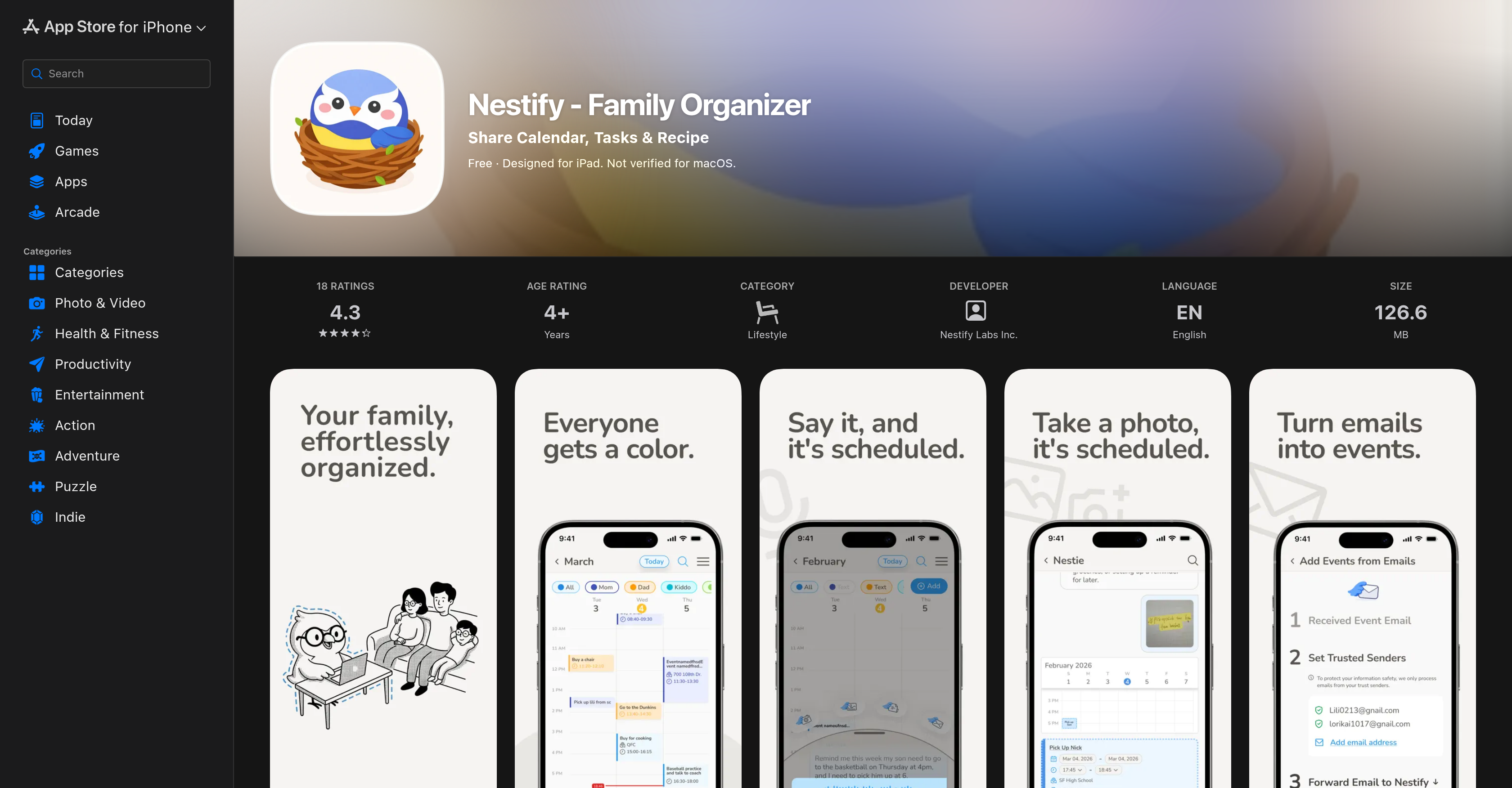
- Eliminate forgotten plans and endless texts by syncing every family member’s schedule in one shared calendar, with color-coded events for instant visual clarity.
- Save hours of typing by adding chores, grocery lists, and to-dos with voice commands, keeping hands free while managing family tasks.
- Streamline dinner prep by importing favorite recipes from Instagram and TikTok, then automatically adding every ingredient to your shared shopping list in seconds.
- Reduce mental load by speaking a task once—real-time sync instantly updates everyone’s calendar, lists, and chores across all connected devices.
- Coordinate across platforms effortlessly by syncing your shared family calendar with Google and Apple calendars, ensuring no double-booking or missed events.
- Keep every household member accountable with real-time chore updates and assignments, so everyone knows their responsibilities without reminders.
- Protect your family’s privacy with strong data privacy practices that keep your schedules, lists, and meals secure by default.
- Achieve a clutter-free, organized lifestyle with a minimal, intuitive interface designed for busy families to navigate and act fast.
Pros & Cons
Pros
- Developed for Apple devices
- Shared family calendar
- Voice commands support
- Syncs with Google, Apple calendars
- Consolidates chores, to-do lists
- Real-time sync across users
- Recipes & Meals feature
- Import recipes from social media
- Auto-add ingredients to shopping list
- Simplicity and intuitiveness
- User data privacy focus
- Voice to text feature
- Family activity planning
- Task management
- Schedule synchronization
- Meal preparation assistance
- Real time updates
- Colored events visualization
- Grocery list creation
- User-friendly interface
- Reduced mental load
- Chore tracking
- Instagram and Tiktok integration
- Free to start
- Lists & Tasks functionality
- Hands-free experience
- Event management function
- Family life management
- Shared tasks
- Event scheduling
- Clutter-free interface
- Supports iPhone, iPad
- Privacy Focused
- Designed for busy families
- Color-coded events for family members
- Real-time task updates
- Meal planning made easy
- Visual grasp of scheduled events
- Simplified meal preparation process
- Active task listening, organizing, tracking
- Minimal, intuitive interface
- Actively reduces user mental load
- Straightforward to use
- Highly rated by users
- Efficient hands-free experience
- Solid commitment to data privacy
- Streamlines family activities and routines
Cons
- Only for iOS devices
- No Android version
- No web application
- No multi-language support
- Limited third-party integrations
- Notification customization issues
- No macOS verification
- No widget support
- Unable to offline use
- No user-specific customization
Reviews
Rate this tool
Loading reviews...
❓ Frequently Asked Questions
Nestify is primarily designed for iPads, iPhones and other Apple devices requiring iOS 16.0 or later. It also works on a Mac with Apple M1 chip or later running macOS 13.0 or later, and on devices with visionOS 1.0 or later.
Nestify's key features are the Shared Family Calendar, Lists & Tasks, and Recipes & Meals. The Shared Family Calendar allows families to synchronize their schedules, helping to avoid excess texts or forgotten plans. Lists & Tasks consolidates chores, to-do lists, and grocery requirements, with changes synced in real-time across all users. The Recipes & Meals feature helps families plan meals by letting them choose from the app's recipe menu or import favorites from social media and automatically add ingredients to the shared shopping list.
Yes, Nestify can sync its Shared Family Calendar with both Google and Apple calendars. This ensures all plans are coordinated efficiently across all platforms.
The 'Shared Family Calendar' is a feature in Nestify that enables families to synchronize their schedules. This feature avoids the need for excessive communication themes like texts or calls, helping to evade disregarded plans. You can add plans through voice commands and sync them efficiently with Google and Apple calendars.
The 'Lists & Tasks' is a feature in Nestify that helps families to consolidate chores, to-do lists, and grocery requirements. This feature keeps everything all in one place, ensuring nothing gets missed. Items can be added using voice commands, with changes being synced across all users in real-time.
To add items to the Lists & Tasks in Nestify using voice commands, simply speak the items. For instance, stating something like '5 apples, 10 bananas, 5 tissue paper, 2 lb chicken breast' will add these items to your list automatically.
The 'Recipes & Meals' feature in Nestify is a dedicated section for planning meals. Families can choose their meals from the app's recipe menu, streamline meal times, and manage what they eat better.
Yes, you can import favorite recipes from social media like Instagram and TikTok on Nestify. You can then automatically add the ingredients of these recipes to the shared shopping list.
Nestify is highly user-friendly. It strives for a clutter-free and intuitive design, streamlining the process of managing various family activities and routines. The interface is minimal and easy to navigate, with features designed to foster a calmer and more organized lifestyle.
Nestify is free to start. There may be additional costs for extra features or premium services, but there is no initial charge for basic usage of the app.
Nestify maintains a strong commitment to user data privacy. The specific practices regarding data privacy aren't verified, but the developer Nestify Labs Inc. indicates that Nestify's privacy practices may include handling of data as described in the developer's privacy policy.
The voice to text feature in Nestify is an automated function that transcribes voice commands into written text. This feature is particularly useful when adding plans to the Shared Family Calendar or items to the Lists & Tasks, minimizing the need for typing and streamlining the task-creation process.
To use the voice commands feature in Nestify, simply speak your tasks or plans into the device. The voice to text function will automatically transcribe your words, adding them as tasks on your list or plans on your calendar.
Yes, Nestify can assist with meal planning through its 'Recipes & Meals' feature. Families can plan meals easily by selecting from the app’s recipe menu or importing favorites from social media. Ingredients are automatically added to the shared shopping list, streamlining the grocery shopping process.
Yes, you can share recipes in Nestify. You simply need to choose recipes from the built-in app menu or import favorites from social media platforms. Then, you can automatically add the needed ingredients to the shared shopping list.
Nestify can automate chore distribution by allowing families to add and assign chores through the 'Lists & Tasks' feature, reducing miscommunication and ensuring everyone knows what they're responsible for. Any changes or new assignments are synced in real-time across all users.
The real-time syncing on Nestify works on various features throughout the app, including the Shared Family Calendar and Lists & Tasks. Any changes or additions made to these features are immediately updated and visible to all users, enhancing transparency and coordination among the family members.
Nestify assists with lifestyle management by providing a centralized platform for family tasks, plans, and activities. Its shared calendar and task list, real-time syncing, and voice-to-text feature help reduce clutter, improve time management, and foster a calmer, more organized lifestyle.
Yes, creating a grocery list is absolutely possible on Nestify. This can be done through the ‘Lists & Tasks’ feature. It allows families to consolidate all their grocery needs in one place and all items can be added using voice-to-text feature.
Nestify functions as a collaborative platform by offering a shared space for families to document their plans, chores, and meals collectively. It allows for real-time updates on schedules, tasks, groceries, and more across all connected devices, ensuring everyone in the family is always up-to-date.
Nestify's principal features are the Shared Family Calendar, Lists & Tasks, and Recipes & Meals. The Shared Family Calendar enables family members to sync their schedules to avoid excess texts or forgotten plans, and supports voice commands to add plans. These plans can also be synced with Google and Apple calendars. Lists & Tasks consolidates chores, to-dos, and grocery requirements in one place, supporting voice commands to add items which will then be synced in real-time across all users. The Recipes & Meals feature aids in meal planning, offering options to choose from the app's recipe menu or import from social media, and quickly add ingredients to the shared shopping list.
The Shared Family Calendar in Nestify allows family members to sync their schedules to avoid miscommunication or forgotten plans. It enables scheduling of shared events and supports the addition of plans using voice commands. Each family member involved in an event is associated with a specific color, providing a clear visual understanding of schedules and activities. The sync feature ensures that the calendar updates are reflected in real-time across all users.
Yes. Nestify has voice command functionality which you can use to add plans to the Shared Family Calendar. This provides an efficient, hands-free way to manage your family's schedule.
Yes. After adding plans to the Shared Family Calendar in Nestify, you can sync them with both Google and Apple calendars. This seamless integration allows for easy coordination of events across multiple platforms.
The Lists & Tasks feature in Nestify is a consolidated platform for managing chores, to-dos, and grocery needs. You can enter items using voice commands and these changes are synced in real-time across all user accounts. This keeps every member of the family updated on assignments and completed tasks.
Yes. Nestify supports real-time synchronisation of changes across all users. Whether you're adding items to the Lists & Tasks or scheduling an event in the Shared Family Calendar, the changes are instantly reflected for all family members.
Nestify's Recipes & Meals feature is designed to simplify meal planning. It allows users to pick from the app's recipe menu or import their favorites from social media. Ingredients for chosen meals can be instantly added to the shared shopping list, ensuring a smooth meal-preparation process.
Yes. You can import favorite recipes from social media platforms like Instagram and TikTok directly into Nestify. This feature complements the existing recipe menu in the app.
Nestify enforces strong data privacy practices. The app ensures information is kept private by default, acknowledging that the user's data belongs solely to the user. This information is not verified by Apple, and the handling of data aligns with Nestify Lab Inc.'s privacy policy.
Yes. Nestify offers a voice-to-text feature. This reduces the amount of typing required by users, making it an effective tool for creating tasks or adding items to various lists.
No. While Nestify is designed primarily for iPads, iPhones, and other Apple devices, it also offers support for other operating systems such as macOS and visionOS.
Yes. Nestify provides a color-coded event feature in the Shared Family Calendar. Events are color-coded according to the family member involved, providing a visual understanding of everyone's schedule.
Nestify ensures an efficient hands-free experience through the use of voice commands. These voice commands can be used to add plans to the Shared Family Calendar, assign tasks, add items to the grocery list, and more. This feature minimizes typing and makes task creation more convenient.
Yes. Nestify offers real-time updates on tasks. Changes monitored include the creation of new tasks, modification of existing ones, and completion of tasks. These updates are reflected instantaneously across all user accounts.
Yes. In Nestify, the Recipes & Meals feature allows users to directly add meal ingredients to the shared shopping list. This aids in seamless meal planning and preparation, saving time and effort.
Nestify aims to reduce the mental load from the user by actively listening, organizing, and keeping track of details. By remembering less and relying on the app more, users can gain a more organized, clutter-free lifestyle. It operates on the principle of 'say it once, share it with everyone, and let Nestify hold the mental load for you'.
You can download and install Nestify from the App Store. Simply search for 'Nestify - Family Organizer' by Nestify Labs Inc., and click on 'Download'. The app is free to start, but please ensure that your device meets the required specifications for the best user experience.
Yes. Nestify's Lists & Tasks feature allows you to manage chores effectively. Tasks such as chores can be added via voice commands and updates are shared in real-time, helping to distribute and track chores among family members.
Nestify's color-coded events feature associates each family member with a unique color. When creating or viewing events in the Shared Family Calendar, users will see events color-coded according to the person involved. This provides an easy, visual way to keep track of everyone's schedule.
Yes. Nestify offers support for Instagram and TikTok integration. When using the Recipes & Meals feature, you can import favorite recipes directly from these social media platforms along with the existing recipe menu offered in Nestify.
Pricing
Pricing model
Free
Paid options from
Free
