
Overview
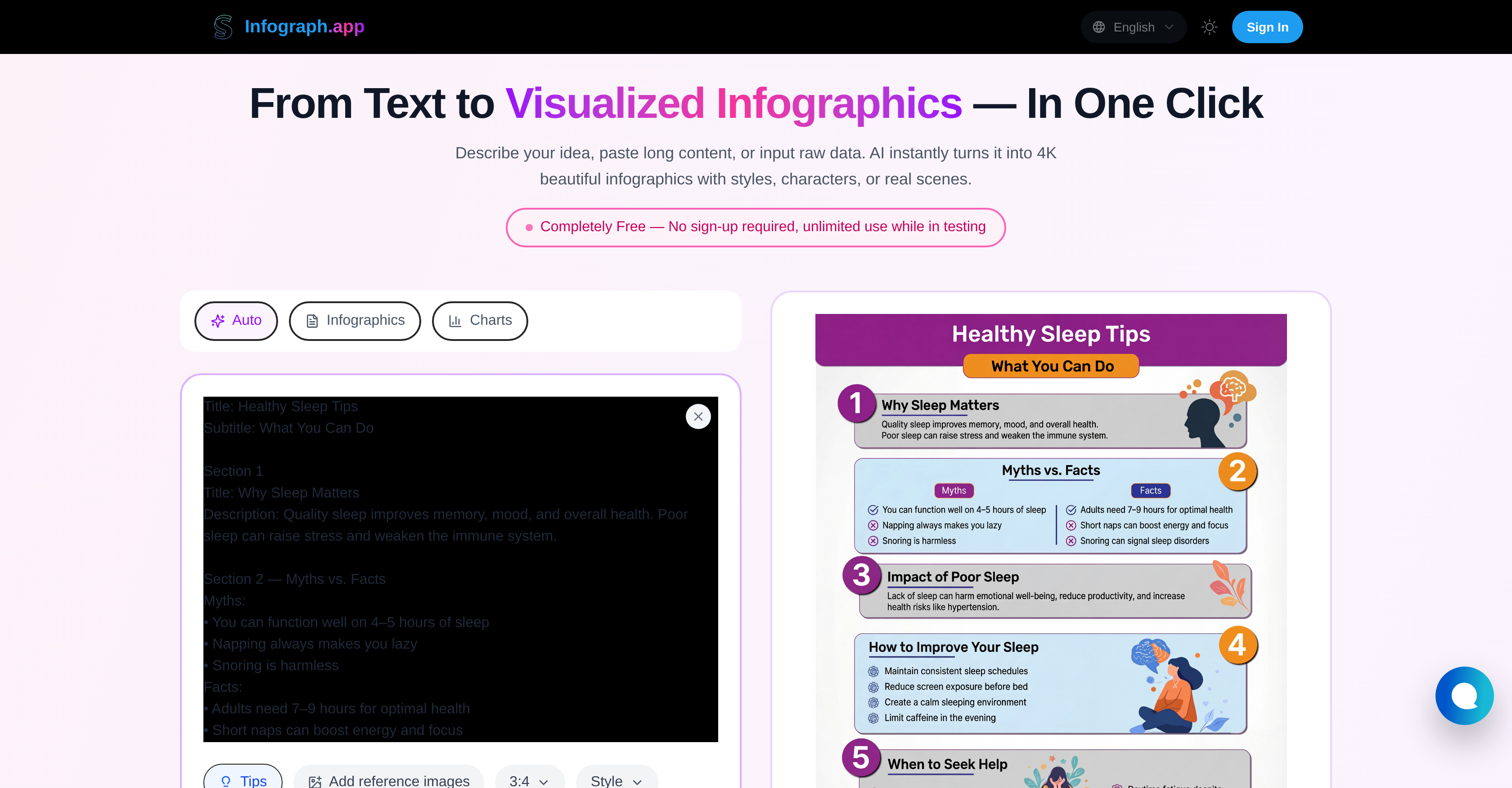
- Transform complex data into clear visuals instantly using AI that analyzes any text or raw numbers
- Create professional presentations and social media content with 300+ chart types including timelines and flowcharts
- Maintain brand consistency by recreating existing infographic layouts with new data automatically
- Reach global audiences by translating entire infographic designs into multiple languages with one click
- Convert hand-drawn whiteboard diagrams into polished infographics while preserving your original concepts
- Generate classroom materials and academic visuals that make complex subjects easily understandable
- Produce marketing decks and product explainers that engage viewers with 4K high-resolution quality
- Customize every layout manually with precise editing tools for complete design control
Pros & Cons
Pros
- High-resolution 4K
- Supports 300+ chart types
- One-click creation
- Editable infographics
- Translation support
- Automatic layout recreation
- Multi-language support
- Versatile user base
- Whiteboard-style diagrams
- Free, no sign-up required
- Supports various infographic adaptations
- Wide array of functionalities
- Simple creation process
- Advanced chart types support
- Upload infographic to recreate
- Design-switch for different languages
- Educational tool
- Business tool
- Marketing tool
- Social media tool
- Content creator tool
- Presentation tool
- Automated infographic creation
- Long textual content support
- Raw data visualization
- 4K visualization
- Data-to-hand-drawn diagrams
- Free infographic templates
- Consistent visual style
- Precise results
- Optimal satisfaction from customization
- Accurate multi-language rendering
- Fast turn around time
- Customizable design
- Exportable infographics
- Infographic Style Cloner
- Auto-Remake feature
- Single click generation
- Student & Researcher friendly
- Teacher & Educator friendly
- Marketer & content creator friendly
- Business & Team friendly
- Independent creators friendly
- Simple, visual teaching aids
- Process charts & workflow diagrams
Cons
- No API support
- Limited layout designs
- No integration with databases
- No collaborative features
- No offline functionality
- No support for animations
- Missing advanced customization options
- Limited multi-language translation
- No support for 3D graphics
- Depends on internet connection
Reviews
Rate this tool
Loading reviews...
❓ Frequently Asked Questions
The AI Infographic Generator is a dynamic tool that fuels the transformation of text and data into vivid infographics in a 4K high-resolution. It leverages the prowess of artificial intelligence to spawn various chart types in a single click.
The AI Infographic Generator uses artificial intelligence to process textual and numerical data and convert them into visually appealing infographics. All it requires is the input data, and with a single click, it revamps plain text or raw numbers into insightful infographics.
Absolutely. The AI Infographic Generator incorporates features for editing and translating the infographics generated. This attests to the tool's flexibility in catering to users' unique needs for precision and clarity.
Indeed, the AI Infographic Generator allows manual tweaks of the infographic layout. This means that users can adjust, modify, or even switch the whole visual design layout depending on their preferred style and satisfaction.
Yes, with AI Infographic Generator, users can create a wide variety of chart types, including but not limited to timelines, mind maps, and flowcharts. This diverse functionality allows for customized infographic creation tailored to the user's specific needs.
The AI Infographic Generator proves beneficial to a broad spectrum of users such as students, researchers, teachers, marketers, businesses, and visual content creators. It is a resourceful tool for anyone keen on creating professional, visually appealing, and coherent presentations, social media content, or educational material.
The AI Infographic Generator serves as an essential tool for creating professional presentations. It helps convert complex data, statistics, and text into digestible, engaging infographics that can capture the attention and understanding of the audience. This process can attained easily with a mere click.
Yes, the AI Infographic Generator supports multiple languages, ensuring it caters to a global user base. Ranging from editing to translating infographics, its features are geared towards producing rapid and precise content irrespective of the language input.
Yes, the AI Infographic Generator is designed to transmute hand-drawn whiteboard diagrams into comprehensive infographics. From scribbled notes and diagrams to professional infographics, the tool amplifies the possibility of automated infographic creation.
Marketers can make immense use of the AI Infographic Generator. Whether it's for creating captivating social media content, marketing decks, or simple product explainers, the tool aids in transforming simple text and numbers into informative and engaging infographics that can boost content engagement and understanding of the information portrayed.
Absolutely. The AI Infographic Generator is compatible with 4K resolution, thus ensuring the visual quality of the infographics generated is top-notch, sharp, and appealing to the users and audience.
The AI Infographic Generator operates with speed as a key feature, effectively generating infographics in a matter of seconds. It takes pride in the ability to deliver quality and insightful infographics rapidly and efficiently.
Definitely. The AI Infographic Generator excels in turning complex data or lengthy text into comprehensive infographics. Whether it’s intricate numbers or a heap of text data, the tool simplifies it into an understandable, visually pleasing infographic.
Yes, the AI Infographic Generator can be a valuable resource for creating educational materials. Whether it’s generating diagrams for complicated subjects or simply transforming lesson outlines into infographics for easy understanding, it is an ideal tool for classrooms.
Yes, the feature of changing or switching the entire design language according to preference or requirement is completely possible with the AI Infographic Generator. This enables users to output a variety of styles and patterns in their infographics.
The AI Infographic Generator proves exceptionally advantageous for researchers. It helps streamline the process of transforming conscious thoughts, research data and theories into infographics, aiding in better visualization, comprehension, and presentation of their finding.
The AI Infographic Generator is characterized by multiple features, a few of which include generating a variety of chart types such as timelines, mind maps, flowcharts, etc., manual adjustments of the infographic layout, translating and editing generated infographics, creating infographics in a 4K high resolution, multi-language support and templates facilitating content creation.
Yes, the AI Infographic Generator can indeed generate automatic infographics from any existing design. Its unique ability to analyze and duplicate an existing design layout with new input information makes it stand out.
Absolutely. The AI Infographic Generator comes with supportive templates that users can utilize, simplifying the creation of unique and professional infographics. These templates offer a range of design and presentation options to choose from, further speeding up the creation process.
Undoubtedly, one of the principal functionalities of the AI Infographic Generator is to turn text into comprehensible and visually pleasing infographics. Irrespective of the text's length or complexity, it simplifies and transforms it into a meaningful infographic.
The AI Infographic Generator turns text into visuals by analyzing the input text or data, structuring it, and then presenting it visually. It supports 300+ chart types like timelines, flowcharts, comparison charts, mind maps, and Venn diagrams which aids in clear and visually compelling presentation of information.
Yes, the AI Infographic Generator provides users with customization options. Users can tweak the layout, adapt the design language of the infographic or manually adjust several infographic elements to suit their specific needs.
The AI Infographic Generator supports more than 300 chart types ranging from timelines, flowcharts, comparison charts, mind maps, Venn diagrams, to concept maps and many others, providing diverse chart options for users to select based on their preferences.
Yes, the AI Infographic Generator does offer multi-language support. It provides a feature to translate the infographics into multiple languages, serving diverse demographics.
Users can edit the infographic created by the AI Infographic Generator through the tool's precise editing and translation features. They can update text, adjust the layout, or switch the entire design into another language.
Yes, the AI Infographic Generator is designed to create professional whiteboard-style diagrams, lending itself as a useful resource for visualizing ideas in education, presentations, or professional use.
Yes, users can input raw data into the AI Infographic Generator. The tool will analyze and interpret the raw data to create a suitable infographic, amplifying the understanding and meaningful presentation of the raw data.
The AI Infographic Generator has equipped a translation feature that allows the users to change the language of the generated infographics. All the user needs to do is switch the design language to the desired one, and the tool will render the infographic in that language.
Yes, the AI Infographic Generator can recreate existing infographic designs. Users can upload any infographic and the AI can instantly recreate the same layout with different data while maintaining a consistent visual style.
The AI Infographic Generator proves to be beneficial for a broad user base including students, researchers, teachers, marketers, businesses, and content creators. These users can use the tool to create presentations, social media content, academic projects, marketing decks, and more.
Yes, the AI Infographic Generator can be very useful in creating professional presentations. By converting complex data into compelling visuals, it can make the presentations more engaging and easy to understand.
Yes, users can create social media content using the AI Infographic Generator. With its plethora of chart types and customization options, it aids in creating visually appealing content pieces that can enhance the user engagement on social media platforms.
The AI Infographic Generator aids in academic projects by allowing students and researchers to convert their ideas, content, or data into infographics. It hereby simplifies the understanding and presentation of academic content, making learning more engaging.
Yes, the AI Infographic Generator does serve as a valuable teaching tool. Teachers can use it to turn complex lessons into simple, visual teaching aids like timelines, diagrams, comparison charts, and more, hence contributing to an enhanced learning experience.
The AI Infographic Generator aids in generating marketing content by converting complex data into visually appealing infographics which can attract more users' attention and increase their understanding of the product or service, thereby boosting their marketing efforts.
Businesses can benefit from using the AI Infographic Generator by leveraging it to create process charts, workflow diagrams, organizational charts, and data visuals. These can considerably enhance team communication and lend in a better understanding of business processes and workflows.
Yes, users can create concept maps using the AI Infographic Generator. It aids in visualizing relationships between various concepts, enriching the understanding and presentation of the related concepts.
Pricing
Pricing model
Free
Paid options from
Free