

Leveld
Stop letting key tasks fall through the net: every email is converted into an action, risk, decision or information item, with the owner, due date and description extracted automatically.
Listing not yet reviewed by our editors · How we check
Overview
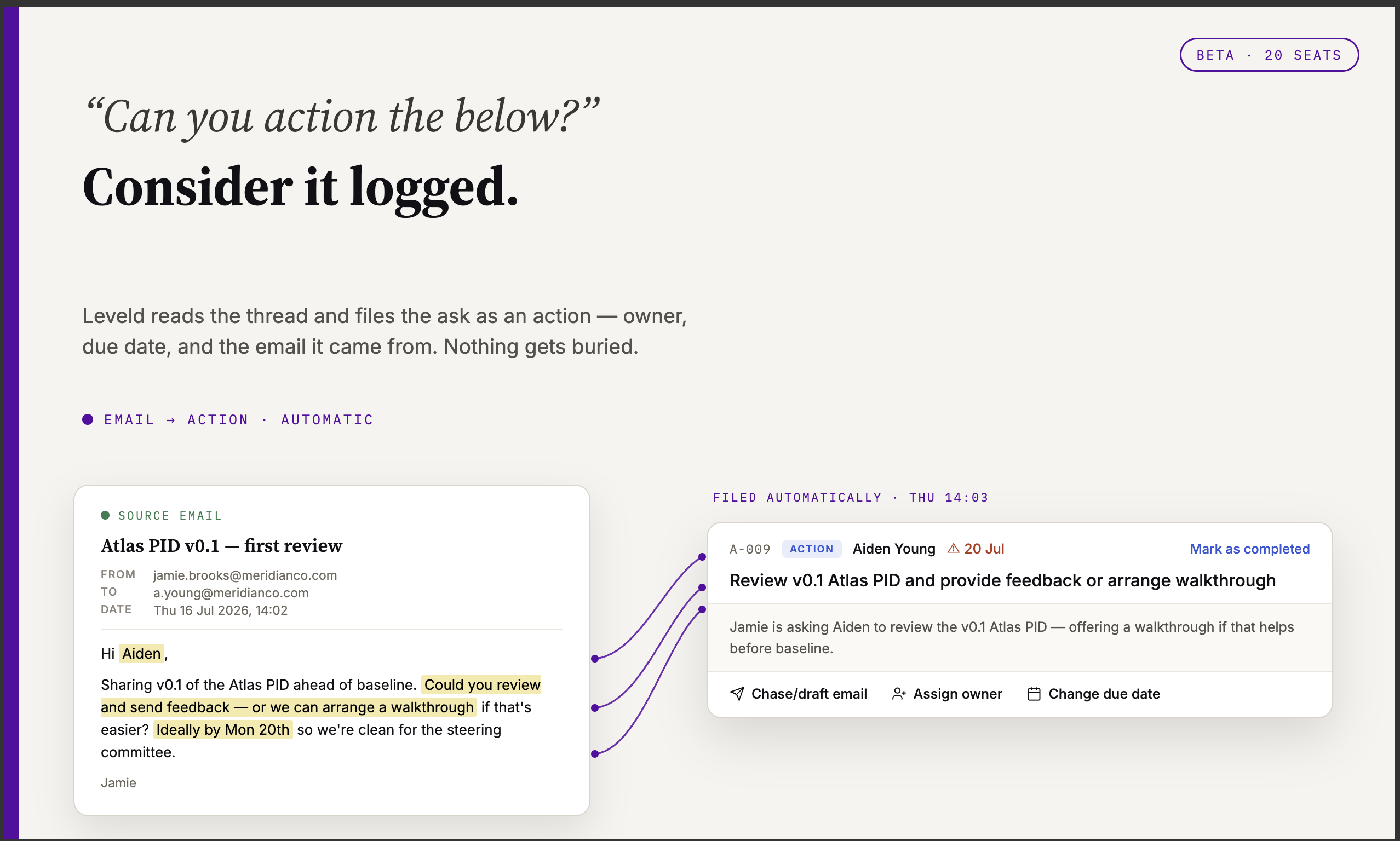
- Stop letting key tasks fall through the net: every email is converted into an action, risk, decision or information item, with the owner, due date and description extracted automatically.
- Close open loops without digging through old threads: each item stays visible until it is resolved, and overdue items are chased with a single click.
- Find client approvals, boss sign-offs and warranty certificates in seconds: every item is filed into categories and sub-categories, building a searchable decision log and personal records archive.
- Catch money leaks before they cost you: rising electricity or gas bills surface as actions to investigate, trial subscriptions appear on the date you can still cancel, and supplier overcharges are called out.
- Avoid late payments and missed due dates on bills and commitments: timing cues read your inputs, including calendars, and flag deadlines before they pass.
- Spot project risks, scope changes and blockers early: scattered work is consolidated into a structured register of tasks, risks and decisions, with suggested remedial actions.
- Keep full accountability for every follow-up: nothing is sent or executed until you approve it from a structured task list.
- Trust what you act on: a citation trail links every recommendation and evidence-backed follow-up to its source email for instant verification.
- See what matters and skip the junk: a model trained on more than 20,000 example items, built on 15+ years of consulting with leading companies, prioritises the signals that drive outcomes.
- Get a task list that sounds like you: Leveld learns your preferred wording, priorities and approval choices over time.
- Manage work and personal email in one place: Leveld connects with Gmail today, with Outlook and more tools on the way, and is available as a free beta for 20 users by request.
Pros & Cons
From the listing; not yet checked by our editors.
Pros
- Streamlines project management
- Consolidates data from multiples sources
- Identifies project blockages
- Suggests remedial actions
- Transforms scattered work into tasks
- Works across Gmail, Outlook, Slack, Zoom
- Detects potential risks
- Identifies scope changes
- Captures decisions made
- suggests follow-up actions
- Adds citation trails for accountability
- Timing cues for tracking deadlines
- Tailors learning process
- Enhances productivity
- Manages communication parsing
- Tracks project progress
- Keeps project-related decisions visible
- Approval process ensures user control
- Enhances workstream organization
- Reads messages, meetings, docs, calendars
- Saves approximately 2 hours per day
- 100% tied to source evidence
- Turns scattered project signals into manageable tasks
- Finds promised follow-ups for review
- Captures agreed outcomes
- Flags blockers, slipping dates, unresolved issues
- Keeps responsibility visible
- Prepares replies, nudges, meeting notes for approval
- Keeps source trail attached for verification
- Tracks deadlines, meeting movements
- Learns preferred wording, priorities over time
- Turns emails, transcripts, documents into structured items
- Keeps project day moving seamlessly
- Highlights owner gaps, open decisions
- Keeps control in user's hands
- Records outcome of decision, action
- Can prepare work like a project manager
- Security and privacy features
- Sends nothing without user approval
- Keeps sensitive content protected
- Maintains access controls for separate organizations
- Easy set-up in four steps
- Turns last seven days of emails into actionable tasks
Cons
- Limited tool integration
- Manual approval required
- Learning period necessary
- Limited visibility over data
- Beta stage implies possible instability
- Email heavy dependency
- No auto-send by default
- Limited use cases
Alternatives to Leveld
Tools that share the most tags with Leveld.
- AI Pro Management
Eliminate manual project planning with AI that generates Work Breakdown Structures and predicts timelines using predictive algorithms
Freemium · from $15.46/month
$15.46/month
Not yet checked
- Progr
Build production-ready AI models faster with streamlined workflows for data preprocessing, model development, training, and deployment
Freemium · from $10/month
$10/month
Not yet checked
- PMI Infinity
Eliminate hours of manual research with instant access to 14,000+ PMI-vetted content pieces through smart navigation
Not listed
Not listed
Not yet checked
- Quila
Transform complex projects into precise, actionable task breakdowns with AI-powered chat assistance that understands your project context
Free trial · from $7/month
$7/month
Not yet checked
- Dart
Save one-third of project management time by automating administrative tasks with GPT-4 technology
Freemium · from $8/month
$8/month
Not yet checked
- Easy Redmine
Manage hybrid projects with both agile and waterfall methodologies through a single integrated platform
Free trial · from $7.50/month
$7.50/month
Not yet checked
Reviews
Rate this tool
Loading reviews...
Frequently asked questions
What is Leveld?
Leveld is an AI-enabled project manager designed to streamline project management tasks. It automates the process of managing projects by reading messages, meetings, docs, and calendars, and consolidates these scattered pieces of work into a structured list of tasks that require attention or approval.
How does Leveld serve as a project manager?
Leveld serves as a project manager by consolidating data from different forms of communication, identifying potential blockages, and suggesting remedial actions. Leveld can read messages, meetings, docs, and calendars to gather task inputs. It then structures these scattered inputs into a list of tasks for attention or approval, identifying potential risks or scope changes, capturing decisions made, and suggesting follow-up actions.
What platforms does Leveld work across?
Leveld works across a variety of platforms, including Gmail, Outlook, Slack, Zoom and others. This compatibility ensures comprehensive coverage of potential project inputs.
What features does Leveld offer for project management?
Leveld offers features like citation trails for accountability, timing cues for tracking deadlines, and a learning process tailored to your preferences over time. It manages tasks, automates data consolidation, identifies risks and scope changes, captures decisions, and suggests follow-up actions. It also organizes workstreams and parses communication, besides keeping track of projects and enhancing productivity.
Does Leveld save time for project management?
Yes, Leveld can save a considerable amount of time in project management. It transforms scattered pieces of work into a structured list of tasks that require attention or approval. This automation streamlines the project management process, thus saving time.
How does the Leveld approval process work?
In Leveld's approval process, every action, such as follow-ups, decisions and risks, are prepared in a structured list and are required to be approved before execution. The system maintains full visibility of project-related decisions and ensures that the final approval remains with the user, keeping accountability fully in check.
What are Leveld's capabilities regarding risk identification and scope change detection?
Leveld's capabilities regarding risk identification and scope change detection are accomplished by reading and analyzing messages, meetings, documents, and calendars. During this process, Leveld identifies potential risks or scope changes and captures these instances. It then suggests follow-up actions, all of which are subject to user approval before execution.
Does Leveld require my approval to execute tasks?
Yes, Leveld requires your approval to execute tasks. All potential tasks, follow-up actions, decisions, and risks identified by Leveld are consolidated into a task list which is presented to you for approval. Nothing is implemented or executed without your final approval.