

Made to Spark
Start promoting your site on Pinterest without touching code: enter your URL to connect WordPress, Shopify, Etsy, or any XML sitemap with no plugin or installation.
Listing not yet reviewed by our editors · How we check
Overview
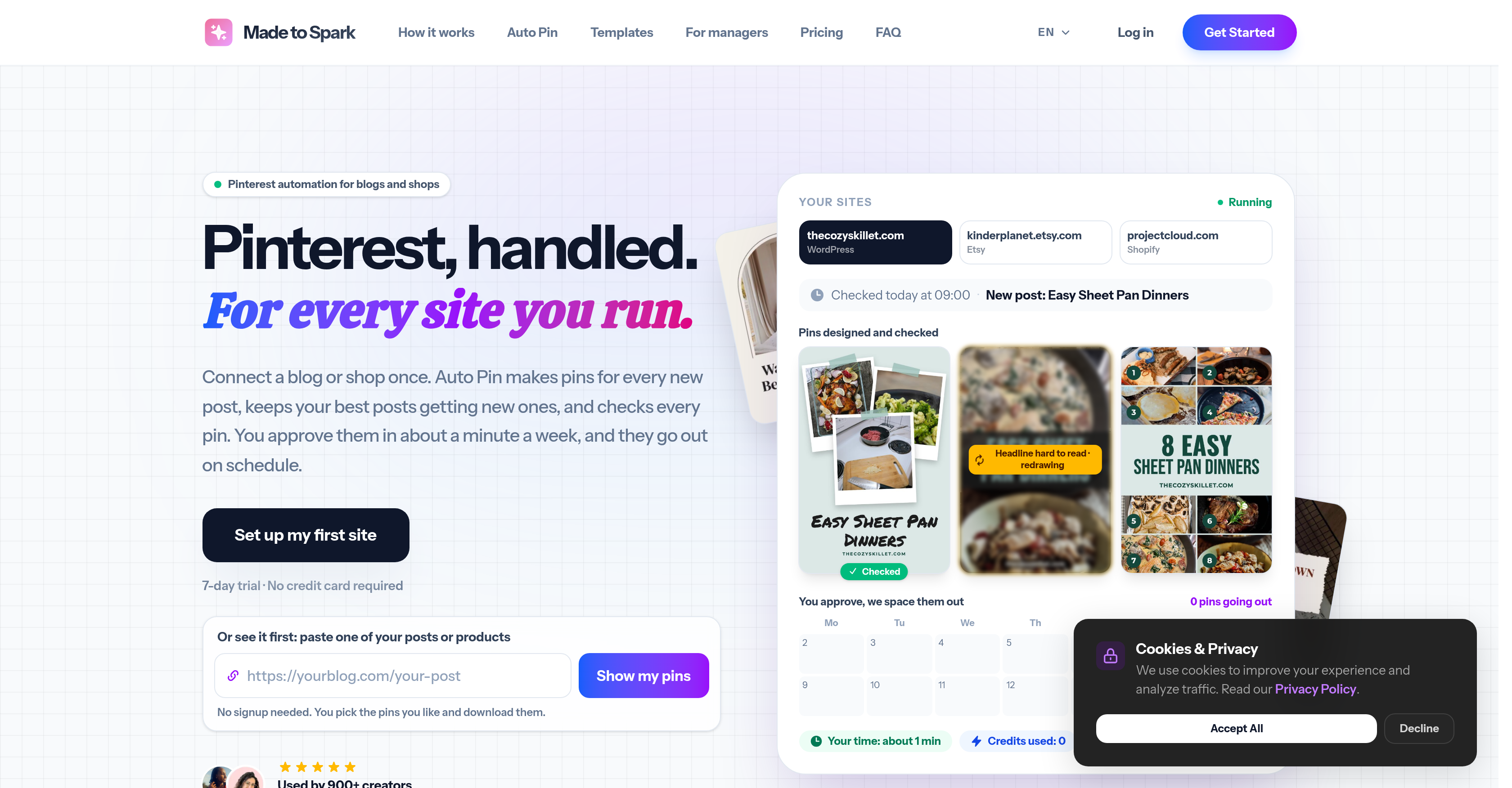
- Start promoting your site on Pinterest without touching code: enter your URL to connect WordPress, Shopify, Etsy, or any XML sitemap with no plugin or installation.
- Get every new blog post or product onto Pinterest without tracking publish dates: Auto Pin scans your site every 24 hours and drafts pins, with several design options for fresh content.
- Turn older posts and products into ongoing Pinterest traffic: evergreen repinning runs at the pace you set and puts the items with the most clicks first.
- Keep your Pinterest profile fresh instead of repetitive: each reuse of a link gets a new headline and layout, pins for the same URL are spaced days apart, and published creatives are never reposted.
- Publish on-brand pin designs without hiring a designer: templates with stacked headlines, script accents, image collages, and color strips are filled with your site's photos, text, web address, and brand colors.
- Avoid unreadable or broken pins: a pre-publication check finds hard-to-read headlines and design errors, then redraws the pin with corrected typography or layout.
- Improve Pinterest SEO and discoverability on every pin: each one comes with a headline, description, alt text, and a board selected from your content and site taxonomy, and you can change the board during review.
- Cut Pinterest management to one review session: pick a weekly or every-four-weeks review day, approve the queued pins, and track your estimated review time on the dashboard.
- Maintain a consistent posting cadence without manual scheduling: approved pins are spread across a steady calendar and published through Pinterest's official API.
- Run Pinterest marketing for several blogs and stores from one place: a single dashboard shows every connected site, newly detected content, design status, approvals, and upcoming publish dates.
- Know your costs in advance: Auto Pin creation and scheduling are included in your plan, use no credits, and have no advertised monthly pin cap.
- See your pins before you commit: paste any post or product URL into the no-signup preview to generate, compare, and download pin designs, or start a free 7-day trial with full access and no credit card.
Pros & Cons
From the listing; not yet checked by our editors.
Pros
- Makes the pins, not just schedules them
- Uses the page's own photos, so pins match the post
- Daily auto pin generation
- Evergreen content repinning schedule
- One plan covers several Pinterest accounts
- Multiple design templates per pin
- Dynamic headline per reuse
- Automatic alt text creation
- Brand color extraction
- Automated design validation
- Hard-to-read headline detection
- You review every pin before it goes out
- Spacing algorithm prevents clustering
- No reposting of creatives
- User approval workflow
- Steady calendar distribution
- Pinterest official API publishing
- Multi-site platform support
- No installation required
- No usage credits consumption
- Unlimited auto pins per plan
- No-signup preview tool
- URL paste preview download
- Trial without credit card
- Extended content queue preparation
- Weekly or less review cycles
- Dashboard shows review time estimate
- Board selection optimization
- Template personalization with site photos
- Script accent template variety
- Color strip template variety
- Image collage template variety
- Auto pin spacing by days
- Pin design personalization per link
- Automatic description generation
- Alt text automation per image
- Pin design iteration per link
- Dynamic board assignment
- Click analytics inform pin order
- No uniform layout across items
- Supports multi-channel e-commerce
- Auto pin redesign on detection
- Pin validation before publishing
- Uses sites color palette
- Generates multiple design options
- Supports sitemap-only connections
- Review session time estimation
- Prioritizes high-click content
- Consistent pin spacing algorithm
- Integrated multi-site dashboard
Cons
- Newer tool with a small number of reviews so far
- Pinterest only, no Instagram or TikTok scheduling
- No Pinterest group boards or Communities features
Alternatives to Made to Spark
Tools that share the most tags with Made to Spark.
- URL2Pin
Transform blog articles into Pinterest traffic drivers instantly by pasting a URL, eliminating hours of manual design and content creation.
Freemium · from $19/month
$19/month
Not yet checked
- FaceShapeDetector
Get a precise, personalized face shape analysis that goes beyond generic labels with our unique Face Shape Blend™, revealing your exact proportions like 80% Oval + 20% Heart.
Freemium · from $6.99
$6.99
Not yet checked
- Transition
Follow a training plan that automatically adjusts to your daily schedule and recovery metrics, ensuring you stay on track even when life gets busy
Paid · from $19/month
$19/month
Not yet checked
- Mixboard
Turn scattered thoughts into mature, actionable concepts by visualizing and manipulating them on an interactive AI concepting board.
Not listed
Not listed
Not yet checked
- NVIDIA Earth-2
Make strategic decisions with confidence using precise, AI-driven weather predictions that mitigate operational risks across aviation, agriculture, and marine sectors.
Not listed
Not listed
Not yet checked
- Engain
Turn Reddit into a repeatable organic traffic channel instead of a gamble by finding and engaging in high-intent discussions that already rank on Google or where users are actively seeking solutions.
Freemium · from $79/month
$79/month
Not yet checked
Reviews
Rate this tool
Loading reviews...
Frequently asked questions
How does Made to Spark connect to my WordPress or Shopify site without installing anything?
Made to Spark connects to WordPress or Shopify by asking you to enter your site’s URL and then using the platforms’ public APIs (WordPress REST API, Shopify Storefront API) or the site’s XML sitemap to pull content; no plugin or code installation is required.
Can Made to Spark automatically pin new blog posts as soon as they’re published?
Yes, Made to Spark automatically creates pins for new blog posts as soon as they are detected during its daily site scan.
What’s the difference between pinning new content vs. evergreen posts in Made to Spark?
New content is pinned once when it first appears on the site; evergreen content is manually selected and then re‑pinned on a recurring schedule you set, with a fresh design each time.
How often does Made to Spark check my site for fresh content?
Made to Spark checks connected sites once every 24 hours for fresh content.
Does Made to Spark let me set a specific day each week to review and approve pins?
Yes, you can choose a specific day of the week (or every four weeks) as your review day, and all pins waiting for approval will be presented on that day.
How does Made to Spark decide which old posts get re‑pinned based on clicks?
When repinning evergreen items, Made to Spark ranks them by the number of clicks their previous pins have received and prioritizes higher‑click items for the next cycle.
Will each reuse of the same link get a new headline and layout in Made to Spark?
Each time the same destination link is reused, Made to Spark generates a new headline and selects a different layout from its template library.
What kind of design templates does Made to Spark use for pins?
Made to Spark uses a library of designer‑crafted templates that include stacked headlines, script accents, image collages, colour strips, strip‑sandwich, script + caps, condensed box, arch frame, Polaroid scrapbook, and many other styles tailored to different verticals.