

MimicPhoto
Save the shot instead of booking a reshoot: upload a portrait with a stiff smile or awkward look, adjust the expression parameters, and get a corrected photo in seconds.
Listing not yet reviewed by our editors · How we check
Overview
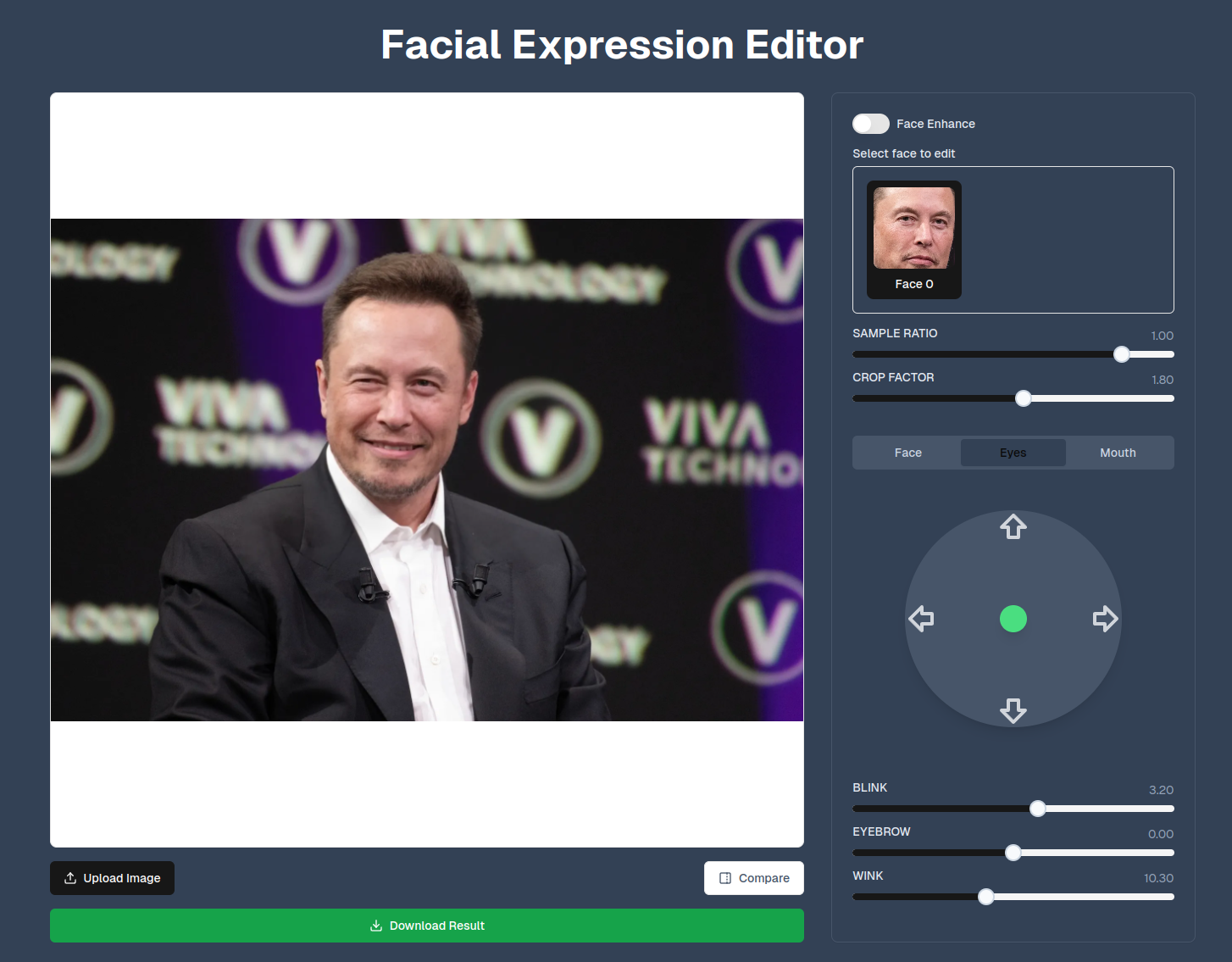
- Save the shot instead of booking a reshoot: upload a portrait with a stiff smile or awkward look, adjust the expression parameters, and get a corrected photo in seconds.
- Keep edited faces believable to clients and followers: facial expression editing trained on millions of images produces realistic adjustments without a warped, artificial look.
- Raise the appeal of product listings: enhance model expressions in e-commerce product photos, with commercial use permitted for business and client work.
- Fix flat or harsh lighting without a studio session: Relight Photo reshapes the lighting and atmosphere of an existing image to set the mood you want.
- Place subjects in a new setting without a location shoot: AI background replacement relights the subject to match the new scene, so the final composition looks unified.
- Get more out of a single still: Photo to Video animates two people hugging or kissing, or generates a custom video clip from your own prompt.
- Post expressive social media content without staging retakes: tweak expressions in existing photos to produce more engaging posts for your feed.
- Edit client and personal portraits with less privacy exposure: uploaded images are processed securely and are not stored permanently on servers.
- Test results on your own photos before paying: a free trial and an interface built for beginners let you start editing immediately, while professional portrait photographers get the control they need.
Pros & Cons
From the listing; not yet checked by our editors.
Pros
- Seamless facial expression editing
- Yields natural-looking results
- User-friendly interface
- Accommodates beginners and professionals
- Handy for various professionals
- Perfects smiles in photos
- Enhances e-commerce product images
- Assists social media influencers
- Ensures data privacy
- Secure image processing
- Useful for commercial projects
- Useful for personal projects
- Accuracy depends on input quality
- Revolutionizes facial manipulation
- Empowers content creators
- Transforms expressions instantly
- Easy for beginners
- Suitable for professional photographers
- Increases model photo appeal
- Generates engaging content
- Preserves image complexity
- Processes images securely
- Doesn't store images permanently
- Suitable for commercial use
- Produces varied results
- Easy-to-use professional tools
Cons
- May struggle with complex images
- Dependent on input image quality
- Limited to facial expressions
- Not suitable for non-portrait images
- Can't edit other photo aspects
- Could produce unnatural results
- Requires internet connection
- No offline version
- Potential privacy concerns
- Not mentioned how it handles shadows/lighting adjustments
Alternatives to MimicPhoto
Tools that share the most tags with MimicPhoto.
- Thumbspot
Maximize your video's click-through rate with AI-generated thumbnails optimized for viewer attention from just your title or description
Paid · from $29/month
$29/month
Not yet checked
- ThumbnailMakerr
Boost your video's click-through rate with AI-generated thumbnails designed to capture attention, using a simple text description to produce multiple professional options instantly.
Free trial · from $15/month
$15/month
Not yet checked
- ThumbnailCreator.com
Generate professional, click-worthy thumbnails in seconds without any design experience required
Free trial · from $9/month
$9/month
Not yet checked
- Pictley
Generate professional YouTube thumbnails in seconds without design skills using AI thumbnail generation from simple text prompts
Paid · from $20/month
$20/month
Not yet checked
- GoThumbnails
Get more views with thumbnails proven to attract clicks using AI that analyzes your video and current trends
Freemium · from $9/month
$9/month
Not yet checked
- Thumbs AI
Create high-CTR YouTube thumbnails in seconds from a text prompt or uploaded photo using AI-powered generation
Free trial · from $13/month
$13/month
Not yet checked
Reviews
Rate this tool
Loading reviews...
Frequently asked questions
What is MimicPhoto?
MimicPhoto is an advanced AI-powered tool designed for seamless facial expression editing in photos. It uses innovative AI algorithms to analyze and modify portraits to create natural-looking results.
How does MimicPhoto work?
MimicPhoto uses advanced AI algorithms to analyze facial expressions in photos. The photos are uploaded, the expression parameters are adjusted and the advanced AI of MimicPhoto generates a natural-looking result.
What advanced AI algorithms does MimicPhoto use?
The specific algorithms used by MimicPhoto are proprietary and not specified on their website, but it is stated they are advanced and AI-based, designed to analyze and modify facial expressions in photos to yield natural-looking results.
Who can use MimicPhoto?
MimicPhoto can be used by both beginners and professionals. It's ideal for portrait photographers, e-commerce businesses, and social media influencers, among others who require facial expression adjustments in photos.
What are the applications of MimicPhoto?
MimicPhoto can be used for various applications such as perfecting smiles and expressions in portrait photos, enhancing model expressions in e-commerce product images to boost appeal, and generating engaging and expressive content for social media platforms.
How user-friendly is MimicPhoto?
MimicPhoto is a user-friendly tool. It's described as being intuitive and designed for both beginners and professionals, offering an easy-to-use interface alongside advanced features.
Can MimicPhoto be used for commercial projects?
Yes, MimicPhoto can be used for commercial projects. It can be used not only for personal use but professional tasks as well, such as improving expressions in product photos for e-commerce businesses.
How does MimicPhoto ensure data privacy?
MimicPhoto ensures data privacy by processing all uploaded images securely. Images are not stored permanently on their servers, adhering to their firm commitment towards privacy.