

Movmix | AI Story Generator
Go from a plot idea to a finished narrative video in one pass: describe themes, characters, setting, plot, and atmosphere, and the AI story generator builds the script structure, character definitions, scene assets, and storyboard.
Listing not yet reviewed by our editors · How we check
Overview
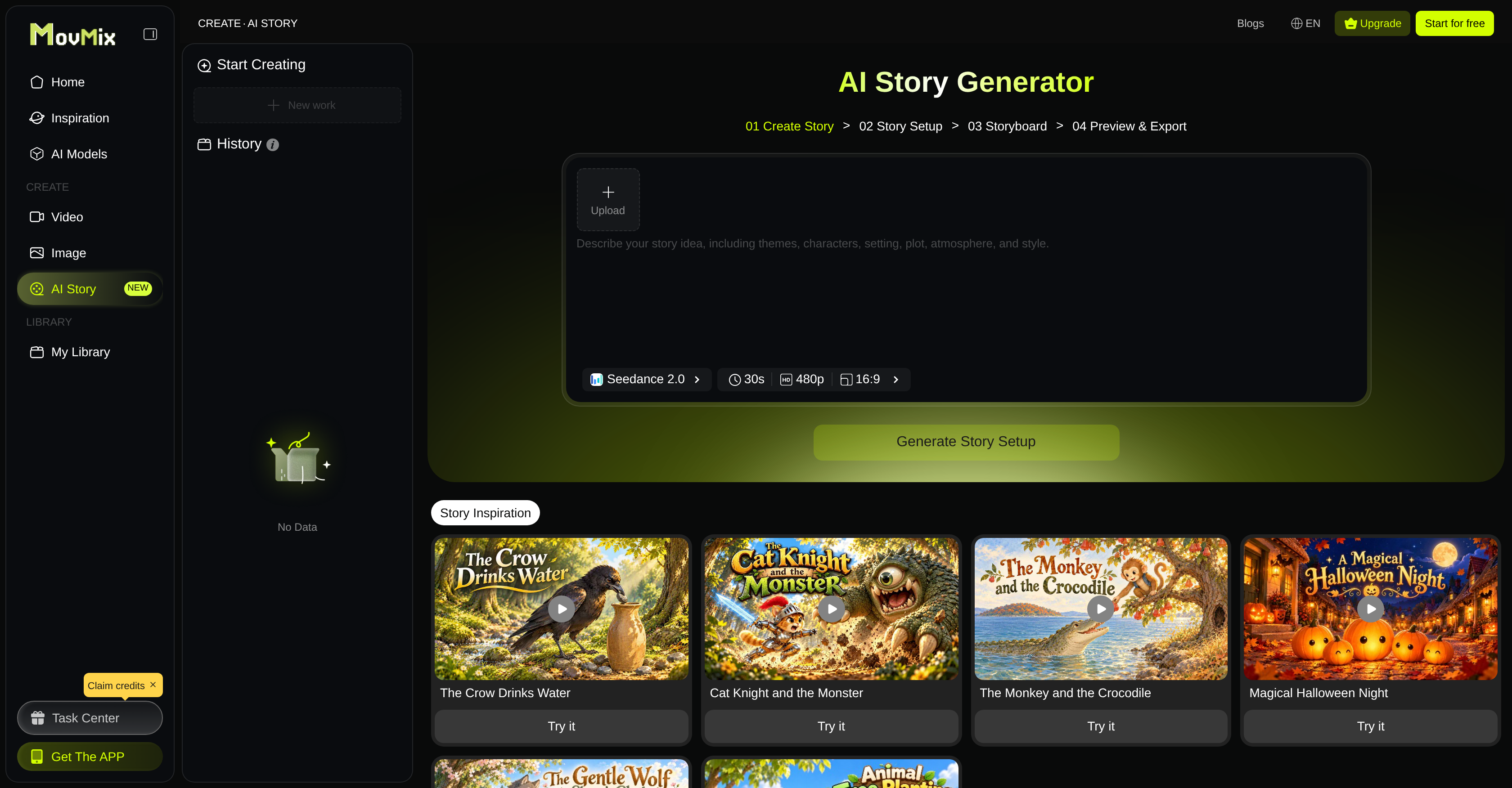
- Go from a plot idea to a finished narrative video in one pass: describe themes, characters, setting, plot, and atmosphere, and the AI story generator builds the script structure, character definitions, scene assets, and storyboard.
- Keep heroes, monsters, and backgrounds recognizable in every shot: character lock applies your reference images and story outline to fix designs before scene generation, so recurring elements stay consistent across the whole sequence.
- Skip manual shot planning: automatic storyboard generation splits your outline into timed, multi-shot panels, with each plot segment assigned to its own panel.
- Get cinematic motion without animation skills: static storyboard panels become animated video clips with pans, zooms, and action-oriented camera trajectories.
- Match your exact creative vision: per-scene prompts set lighting, mood, environment, character behavior, framing, pacing, shot length, and any visual style, from Ghibli-style anime to Pixar-style 3D and cinematic fantasy.
- Steer results with your own material: multimodal input combines text prompts with uploaded reference images, video clips, and audio cues.
- Deliver complete, narrated stories: automatic voiceover generation adds narration, and your own uploaded audio replaces or supplements it.
- Fix one moment without starting over: single-shot regeneration edits an individual scene and leaves the rest of the project untouched.
- Publish at the quality your channel needs: the preview and export stage lets you review the assembled video, then export up to 4K at 60 fps or lighter presets down to 480p.
- Start a story in seconds: ready-made templates for fables, animal adventures, and seasonal tales, including "The Crow Drinks Water" and "Cat Knight and the Monster," give you a tested starting point.
- Run several story projects side by side: the Task Center, library, and work history track every job's progress, store generated assets, and switch between pipelines from one dashboard.
- Expand a story beyond the storyboard: linked text-to-video, image-to-video, video extension, motion control, recasting, image-to-image, and upscaling tools sit in the same creation workspace.
- Create on the go: the iOS app and mobile-ready experience let you draft and generate stories away from your desk.
Pros & Cons
From the listing; not yet checked by our editors.
Pros
- Multi-modal reference asset upload
- Character locking ensures visual continuity
- Automatic timed storyboard panels
- Camera motion automation pan zoom
- Integrated voiceover synchronization
- Template-driven story inspiration
- One-click multi-scene export
- Highresolution 4K 60fps output
- Customizable pacing control
- Lighting and atmosphere scripting
- Visual style specification per shot
- Assetdriven monster design lock
- Integrated library and history
- Task center workflow orchestration
- Dynamic scene generation from plot
- Panel-to-clip animation conversion
- Multiangle asset locking across cuts
- Supports image, video, audio inputs
- Automatic plot parsing into shots
- Unified video-image interface
- Recasting and dance generation modules
- Upscaling of generated assets
- Motion control integration
- Video extension capability
- Output framing customization
- Consistent background assets across scenes
- Preview stage for iterative review
- Single pipeline: storytovideo
- Multishot sequencing with timing
- Voiceover added during export
- Highframerate smooth animation
- Dynamic camera trajectories per action
- Template library for fables, adventures
- Customizable animation style per scene
- Supports 30second narrative clips
- Integrated task management
- Seamless asset reference handling
- Automatic character definition generation
- Script structuring from textual outline
- Multimodal asset limits enforcement
- Visual continuity across recurring characters
- Dynamic lighting control per shot
- Export to multiple formats
Cons
- Strict upload size limits
- Fixed 30second video cap
- No API access
- Rerender for single shot changes
- Voiceover limited to preset voices
- Aspect ratio locked to 16:9
- No custom 3D model import
- Asset locking prevents later edits
- Long rendering times for multiscene
- No realtime preview editing
Alternatives to Movmix | AI Story Generator
Tools that share the most tags with Movmix | AI Story Generator.
- C2Story
Transform any idea or memory into a finished, illustrated story in minutes using AI-powered generation, from a simple prompt to a printable PDF.
Free trial · from $10.99/month
$10.99/month
Not yet checked
- Plot Party
Launch your first AI-generated storyboard in under five minutes using an AI agent that selects the perfect visual models for your creative vision
Paid · from $25/month
$25/month
Not yet checked
- MkAnime AI
Launch a complete anime production from a single story prompt, using AI-generated scripts, storyboards, and visual assets that eliminate manual drafting.
Paid · from $19.90/month
$19.90/month
Not yet checked
- Osmo.inc
Animate your designs without rebuilding them: Figma integration converts existing Figma files directly into motion graphics and animated content.
Freemium · from $19/month
$19/month
Not yet checked
- Cinely
Find your next AI film series fast, without endless scrolling: trending titles, new releases, and genre collections for drama, fantasy, action, and horror take you straight to active releases.
Free trial · from $14.99/month
$14.99/month
Not yet checked
- Lovable Tales
Watch your child become the hero of every story with interactive character selection that puts them at the center of the adventure
Free
Not listed
Not yet checked
Reviews
Rate this tool
Loading reviews...
Frequently asked questions
How do I upload reference images or videos for Movmix AI Story Generator?
On their website you upload reference assets by clicking the Upload button or dragging and dropping image, video, or audio files into the designated upload area during the story creation step.
What are the file size and format limits for assets I can upload?
IDK
Can I lock a character design so it stays consistent across all scenes?
Yes, you can lock a character or monster design by providing reference assets and confirming the lock before scene generation, ensuring the design stays identical across all subsequent shots.
How does Movmix split my story outline into storyboard panels automatically?
The system parses your written outline with its AI engine and automatically breaks it into timed, multi‑shot storyboard panels, assigning each logical segment of the plot to a separate panel.
Is it possible to control camera moves like pans and zooms in the generated clips?
Yes, after static panels are created you can add camera movements such as pans, zooms, and action‑oriented trajectories to produce animated clips.
What animation styles can I choose (e.g., Studio Ghibli, Pixar, 3D)?
You can request any visual style in the textual prompt; examples on their website include Studio Ghibli anime, Pixar‑style 3D, cinematic fantasy, and other custom styles.
Does Movmix add voiceover automatically, and can I use my own audio?
Movmix AI Story Generator can generate a voiceover automatically and also accepts user‑uploaded audio files, allowing you to replace or supplement the auto‑generated narration.
How long can the final narrative video be? Any time limits?
The website showcases 30‑second narrative videos as typical outputs, but it does not list a maximum length; therefore the exact time limit is not specified.