

MusicMV
Get a music video that moves with your track, with every cut landing on the beat. MusicMV maps the beat of your song and cuts every shot to it.
Listing not yet reviewed by our editors · How we check
Overview
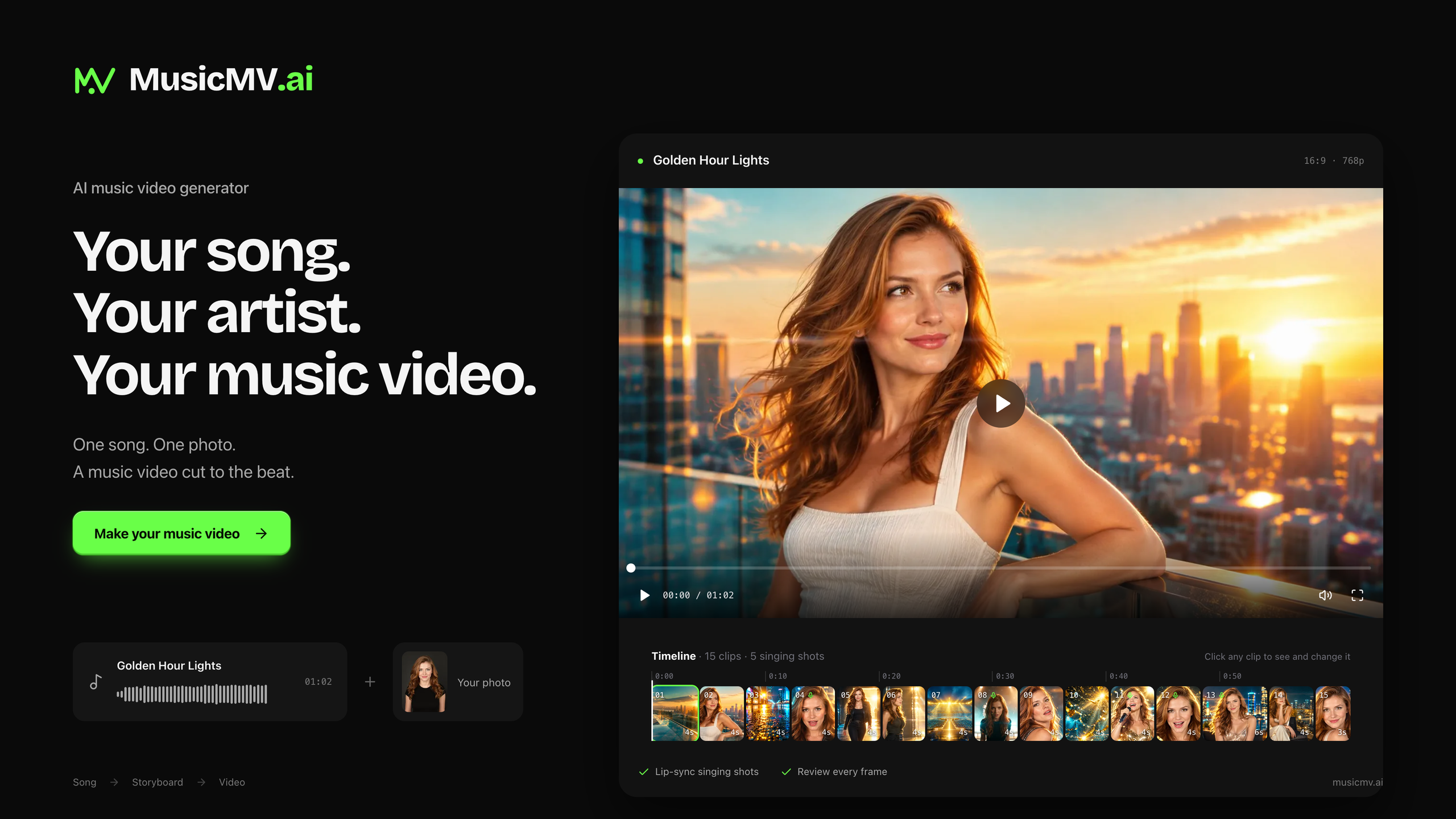
- Get a music video that moves with your track, with every cut landing on the beat. MusicMV maps the beat of your song and cuts every shot to it.
- Keep your artist recognizable from the first frame to the last. One clear, front-facing photo locks in the lead character for a consistent look across the whole music video.
- Put your artist on screen performing the song. Vocal sections become lip-sync singing shots featuring the artist.
- Get visuals that follow your song's structure and emotion. The AI storyboard is written shot by shot from the track's sections, lyrics and mood.
- Spend render credits only on a video you've already approved. You preview the full storyboard before anything renders.
- Fix any scene you don't like without starting over. Rewrite what a frame should show and redraw it, then keep only the shots you want in the final cut.
- Post one song across every channel in the right shape. Export in 9:16 for TikTok and Reels, 16:9 for YouTube, plus 1:1, 4:3 and 3:4.
- Match the video's look to your sound and brand. Choose from cinematic, anime, neon, lo-fi and other visual styles.
- Start from the files you already have and finish with a video ready to publish. Upload MP3, WAV or M4A tracks and get a final MP4 render at up to 1080p.
Pros & Cons
From the listing; not yet checked by our editors.
Pros
- Beat-synced video creation
- Storyboard generation
- Consistent artist feature
- Lip-sync singing shots
- Storyboard preview option
- Flexible frame editing
- Multiple video formats
- Variety of video styles
- Resolutions up to 1080p
- Can pick specific song sections
- Rewrite and redraw frames
- One photo creates character
- Focus on lyrics and mood
- Frames tailor for screen shape
- Format not cropped
- Chorus-only video option
- Character consistency retained
- Video styles for genres
- Vocal parts lip-synced
- Multiple screen formats
- Storyboard review before rendering
- Retry failed frames free
- No subscription fee
- Credits never expire
- Generated songs option
- Lyric captions option
- No watermark after credit purchase
- Commercial usage allowed
Cons
- Limited to two characters
- Relies heavily on photos
- Resolution capped at 1080p
- Limited video style variety
- Limited format compatibility
- No 4K output
- Cannot create longer videos
- Paid service after 15 seconds
Alternatives to MusicMV
Tools that share the most tags with MusicMV.
- yesTool | AI Music Video
Create professional animated music videos from any song and image with automatic lip-sync accuracy using Wan S2V AI technology
Freemium · from $14.90/month
$14.90/month
Not yet checked
- Plazmapunk
Transform your music into professional videos in minutes with fast generation that eliminates long rendering times
Freemium · from $5.78/month
$5.78/month
Not yet checked
- AirMusic - AI Music Video Generator
Instantly produce a complete, multi-scene music video from any song with one click using Director Mode for fast, professional results.
Paid · from $11.90/month
$11.90/month
Not yet checked
- 1MoreShot
Create professional music videos from your tracks in minutes using automated AI generation
Freemium · from $8.25/month
$8.25/month
Not yet checked
- LABEL IQ AI
Transform images, lyrics, and keywords into professional music and videos using AI creation tools
Free trial · from $5
$5
Not yet checked
- BeatViz AI
Transform any audio track into professional music videos with perfect beat synchronization using AI-powered audio-visual analysis
Free trial · from $13.90/month
$13.90/month
Not yet checked
Reviews
Rate this tool
Loading reviews...
Frequently asked questions
What music formats does MusicMV support for uploads?
MusicMV supports MP3, WAV or M4A formats for song uploads.
How does MusicMV generate the storyboard based on my song?
MusicMV generates the storyboard by listening to the track, mapping the beat, sections, lyrics and mood, and then writing a shot-by-shot storyboard.
Can I modify the storyboard that MusicMV generates?
Yes, in MusicMV, users have the facility to review the storyboard and also rewrite and redraw the frames they don’t like before they spend credits on video rendering.
What kind of photo should I upload to work with MusicMV?
For working with MusicMV, users should upload a clear, front-facing photo of their artist.
How does MusicMV ensure the artist is consistent across the video?
MusicMV maintains artist consistency by utilizing the single photo uploaded by the user. This photo locks in the lead character, ensuring they're consistently presented throughout the video.
What options do I have to edit the video frame in MusicMV?
In MusicMV, if users are not happy with a frame, they can edit it by rewriting what it should show and then redraw it.
What video formats are the final render available in MusicMV?
MusicMV renders the final video in MP4 format with resolutions up to 1080p. The available aspect ratios include 9:16, 16:9, 1:1, 4:3, and 3:4.
What are the different style options available in MusicMV?
MusicMV offers a variety of style options to choose from. These include cinematic, anime, neon, lo-fi, and several others.