

Pipp
Stop double-replying and dropped emails: every customer email lands in one shared inbox where teammates assign conversations, leave internal notes, and see in real time who is reading or responding.
Listing not yet reviewed by our editors · How we check
Overview
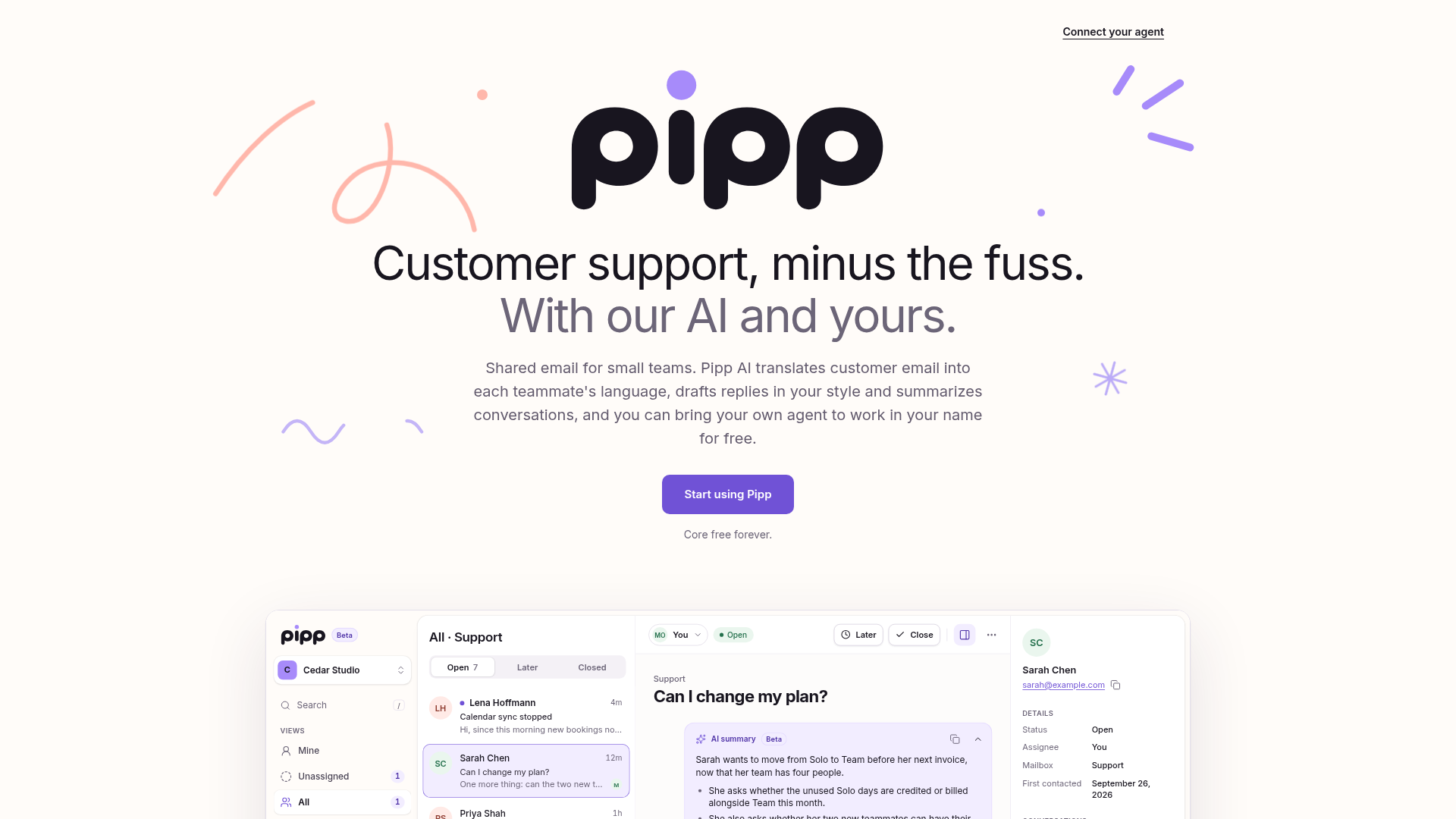
- Stop double-replying and dropped emails: every customer email lands in one shared inbox where teammates assign conversations, leave internal notes, and see in real time who is reading or responding.
- Hand customer support to the AI agent you already use: connect Claude, Claude Code, ChatGPT, Codex, Cursor, Grok Bot, or any MCP agent through OAuth, grant only read, draft, or send permissions, and see every agent action in the inbox.
- Answer customers in any language without hiring for it: Pipp AI translates each incoming email into every teammate's preferred language and translates replies back into the customer's language before sending, with the original one click away.
- Keep every reply on-brand: Pipp AI drafts responses in the tone, voice, and formatting you define in your AI settings, ready for review before you send.
- Pick up any ticket instantly: a concise conversation summary sits at the top of each thread, showing the issue and prior actions at a glance.
- Clear your support queue faster: a command palette and single-key keyboard shortcuts let you search, assign, and reply without leaving the keyboard.
- Catch mistakes before customers see them: a 10-second undo-send window lets you retract any reply right after sending.
- Meet privacy requirements with confidence: data is stored in Switzerland under GDPR, AI features stay off until an owner or admin consents, and only the content needed for each task is shared with the AI provider.
- Run customer support with zero software cost: the core shared inbox and bring-your-own-agent access are free forever, and Pipp AI is free during beta.
- Reply from your own brand address: verify your domain with the SPF, DKIM, and TXT records Pipp supplies so customer emails come from you, not a third-party help desk.
Pros & Cons
From the listing; not yet checked by our editors.
Pros
- Live viewer presence indicator
- Per-user language email view
- One-click original email access
- Undo-send window ten seconds
- Command palette navigation
- Extensive keyboard shortcuts
- Conversation summary header
- Internal notes per thread
- Team assignment tagging
- Full-text conversation search
- Domain verification via DNS
- Multiple sending domains support
- Swiss data residency
- GDPR-compliant data handling
- Daily recipient delivery limits
- Workspace creation rate limits
- Free core inbox forever
- Toggle optional features per admin
- MCP OAuth agent integration
- Permission-scoped agent actions
- Transparent agent activity logs
- Customizable writing style drafts
- API connectors for Claude
- API connectors for Codex
- OpenAPI endpoint for agents
- Granular permission controls
- OAuth sign-in external agents
- Multi-language UI (30 languages)
- Threaded email view
- Real-time collaboration indicators
- Bulk recipient counting per delivery
- Beta features disabled by default
- Free external agent connection
- Summaries generated per conversation
- Customizable daily limits request
- No manual approval sending
- Single workspace per domain
- Built-in email threading
- To/Cc counting support
- Future chat module roadmap
- Developer-friendly MCP server
- Cross-agent compatibility Claude Grok
- Secure OAuth token handling
- Activity feed shows actions
- Configurable notification preferences
- Browser-based interface
- Responsive design any device
- Exportable conversation logs
- Integration with DNS providers
- Supports custom domain email
Cons
- DNS verification needed for replies
- Only one sending domain allowed
- 100 recipient deliveries per day
- Chat feature still missing
- MCP only supports OAuth agents
- 3 workspaces creation limit daily
- No native mobile app
- No built-in ticketing workflow
Alternatives to Pipp
Tools that share the most tags with Pipp.
- Chatisto
Answer customer questions instantly with AI agents that handle common inquiries 24/7
Freemium · from $29/month
$29/month
Not yet checked
- Notification Harbor
Drive more sales with AI-personalized notifications and emails crafted from individual user data and marketing intent
Not listed
Not listed
Not yet checked
- Qualified
Convert website visitors into sales opportunities instantly with AI-powered conversations that identify high-intent buyers in real-time
Paid
Not listed
Not yet checked
- SoundHound
Deploy voice AI across any platform with an end-to-end tech stack that handles everything from speech recognition to response generation
Not listed
Not listed
Not yet checked
- Ebi
Handle 85% of routine customer enquiries automatically from day one with AI assistant capabilities
Freemium · from $123/month
$123/month
Not yet checked
- GPT Trainer
Launch custom AI chatbots in minutes without technical expertise using our intuitive, code-free chatbot builder
Freemium · from $150
$150
Not yet checked
Reviews
Rate this tool
Loading reviews...
Frequently asked questions
What is Pipp and how does its shared inbox work?
Pipp is a shared email inbox built for founders, developers, and small teams to handle customer support without a complex help‑desk. It provides a single workspace where all inbound customer emails are collected. Teammates can view, reply, assign, and leave internal notes on each conversation, with real‑time visibility of who is reading or responding.
Can I assign conversations to teammates in Pipp?
Yes. Pipp lets you assign conversations to specific teammates so they can take ownership and respond.
How does Pipp AI translate incoming emails for each teammate?
When Pipp AI is enabled, it automatically translates each incoming email into the preferred language of every teammate. The original message stays a single click away, and the teammate composes the reply in their own language; Pipp AI then translates the reply back into the customer's language before sending.
Is the translation feature enabled automatically?
No. Translation is disabled by default. An owner or administrator must first enable Pipp AI and then turn on translation in the Settings → AI section.
How does Pipp AI draft replies in my custom writing style?
Pipp AI drafts replies using a writing style that you configure in the AI settings. The model generates reply text that matches the selected tone, voice, and formatting preferences before you send it.
What does the conversation summary look like and where is it shown?
A concise summary is generated for each conversation and displayed at the top of the thread, giving a quick overview of the issue and prior actions.
Can I turn off Pipp AI or any of its features?
Yes. You can disable Pipp AI entirely or toggle individual features (translation, drafting, summarisation) from the workspace Settings → AI page.
How does Pipp handle privacy and data sharing with AI providers?
AI features are off by default and only process content after an owner or admin reviews and consents to the data‑sharing terms. When enabled, only the data required for translation, drafting, or summarisation is sent to the selected AI provider. External agents connect via OAuth with permission‑scoped access, and all agent actions are visible to teammates.