Overview
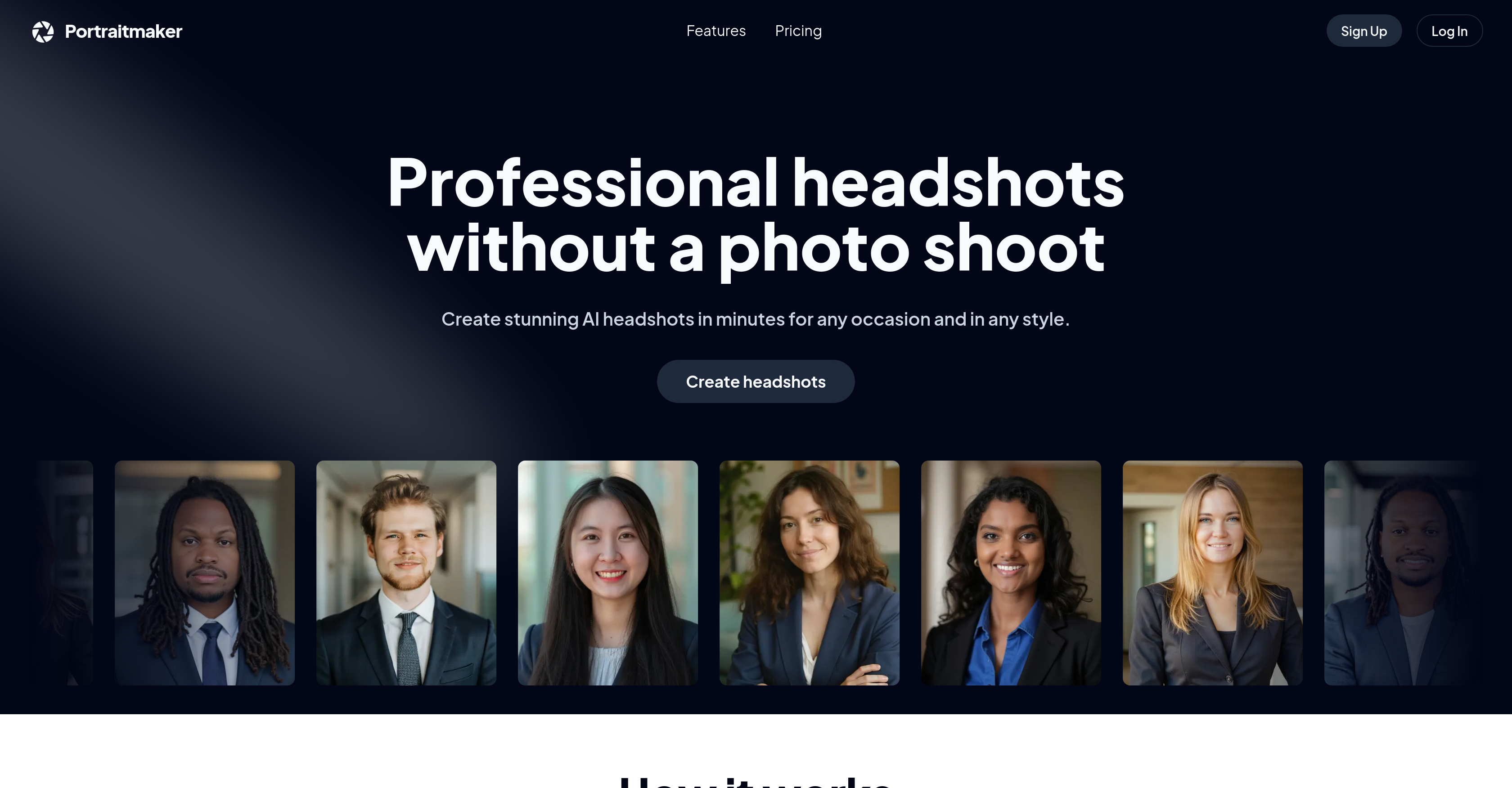
- Get a professional headshot without booking a photographer by uploading 10-25 selfies for the AI to process
- Customize your professional image for LinkedIn, legal, or medical profiles with preset business attire and lab coat options
- Select the perfect background for your industry from office, courthouse, and hospital settings to match your career
- Receive your polished headshots in as little as one hour with plan-based turnaround times for urgent needs
- Achieve consistent, studio-quality lighting in every shot without professional equipment by following simple selfie guidelines
Pros & Cons
Pros
- Professional headshots generation
- No need for photo shoot
- User-friendly three-step process
- Requires 10-25 selfies upload
- Facilitates customization of headshots
- Provides outfit options
- Multiple backdrop choices
- Wide professional use-cases
- Specific plans depending on needs
- Perfect for LinkedIn, business
- Good for real estate professionals
- Creates avatars in minutes
- Personalized background and attire
- Pocket-friendly pricing
- Improved turnaround time
- Mix and match outfits/backdrops
- Quick generation of headshots
- Supports high-quality selfies
- Efficient headshot creation
- Use-case oriented options
- Comprehensive tool for professionals
- Versatile attire selection
- Versatile background selection
- Ideal for academic professionals
- Ideal for legal professionals
- Ideal for medical professionals
- Improves personal branding
- Saves time and resources
- Generates multiple unique headshots
- Ensures good lighting conditions
- User settings available
- Minimizes physical photoshoot hassles
- Reduces dependency on photographers
- Considers user's attire preference
- Efficiently handles high-end interior settings
- Creates tailored professional headshots
- Adequate for conservative business representation
- Necessary for digital photography
- Supports business headshots specifically
- Useful for realtor headshots
- Serves academic headshots need
- Enhances online professional presence
- Automates headshot making process
- Ideal for creating avatars
- Supports multiple modes of attire
- Offers headshots in high resolution
- Convenience of home photo session
Cons
- Requires 10 to 25 selfies
- Limited preset outfit options
- Limited background choices
- Potential variations in lighting
- No free trial
- One hour minimum turnaround
- Doesn't support distant selfies
- Cannot customize beyond presets
- Limted to 4 outfit and background combinations
- Not suitable for outdoor headshots
Reviews
Rate this tool
Loading reviews...
❓ Frequently Asked Questions
PortraitMaker is an AI tool that enables users to generate professional headshots without the need of a photo shoot. It works by taking user selfies as the base and with customization options for both attire style and background preferences, creates unique and professional looking headshots.
PortraitMaker works in three steps. First, the user uploads between 10 to 25 selfies, taken in suitable lighting with the face fully visible. Next, the user can customize the look of their professional headshots by selecting their preferred background and attire style. Finally, PortraitMaker uses AI to generate professional-level headshots which the user can receive.
To achieve the best results with PortraitMaker, it is recommended to upload between 10 to 25 selfies. The selfies should be taken in good light conditions with the face completely visible.
There are several preset attire options offered by PortraitMaker including business attire, conservative business attire, lab coat attire, and tailored professional attire.
There are numerous backdrop options available in PortraitMaker such as office, courthouse, hospital office, and high-end interior settings.
PortraitMaker provides the flexibility of selecting a plan based on specific user requirements. It offers both subscription plans and one-time payment options, providing both within different pricing ranges.
Yes, the headshots created using PortraitMaker are perfect for use on LinkedIn profiles. They are professional and tailored to the individual preferences and needs of the user.
Yes, PortraitMaker is useful for realtors. It allows realtors to create professional headshots efficiently and effectively without the need for a complex photo shoot.
Yes, PortraitMaker caters to various professional scenarios, including use cases for academic or any other professional profiles. It provides different preset attire and background options which can suit a wide range of professional contexts.
The best lighting conditions when taking selfies for PortraitMaker are those where the light is even, with no shadows cast on the face. A well-lit environment where the lighting is natural or bright can yield the best results.
After the user has uploaded their selfies and made their selections for attire and background, the turnaround time to generate professional headshots with PortraitMaker depends on the plan selected. The turnaround times vary from 3 hours to just 1 hour.
Yes, PortraitMaker affords its users the ability to customized their attire and backdrop within the headshots. The user can choose from a variety of predefined options for both attire and backdrop to match their professional or personal preference.
Yes, PortraitMaker provides options specific for generating medical professional headshots. It includes attires such as a lab coat and backdrops like a hospital office setting, catering effectively to the medical professional sector.
The best practices for uploading selfies to PortraitMaker include uploading selfies taken in good, even lighting, with the face fully visible. Selfies should be taken from a reasonable distance to avoid distortions and to get a clear, professional looking headshot.
Yes, PortraitMaker acts as a viable substitute for a traditional photo shoot, allowing users to create professional headshots from the comfort of their own homes. It is both efficient and cost-effective, providing results comparable to a professional photography session.
Pricing
Pricing model
Paid
Paid options from
$20
Billing frequency
One-time
Refund policy
No Refunds