

Sapling
Cut response times instantly with real-time suggestions that pull from your team's response bank using Sapling Suggest™
Listing not yet reviewed by our editors · How we check
Overview
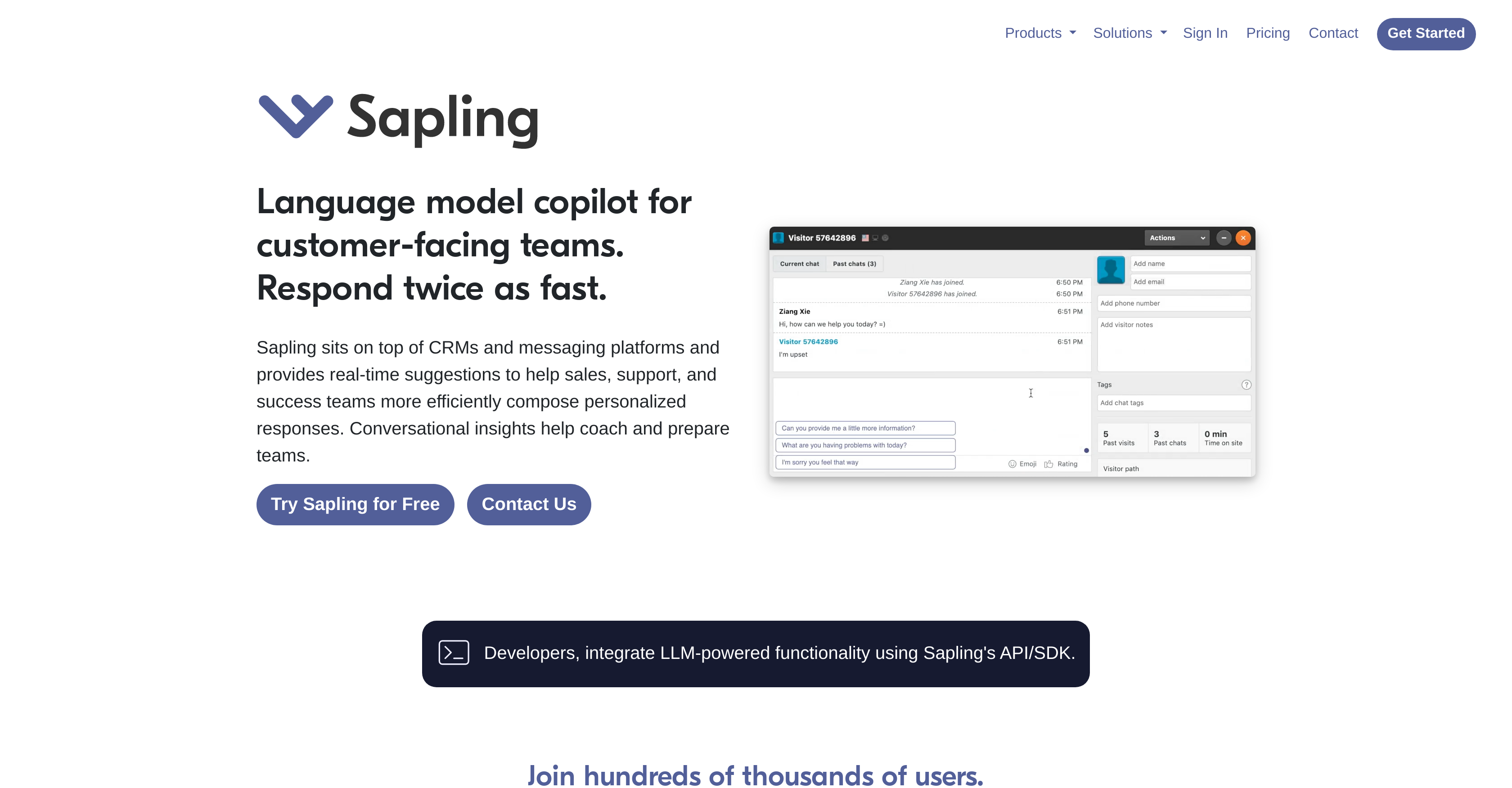
- Cut response times instantly with real-time suggestions that pull from your team's response bank using Sapling Suggest™
- Compose messages 60% faster with deep learning-powered autocomplete that works across all your messaging platforms
- Eliminate language errors and maintain professional tone with AI that catches 60% more grammar issues than standard checkers
- Share team knowledge instantly using snippet libraries and text expansion shortcuts for consistent, compliant responses
- Gain actionable insights from every conversation with automated quality scoring and trend monitoring across all customer interactions
- Secure sensitive customer data with enterprise-grade encryption, PII redaction, and self-hosted deployment options
- Deploy in under 10 minutes with two-click installation and achieve over 90% team adoption without extensive training
Pros & Cons
From the listing; not yet checked by our editors.
Pros
- Improves response quality
- Integrates with CRMs
- Real-time suggestions
- Personalized responses
- Retrieves responses from team bank
- Deep learning-powered autocomplete
- Catches more language issues
- Snippet library sharing
- Text expansion shortcuts
- Gains insights from conversational data
- Best-in-class omni-channel support
- Enterprise security and encryption
- Two-click provision
- 90% adoption rate
- Optimizes customer experience
- Efficiency in handle time
- API/SDK for developers
- Redaction of PII
- Identity management support
- Coaching opportunities
- Improves productivity
- Topic and trend monitoring
- Usage and efficiency reports
- Automated quality scoring
- Rapid adjustments to issues
- Real-time human-in-the-loop responses
- Decreases repetitive messaging tasks
Cons
- Limited to English language
- High adoption rate required
- No offline usage capability
- Limited enterprise customization
- Requires API/SDK knowledge for advanced use
- Dependent on CRM/messaging platform integration
- No specified non-English grammar support
- Auto-suggestions potentially narrow diversity of responses
- Data encryption might affect performance
- Requires repetitive messaging tasks
Alternatives to Sapling
Tools that share the most tags with Sapling.
- Chatisto
Answer customer questions instantly with AI agents that handle common inquiries 24/7
Freemium · from $29/month
$29/month
Not yet checked
- Notification Harbor
Drive more sales with AI-personalized notifications and emails crafted from individual user data and marketing intent
Not listed
Not listed
Not yet checked
- Qualified
Convert website visitors into sales opportunities instantly with AI-powered conversations that identify high-intent buyers in real-time
Paid
Not listed
Not yet checked
- SoundHound
Deploy voice AI across any platform with an end-to-end tech stack that handles everything from speech recognition to response generation
Not listed
Not listed
Not yet checked
- Ebi
Handle 85% of routine customer enquiries automatically from day one with AI assistant capabilities
Freemium · from $123/month
$123/month
Not yet checked
- GPT Trainer
Launch custom AI chatbots in minutes without technical expertise using our intuitive, code-free chatbot builder
Freemium · from $150
$150
Not yet checked
Related Videos

Sapling Feature Tour
Sapling Intelligence · May 28, 2020
AI Detector Showdown: Sapling vs Writer | AI detection tool tournament
Originality AI · May 1, 2023
Reviews
Rate this tool
Loading reviews...
Frequently asked questions
What is Sapling?
Sapling is an AI messaging assistant intended to enhance response quality and efficiency for customer-facing teams. It integrates with popular messaging platforms and CRMs, providing real-time suggestions for agents to compose personalized responses. Sapling also utilizes a machine learning system to catch 60% more language quality issues than other spelling and grammar checkers and aids teams in sharing knowledge with a snippet library and text expansion shortcuts/macros. Other notable features include natural language processing for gaining business insights from conversational data and robust enterprise security.
What is Sapling Suggest™ and how does it work?
Sapling Suggest™ operates by retrieving relevant responses from a team response bank at the click of a button. It allows for real-time suggestions, enabling agents to respond swiftly to customer inquiries. The feature is designed to drastically reduce response time and improve response quality.
How does Autocomplete Everywhere™ assist customer-facing teams?
Autocomplete Everywhere™ uses deep learning to provide autocomplete suggestions across all integrated messaging platforms. This enables customer-facing teams to draft and send responses faster which streamlines communication and improves efficiency.
What unique features does Sapling offer to improve language and grammar quality?
Sapling uses a machine learning system that has been trained on millions of English sentences to improve language and grammar quality. It is designed to capture 60% more language quality issues than comparable spell and grammar checkers, ensuring professional and consistent communication quality across customer interactions.
What is the purpose of Sapling's snippet library and text expansion shortcuts/macros?
Sapling's snippet library and text expansion shortcuts/macros are tools aimed at optimizing knowledge distribution within teams. They allow instant insertion of common responses across web applications, enabling fast search, compliance, upselling, training, and onboarding. By utilizing these tools, teams can respond to customer inquiries more efficiently.
How can teams gain insights from conversational data using Sapling?
Sapling uses natural language processing to extract insights from customer conversations. This automated quality scoring allows team leads to evaluate teams and agents across all conversations and not just a tiny fraction. It enables the monitoring of topics and trends for rapid adjustment to spikes in issues and reports on usage and efficiency gains at both agent and team level.
How does Sapling handle data encryption and security issues?
Sapling includes robust security measures such as Transport Layer Security (TLS) and Advanced Encryption Standard (AES-256) data encryption for protecting confidential information. It also offers Personal Identifiable Information (PII) redaction and self-hosted/on-premises deployment options that further ensure the security and privacy of users' data.
What is Sapling's process for end-user identity management?
Sapling's approach to end-user identity management includes options for Single Sign-On (SSO), System for Cross-domain Identity Management (SCIM), and Multi-factor Authentication (MFA). These features aim at strengthening the user authentication process and safeguarding data from unauthorized access.